
Perkenalan
The IMICE T97 RGB Honeycomb Gaming Mouse is designed to provide a precise and comfortable experience for gaming and general computer use. It features a high-precision 4800 DPI sensor, a durable and ergonomic design, and is compatible with various operating systems. This manual will guide you through the setup, operation, and maintenance of your new gaming mouse.
- Merek: IMICE
- Jenis: Mouse
- Kesesuaian: Komputer dan Laptop
- Fitur Utama: High precision 4800 DPI, comfortable and durable design, anti-sweat design, precise positioning.
- Warna: Hitam
Petunjuk Pengaturan
1. Menghubungkan Mouse
The IMICE T97 mouse uses a standard USB connection for plug-and-play functionality. No additional drivers are typically required for basic operation on supported operating systems.
- Temukan port USB yang tersedia di komputer atau laptop Anda.
- Insert the USB connector of the IMICE T97 mouse firmly into the USB port.
- Sistem operasi Anda akan secara otomatis mendeteksi dan menginstal driver yang diperlukan. Proses ini mungkin memakan waktu beberapa saat.
- Once installed, the mouse will be ready for use.
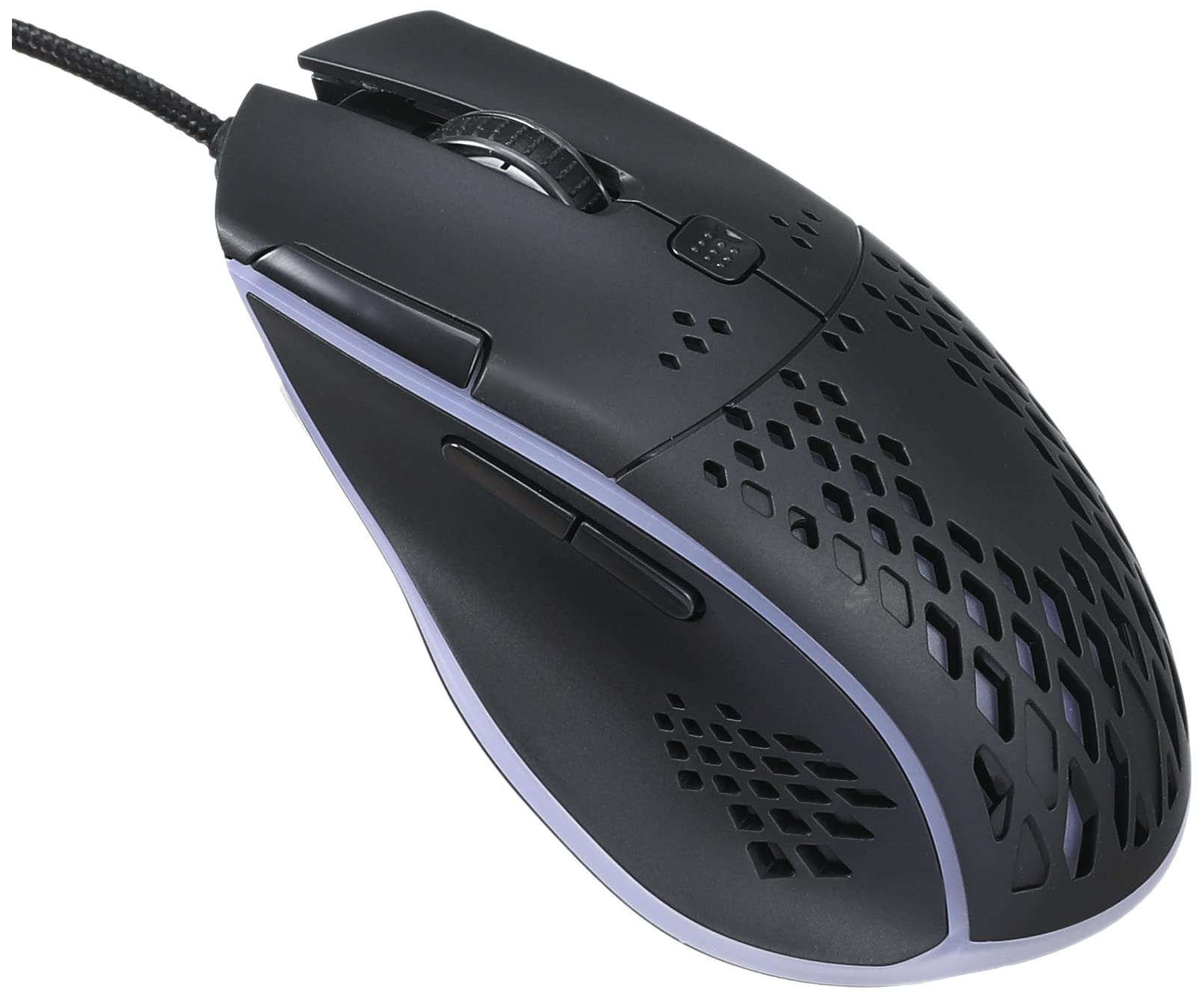
Image: Top-front view of the IMICE T97 RGB Honeycomb Gaming Mouse, showing its ergonomic shape and honeycomb shell design.
Mengoperasikan Mouse
Fungsi Dasar
- Klik kiri: Primary action, selection, activation.
- Klik kanan: Menu konteks, tindakan sekunder.
- Roda Gulir: Gulir dokumen ke atas/bawah dan web halaman. Dapat juga diklik untuk fungsi klik tengah.
- Tombol Samping: (If present, typically for forward/back navigation in browsers or custom functions in games). The T97 model typically includes two side buttons.
Penyesuaian DPI
The IMICE T97 mouse features adjustable DPI (Dots Per Inch) settings, allowing you to change the cursor sensitivity. This mouse supports up to 4800 DPI. There is usually a dedicated button, often located behind the scroll wheel, to cycle through different DPI levels. Press this button to switch between sensitivity settings to find your preferred speed.
Pencahayaan RGB
The mouse features RGB lighting, which typically cycles through various colors automatically. There may not be user-configurable software for lighting control, and it operates as a default aesthetic feature.

Gambar: Bagian bawah view of the IMICE T97 RGB Honeycomb Gaming Mouse, showing the optical sensor, product label with model T97, and regulatory marks.
Pemeliharaan
Pembersihan
- Lepaskan mouse dari komputer sebelum membersihkan.
- Gunakan kain yang lembut, kering, dan tidak berbulu untuk menyeka permukaan tetikus.
- Untuk kotoran membandel, sedikit dampBasahi kain dengan air atau larutan pembersih ringan (hindari bahan kimia keras).
- Gunakan kapas atau udara bertekanan untuk membersihkan area di sekitar tombol dan roda gulir.
- Pastikan tidak ada cairan yang masuk ke komponen internal mouse.
Penyimpanan
Simpan mouse di tempat yang sejuk dan kering, jauh dari sinar matahari langsung dan suhu ekstrem saat tidak digunakan dalam jangka waktu lama.
Penyelesaian Masalah
| Masalah | Larutan |
|---|---|
| Tikus tidak merespons. |
|
| Pergerakan kursor tidak menentu atau tersentak-sentak. |
|
| Buttons or scroll wheel are not working. |
|
| Cannot find software for customization. | The IMICE T97 mouse is primarily designed for plug-and-play operation. Dedicated software for advanced customization (like button remapping or detailed RGB control) may not be available or easily accessible for this model. Most functions are hardware-controlled. |
Spesifikasi
| Merek | IMICE |
| Model | T97 |
| Warna | Hitam |
| Teknologi Konektivitas | USB |
| DPI (Maks) | 4800DPI |
| Fitur Khusus | Comfortable design, RGB lighting, honeycomb shell |
| Orientasi Tangan | Sangat pandai |
| Penggunaan yang Direkomendasikan | Permainan |
| Perangkat yang Kompatibel | Komputer Pribadi, Laptop |
| Kompatibilitas Sistem Operasi | Linux, Windows XP (dan versi yang lebih baru) |
| Berat Barang | 120 gram |
| Dimensi Pengiriman | Ukuran 15x11x5 cm |
| Baterai Termasuk | No (Wired USB mouse) |
| ASIN | B0BD2DDWNQ |
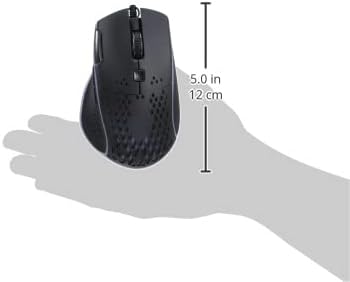
Gambar: Samping view of the IMICE T97 RGB Honeycomb Gaming Mouse held in a hand, illustrating its compact size (approximately 5.0 inches or 12 cm in length).
Informasi Garansi
Please refer to the retailer or your purchase documentation for specific warranty terms and conditions. IMICE products typically come with a limited warranty against manufacturing defects. Keep your proof of purchase for warranty claims.
Dukungan Pelanggan
For technical assistance or further inquiries, please contact your retailer or visit the official IMICE website for support resources. Ensure you have your product model (T97) and purchase details ready when contacting support.