
1. Pendahuluan
This manual provides essential instructions for the safe and effective use of your Technical Precision replacement battery, model AX-7SA3-5. This battery is designed as a compatible replacement for the Black & Decker VP940 VERSAPAK Rotary Tool Cordless Tool Battery. Please read this manual thoroughly before installation and operation to ensure optimal performance and safety.
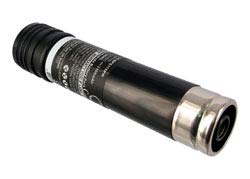
Image 1.1: Technical Precision Replacement Battery. This image displays the replacement battery unit, highlighting its compact design and connection terminals.
2. Informasi Keselamatan
Selalu perhatikan tindakan pencegahan keselamatan berikut saat menangani dan menggunakan baterai:
- Jangan membongkar, membuka, atau merusak kemasan baterai.
- Jangan biarkan baterai terkena panas atau api. Hindari penyimpanan di bawah sinar matahari langsung.
- Do not short-circuit the battery. Do not store battery packs haphazardly in a box or drawer where they may short-circuit each other or be short-circuited by other metal objects.
- Do not remove the battery from its original packaging until required for use.
- Jangan sampai paket baterai terkena kejut mekanis.
- Jika baterai bocor, jangan biarkan cairan terkena kulit atau mata. Jika terkena, segera cuci area yang terkena dengan banyak air dan segera konsultasikan ke dokter.
- Jangan gunakan pengisi daya apa pun, kecuali yang khusus disediakan untuk digunakan bersama peralatan tersebut.
- Amati tanda plus (+) dan minus (-) pada baterai dan peralatan dan pastikan penggunaan yang benar.
- Jauhkan baterai dari jangkauan anak-anak.
- Segera dapatkan bantuan medis jika paket baterai telah tertelan.
- Selalu beli baterai yang benar untuk peralatan tersebut.
- Jaga agar baterai tetap bersih dan kering.
- Bersihkan terminal baterai dengan kain kering yang bersih jika kotor.
- Jangan biarkan baterai terisi daya dalam waktu lama bila tidak digunakan.
- Setelah penyimpanan dalam jangka waktu lama, baterai mungkin perlu diisi dan dikosongkan beberapa kali untuk memperoleh kinerja maksimal.
- Isi ulang hanya dengan pengisi daya yang ditentukan oleh produsen.
3. Isi Paket
Paket Anda harus berisi item berikut:
- 1 x Technical Precision Replacement Battery (Model: AX-7SA3-5)
4. Pengaturan & Instalasi
Follow these steps to install the replacement battery into your compatible Black & Decker VERSAPAK rotary tool:
- Pastikan alat dalam keadaan mati: Before attempting to replace the battery, ensure your Black & Decker VERSAPAK rotary tool is powered off and disconnected from any power source.
- Lepaskan Baterai Lama: Locate the battery compartment on your rotary tool. Depending on the model, there may be a latch or button to release the existing battery. Carefully remove the old battery.
- Masukkan Baterai Baru: Align the Technical Precision replacement battery (Model AX-7SA3-5) with the battery compartment. Ensure the positive (+) and negative (-) terminals match the tool's connectors.
- Baterai Aman: Gently push the battery into the compartment until it clicks into place or is firmly seated. Ensure it is secure and does not wobble.
- Uji Fungsionalitas: After installation, attempt to power on your rotary tool to confirm the battery is correctly installed and providing power.
Note: If the tool does not power on, re-check the battery's seating and ensure it is fully charged.
5. Petunjuk Pengisian
This is a rechargeable battery. To charge your Technical Precision replacement battery, use the original Black & Decker VERSAPAK charger compatible with VP940 batteries.
- Hubungkan Pengisi Daya: Plug your Black & Decker VERSAPAK charger into a standard electrical outlet.
- Masukkan Baterai: Place the Technical Precision battery into the charging slot of the charger. Ensure it is properly seated.
- Memantau Pengisian Daya: The charger's indicator light (if available) will typically show when the battery is charging and when it is fully charged. Refer to your original Black & Decker charger manual for specific indicator meanings.
- Lepaskan Saat Terisi Daya: Once the battery is fully charged, remove it from the charger to prevent overcharging, which can reduce battery life.
Important: Do not use incompatible chargers. Using an incorrect charger may damage the battery or pose a safety risk.
6. Petunjuk Pengoperasian
Once the Technical Precision replacement battery is installed and charged, your Black & Decker VERSAPAK rotary tool is ready for use. Operate your tool according to its original manufacturer's instructions.
- Daya Hidup/Mati: Use the power switch on your rotary tool to turn it on or off.
- Monitor Kinerja: If you notice a decrease in tool performance or power, it may be an indication that the battery needs recharging.
- Hindari Pelepasan Cairan Dalam: Untuk masa pakai baterai yang optimal, hindari menguras baterai sepenuhnya sebelum mengisi ulang.
7. Pemeliharaan
Proper maintenance ensures the longevity and performance of your replacement battery:
- Pembersihan: Keep the battery terminals clean and free of dirt or debris. Use a dry, clean cloth to wipe them if necessary.
- Penyimpanan: Store the battery in a cool, dry place away from direct sunlight and extreme temperatures. If storing for extended periods, ensure the battery has a partial charge (around 50%) to prevent deep discharge.
- Pemakaian Reguler: If the battery is not used for a long time, it is recommended to charge and discharge it periodically to maintain its capacity.
- Pembuangan: Do not dispose of batteries in household waste. Follow local regulations for proper battery recycling.
8. Penyelesaian masalah
| Masalah | Kemungkinan Penyebab | Larutan |
|---|---|---|
| Tool does not power on after battery installation. | Baterai tidak terisi penuh. Baterai tidak terpasang dengan benar. Kerusakan alat. | Ensure battery is fully charged using a compatible charger. Lepas dan masukkan kembali baterai, pastikan terkunci pada tempatnya. If the issue persists, consult your tool's manual or contact tool manufacturer. |
| Baterai tidak terisi. | Pengisi daya tidak terpasang. Battery not properly inserted into charger. Pengisi daya atau baterai rusak. | Verify the charger is securely plugged into a working outlet. Pastikan baterai terpasang dengan benar di pengisi daya. Test with another known good battery/charger if possible. Contact support if issue persists. |
| Waktu pengoperasian atau konsumsi daya berkurang. | Baterai perlu diisi ulang. Baterai mendekati akhir masa pakainya. Tool operating under heavy load. | Isi ulang baterai hingga penuh. Consider replacing the battery if it consistently holds less charge. Ensure the tool is used within its intended operating parameters. |
9. Spesifikasi
| Fitur | Detil |
|---|---|
| Merek | Presisi Teknis |
| Nama Model | AX-7SA3-5 |
| Nomor Model | AX-7SA3-5 |
| Kesesuaian | Black & Decker VP940 VERSAPAK Rotary Tool Cordless Tool Battery |
| Jil.tage | 3 Volt |
| Dapat digunakan kembali | Dapat diisi ulang |
| Jumlah Satuan | 1.0 Hitung |
| Pabrikan | Presisi Teknis |
| Jenis Bagian | Bagian pengganti |
| ASIN | B0BSVM497X |
10. Informasi Garansi
This Technical Precision replacement battery comes with a Garansi Pabrik 1 TahunGaransi ini mencakup cacat material dan pengerjaan dalam penggunaan normal. Harap simpan bukti pembelian Anda untuk klaim garansi.
For warranty service, please contact Technical Precision customer support with your product details and proof of purchase.
11. Dukungan Pelanggan
If you encounter any issues or have questions regarding your Technical Precision replacement battery that are not addressed in this manual, please contact our customer support team.
For the most up-to-date contact information, please visit the official Technical Precision webatau merujuk pada dokumen pembelian Anda.
Sumber Daya Daring: Technical Precision Store on Amazon