
1. Pendahuluan
This manual provides detailed instructions for the installation, operation, and maintenance of your TP-Link Deco X50-Outdoor AX3000 Whole Home Mesh WiFi 6 Unit. The Deco X50-Outdoor is designed to extend your mesh WiFi network to outdoor and indoor spaces, providing robust and stable wireless connectivity. Please read this manual thoroughly before using the device to ensure proper setup and optimal performance.
2. Informasi Keselamatan
Selalu ikuti tindakan pencegahan keselamatan dasar ini untuk mengurangi risiko kebakaran, sengatan listrik, dan cedera:
- Jangan biarkan perangkat ini terkena air atau lembab.
- Jangan mencoba membongkar, memperbaiki, atau memodifikasi perangkat.
- Gunakan hanya adaptor daya yang disertakan dengan perangkat.
- Pastikan perangkat terpasang di lokasi yang stabil untuk mencegahnya jatuh.
- Jauhkan perangkat dari sumber panas dan sinar matahari langsung.
- For outdoor installation, ensure all cable connections are properly sealed to prevent water ingress.
3. Isi Paket
Verifikasi bahwa paket Anda berisi item berikut:
- 1 x TP-Link Deco X50-Outdoor Unit
- 1 x Adaptor Daya
- 1 x Kabel Ethernet
- Mounting Kit (includes mounting bracket, screws, and wall plugs)
- Panduan Instalasi Cepat

Image: The retail packaging for the TP-Link Deco X50-Outdoor unit, showing the device and its key features.
4. Produk Lebihview
The Deco X50-Outdoor is a cylindrical, white unit designed for both outdoor and indoor use. It features an IP65 rating for waterproof and dustproof protection, making it suitable for various weather conditions.
4.1 Tata Letak Perangkat

Gambar: Depan view of the TP-Link Deco X50-Outdoor unit, showcasing its sleek, cylindrical design and 'deco outdoor' branding.

Image: The bottom of the Deco X50-Outdoor unit, revealing the port cover and the attachment point for the mounting bracket.
4.2 Port dan Tombol
Under the protective cover at the bottom of the unit, you will find the following:
- Pelabuhan PoE: Used for Power over Ethernet (PoE) connection, providing both power and data through a single Ethernet cable.
- Port LAN (2): For connecting wired devices or for backhaul connection to other Deco units.
- Pelabuhan Daya: For connecting the included power adapter when not using PoE.
- Tombol Reset: A small button to reset the device to factory settings.

Gambar: Close-up view of the PoE and AC power supply ports located at the base of the Deco X50-Outdoor unit, with labels indicating their functions.
5. Pengaturan
Follow these steps to set up your Deco X50-Outdoor unit. It is recommended to use the TP-Link Deco app for a guided setup process.
5.1 Unduh Aplikasi Deco
- Scan the QR code in the Quick Installation Guide or search for "TP-Link Deco" in the App Store or Google Play.
- Unduh dan instal aplikasi Deco di ponsel cerdas atau tablet Anda.
5.2 Instalasi Fisik
The Deco X50-Outdoor can be mounted on a pole, wall, or placed on a tabletop.
- Pilih Lokasi: Select a location that provides optimal WiFi coverage and is within range of your existing Deco network (if extending). For outdoor use, ensure it's protected from direct impact and accessible for power/Ethernet.
- Pemasangan:
- Tiang Gunung: Use the provided straps to secure the mounting bracket to a pole.
- Wall Mount: Drill holes, insert wall plugs, and screw the mounting bracket to the wall.
- Meja: Simply place the unit on a flat, stable surface.
- Hubungkan Daya:
- Menggunakan Adaptor Daya: Connect the provided power adapter to the power port and plug it into an electrical outlet.
- Menggunakan PoE: Connect an Ethernet cable from a PoE-enabled switch or injector to the PoE port on the Deco unit.
- Connect to Existing Network (Optional): If you are using the Deco X50-Outdoor as a satellite unit, it will connect wirelessly to your main Deco unit. For a wired backhaul, connect an Ethernet cable from one of the LAN ports to your main Deco unit or network switch.

Image: The Deco X50-Outdoor unit securely mounted on an outdoor pole, demonstrating a typical installation scenario.
5.3 Pengaturan yang Dipandu Aplikasi
- Open the Deco app and log in with your TP-Link ID. If you don't have one, create an account.
- Tap the "+" icon in the top right corner to add a new Deco unit.
- Select your Deco model (X50-Outdoor) and follow the on-screen instructions to complete the setup. The app will guide you through connecting the unit and integrating it into your existing Deco mesh network.
6. Operasi
Once set up, your Deco X50-Outdoor unit will automatically integrate into your mesh network, providing seamless WiFi coverage. You can manage your network using the TP-Link Deco app.
6.1 Deco App Features
Aplikasi Deco memungkinkan Anda untuk:
- View Perangkat yang terhubung dan statusnya.
- Siapkan jaringan tamu.
- Kelola kontrol orangtua.
- Prioritize devices for optimal performance (QoS).
- Access HomeShield Security features.
- Perbarui firmware.
- Monitor network health and usage.
6.2 Status Indikator LED
The LED on your Deco unit indicates its status:
- Hijau Padat: Deco berfungsi dengan baik.
- Berdenyut Hijau: Deco sedang memulai.
- Merah Pekat: Deco memiliki masalah (misalnya, tidak ada koneksi internet).
- merah berdenyut: Deco terputus dari unit Deco utama.
- Biru Padat: Deco siap untuk disiapkan.
- Berdenyut Biru: Deco is pairing via Bluetooth.
7. Pemeliharaan
Regular maintenance ensures the longevity and optimal performance of your Deco X50-Outdoor unit.
7.1 Pembaruan Firmware
Keep your Deco's firmware updated to benefit from the latest features, security enhancements, and bug fixes. You can check for and install updates via the Deco app.
7.2 Pembersihan
Wipe the device with a soft, dry cloth. Do not use liquid cleaners or chemical sprays.
7.3 Pertimbangan Lingkungan
Despite its outdoor rating, avoid placing the unit in locations where it is constantly submerged in water or exposed to extreme physical impact.
8. Penyelesaian masalah
If you encounter issues with your Deco X50-Outdoor, try the following solutions:
8.1 Tidak Ada Koneksi Internet
- Check the LED status. If solid red, ensure your main Deco unit has an internet connection.
- Verify that the Ethernet cable (if used) is securely connected.
- Restart your modem, main Deco unit, and then the X50-Outdoor unit.
8.2 Deco X50-Outdoor Disconnected
- Ensure the unit is within range of your main Deco or another satellite Deco.
- Periksa sambungan daya.
- Try relocating the unit to a closer position to the main Deco.
8.3 Kecepatan WiFi Lambat
- Ensure the unit is placed in an open area, free from obstructions.
- Periksa pembaruan firmware.
- Gunakan aplikasi Deco untuk menjalankan uji optimasi jaringan.
8.4 Reset Pabrik
If issues persist, you may need to perform a factory reset. With the Deco unit powered on, use a pin to press and hold the Reset button until the LED turns solid red (approximately 1 second), then release. The unit will restart with factory default settings.
9. Spesifikasi
Technical details for the TP-Link Deco X50-Outdoor unit:
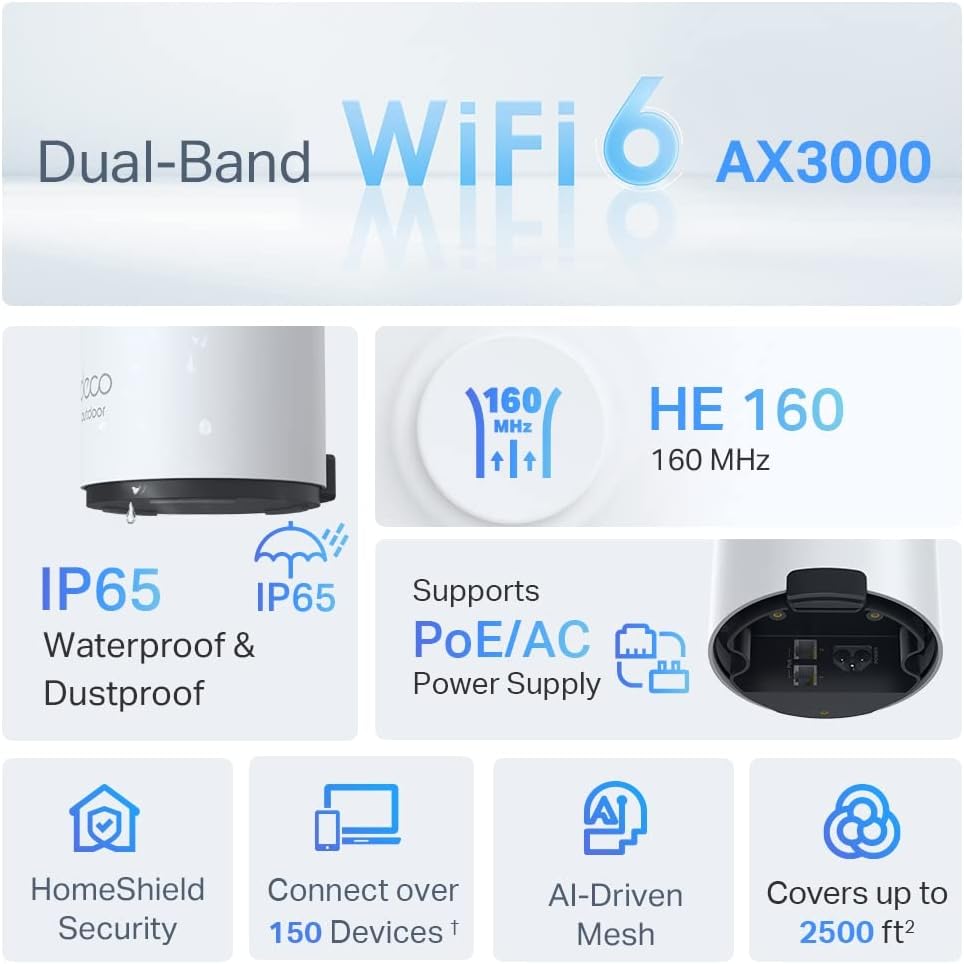
Image: An infographic highlighting key features of the Deco X50-Outdoor, including Dual-Band WiFi 6, AX3000 speeds, IP65 rating, PoE/AC power support, HomeShield Security, support for over 150 devices, AI-Driven Mesh, and up to 2500 sq ft coverage.
| Fitur | Detil |
|---|---|
| Nama Model | AX3000 Outdoor Whole Home Mesh WiFi 6 Unit |
| Standar nirkabel | Koneksi Wi-Fi 6 (802.11ax) |
| Kelas Pita Frekuensi | Pita Ganda |
| Kecepatan Transfer Data | Hingga 2402 Mbps (5 GHz) + 574 Mbps (2.4 GHz) |
| Rentang Konektivitas | Up to 2000 Square Feet (per unit) |
| Pelabuhan | 2 x Gigabit Ethernet Ports (Auto-sensing WAN/LAN) |
| Catu Daya | PoE (802.3at) or AC Power Adapter (240V AC) |
| Tahan Cuaca | IP65 (Tahan Air & Tahan Debu) |
| Protokol Keamanan | WPA, WPA2, WPA3 |
| Metode Kontrol | TP-Link Deco App |
| Berat Barang | 0.9 Kilogram |
10. Garansi dan Dukungan
Untuk informasi garansi dan dukungan teknis, silakan merujuk ke situs web resmi TP-Link websitus atau hubungi layanan pelanggan mereka.
- TP-Link Resmi Weblokasi: www.tp-link.com
- Dukungan Teknis: Kunjungi bagian dukungan di TP-Link. websitus untuk FAQ, panduan pemecahan masalah, dan informasi kontak.