
KKmoon KKM828
KKmoon KKM828 2-in-1 Digital Multimeter with Oscilloscope User Manual
Model: KKM828
1. Pendahuluan
The KKmoon KKM828 is a versatile 2-in-1 device combining the functionalities of a digital multimeter and an oscilloscope. Designed for efficiency and accuracy, it features a 2.4-inch color display, a 1MHz bandwidth for AC voltage, and a 2.5Msps real-time sampling rate. This manual provides essential information for safe and effective operation of your KKM828 device.
2. Informasi Keselamatan
Please read and understand all safety instructions before using the device. Failure to follow these instructions may result in electric shock, fire, or damage to the device or other equipment.
- Always ensure the device is in good working condition and free from damage before use.
- Jangan gunakan vol.tage or current that exceeds the maximum limits specified in the technical specifications.
- Berhati-hatilah saat bekerja dengan voltages above 24V, as they pose a shock hazard. The device will emit an audible warning if the input voltage melebihi 24V.
- Pastikan fungsi dan rentang yang tepat dipilih sebelum melakukan pengukuran.
- Ganti baterai segera ketika indikator baterai lemah muncul untuk memastikan pembacaan yang akurat.
- The device is equipped with double fuses (500mA/250V and 10A/250V) for protection. Do not bypass or use incorrect fuse types.
- Do not operate the device in wet environments or explosive atmospheres.
- Refer to the "Maintenance" section for proper cleaning and storage procedures.
3. Produk Lebihview
The KKmoon KKM828 integrates a digital multimeter and an oscilloscope into a compact, handheld unit. Key components and features are detailed below.
3.1 Fitur Utama
- Fungsionalitas 2-in-1: Combines a digital multimeter and an oscilloscope.
- Menampilkan: 2.4-inch 320x240 LCM color screen for clear readings and waveform display.
- Oscilloscope Performance: 1MHz ACV bandwidth, 2.5Msps real-time samptingkat ling.
- Fungsi Multimeter: Mengukur AC/DC voltage, AC/DC current, resistance, capacitance, frequency, duty cycle, diode, and continuity.
- Penyimpanan Data: Stores up to 100 sets of data and 10 waveforms.
- Antarmuka Pengguna: Silicone buttons and a pressure-sensitive dial for precise function selection.
- Ilmu Ergonomi: Integrated back bracket for a 60° viewsudut.
- Keamanan: Double fuse protection (500mA/250V, 10A/250V) and input voltage peringatan.
3.2 Komponen Perangkat
Lihat gambar di bawah ini untuk melihat lebih detail.view of the device's main components.

Figure 1: KKM828 Product Details. This image highlights the device's HD color screen (01), the function dial for accurate gear changes (02), and the back bracket (03) for easy viewing.
- Layar HD: 2.4-inch color screen for clear display of measurements and waveforms.
- Panggilan Fungsi: Rotary switch for selecting measurement functions (voltage, current, resistance, etc.) and oscilloscope mode.
- Buttons (F1-F4, R, S): Used for navigating menus, selecting ranges, holding data, and other specific functions.
- Jack masukan: Terminals for connecting test leads for various measurements (e.g., VΩHz, mA, 10A, COM).
- Braket Belakang: Foldable stand for propping up the device at a 60° angle for convenient viewing.
4. Pengaturan
4.1 Pemasangan Baterai
The KKM828 requires three AA batteries for operation. Ensure the device is powered off before installing or replacing batteries.
- Temukan penutup ruang baterai di bagian belakang perangkat.
- Open the battery compartment cover by sliding or unscrewing it (if applicable).
- Insert three AA batteries, observing the correct polarity (+ and -) as indicated inside the compartment.
- Tutup penutup ruang baterai dengan rapat.
4.2 Menghidupkan/Mematikan
To power on the device, rotate the function dial from the "OFF" position to any desired measurement function. To power off, rotate the dial back to the "OFF" position.
5. Petunjuk Pengoperasian
5.1 Fungsi Multimeter
The KKM828 offers a comprehensive range of multimeter measurement capabilities. Always connect test leads correctly to the appropriate input jacks (e.g., COM, VΩHz, mA, 10A) for the selected function.
- Tegangan AC/DCtage Pengukuran: Rotate the dial to the 'V~' or 'V=' position. Connect test leads in parallel with the circuit.
- Pengukuran Arus AC/DC: Rotate the dial to the 'mA~', 'mA=', '10A~', or '10A=' position. Connect test leads in series with the circuit.
- Pengukuran Resistansi: Rotate the dial to the 'Ω' position. Ensure the circuit is de-energized before measuring resistance.
- Pengukuran Kapasitansi: Rotate the dial to the 'mF' position. Discharge capacitors before measurement.
- Frequency and Duty Cycle Measurement: Rotate the dial to the 'Hz%' position.
- Tes Dioda: Rotate the dial to the 'Diode' position. Connect leads across the diode to check forward voltagjatuh.
- Uji Kontinuitas: Rotate the dial to the 'Continuity' position. The device will beep if resistance is below approximately 50Ω.

Gambar 2: Contoh Pengukuran Multimeterampsedikit. This image illustrates the display during Frequency, Duty Cycle, Diode Test, and Continuity measurements, demonstrating the device's various multimeter functions.
5.2 Fungsi Osiloskop
The KKM828 features a convenient one-button oscilloscope for waveform analysis.
- Rotate the function dial to the 'Graphical' (oscilloscope) mode.
- Connect the test leads to the circuit where you wish to observe the waveform.
- The device will automatically display the waveform. Use the secondary display at the bottom to view parameters such as Peak-to-Peak voltage (VP-P), average value, RMS value, frequency, time base, and ampgaris lintang.
- Measurement modes include 'Normal' and 'Automatic'. The device can quickly and accurately measure and display waveforms.
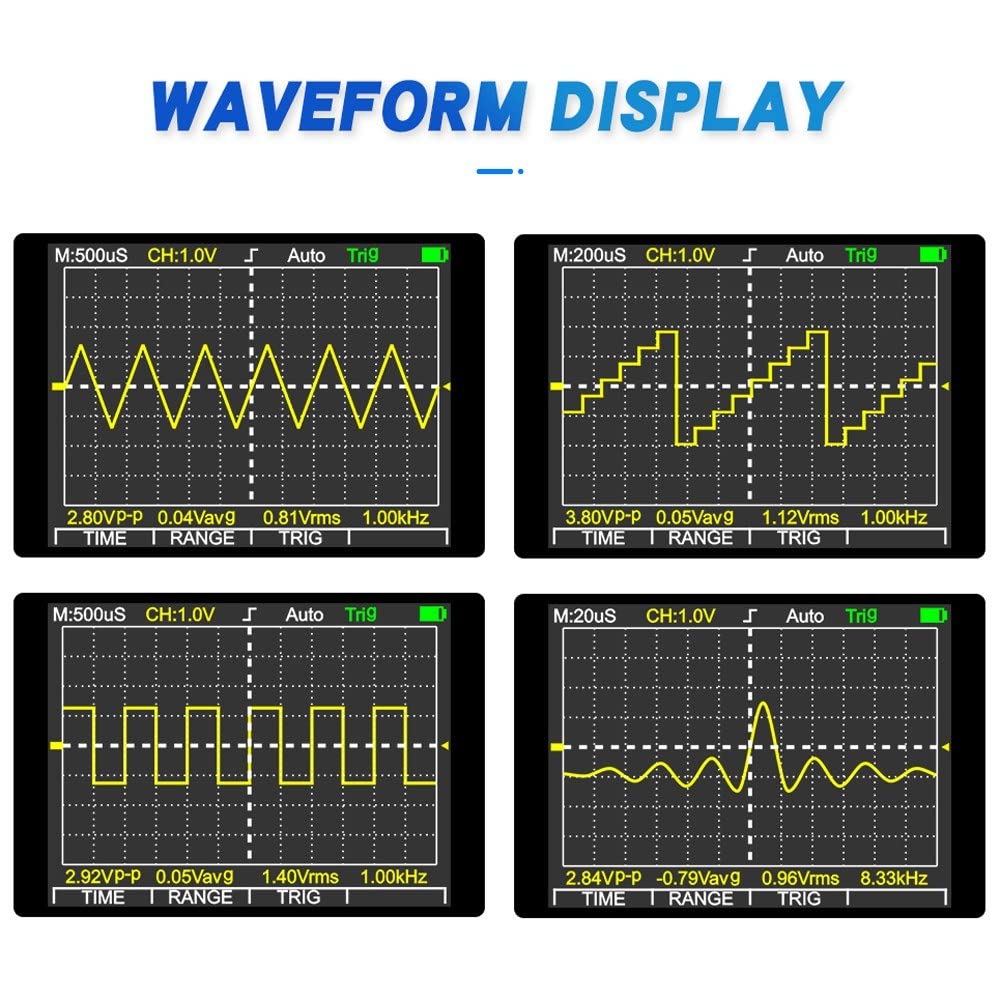
Figure 3: Oscilloscope Waveform Display. This image shows examples of different electrical waveforms (sine, square, pulse, complex) as displayed on the KKM828's oscilloscope screen, along with key measurement parameters.
5.3 Penyimpanan dan Pengambilan Data
The KKM828 can store up to 100 sets of measurement data and 10 waveforms for later review.
- Specific instructions for saving and recalling data are typically accessed via the function buttons (e.g., 'S' for Save, 'R' for Recall) in relevant measurement modes. Refer to the on-screen prompts for detailed operation.
- The device allows for simultaneous display of historical records and real-time data for easy comparison and analysis.
6. Pemeliharaan
6.1 Pembersihan
To clean the device, wipe the casing dengan iklanamp cloth and a mild detergent. Do not use abrasive cleaners or solvents. Ensure the device is powered off and disconnected from any circuits before cleaning. Do not allow moisture to enter the device.
6.2 Penggantian Baterai
When the low battery indicator appears on the display, replace the three AA batteries as described in the "Battery Installation" section (4.1). Always use fresh batteries of the same type.
6.3 Penyimpanan
When not in use for extended periods, remove the batteries to prevent leakage. Store the device in a cool, dry place within the specified storage environment: -10°C to 60°C, with relative humidity less than 90% RH.
7. Penyelesaian masalah
This section addresses common issues you might encounter with your KKM828 device.
| Masalah | Kemungkinan Penyebab | Larutan |
|---|---|---|
| Perangkat tidak menyala. | Baterai mati atau tidak terpasang dengan benar. | Periksa polaritas baterai dan ganti dengan baterai AA yang baru. |
| Tidak ada pembacaan atau "OL" (Kelebihan Beban) yang ditampilkan. | Incorrect range selected, open circuit, or input exceeds maximum limit. | Select appropriate range, check test lead connections, ensure circuit is closed. Verify input does not exceed specifications. |
| Pengukuran yang tidak akurat. | Low battery, incorrect connection, or environmental factors. | Replace batteries, re-check test lead connections, ensure operating environment is within specified range. |
| Oscilloscope waveform is unstable or absent. | Poor connection, signal too weak/strong, or incorrect mode. | Ensure secure test lead connection. Adjust amplitude or time base if available (though KKM828 is mostly auto-ranging). Verify signal source. |
| Perangkat berbunyi bip terus menerus. | Volume masukantage exceeds 24V (safety warning). | Immediately disconnect the device from the circuit and verify the voltage level. Do not proceed if voltage terlalu tinggi. |
8. Spesifikasi
The following table details the technical specifications of the KKmoon KKM828.
| Parameter | Nilai |
|---|---|
| Model | KKM828 |
| Menampilkan | 2.4-inch 320 x 240 LCM Color Screen |
| Resistansi Masukan | 10 juta |
| Jenis Baterai | 3 x baterai AA (tidak termasuk) |
| Konsumsi Daya | kira-kira 80 mA |
| Operating Time (low brightness) | Sekitar 5 jam |
| Penyimpanan Data | 100 data sets / 10 waveforms |
| Lingkungan Operasional | 0 ~ 40 °C, <75% RH |
| Lingkungan Penyimpanan | -10 ~ 60 °C, <90% RH |
| Bandwidth (ACV) | Frekuensi 1 MHz |
| Bandwidth (ACA) | Frekuensi 5kHz |
| Max. Real-time SampTarif ling | 2.5 Msps |
| Multimeter Range (DC Voltage) | 400mV / 4V / 40V / 400V / 1000V (Accuracy: 0.75% rdg + 10dgt) |
| Multimeter Range (AC Voltage) | 400mV / 4V / 40V / 400V / 750V (Accuracy: 1.0% rdg + 10dgt) |
| Multimeter Range (DC Current) | 40mA / 400mA / 4A / 10A (Accuracy: 1.2% rdg + 10dgt) |
| Multimeter Range (AC Current) | 40mA / 400mA / 4A / 10A (Accuracy: 1.5% rdg + 10dgt) |
| Multimeter Range (Resistance) | 400.0 Ω ~ 40.00 MΩ (Accuracy: 1.0% rdg + 5dgt) |
| Multimeter Range (Capacitance) | 0.1nF ~ 100, 10.00mF (Accuracy: 2.0% rdg + 10dgt) |
| Multimeter Range (Frequency) | 5Hz ~ 10MHz (Accuracy: 1.0% rdg + 5dgt) |
| Multimeter Range (Duty Cycle) | 0.1 % ~ 99.9 % (Accuracy: 1.0% rdg + 5dgt) |
| Tes Dioda | Jil.tage approx. 5V, Test current approx. 1.5mA |
| Uji Kontinuitas | Bel berbunyi jika resistansi < 50Ω |
| Spesifikasi sekering | 500mA / 250V, 10A / 250V |
| Ukuran | Ukuran 160x83x32 mm |
| Berat | 195 gram |
Ask a question about this manual
Ask about setup, troubleshooting, compatibility, parts, safety, or missing instructions. Manuals+ will review the question and use this page’s manual context to help answer it.