
1. Pendahuluan
Terima kasih sudah membeliasing the eppfun SK001 USB Speakerphone. This device is designed to provide clear and efficient audio conferencing for home offices, remote work, and small to medium-sized meeting rooms. It features 360° voice pickup, smart voice enhancement, and broad compatibility with popular conferencing platforms.
2. Isi Paket
Harap verifikasi bahwa semua item ada dalam paket Anda:
- eppfun SK001 USB Speakerphone
- Kabel USB-C ke USB-C
- Kabel USB-A ke USB-C
- Instruksi Manual (dokumen ini)
3. Produk Lebihview
The eppfun SK001 features intuitive controls for managing your calls and audio settings.

Gambar: Atas view of the eppfun SK001 speakerphone showing its control buttons. The buttons include microphone mute, microphone volume up/down, and speaker volume up/down.
Tombol Kontrol:
- Tombol Bisukan Mikrofon: Press to mute or unmute the microphone. An indicator light will show the mute status.
- Microphone Volume Up/Down: Menyesuaikan sensitivitas masukan mikrofon.
- Speaker Volume Up/Down: Adjusts the speaker output volume.
Pelabuhan:
- Port USB-C: For connecting to your computer using the provided USB cables.
4. Pengaturan
The eppfun SK001 is a plug-and-play device, requiring no driver installation for most operating systems.
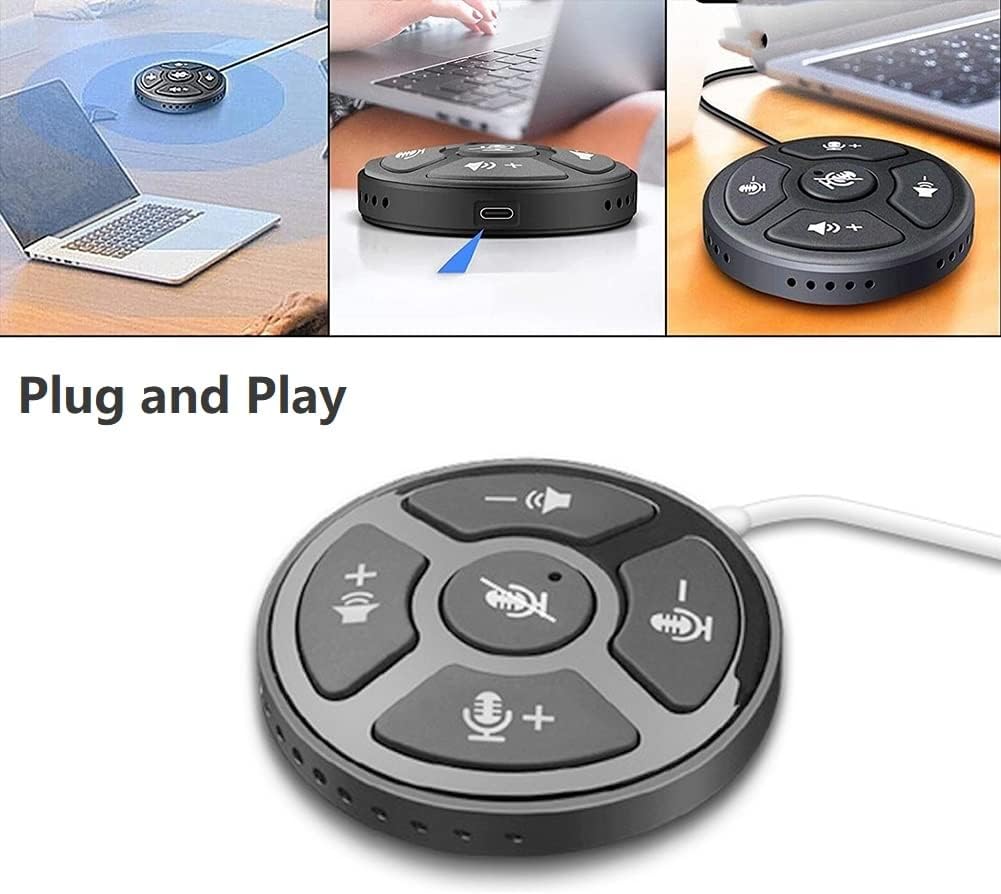
Image: A collage showing the eppfun SK001 speakerphone connected to a laptop via USB, highlighting its plug-and-play functionality.
- Hubungkan speakerphone:
- Use the provided USB-C to USB-C cable or USB-A to USB-C cable.
- Connect one end of the cable to the USB-C port on the SK001 speakerphone.
- Connect the other end of the cable to an available USB port (USB-A or USB-C) on your computer (PC, laptop, or Mac).
- Pengenalan Sistem: Komputer Anda akan secara otomatis mendeteksi dan menginstal driver yang diperlukan. Proses ini mungkin memakan waktu beberapa saat.
- Pilih sebagai Perangkat Audio:
- Open your operating system's sound settings (e.g., Windows Sound Settings, macOS System Preferences > Sound).
- Select "eppfun SK001" as your default input (microphone) and output (speaker) device.
- In your conferencing software (e.g., Zoom, Microsoft Teams, Skype), navigate to its audio settings and select "eppfun SK001" for both microphone and speaker.
5. Petunjuk Pengoperasian
Basic Call Management:
- Penyesuaian Volume: Use the speaker volume up (+) and down (-) buttons on the device to control the playback volume.
- Mikrofon Bisu: Press the central microphone mute button to toggle the microphone on or off. A red indicator light typically signifies that the microphone is muted. This mute function is linked with Zoom Meeting certification.
- Sensitivitas Mikrofon: Use the microphone volume up (+) and down (-) buttons to adjust the microphone's input sensitivity.
Fitur Utama:
- 360° Omnidirectional Voice Pickup: The SK001 is equipped with high-performance microphones capable of capturing voices from all directions within a 5-meter radius, ideal for small to medium-sized conference rooms.
- Peningkatan Suara Cerdas: Features echo cancellation, reverberation suppression, and noise reduction to ensure clear audio during calls.
- Zoom Meeting Certified: Guarantees high-quality calls and seamless integration with Zoom, including synchronized mute status.
6. Pemeliharaan
- Pembersihan: Gunakan kain lembut dan kering untuk membersihkan permukaan speakerphone. Jangan gunakan cairan pembersih atau aerosol.
- Penyimpanan: Simpan perangkat di tempat yang sejuk dan kering saat tidak digunakan.
- Penanganan: Avoid dropping the device or exposing it to extreme temperatures or humidity.
7. Penyelesaian masalah
- No Sound / Microphone Not Working:
- Ensure the USB cable is securely connected to both the speakerphone and your computer.
- Verify that "eppfun SK001" is selected as the default audio input and output device in your computer's sound settings and within your conferencing application.
- Check if the microphone is muted on the device (red indicator light) or within your software.
- Sesuaikan level volume pada speakerphone dan komputer Anda.
- Try connecting the speakerphone to a different USB port or a different computer to rule out port or system issues.
- Kualitas Audio Buruk:
- Ensure the speakerphone is placed on a stable surface, away from obstructions.
- Confirm that the microphone sensitivity is appropriately set.
- Check for background noise in your environment. The device has noise reduction, but extreme noise can still affect quality.
- Verify your internet connection stability if experiencing issues during online calls.
- Perangkat tidak dikenali:
- Putuskan dan sambungkan kembali kabel USB.
- Hidupkan ulang komputer Anda.
- Coba port USB lain di komputer Anda.
- Pastikan sistem operasi Anda sudah diperbarui.
8. Spesifikasi
| Fitur | Detil |
|---|---|
| Nomor Model | SK001 |
| Merek | eppfun |
| Teknologi Konektivitas | USB (USB-C, USB-A) |
| Faktor Bentuk Mikrofon | Mini |
| Pola Kutub | Omnidirectional (360°) |
| Audio Sensitivitas | 30 Desibel |
| Sound Pickup Range | Hingga 5 meter |
| Platform Perangkat Keras | Laptop, komputer |
| Sistem Operasi yang Kompatibel | Windows XP/Vista/7/8/10/11, MacOS |
| Berat Barang | 80 Gram (2.82 ons) |
| Dimensi Paket | 6.1x4.72x1.3 inci |
9. Garansi dan Dukungan
The eppfun SK001 comes with a Garansi 12 bulan sejak tanggal pembelian. Garansi ini mencakup cacat produksi dan malfungsi dalam penggunaan normal.
For technical support, warranty claims, or any questions regarding your eppfun SK001 speakerphone, please contact eppfun customer service. Refer to the contact information provided on the eppfun official websitus atau dokumentasi pembelian Anda.
Harap simpan bukti pembelian Anda untuk tujuan garansi.