
Perkenalan
Thank you for choosing the Hodozzy 9310W 2 Din Car Stereo. This manual provides detailed instructions for installation, operation, maintenance, and troubleshooting to ensure optimal performance and user experience. Please read this manual thoroughly before using the device and keep it for future reference.
Isi Paket
Saat membongkar kemasan, harap verifikasi bahwa semua barang yang tercantum di bawah ini ada dan dalam kondisi baik:
- 1 x Hodozzy 9310W Car MP5 Player
- 1 x Kabel Daya
- 1 x Kabel USB
- 1 x Kepala Antena
- 1x Kontrol Jarak Jauh
- 1 x 2 Din Frame
- 1 x Panduan Pengguna
- 1 x Braket Pemasangan
- 4 x Sekrup
- 1 x Mikrofon
- 1 x Kamera Mundur
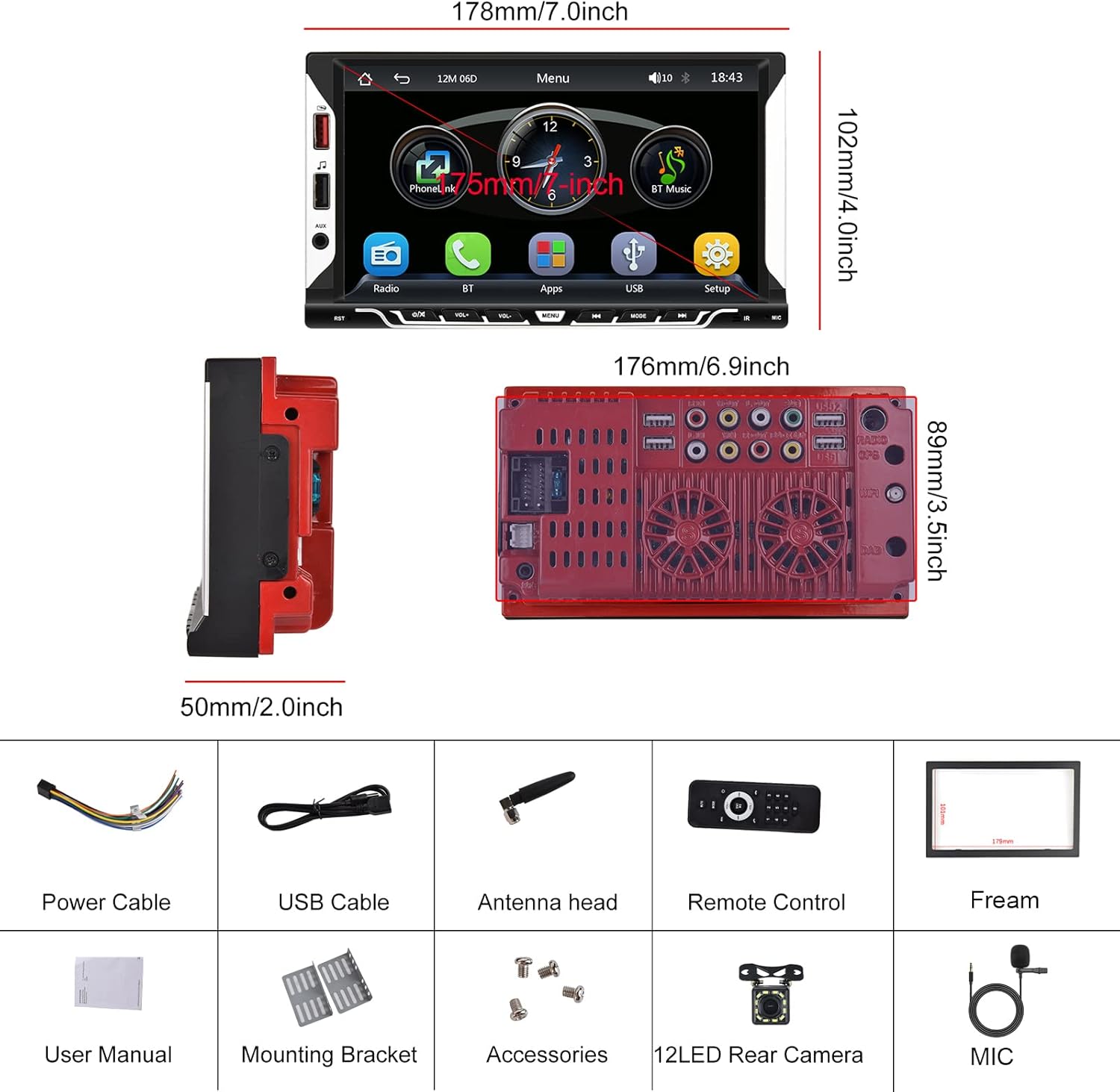
Image: Hodozzy 9310W Car Stereo package contents, showing the main unit, power cable, USB cable, antenna, remote control, frame, user manual, mounting bracket, screws, microphone, and reversing camera.
Pengaturan dan Instalasi
Diagram Pengkabelan
Refer to the following diagram for proper wiring connections. Incorrect wiring can damage the device or your vehicle's electrical system. If you are unsure, consult a professional installer.
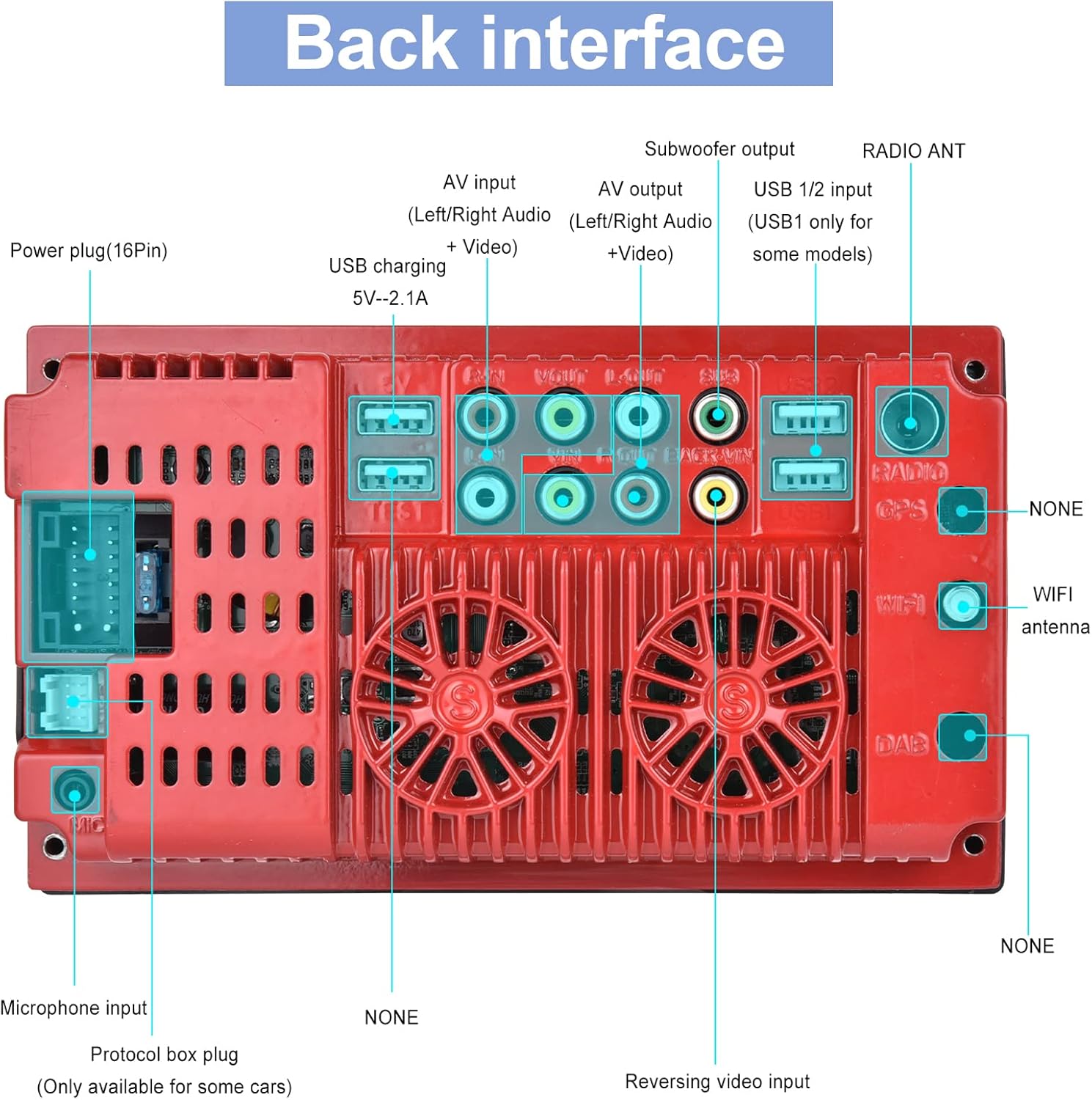
Image: Back interface of the Hodozzy 9310W Car Stereo, detailing connections for power (16-pin), AV input/output, subwoofer output, USB 1/2, radio antenna, microphone input, protocol box plug, and reversing video input.
- Kabel listrik: Connect the yellow wire to the constant 12V power supply, the red wire to the accessory (ACC) 12V power supply, and the black wire to ground.
- Kabel Pembicara: Connect the speaker wires to your vehicle's speakers, ensuring correct polarity for each channel (Front Left, Front Right, Rear Left, Rear Right).
- Input Kamera Mundur: Connect the reversing camera's video output to the 'Reversing Video Input' port. Connect the camera's power to the vehicle's reverse light circuit.
- Port USB: Use the USB 2.0 ports for media playback, smartphone charging, or connecting a designated USB DVR.
- Masukan AUX: Hubungkan perangkat audio eksternal melalui input AUX.
- Mikropon: Hubungkan mikrofon eksternal untuk meningkatkan kualitas panggilan selama pengoperasian hands-free.
- Antena Radio: Connect your vehicle's radio antenna to the 'RADIO ANT' port.
Pemasangan
Install the mounting brackets to the sides of the car stereo using the provided screws. Slide the unit into the 2 Din opening in your vehicle's dashboard until it clicks into place. Secure the unit using the mounting frame and screws.
Petunjuk Pengoperasian
Operasi Dasar
- Daya Hidup/Mati: Tekan tombol daya pada panel depan atau kendali jarak jauh.
- Kontrol Volume: Use the volume knob or buttons on the front panel/remote to adjust the sound level.
- Layar sentuh: Navigate through menus and functions by touching the 7-inch display.
CarPlay dan Android Auto nirkabel
This unit supports wireless CarPlay for iPhone and wireless Android Auto for Android phones, allowing seamless integration of your smartphone's features.
- Pastikan Bluetooth diaktifkan di ponsel cerdas Anda.
- On the car stereo, go to the CarPlay/Android Auto application.
- Pencarian untuk and select your car stereo's Bluetooth name on your phone.
- Konfirmasikan kode pemasangan pada kedua perangkat.
- Setelah terhubung, CarPlay atau Android Auto akan diluncurkan secara otomatis.
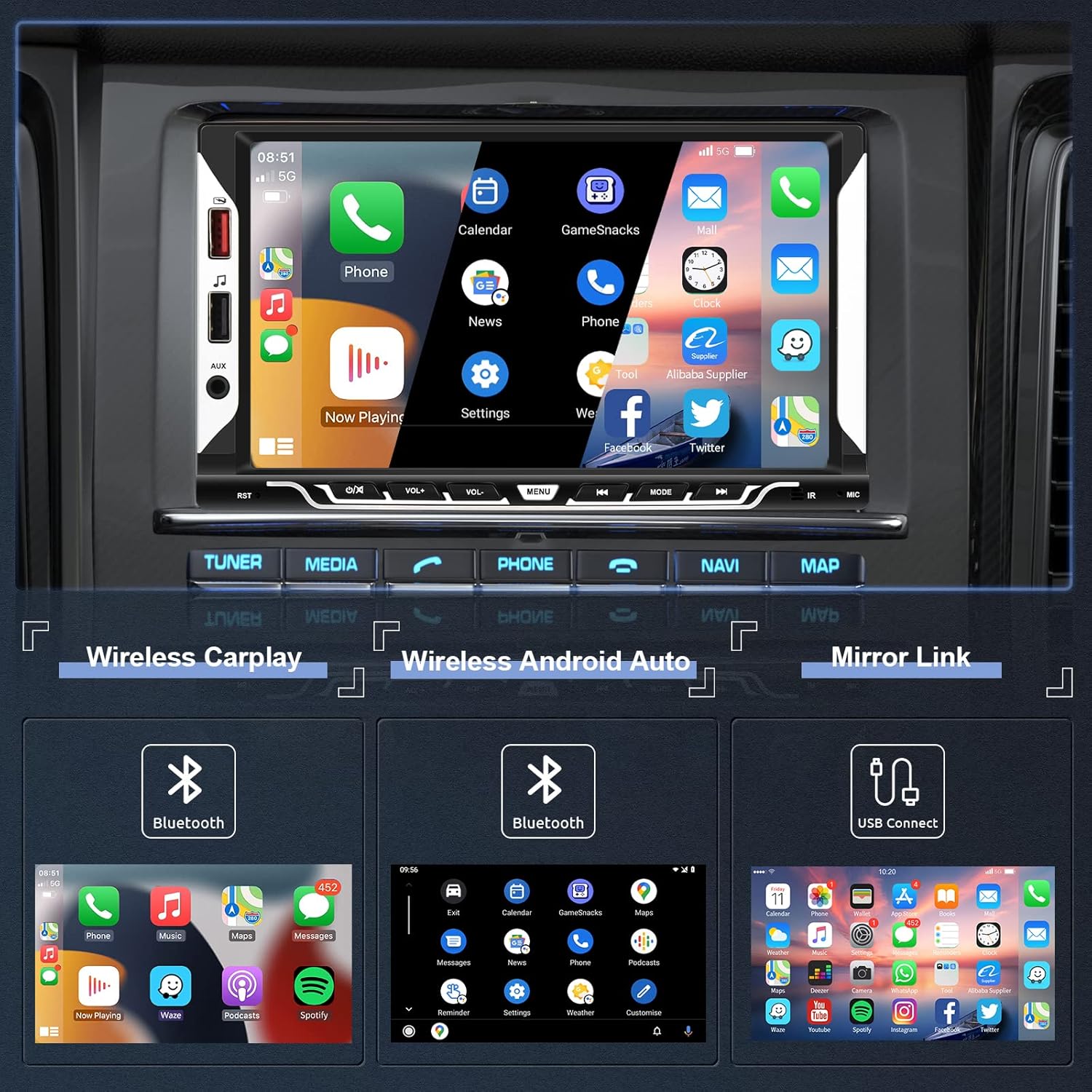
Image: The car stereo screen showing the main interface with options for Wireless CarPlay, Wireless Android Auto, and Mirror Link. Below, examples of CarPlay, Android Auto, and Mirror Link interfaces are displayed.
Fungsi Mirror Link
Mirror Link allows you to display your smartphone's screen directly on the car stereo's display via a USB cable.
- Connect your smartphone to the car stereo using an original USB cable.
- Follow the on-screen prompts on both your phone and the car stereo to enable screen mirroring.
Konektivitas Bluetooth
The integrated Bluetooth 5.1 module enables hands-free calling and wireless audio streaming.
- Aktifkan Bluetooth di telepon pintar Anda.
- Pada sistem audio mobil, navigasikan ke menu Bluetooth.
- Pencarian untuk available devices and select the car stereo's Bluetooth name.
- Konfirmasikan pemasangan. Sekarang Anda dapat melakukan/menerima panggilan dan memutar musik secara nirkabel.

Image: The top section shows the Bluetooth interface for pairing devices, making calls, and accessing music and address book. The bottom section displays the EQ System settings with a 10-band equalizer and preset sound modes like Jazz, Classic, Rock, Pop, and User.
Radio FM Indonesia
Access FM radio stations with clear reception and 18 preset memory slots.
- Pemindaian Otomatis: The unit can automatically scan and save strong FM stations.
- Penyetelan Manual: Manually tune to desired frequencies.
- Stasiun Preset: Save your favorite stations to the 18 preset buttons for quick access.

Image: The top section illustrates the FM Radio interface, showing frequency display (87.50 MHz), signal strength, and preset station buttons (P1-P6). The bottom section shows the Steering Wheel Control (SWC) setup menu, allowing users to program various functions to their vehicle's steering wheel buttons.
Kontrol Roda Kemudi (SWC)
If your vehicle supports steering wheel controls, you can configure them to operate the car stereo for convenience and safety.
- Access the 'Steering Wheel Controls' settings menu.
- Follow the on-screen instructions to map your steering wheel buttons to specific functions (e.g., volume up/down, next/previous track, mode).
Reversing Camera Function
Kamera mundur yang disertakan memberikan tampilan yang jelas. view of the area behind your vehicle, enhancing safety during parking and reversing maneuvers.
- When the vehicle is shifted into reverse gear, the car stereo will automatically display the camera feed on the screen.
- The display includes parking guidelines to assist with precise maneuvering.
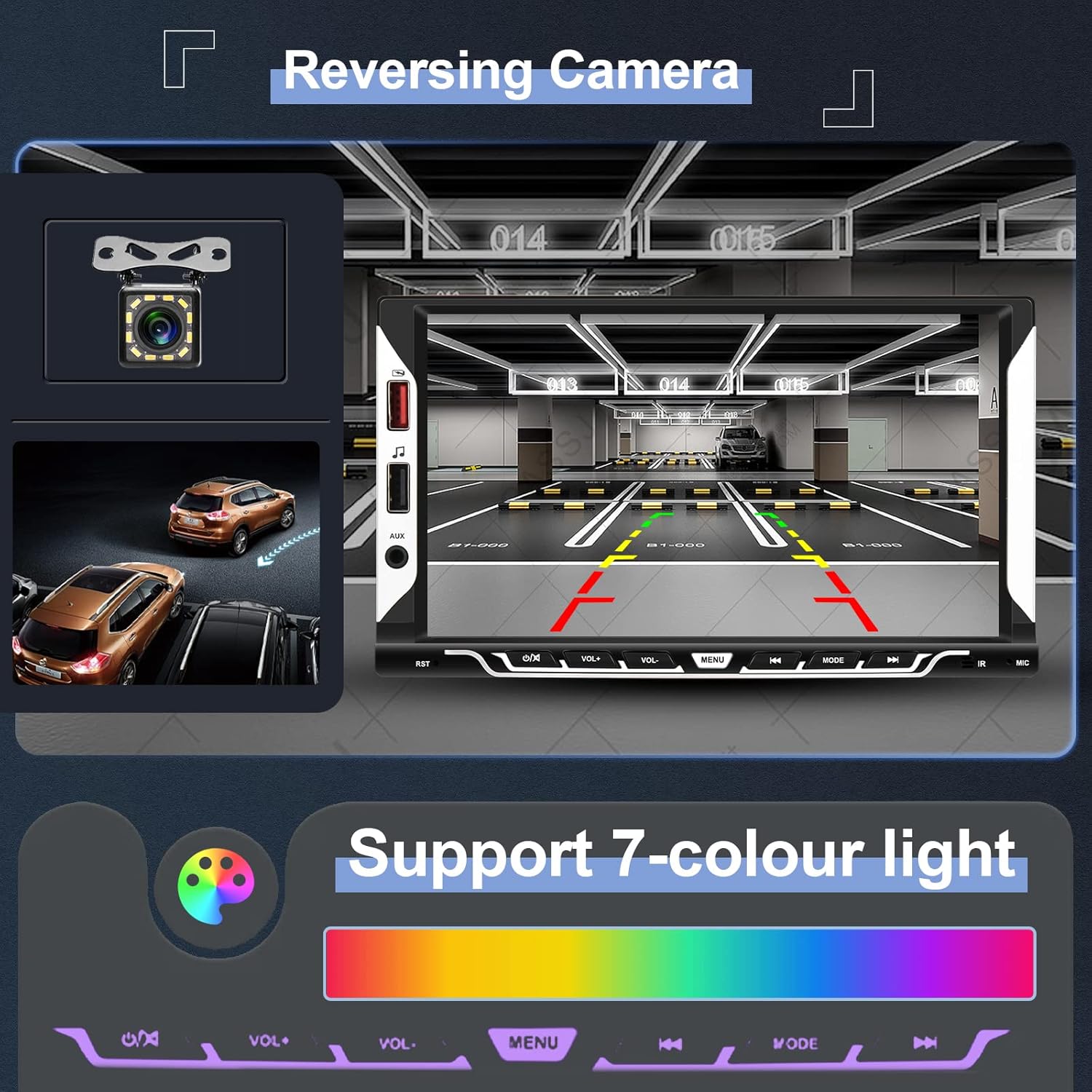
Image: The top section shows the reversing camera view on the car stereo screen, complete with parking guidelines and a clear image of the rear environment. The bottom section illustrates the 7-color light support, allowing users to customize the button illumination colors.
EQ System
Adjust the audio output to your preference using the built-in 10-band equalizer and various preset sound effects (Jazz, Classic, Rock, Pop, User).
Kustomisasi UI
Personalize your car stereo's appearance:
- Pengaturan Lampu Latar: Choose from 7 different button illumination colors or set them to cycle automatically.
- Wallpaper: Select from various themed UI wallpapers.
Pemeliharaan
- Pembersihan Layar: Gunakan kain lembut dan bebas serat untuk menyeka layar sentuh dengan lembut. Hindari pembersih abrasif atau pelarut.
- Perawatan Umum: Keep the unit free from dust and moisture. Do not expose it to extreme temperatures.
- Pembaruan Perangkat Lunak: Check the official Hodozzy website for any available software updates to ensure optimal performance and new features.
Penyelesaian Masalah
| Masalah | Kemungkinan Penyebab | Larutan |
|---|---|---|
| Tidak ada daya | Kabel daya salah pasang; Sekring putus; Aki kendaraan lemah. | Check power cable connections (yellow, red, black). Inspect vehicle fuses. Ensure vehicle battery is charged. |
| Tidak ada suara | Kabel speaker terputus; Volume terlalu rendah; Fungsi mute aktif. | Verify speaker wire connections. Increase volume. Check if the unit is muted. |
| Bluetooth tidak terhubung | Bluetooth not enabled on phone/stereo; Incorrect pairing process. | Ensure Bluetooth is active on both devices. Restart Bluetooth on both devices. Re-attempt pairing. |
| CarPlay/Android Auto tidak dapat diluncurkan. | Incorrect Bluetooth connection; Phone software issue; USB cable issue for Mirror Link. | Ensure stable Bluetooth connection for wireless. For Mirror Link, use an original USB cable. Restart phone and stereo. |
| Reversing camera not displaying | Camera wiring incorrect; Camera power issue; Reverse trigger wire not connected. | Check camera video input and power connections. Ensure the reverse trigger wire is correctly connected to the vehicle's reverse light. |
| Unit freezes or is unresponsive | Gangguan perangkat lunak sementara. | Press the reset button (usually a small hole requiring a pin) or disconnect power for a few minutes and reconnect. |
Spesifikasi
| Model | 9310W |
| Sistem | F133 |
| Ukuran Layar | 7.0 inci |
| Resolusi Layar | 1024*600 |
| Jil.tage | 12V |
| Suara Amppengangkat | 7388 |
| Daya Keluaran | 4*45W |
| Versi Bluetooth | 5.1 |
| Antarmuka USB | USB2.0 |
| Membalikkan Input | CVBS |
| Jangkauan Radio | FM 87.5-108.0MHz (Eropa) |
| Suhu Operasional | -20℃ ~ 70℃ |
| Format Audio yang Didukung | MP3 / WMA / WAV / APE / FLAC |
| Format Video yang Didukung | MKV/AVI/TS/TP/MP4/M4V (Max bitrate 50-80Mbps) |
| Fitur Khusus | Wireless Apple CarPlay, Wireless Android Auto, Mirror Link, Bluetooth, FM Radio, Reversing Camera Input, Steering Wheel Control |
Ukuran
Image: Diagram showing the dimensions of the Hodozzy 9310W car stereo. The front panel measures 178mm (7.0 inches) in width and 102mm (4.0 inches) in height. The main body has a width of 176mm (6.9 inches), a height of 89mm (3.5 inches), and a depth of 50mm (2.0 inches).
Informasi Garansi
The Hodozzy 9310W Car Stereo comes with a 2-year replacement warranty. This warranty covers manufacturing defects and ensures that your product will be replaced if it fails due to such issues within two years from the date of purchase. Please retain your proof of purchase for warranty claims.
Dukungan Pelanggan
For any questions, technical assistance, or warranty claims, please contact Hodozzy customer support. We offer lifetime support for our products.
- E-mail: hodozzyofficial@163.com
- Waktu Respon: Kami berupaya menanggapi pertanyaan dalam waktu 18 jam.