Perkenalan
This manual provides essential instructions for the proper setup, operation, and maintenance of your Generic replacement remote control, designed for use with the JVC JVSH502018SV 2.1 Channel Soundbar Speaker System.
Catatan Penting: This is a replacement remote control. While it is designed to function with the specified JVC soundbar model, some advanced or original-specific functions may not be fully supported. Please ensure your soundbar model is JVC JVSH502018SV before proceeding.
Pengaturan
1. Pemasangan Baterai
Remote control ini memerlukan dua (2) baterai AAA (tidak termasuk). Ikuti langkah-langkah berikut untuk memasangnya:
- Temukan tempat baterai di bagian belakang remote control.
- Geser penutup kompartemen baterai ke bawah atau ke luar untuk membukanya.
- Masukkan dua baterai AAA, pastikan terminal positif (+) dan negatif (-) sejajar dengan tanda di dalam kompartemen.
- Pasang kembali penutup ruang baterai dengan menggesernya kembali ke posisinya hingga terkunci dengan aman.
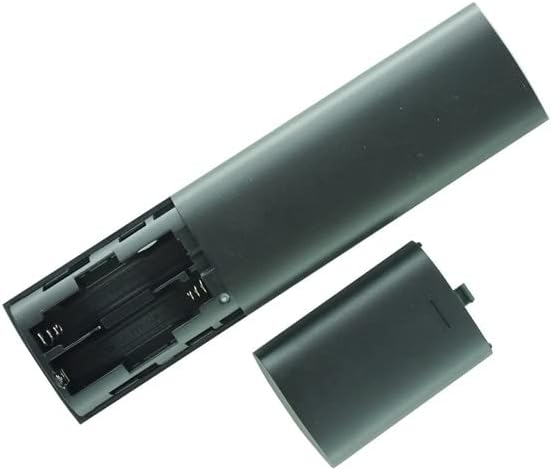
Gambar: Belakang view of the remote control with the battery cover removed, revealing the two AAA battery slots.
2. Penggunaan Awal
Once batteries are installed, the remote control is ready for use. Point the remote directly at the JVC JVSH502018SV soundbar and press the desired function button. No additional pairing or programming is typically required for this infrared (IR) replacement remote.
Petunjuk Pengoperasian
Familiarize yourself with the buttons on your remote control. Below is a general overview of common functions:

Gambar: Depan view of the remote control, displaying its button layout.
- Tombol power (⏻): Mengaktifkan atau menonaktifkan bilah suara.
- Volume Naik/Turun (+/-): Adjusts the soundbar's volume level.
- Tombol Bisu (🔇): Membisukan atau mengaktifkan suara.
- Putar/Jeda (▶/‖): Controls media playback (if supported by the soundbar's input source).
- Previous/Next Track (⏮/⏭): Skips to the previous or next track (if supported).
- Input/Source Button (⎚): Cycles through available input sources (e.g., Bluetooth, Optical, AUX).
- Bass +/- Buttons: Adjusts the bass level of the soundbar.
- Tombol Bluetooth (Ⓑ): Activates or switches to Bluetooth mode.
- EQ/Sound Mode Button (🎛): Cycles through equalizer presets or sound modes.
For specific functions and their corresponding buttons, refer to the original JVC soundbar manual if available, as this replacement remote aims to replicate the primary functions.
Pemeliharaan
Penggantian Baterai
Replace batteries when the remote control's response becomes sluggish or stops working. Always replace both AAA batteries at the same time with new ones. Do not mix old and new batteries, or different types of batteries.
Pembersihan
Untuk membersihkan remote control, gunakan kain lembut dan kering. Jangan gunakan cairan pembersih, semprotan, atau bahan abrasif, karena dapat merusak permukaan atau komponen internal remote.
Penyimpanan
Store the remote control in a dry place, away from direct sunlight and extreme temperatures. If the remote will not be used for an extended period, it is recommended to remove the batteries to prevent leakage.
Penyelesaian Masalah
- Perangkat jarak jauh tidak merespons:
- Pastikan baterai terpasang dengan benar dengan polaritas yang tepat (+/-).
- Ganti baterai lama dengan baterai AAA baru.
- Check for any obstructions between the remote control and the soundbar's IR receiver.
- Ensure you are within the effective range and pointing the remote directly at the soundbar.
- Some functions do not work:
- As a replacement remote, it may not support all functions of the original JVC remote. Focus on primary functions like power, volume, and input selection.
- Verify that the function you are trying to use is supported by your JVC JVSH502018SV soundbar model.
- Pekerjaan jarak jauh bersifat tidak tetap:
- Ini sering kali menandakan daya baterai rendah. Ganti baterainya.
- Pastikan tidak ada gangguan dari perangkat elektronik lainnya.
Spesifikasi
| Tipe Produk | Pengendali Jarak Jauh Pengganti |
| Kesesuaian | JVC JVSH502018SV 2.1 Channel Soundbar Speaker System |
| Sumber Daya | 2 x Baterai AAA (tidak termasuk) |
| Jenis Transmisi | Infrared (IR) |
| Warna | Hitam |
| Perangkat yang Didukung Maksimum | 1 |
Garansi dan Dukungan
This product is a Generic replacement remote control. Specific warranty information is not provided in this manual. For any issues or inquiries regarding compatibility or functionality, please refer to the seller or retailer from whom the product was purchased.
It is recommended to verify your soundbar model number (JVC JVSH502018SV) before contacting support to ensure accurate assistance.