
1. Pendahuluan
Thank you for choosing the Toshiba 55UA5D63DG 4K UHD Android TV. This manual provides essential information for setting up, operating, and maintaining your new television. Featuring a 139 cm (55-inch) 4K Ultra HD display, Android TV functionality, Dolby Audio, and Dolby Vision HDR, your TV delivers a rich entertainment experience. Please read this manual thoroughly before using your TV and keep it for future reference.
2. Petunjuk Keselamatan Penting
- Sumber Daya: Pastikan TV terhubung ke catu daya dalam tegangan yang ditentukan.tage range. Do not overload power outlets.
- Ventilasi: Maintain adequate ventilation around the TV. Do not block ventilation openings or place the TV on soft surfaces that may impede airflow.
- Air dan Kelembaban: Do not expose the TV to rain, moisture, or liquids. Avoid placing objects filled with liquids, such as vases, on or near the TV.
- Pembersihan: Cabut TV sebelum membersihkannya. Gunakan kain yang lembut dan kering. Jangan gunakan pembersih cair atau aerosol.
- Penempatan: Place the TV on a stable, level surface or mount it securely to a wall according to manufacturer instructions. Keep the TV away from direct sunlight, heat sources, and strong magnetic fields.
- Anak-anak: Awasi anak-anak agar mereka tidak memanjat TV atau penyangganya.
- Pelayanan: Jangan mencoba memperbaiki TV sendiri. Serahkan semua perbaikan kepada teknisi yang berkualifikasi.
3. Apa yang ada di dalam kotak
Saat membongkar kemasan, harap verifikasi bahwa semua item berikut telah disertakan:
- Toshiba 55UA5D63DG 4K UHD Android TV
- Kontrol Jarak Jauh
- Baterai untuk Remote Control (AAA x 2)
- Kabel Listrik
- TV Stand Components (2 legs)
- Sekrup untuk Dudukan TV
- Panduan Memulai Cepat / Manual Pengguna
4. Pengaturan Awal
4.1 Memasang Dudukan
- Letakkan TV dengan hati-hati menghadap ke bawah di atas permukaan yang lembut dan rata (misalnya, selimut atau busa) untuk mencegah kerusakan layar.
- Sejajarkan setiap kaki dudukan dengan slot yang sesuai di bagian bawah TV.
- Kencangkan setiap kaki dengan sekrup yang disediakan, pastikan sekrup dikencangkan dengan kuat.
- Angkat TV dengan hati-hati ke posisi tegak dan letakkan pada permukaan yang stabil dan rata.
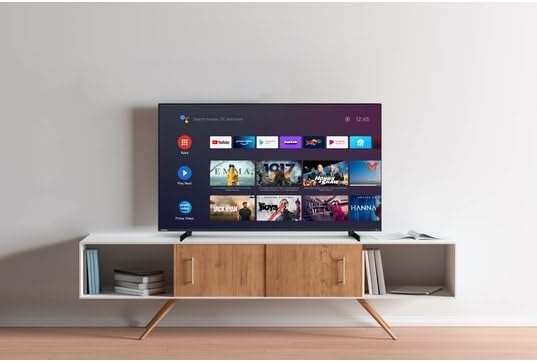
Image: The Toshiba 55UA5D63DG television displayed on its two-leg stand, positioned on a media console in a room.
4.2 Menghubungkan Periferal
- Perangkat HDMI: Connect your Blu-ray player, game console, or set-top box to the HDMI ports on the back of the TV. This TV features 3 HDMI inputs.
- Perangkat USB: Connect USB drives for media playback or other compatible devices to the 2 USB ports.
- Antena/Kabel: Hubungkan antena atau sinyal TV kabel Anda ke input RF.
- Jaringan: Connect an Ethernet cable to the LAN port for a wired internet connection, or connect wirelessly via Wi-Fi during the initial setup.
4.3 Menghidupkan Perangkat untuk Pertama Kalinya
- Hubungkan kabel daya ke TV lalu ke stopkontak di dinding.
- Tekan tombol Daya pada remote control atau pada TV itu sendiri.
- Follow the on-screen instructions for the initial setup wizard. This will guide you through language selection, network connection (Wi-Fi setup), channel scanning, and Google account sign-in for Android TV features.
5. Operating Your Toshiba TV
5.1 Kendali Jarak Jauh Berakhirview
The remote control allows you to access all the functions of your TV. Key buttons typically include:
- Kekuatan: Menyalakan atau mematikan TV.
- Masukan: Memilih sumber masukan (HDMI 1, HDMI 2, TV, dll.).
- Volumenya +/-: Menyesuaikan tingkat volume.
- Saluran +/-: Mengganti saluran TV.
- Tombol Navigasi (Panah): Menavigasi menu dan opsi.
- Oke/Masukkan: Konfirmasikan pilihan.
- Rumah: Mengakses layar beranda Android TV.
- Kembali: Kembali ke layar atau menu sebelumnya.
- Tombol Pintasan Aplikasi: Direct access to popular streaming services (e.g., YouTube, Prime Video).
- Asisten Google: Mengaktifkan perintah suara untuk pencarian dan kontrol.
5.2 Fitur Smart TV (Android TV)
Your Toshiba TV runs on Android TV, providing access to a vast array of apps, streaming services, and smart features.

Image: The Android TV home screen interface of the Toshiba 55UA5D63DG, displaying various application icons and recommended content tiles.
- Layar Beranda: From the Home screen, you can quickly access your favorite apps, live TV, and recommended content.
- Aplikasi: Navigate to the 'Apps' section to browse and download new applications from the Google Play Store. Pre-installed apps include YouTube, Prime Video, and Twitch.
- Asisten Google: Use the Google Assistant button on your remote to search for content, control smart home devices, get answers, and more, using your voice.
- Chromecast Bawaan: Tayangkan konten dari ponsel pintar, tablet, atau komputer Anda yang kompatibel langsung ke TV Anda.

Gambar: Close-up view of the Toshiba 55UA5D63DG's Android TV interface, showing the search bar, app icons, and content suggestions.
5.3 Pengaturan Gambar dan Suara
Akses menu pengaturan TV untuk menyesuaikan pengaturan Anda. viewdan pengalaman mendengarkan.
- Pengaturan Gambar: Adjust brightness, contrast, color, sharpness, and select picture modes (e.g., Standard, Movie, Sport, Game). The TV supports 4K Ultra HD resolution and Dolby Vision HDR for enhanced visual quality.
- Pengaturan Suara: Adjust volume, select sound modes (e.g., Standard, Music, Movie), and configure audio output options. The TV features Dolby Audio for immersive sound.
6. Perawatan dan Pemeliharaan
- Pembersihan Layar: Usap layar secara perlahan dengan kain lembut dan bebas serat. Untuk noda membandel, usap layar dengan lembut.ampbilas kain dengan air atau pembersih layar khusus (jangan pernah menyemprotkan langsung ke layar).
- Pembersihan Bodi TV: Use a soft, dry cloth to wipe the TV's casing. Hindari pembersih atau pelarut yang bersifat abrasif.
- debu: Bersihkan debu pada lubang ventilasi secara teratur untuk mencegah panas berlebih.
- Mencabut: Always unplug the TV from the power outlet before performing any cleaning or maintenance.
7. Panduan Pemecahan Masalah
Jika Anda mengalami masalah dengan TV Anda, lihat tabel di bawah ini untuk masalah umum dan solusinya.
| Masalah | Kemungkinan Penyebab | Larutan |
|---|---|---|
| Tidak ada daya | Kabel daya terputus; Masalah pada stopkontak; Baterai remote lemah. | Periksa sambungan kabel daya; Uji stopkontak dengan perangkat lain; Ganti baterai remote. |
| Tidak ada gambar, tetapi ada suara | Sumber input yang dipilih salah; Masalah lampu latar. | Press the 'Input' button on the remote to select the correct source; Contact support if backlight is faulty. |
| Tidak ada suara, tetapi gambar ada | Volume muted or too low; External audio system issue; Audio settings incorrect. | Unmute or increase volume; Check external audio connections; Adjust TV audio settings. |
| Kontrol jarak jauh tidak berfungsi | Baterai habis; Ada penghalang antara remote dan TV; Sensor remote terhalang. | Ganti baterai; Singkirkan penghalang; Pastikan sensor remote TV tidak terhalang. |
| Tidak dapat terhubung ke Wi-Fi | Kata sandi salah; Masalah router; TV terlalu jauh dari router. | Verify Wi-Fi password; Restart router; Move TV closer to router or use a wired connection. |
8. Spesifikasi Teknis
- Model: Toshiba 55UA5D63DG
- Ukuran Layar: 139cm (55 inci)
- Resolusi: Resolusi 4K Ultra HD (3840x2160)
- Sistem Operasi: TV Android
- Keluaran Audio: 2x10 watt
- Teknologi Audio: Suara Dolby
- Dukungan HDR: Dolby Vision HDR
- Konektivitas: 3 x HDMI, 2 x USB
- Konektivitas Nirkabel: Wifi gratis
- Warna: Hitam
8.1 Efisiensi Energi
Refer to the energy label for detailed information on power consumption and energy efficiency class.

Image: The energy efficiency label for the Toshiba 55UA5D63DG television, indicating an energy class E and power consumption details.
9. Garansi dan Dukungan Pelanggan
9.1 Informasi Garansi
This Toshiba 55UA5D63DG television comes with a Garansi 2 tahun from the date of purchase. This warranty covers manufacturing defects and ensures that your product meets quality standards. Please retain your proof of purchase for warranty claims.
9.2 Dukungan Pelanggan
For technical assistance, warranty claims, or any other inquiries regarding your Toshiba TV, please contact Toshiba customer support. Refer to the contact information provided in your product packaging or visit the official Toshiba websitus untuk wilayah Anda.