1. Pendahuluan
This manual provides essential information for the safe and efficient use of the Generic EPW3000-12A 3000W Server Power Supply. Please read this manual thoroughly before installation and operation to ensure proper functionality and to prevent damage to the unit or connected equipment. Keep this manual for future reference.
2. Informasi Keselamatan
- Bahaya Listrik: Unit ini beroperasi dengan tegangan tinggi.tage. Do not open the power supply casing. Serahkan semua servis kepada personel yang berkualifikasi.
- Ventilasi: Pastikan aliran udara yang cukup di sekitar catu daya. Jangan menghalangi lubang ventilasi. Panas berlebih dapat menyebabkan kerusakan atau kebakaran.
- Lingkungan: Install the power supply in a dry, well-ventilated area, away from direct sunlight, heat sources, and moisture.
- Pembumian: Selalu sambungkan catu daya ke stopkontak listrik yang diarde dengan benar.
- Pemutusan Daya: Disconnect the power cord from the wall outlet before performing any installation, maintenance, or troubleshooting.
- Kesesuaian: Ensure the power supply's specifications match the requirements of your server system.
3. Produk Lebihview
The Generic EPW3000-12A is a high-performance 3000W server power supply designed to provide stable and reliable power to demanding server environments. It features a 12V output at 240A, making it suitable for various server configurations, including the RH5885V2. The unit incorporates an air cooling method to maintain optimal operating temperatures.
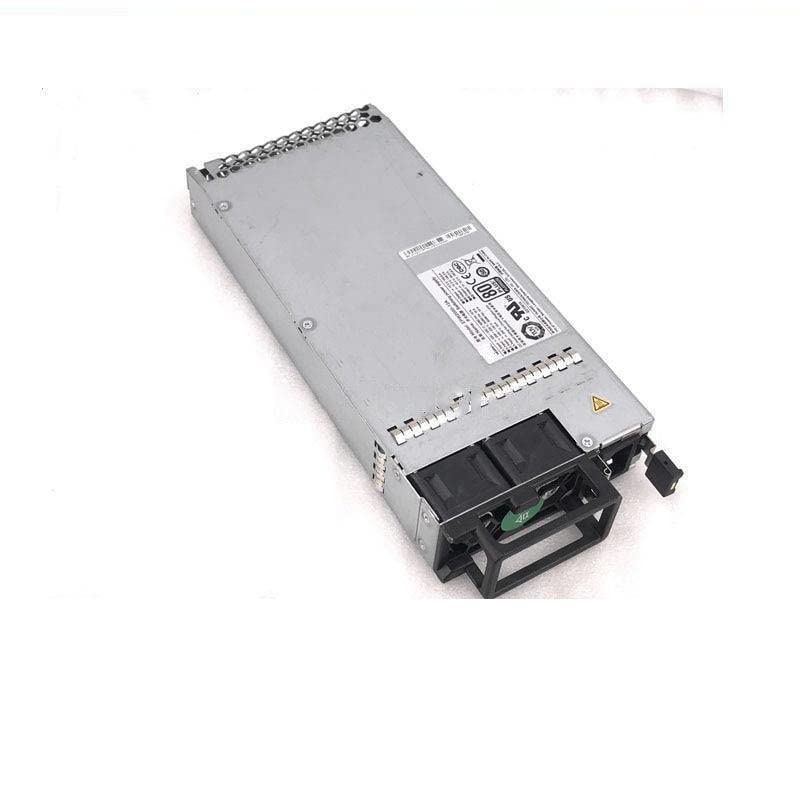
Figure 3.1: Generic EPW3000-12A 3000W Server Power Supply. This image displays the external view of the power supply unit, typically a rectangular metal enclosure with various connectors and cooling vents.
4. Pengaturan
- Membongkar: Keluarkan adaptor daya dari kemasannya dengan hati-hati. Periksa apakah ada tanda-tanda kerusakan selama pengiriman.
- Pemasangan: Install the power supply into the designated bay within your server chassis. Ensure it is securely fastened using appropriate screws.
- Koneksi Kabel: Connect all necessary power cables from the power supply to the server's motherboard, CPU, and other components (e.g., hard drives, GPUs). Ensure all connections are firm and correctly oriented.
- Kabel Daya: Connect the AC power cord to the power supply's input port, then plug the other end into a grounded electrical outlet.
- Nyalakan Daya Pertama: After all connections are made, power on the server. Observe for any unusual noises, smells, or error indicators.
5. Petunjuk Pengoperasian
The EPW3000-12A power supply operates automatically once installed and connected to a power source and the server components. It provides continuous power to the server system. No user intervention is typically required during normal operation.
- Nyalakan: The power supply will activate when the server is powered on.
- Matikan: To power off the server and the power supply, follow the standard shutdown procedure for your server operating system, then disconnect the AC power cord if necessary for maintenance.
- Pemantauan: Server management software may provide information on power supply status, voltage, and temperature. Refer to your server's documentation for details.
6. Pemeliharaan
- Penghilangan Debu: Periodically inspect the power supply's fan and vents for dust accumulation. Use compressed air to gently clean dust from the cooling fins and fan blades to ensure efficient heat dissipation. Perform this with the power supply disconnected from all power sources.
- Pemeriksaan Kabel: Regularly check all power cables for signs of wear, fraying, or loose connections. Replace damaged cables immediately.
- Pemeriksaan Lingkungan: Ensure the server environment remains within recommended temperature and humidity ranges to prevent stress on the power supply components.
7. Penyelesaian masalah
| Masalah | Kemungkinan Penyebab | Larutan |
|---|---|---|
| No power to server | Loose power cable; tripped circuit breaker; faulty power supply | Check all power connections. Verify wall outlet functionality. Reset circuit breaker. If problem persists, test with a known good power supply. |
| Server shuts down unexpectedly | Overheating; power supply overload; internal fault | Ensure proper ventilation and clean dust. Verify total power draw does not exceed 3000W. If issues continue, professional diagnosis may be required. |
| Suara kipas yang keras | Dust accumulation; failing fan bearing; high load/temperature | Clean fan and vents. Monitor server temperature. If noise is excessive and persistent, the fan may need replacement by a qualified technician. |
If you encounter issues not listed here or if the suggested solutions do not resolve the problem, contact your seller or a qualified service technician for assistance.
8. Spesifikasi
- Merek: Umum
- Model: EPW3000-12A
- Keluaran Wattage: 3000 Watt
- Volume Keluarantage: 12V
- Keluaran Ampera: 240A
- Perangkat yang Kompatibel: Server (e.g., RH5885V2)
- Metode Pendinginan: Udara
- ASIN: B0C3BHXNFM
- Tanggal Pertama Tersedia: 23 April 2023
9. Garansi dan Dukungan
For warranty information and technical support, please refer to the documentation provided by your seller or contact the manufacturer directly. Specific warranty terms and support procedures may vary depending on your region and point of purchase.


