
1. Pendahuluan
Thank you for choosing the Podofo 1 Din Android Car Stereo. This device integrates advanced features such as a 7-inch retractable touch screen, Android operating system, Bluetooth, GPS navigation, Wi-Fi connectivity, FM/RDS radio, Mirror Link, AUX-in, and support for a backup camera. This manual provides essential information for installation, operation, maintenance, and troubleshooting to ensure optimal performance and user experience.

Image 1.1: Podofo 1 Din Android Car Stereo with its main components and accessories.
2. Isi Paket
Harap periksa paket dengan cermat untuk memastikan semua item ada:
- 1 x Single DIN Car Stereo Unit
- 1 x Kamera Cadangan
- 1 x Antena GPS
- 1 x Power Cable Harness
- 1 x Speaker Cable Harness
- 2 x Kunci Pembongkaran
- 1 x Panduan Pengguna
- 1 x Pemasangan Braket Set

Gambar 2.1: Representasi visual isi paket.
3. Spesifikasi
| Sistem | Android 10.0 |
| Ukuran Layar | 7-inch Retractable Touch Screen |
| Resolusi | Ukuran 1024x600 |
| Versi Bluetooth | 4.2 |
| Jangkauan Radio FM | 87.5 ~ 108 MHz |
| Suhu Operasional | -10℃ ~ +60℃ |
| Antarmuka USB | Kabel USB 2.0 |
| Jil.tage | 12V |
| Daya Keluaran | 60W |
| Penyimpanan | RAM 1GB + ROM 16GB |
| Format Audio | MP3 / WMA / WA / OGG / FLAC / APE |
| Format Video | RM / RMVB / MP4 / FLV / MKV / 3GP / AVIASF / SWFMP1 |
| Format Gambar | Format JPG |
| Konektivitas | Wifi gratis |
| Dimensi Produk (P x L x T) | Ukuran 18.8cm x 5.8cm x 16.5cm |
| Berat | 1660 gram |

Image 3.1: Product details including dimensions and rear panel connections.
4. Pengaturan dan Instalasi
Before installation, ensure your vehicle's power is disconnected. Professional installation is recommended.
4.1 Koneksi Kabel
- Sambungan Daya: Connect the power cable harness to your vehicle's power supply (ACC, B+, GND). Ensure correct polarity.
- Koneksi Pembicara: Connect the speaker cable harness to your vehicle's speakers. Match positive and negative terminals.
- Antena GPS: Hubungkan antena GPS ke port khusus di bagian belakang unit dan pasang di lokasi dengan pandangan yang jelas. view dari langit.
- Kamera Cadangan: Connect the backup camera's video output to the 'CAMERA IN' port on the stereo. Connect the camera's power to your vehicle's reverse light circuit for automatic activation.
- AUX-in/USB: Connect external devices via the AUX-in port or USB ports as needed.
- Kontrol Roda Kemudi (SWC): If your vehicle supports SWC, connect the SWC wires (KEY1, KEY2) to the corresponding wires from your vehicle's harness. Configuration will be done in the settings menu.

Image 4.1: Backup camera wiring diagram.
4.2 Memasang Unit
Insert the single DIN unit into your vehicle's dashboard opening. Secure it using the provided mounting brackets and screws. Ensure the retractable screen mechanism has enough clearance to operate freely.
5. Petunjuk Pengoperasian
5.1 Operasi Dasar
- Daya Hidup/Mati: Press the power button (usually labeled SRC or PWR) to turn the unit on or off.
- Kontrol Volume: Gunakan kenop putar atau kontrol di layar untuk mengatur volume.
- Penarikan Kembali Layar: Manually adjust the screen's angle or retract it into the unit as desired.
5.2 Bluetooth Connectivity (Bluetooth 4.2)
Pair your mobile phone with the car stereo for hands-free calling and audio streaming.
- Go to the Bluetooth menu on the car stereo.
- Aktifkan Bluetooth di ponsel Anda dan cari perangkat yang tersedia.
- Select "MY PODOFO" or a similar name from the list on your phone.
- Konfirmasikan kode pemasangan jika diminta.
- Setelah terhubung, Anda dapat melakukan/menerima panggilan dan memutar musik melalui stereo mobil.

Image 5.1: Bluetooth connection and FM/RDS radio interface.
Radio 5.3 FM/RDS
Access the Radio application to listen to FM broadcasts. The RDS function displays station names and program information where available.
- Open the "Radio" app from the main menu.
- Gunakan kontrol di layar untuk memindai stasiun, menyetel secara manual, atau memilih stasiun yang sudah diatur sebelumnya.
5.4 Navigasi GPS
The unit supports both online and offline navigation. Ensure the GPS antenna is properly connected.
- Open the "Navigation" or "Maps" app.
- For offline maps, download them via Wi-Fi before driving.
- Masukkan tujuan Anda dan ikuti petunjuk suara.
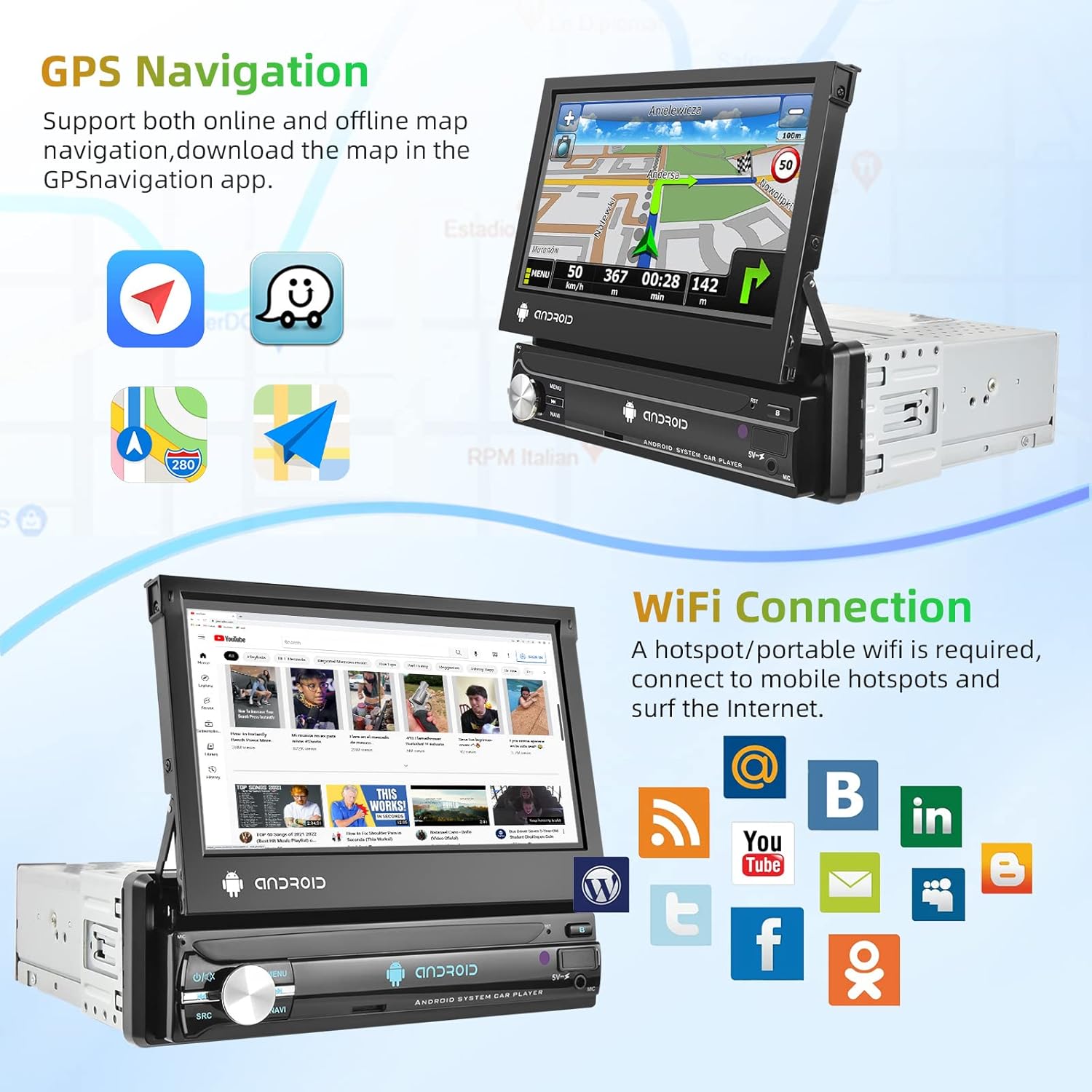
Image 5.2: GPS navigation and Wi-Fi connection features.
Koneksi Wi-Fi 5.5
Connect to a mobile hotspot or Wi-Fi network to access online features, download apps, and browse the internet.
- Buka "Pengaturan" dan pilih "Wi-Fi".
- Aktifkan Wi-Fi dan pilih jaringan yang Anda inginkan.
- Masukkan kata sandi jika diperlukan.
5.6 Tautan Cermin
Project your smartphone screen onto the car stereo display. Supports both Android and iOS devices via USB connection.
- Connect your smartphone to the car stereo via a USB cable.
- Follow the on-screen prompts on both your phone and the stereo to establish the connection.

Image 5.3: Split screen, EQ settings, Mirror Link, and Steering Wheel Control features.
5.7 Tampilan Kamera Mundur
When the vehicle is shifted into reverse gear, the car stereo will automatically display the view from the connected backup camera.
5.8 Kontrol Roda Kemudi (SWC)
Konfigurasikan tombol-tombol pada setir kendaraan Anda untuk mengontrol fungsi sistem audio mobil.
- Go to "Settings" and find the "Steering Wheel Control" or "SWC Learning" option.
- Follow the on-screen instructions to assign functions to each button.
5.9 EQ Setting
Adjust audio equalization for a personalized sound experience.
- Akses menu "EQ" atau "Pengaturan Suara".
- Choose from preset equalizer modes or manually adjust frequency bands.
5.10 Layar Terpisah
Run two applications simultaneously on the screen for enhanced multitasking.
- While an app is open, long-press the recent apps button or drag an app to one side of the screen (depending on Android version).
- Select another app to open on the other side.
6. Pemeliharaan
- Pembersihan Layar: Use a soft, lint-free cloth to gently wipe the touch screen. Avoid abrasive cleaners or solvents.
- Pembersihan Umum: Keep the unit free from dust and debris. Use a dry cloth for the main body.
- Pembaruan Perangkat Lunak: Periksa pembaruan perangkat lunak secara berkala melalui pengaturan sistem untuk memastikan kinerja optimal dan akses ke fitur-fitur baru.
7. Penyelesaian masalah
| Masalah | Kemungkinan Penyebab | Larutan |
|---|---|---|
| Unit tidak menyala. | Incorrect wiring, blown fuse, no power supply. | Check power cable connections (ACC, B+, GND). Verify vehicle fuse. Ensure vehicle battery is charged. |
| Tidak ada suara. | Speaker wires disconnected, volume too low, incorrect audio source. | Check speaker wiring. Increase volume. Select correct audio source (FM, Bluetooth, USB, AUX). |
| Sinyal GPS hilang atau tidak akurat. | GPS antenna improperly connected or obstructed. | Ensure GPS antenna is securely connected and mounted in a clear location (e.g., dashboard, not under metal). |
| Bluetooth tidak tersambung. | Bluetooth off on either device, incorrect pairing process. | Ensure Bluetooth is enabled on both the stereo and phone. Delete previous pairings and try pairing again. |
| Kamera mundur tidak menampilkan gambar. | Camera not powered, video cable disconnected, reverse trigger wire not connected. | Check camera power and video connections. Ensure the reverse trigger wire is correctly connected to the vehicle's reverse light. |
8. Garansi dan Dukungan
8.1 Informasi Garansi
Produk ini dilengkapi dengan Garansi pabrik 2 tahunHarap simpan bukti pembelian Anda untuk klaim garansi. Garansi mencakup cacat material dan pengerjaan dalam penggunaan normal.
8.2 Dukungan Pelanggan
For technical assistance, troubleshooting beyond this manual, or warranty inquiries, please contact Podofo customer support through the retailer where the product was purchased or visit the official Podofo websitus untuk informasi kontak.