
1. Produk Lebihview
The Godox SL60II-D is a daylight-balanced LED video light designed for continuous lighting applications in studio video recording, filming, and podcasting. This kit provides strong output and user-friendly controls, including app connectivity via Bluetooth. It is an upgraded version of the SL-60W, offering enhanced performance and quieter operation.

Image: Godox SL60II-D LED Video Light unit.
2. Apa yang ada di dalam kotak
The Godox SL60II-D LED Video Light Kit typically includes the following components:
- 2x Godox SL60II-D LED Video Lights
- 2x Square Grid Softboxes
- 2x Light Stands
- 1x Kontrol Jarak Jauh
- Honeycomb Grids (for softboxes)
- Kabel Listrik
- Color Filter Set
- Tas Pembawa
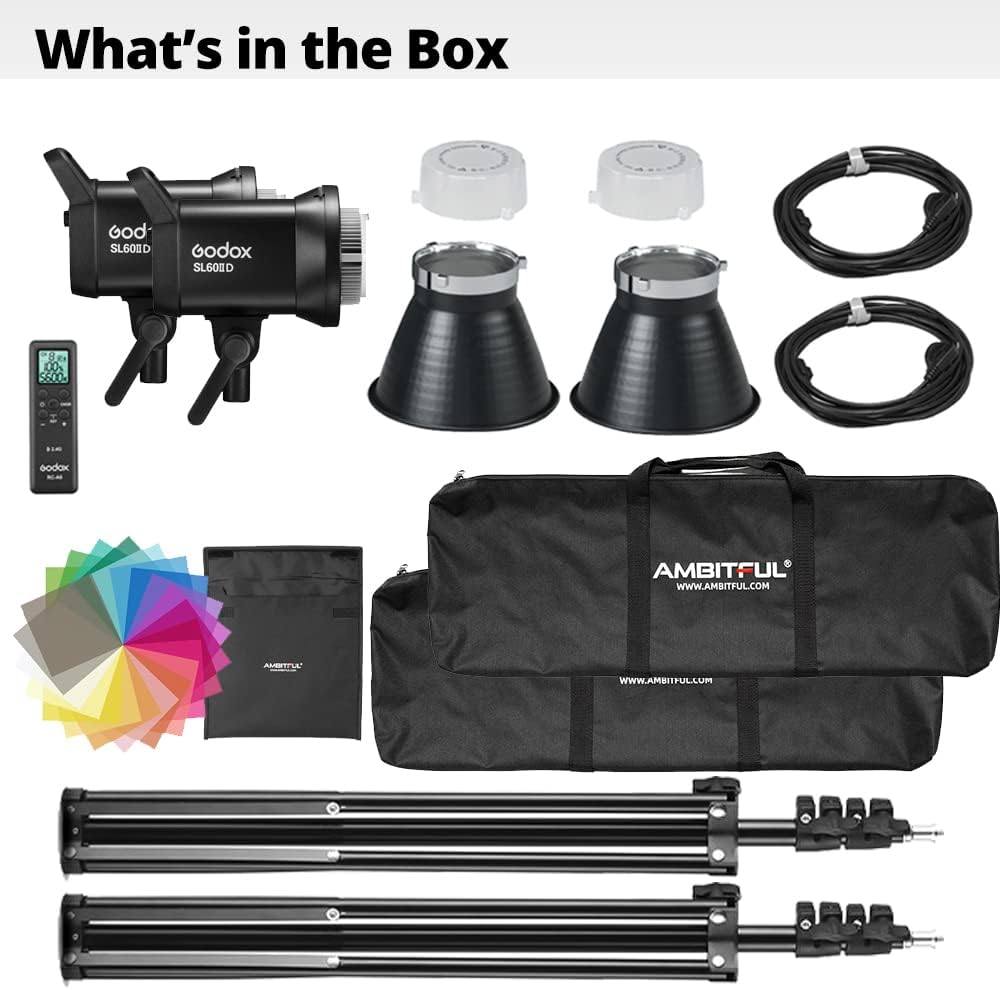
Image: All components included in the Godox SL60II-D LED Video Light Kit.
3. Petunjuk Penyiapan
Follow these steps to set up your Godox SL60II-D LED Video Light Kit:
- Assemble the Light Stands: Extend the legs of the light stands to create a stable base. Adjust the height to your desired level and secure with the locking knobs.
- Mount the LED Lights: Attach each Godox SL60II-D LED light unit to the top of a light stand. Ensure it is securely fastened.
- Attach Softboxes: Open and assemble the square grid softboxes. Mount each softbox onto the front of an LED light unit. The Bowens mount ensures a secure fit.
- Hubungkan Daya: Plug the power cables into the LED light units and then into a suitable power outlet.
- Penempatan: Place the assembled lights in your desired positions for optimal lighting.
Tutorial Video Pengaturan
Video: A tutorial demonstrating the setup and basic operation of the Godox SL60II-D LED Video Light.
4. Petunjuk Pengoperasian
Daya Hidup/Mati
Locate the power switch on the back of the light unit. Flip the switch to the 'ON' position to power on the light. Flip it to 'OFF' to power off.
Penyesuaian Kecerahan
The brightness can be adjusted from 0% to 100%. Rotate the Panggilan DIM on the back panel of the light unit to increase or decrease the light intensity. The current brightness percentage akan ditampilkan di layar.
Image: Rear control panel of the Godox SL60II-D, showing the DIM dial for brightness adjustment.
Suhu Warna
The Godox SL60II-D is a daylight-balanced light with a fixed color temperature of 5600K. This model does not offer adjustable color temperature. For bi-color options, refer to the Godox SL60II-Bi model.
Special Effects (FX Modes)
The SL60II-D features 8 built-in special effects to simulate various lighting scenarios. Press the tombol FX on the control panel to cycle through effects such as Broken Bulb, TV, and Storm. Rotate the Tombol CCT/FX to select specific effects.

Image: Visual representation of the 8 special effects available on the Godox SL60II-D.
Kontrol Aplikasi (Bluetooth)
The light can be controlled wirelessly via the 'Godox Light' mobile application. Download the app from your device's app store. Enable Bluetooth on your smartphone and pair it with the SL60II-D light. You can then adjust brightness, select effects, and manage other parameters directly from your phone.

Image: A smartphone displaying the Godox Light app, controlling the SL60II-D LED light.
Kontrol Jarak Jauh
Use the included remote control to adjust the light's settings from a distance. Ensure the remote is paired with the light according to the remote's specific instructions. The remote allows for brightness adjustments and other functions.

Image: The Godox SL60II-D light unit with its dedicated remote control.
Operasi Selesaiview Video
Video: Sebuah overview of the Godox SL60II-D and SL60II-Bi models, demonstrating key operational features.
5. Pemeliharaan
To ensure the longevity and optimal performance of your Godox SL60II-D LED Video Light Kit, follow these maintenance guidelines:
- Pembersihan: Regularly wipe the light unit and accessories with a soft, dry cloth. Do not use abrasive cleaners or solvents.
- Penyimpanan: When not in use, store the kit in its carrying bags in a cool, dry place, away from direct sunlight and excessive humidity.
- Perawatan Kabel: Avoid bending or kinking power cables excessively. Always unplug by grasping the plug, not the cable.
- Ventilasi: Ensure the light's ventilation openings are clear and unobstructed during operation to prevent overheating. The upgraded fan design provides quieter operation.
6. Penyelesaian masalah
If you encounter issues with your Godox SL60II-D LED Video Light, refer to the following common troubleshooting steps:
- Lampu Tidak Menyala:
- Check if the power cable is securely connected to both the light unit and the power outlet.
- Ensure the power switch on the light unit is in the 'ON' position.
- Pastikan stopkontak berfungsi.
- Tidak Ada Keluaran Cahaya:
- Check the brightness setting; ensure it is not set to 0%.
- If using a remote or app, ensure it is properly paired and communicating with the light.
- Remote/App Not Connecting:
- Ensure Bluetooth is enabled on your smartphone for app control.
- For remote control, check battery levels and ensure the remote is within range and on the correct channel/group.
- Restart both the light and the controlling device (smartphone/remote).
- Terlalu panas:
- Ensure adequate ventilation around the light unit. Do not block air vents.
- Reduce the brightness setting if operating for extended periods in high ambient temperatures.
If these steps do not resolve the issue, please contact Godox customer support.
7. Spesifikasi
Key technical specifications for the Godox SL60II-D LED Video Light:
| Fitur | Spesifikasi |
|---|---|
| Model | SL60II-D |
| Catu Daya | 100V-240V~50/60Hz 0.7A |
| Daya Maks. | Maks. 70W |
| Suhu Warna (CCT) | 5600K ± 200K |
| Saluran | 32 |
| Kelompok | 16 (A,B,C,D,E,F,0-9) |
| ID | 1-99/DARI |
| CRI | ≥96 |
| TLCI | ≥97 |
| Tipe Valas | 8 |
| Metode Kontrol | Kontrol Bodi Nirkabel/Bluetooth/Lampu 2.4GHz |
| Jarak Transmisi 2.4GHz | 30m |
| Jarak Transmisi Bluetooth | 30m |
| Rentang Kecerahan | 0% - 100% |
| Suhu Lingkungan Kerja | -10°C - 40°C |
| Dimensi (dibuka tanpa reflektor) | Ukuran 140mm x 236mm x 215mm |
| Berat Bersih | 1.43 kg |
Catatan: Spesifikasi dapat berubah tanpa pemberitahuan sebelumnya.
8. Garansi dan Dukungan
Informasi Garansi
This Godox SL60II-D LED Video Light Kit comes with a garansi satu tahun Terhitung sejak tanggal pembelian. Garansi mencakup cacat produksi dan kerusakan dalam penggunaan normal. Harap simpan bukti pembelian Anda untuk klaim garansi.
The warranty does not cover damage caused by misuse, unauthorized modifications, accidents, or natural disasters. For detailed warranty terms and conditions, please refer to the official Godox websitus atau hubungi layanan pelanggan.
Dukungan Pelanggan
For technical assistance, troubleshooting, or warranty inquiries, please contact Godox customer support through their official website or the contact information provided with your product packaging. You can also visit the official Godox website for updated manuals, firmware, and FAQs.
Resmi Weblokasi: www.godox.com