
Perkenalan
Thank you for choosing the Technics EAH-AZ60M2 Wireless in-Ear Noise-Cancelling Headphones. This manual provides essential information for the proper setup, operation, and maintenance of your new headphones. Please read this manual thoroughly before use to ensure optimal performance and longevity of the product.

Image: The Technics EAH-AZ60M2 wireless in-ear headphones, shown alongside their compact black charging case.
Apa yang ada di dalam kotak
Upon opening the packaging, please verify that all the following components are included:
- Technics EAH-AZ60M2 Wireless In-Ear Noise-Cancelling Headphones (Left and Right earbuds)
- Kotak Pengisian Daya
- Kabel Pengisian Daya USB-C
- Multiple sizes of Earpieces (7 pairs)
- User Manual (dokumen ini)
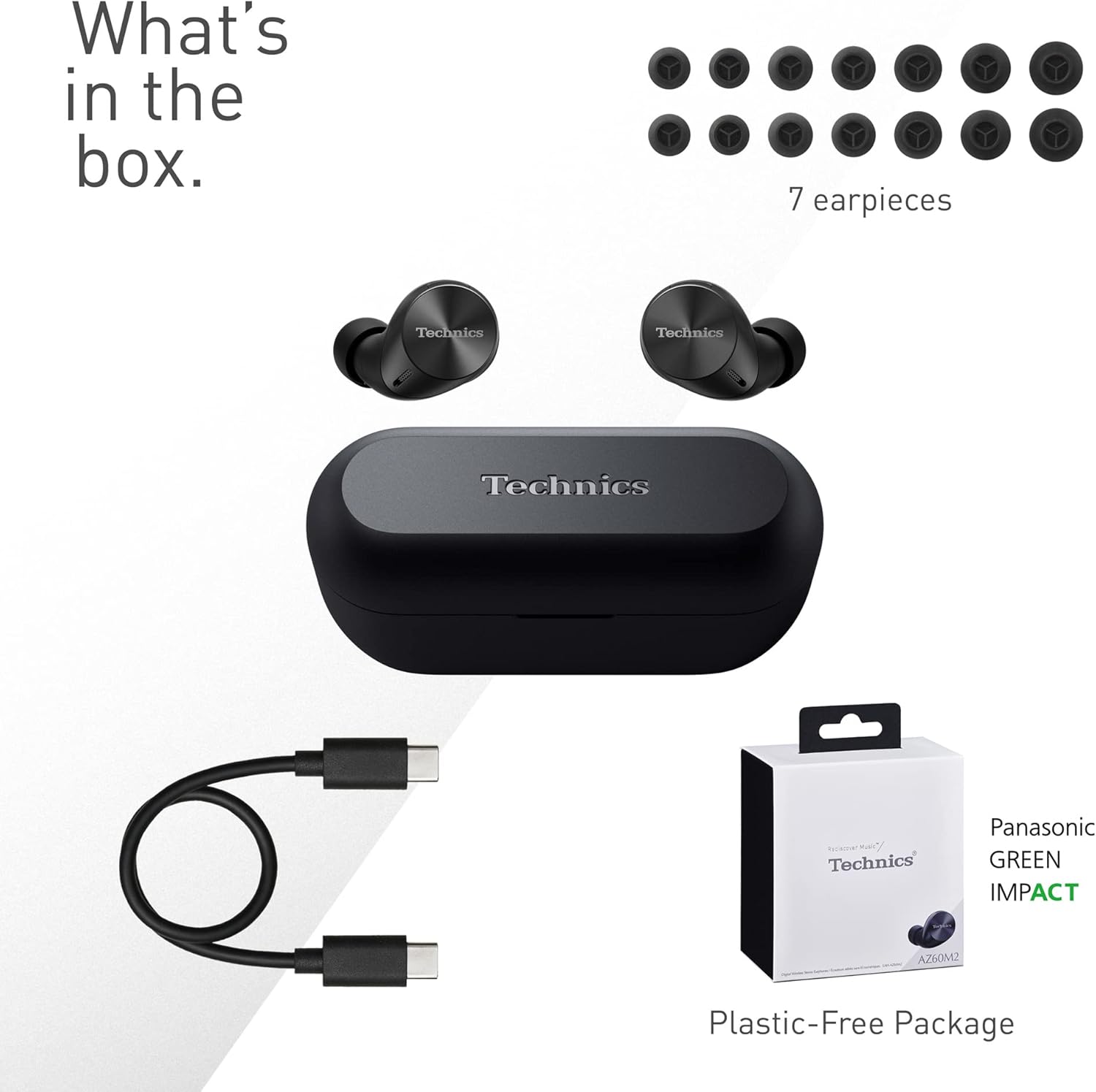
Image: A visual representation of the items included in the product packaging: the two earbuds, the charging case, a USB-C charging cable, and a selection of seven different earpiece sizes.
Pengaturan
Pengisian Awal
Sebelum penggunaan pertama, isi daya headphone dan casing pengisi daya hingga penuh.
- Tempatkan kedua earbud ke dalam wadah pengisi daya.
- Hubungkan kabel pengisi daya USB-C ke port pengisian daya pada casing dan ke sumber daya USB.
- The indicator lights on the case will show charging status. A full charge typically takes approximately 2.5 hours for the case and earbuds.
Memasangkan dengan Perangkat
The EAH-AZ60M2 headphones use Bluetooth for wireless connection.
- Buka wadah pengisi daya dengan earbud di dalamnya. Earbud akan secara otomatis memasuki mode pemasangan.
- Pada perangkat Anda (ponsel pintar, tablet, PC), aktifkan Bluetooth dan cari perangkat yang tersedia.
- Select "EAH-AZ60M2" from the list of found devices.
- Once connected, a confirmation sound will play from the headphones.
Aplikasi Technics Audio Connect
For enhanced control and customization, download the "Technics Audio Connect" app from your device's app store (Google Play for Android 6.0+ or App Store for iOS 12+). The app allows you to:
- Periksa level baterai.
- Select EQ sound modes.
- Adjust noise cancelling levels.
- Customize touch sensor functions.
- Lakukan pembaruan firmware.
Petunjuk Pengoperasian
Memakai Headphone
Select the earpieces that provide the most comfortable and secure fit for optimal sound quality and noise cancellation. The app can assist in finding the best fit. Insert the earbuds gently into your ears and rotate them slightly to ensure a snug seal.

Image: A person wearing the Technics EAH-AZ60M2 headphones, illustrating their comfortable, low-profile design. The image also displays the wide range of eartip sizes available for a customized fit.
Kontrol Sentuh
The headphones feature touch-sensitive panels on each earbud for controlling playback, calls, and noise modes. Functions can be customized via the Technics Audio Connect App.
| Tindakan | Earbud Kiri | Earbud Kanan |
|---|---|---|
| Ketukan Tunggal | Putar/Jeda, Jawab Panggilan | Putar/Jeda, Jawab Panggilan |
| Ketuk Dua Kali | Lewati Lacak Maju | Volume Naik |
| Ketuk Tiga Kali | Lewati Track Mundur | Volume Turun |
| Tekan Lama | Toggle Noise Cancelling/Ambient Mode | Asisten Suara |
Mode Kontrol Kebisingan
The EAH-AZ60M2 features Dual Hybrid Active Noise Cancelling for immersive listening and Ambient Sound Modes for situational awareness.
- Peredam Kebisingan Aktif (ANC): Reduces external noise for focused listening.
- Natural Ambient Mode: Allows you to hear surrounding sounds naturally.
- Attention Mode: Focuses on human voices, making it easier to hear announcements or conversations without removing the headphones.
Toggle between these modes by long-pressing the left earbud's touch sensor, or adjust settings precisely using the Technics Audio Connect App.

Image: A close-up of a single Technics EAH-AZ60M2 earbud, highlighting its key audio features including Hi-Res Audio Wireless support, LDAC compatibility, 8mm drivers, and Noise Cancelling capabilities.
Koneksi Multipoint
The headphones support multipoint connection, allowing simultaneous pairing with up to three devices (e.g., a smartphone, tablet, and PC). This enables seamless switching between audio sources without re-pairing.
- To switch audio, simply play content on the desired device. The headphones will automatically connect to the active audio source.
- Note: LDAC playback is not possible when connected to three devices simultaneously.

Image: A person sitting at a desk, demonstrating the smart 3-device switching feature of the Technics EAH-AZ60M2 headphones, with connection lines illustrating simultaneous pairing to a smartphone, tablet, and laptop.
Making and Receiving Calls (JustMyVoice Technology)
The EAH-AZ60M2 incorporates JustMyVoice Technology, utilizing 8 separate microphones and advanced wind noise reduction to isolate and amplify your speech while minimizing background noise during calls.
- Menjawab Panggilan: Ketuk satu kali pada salah satu earbud.
- Akhiri Panggilan: Ketuk salah satu earbud sekali selama panggilan.
- Tolak Panggilan: Tekan lama salah satu earbud.
- Single Earphone Use: You can use one earbud independently while the other is charging or stored.

Image: A person outdoors, demonstrating the JustMyVoice Technology feature of the Technics EAH-AZ60M2 headphones, with visual cues indicating sound pickup and voice isolation.
Pengisian Daya dan Daya Tahan Baterai
The EAH-AZ60M2 headphones offer extended listening times with the included charging case.
- Daya Tahan Baterai Penyumbat Telinga: Up to 7 hours of playback with Active Noise Cancelling (ANC) enabled.
- Total Playback with Case: Up to 24 hours of total playback time with multiple charges from the case.
- Pengisian Cepat: A 15-minute quick charge provides approximately 70 minutes of playback.
Pengisian Nirkabel Qi
The charging case supports Qi wireless charging. Simply place the case on a compatible Qi wireless charger (sold separately) to charge.

Image: An illustration depicting the battery life of the Technics EAH-AZ60M2 headphones, showing 7 hours of listening time for the earbuds and an additional 24 hours of backup with the charging case.
Pemeliharaan
Pembersihan
- Regularly clean the earbuds, especially the earpieces and mesh grilles, with a soft, dry, lint-free cloth.
- Remove earpieces and clean them with mild soap and water if necessary, ensuring they are completely dry before reattaching.
- Bersihkan kontak pengisian daya pada kedua earbud dan bagian dalam wadahnya dengan kapas kering.
- Jangan gunakan pembersih abrasif, alkohol, atau pelarut.
Tahan Air
The EAH-AZ60M2 earbuds are IPX4 water resistant, meaning they are protected against splashing water from any direction. This makes them suitable for light rain or intensive workouts.
- Kasing pengisi daya tidak tahan air.
- Jangan merendam earbud di dalam air.
- Ensure earbuds are dry before placing them back into the charging case.
Penyimpanan
When not in use, store the headphones in their charging case to protect them and keep them charged. Store in a cool, dry place away from direct sunlight and extreme temperatures.
Penyelesaian Masalah
| Masalah | Kemungkinan Penyebab | Larutan |
|---|---|---|
| Tidak ada suara dari headphone. | Headphones not paired or connected. Low battery. Volume too low. | Ensure headphones are paired and connected to your device. Charge headphones. Increase volume on both headphones and device. |
| Cannot pair headphones. | Headphones not in pairing mode. Device Bluetooth off. Interference. | Ensure earbuds are in the case and lid is open to enter pairing mode. Turn device Bluetooth off and on. Move closer to device. Forget device and re-pair. |
| Noise cancelling not effective. | Poor earbud fit. ANC mode not active. | Try different earpiece sizes for a better seal. Ensure ANC is enabled via touch control or app. |
| Kualitas panggilan buruk. | Environmental noise. Single earbud use. | Ensure both earbuds are used for optimal call quality. Move to a quieter environment. |
| Headphone tidak mengisi daya. | Poor contact. Faulty cable/charger. | Ensure earbuds are correctly seated in the case. Clean charging contacts. Try a different USB-C cable or power source. |
For further assistance, refer to the Technics Audio Connect App or visit the official Technics support weblokasi.
Spesifikasi
| Fitur | Detil |
|---|---|
| Nama Model | EAH-AZ60M2 |
| Nomor Model Barang | EAH-AZ60M2EK |
| Merek | Teknik |
| Warna | Hitam |
| Teknologi Konektivitas | Nirkabel (Bluetooth) |
| Faktor Bentuk | Di telinga |
| Kontrol Kebisingan | Peredam Kebisingan Aktif (Dual Hybrid) |
| Ukuran Pengemudi | ukuran 8mm |
| Mikrofon | 8 (for JustMyVoice Technology) |
| Koneksi Multipoint | Hingga 3 perangkat |
| Tahan Air | IPX4 (hanya earbud) |
| Earbud Battery Life (ANC On) | Hingga 7 Jam |
| Total Daya Tahan Baterai dengan Casing | Hingga 24 Jam |
| Baterai Kotak Pengisian Daya | 24 Hours average life |
| Pengisian daya | USB-C, Pengisian Daya Nirkabel Qi |
| Berat Barang (Earbud) | 7 Gram (sekitar 0.247 ons) |
| Berat Kotak Pembawa | 28 gram |
| Dimensi Produk | 1.1 x 0.91 x 1.02 inci (earbud) |
Garansi dan Dukungan
For information regarding warranty coverage, terms, and conditions, please refer to the warranty card included with your product or visit the official Technics weblokasi.
For technical support, product registration, or frequently asked questions, please visit the Technics support page or contact their customer service.
- Teknisi Resmi Weblokasi: www.technics.com
- Aplikasi Technics Audio Connect: Tersedia di Google Play Store dan Apple App Store.