
Perkenalan
Thank you for choosing the Shadowhawk S9322 Rechargeable Tactical LED Flashlight. This manual provides essential information for the safe and efficient operation, maintenance, and troubleshooting of your device. Please read it thoroughly before use and retain it for future reference.
The Shadowhawk S9322 is a high-performance tactical flashlight featuring an advanced XHP70.2 LED chip, delivering up to 250,000 lumens of brightness. It offers 5 light modes, adjustable focus, USB input and output for charging and power bank functionality, and an IP67 waterproof rating, making it suitable for various outdoor activities and emergency situations.
Komponen Produk
The Shadowhawk S9322 flashlight package includes the following items:
- Shadowhawk S9322 Rechargeable Flashlight
- Baterai Lithium-Ion Isi Ulang
- Kabel Pengisian Daya USB-C
- Tali gantungan
- Petunjuk Pengoperasian (panduan ini)

Image: Contents of the Shadowhawk S9322 package, showing the flashlight, battery, USB-C cable, lanyard, and instruction manual.
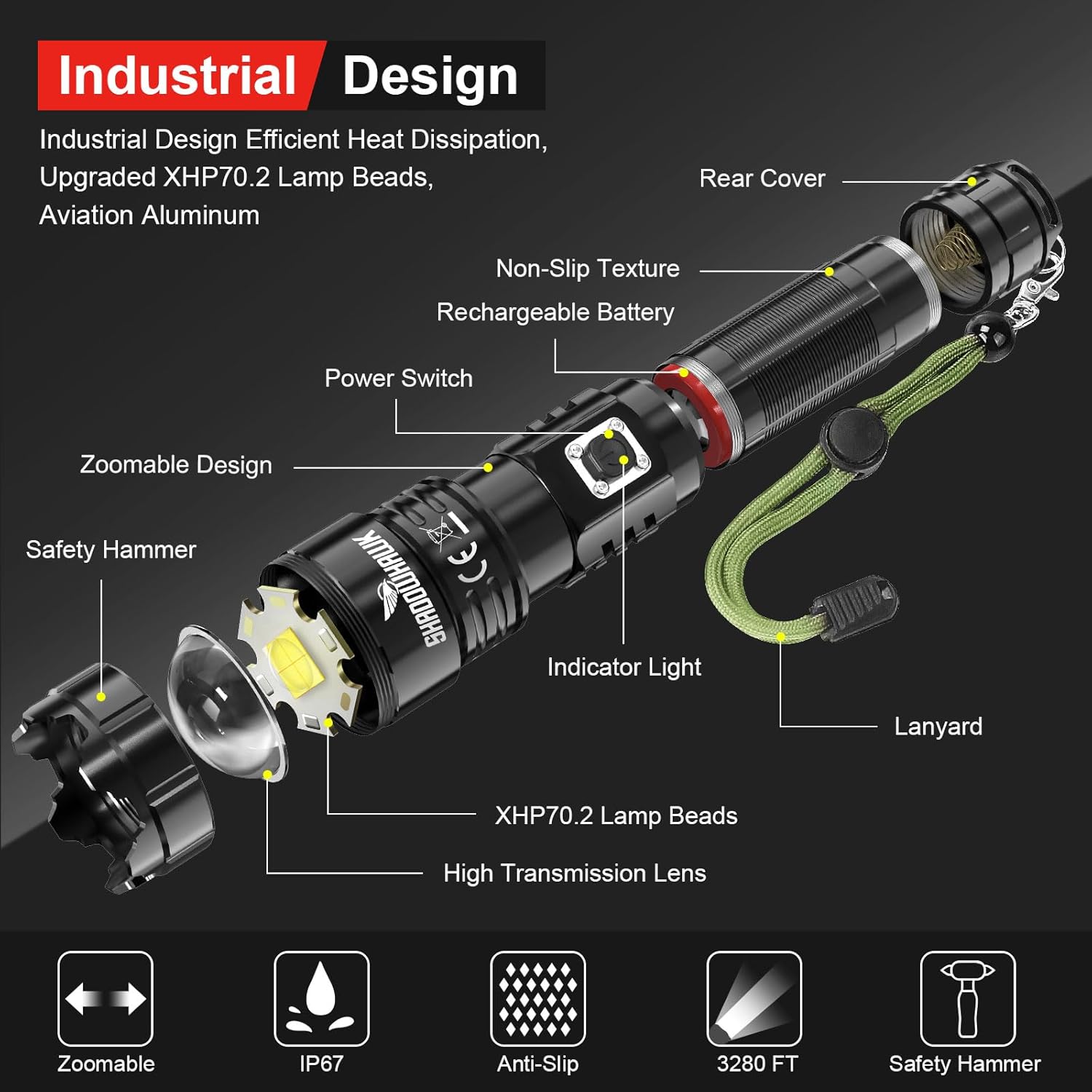
Image: Exploded diagram illustrating the internal and external components of the Shadowhawk S9322 flashlight, such as the XHP70.2 LED, lens, battery, and power switch.
Pengaturan
1. Pemasangan Baterai
- Hapus Film Pelindung: Before first use, locate the rechargeable battery and carefully remove the transparent plastic protective film from its outer layer. Do not remove the blue plastic casing of the battery itself.
- Open Rear Cover: Lepaskan penutup belakang senter dengan memutarnya berlawanan arah jarum jam.
- Masukkan Baterai: Insert the battery into the flashlight body. Ensure correct polarity: the positive (+) side (protruding part) should face towards the flashlight head, and the negative (-) side (flat part) should face towards the tail cap.
- Penutup Aman: Screw the rear cover back on clockwise until it is securely tightened.

Image: Step-by-step guide for installing the rechargeable battery, emphasizing the removal of the protective film and correct polarity.
2. Pengisian Awal
It is recommended to fully charge the flashlight before its first use to ensure optimal performance and battery life.
- Hubungkan Kabel: Insert the USB-C end of the charging cable into the flashlight's charging port.
- Hubungkan Daya: Connect the USB-A end of the cable to a compatible USB power source (e.g., wall adapter, computer, power bank).
- Indikator Monitor: Lampu indikator pada senter akan menyala merah during charging. It will turn hijau saat baterai terisi penuh.
- Waktu Pengisian: Pengisian penuh biasanya memakan waktu sekitar 4 jam.

Image: Visual guide for charging the flashlight and understanding the charging indicator lights (red for charging, green for fully charged).
Petunjuk Pengoperasian
1. Daya Hidup/Mati
- Untuk menyalakan senter ON, press and hold the power switch for approximately 3 seconds.
- Untuk menyalakan senter MATI, press and hold the power switch for approximately 3 seconds again.
Note: This 3-second press feature prevents accidental activation, conserving battery life.
2. Changing Light Modes
Once the flashlight is on, short press the power switch to cycle through the 5 available light modes:
- Tinggi: Kecerahan maksimum untuk penerangan yang luas.
- Sedang: Kecerahan seimbang untuk penggunaan umum.
- Rendah: Kecerahan dikurangi agar dapat digunakan dalam waktu lama atau melakukan tugas jarak dekat.
- Strobo: Lampu yang berkedip sebagai tanda atau tanda disorientasi.
- SOS: Sinyal kode Morse internasional untuk keadaan darurat.
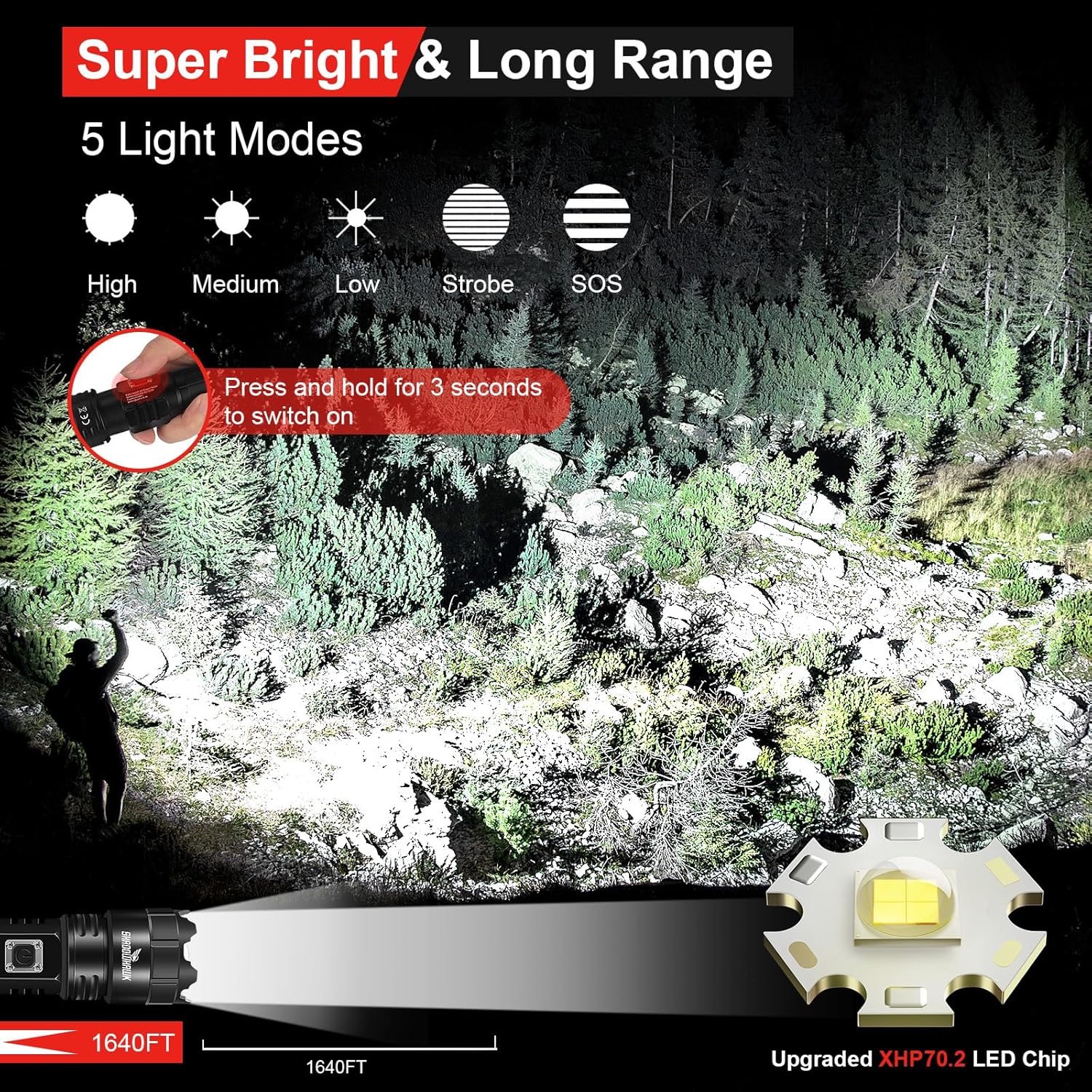
Image: Illustration of the five distinct light modes (High, Medium, Low, Strobe, SOS) and their visual effects, along with the 3-second press to activate the flashlight.
3. Fokus yang Dapat Disesuaikan (Fungsi Zoom)
Senter ini memiliki mekanisme fokus yang dapat disesuaikan untuk beralih antara sorotan cahaya lebar dan sorotan cahaya terfokus.
- To adjust the focus, gently slide the head of the flashlight forward or backward.
- Sliding the head forward will narrow the beam into a focused menyoroti.
- Sliding the head backward will widen the beam into a broad lampu sorot.

Image: Depiction of the flashlight's zoomable feature, illustrating the transition between a wide floodlight and a focused spotlight beam.
4. Fungsi Power Bank
The Shadowhawk S9322 can be used as a portable power bank to charge other electronic devices.
- Hubungkan kabel pengisi daya perangkat Anda ke port output USB-A pada senter.
- Senter akan mulai mengisi daya perangkat Anda.
Note: Using the power bank function will consume the flashlight's battery. Monitor the battery indicator to ensure sufficient power for flashlight operation.
Pemeliharaan
1. Pengisian daya
- Charge the flashlight when the indicator light turns red.
- Always use the provided USB-C cable or a certified equivalent.
- Avoid over-discharging the battery.
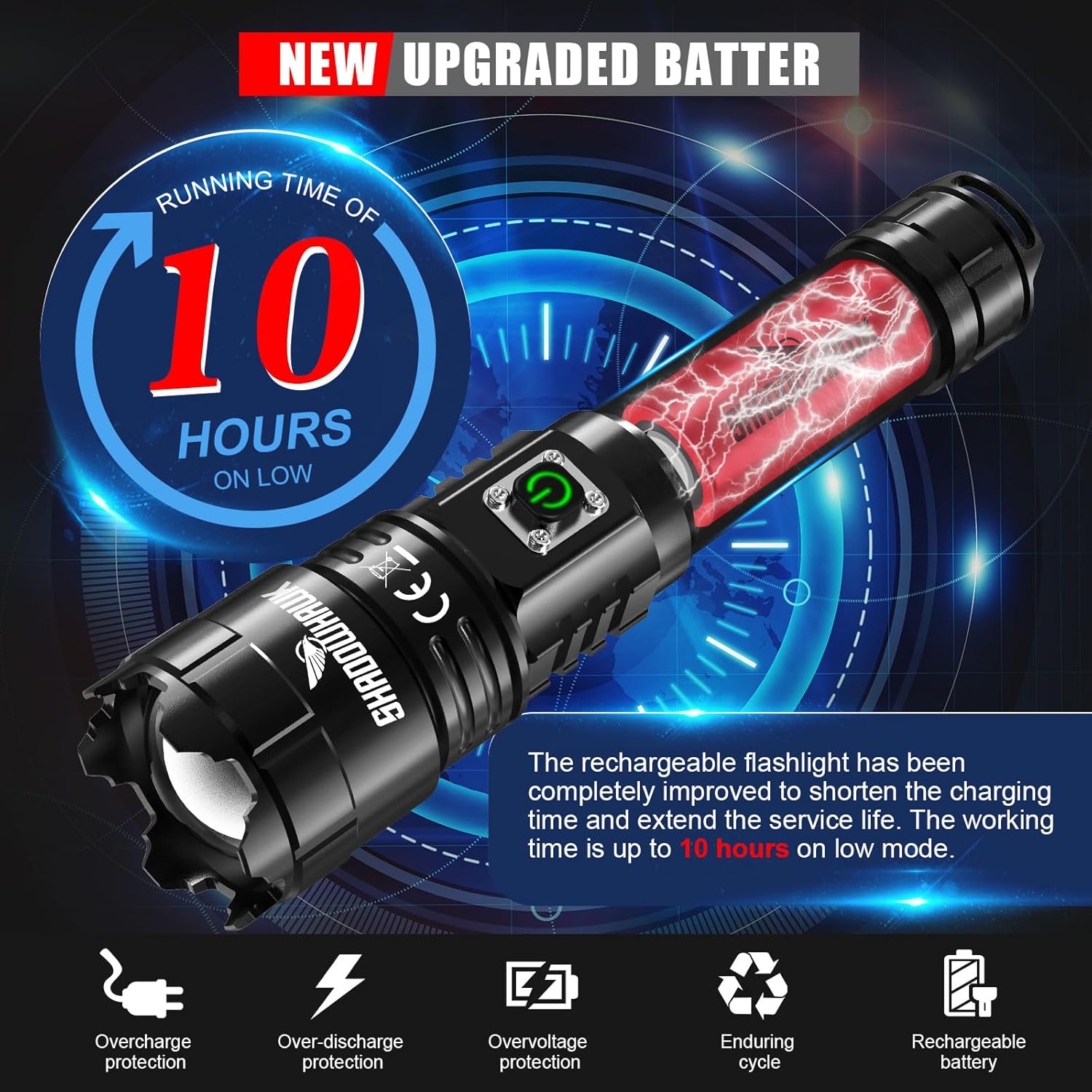
Image: Information on the upgraded battery's runtime and built-in protections (overcharge, over-discharge, overvoltagdan).
2. Pembersihan
- Bersihkan badan senter dengan kain lembut dan kering.amp kain.
- Jangan gunakan pembersih atau pelarut yang bersifat abrasif.
- Jaga kebersihan lensa untuk keluaran cahaya yang optimal. Gunakan kain pembersih lensa jika perlu.
3. Penyimpanan
- Simpan senter di tempat sejuk dan kering, jauh dari sinar matahari langsung dan suhu ekstrem.
- Jika disimpan dalam jangka waktu lama, isi daya baterai hingga sekitar 50% setiap 3-6 bulan untuk menjaga kesehatan baterai.
Informasi Keselamatan
- Do not look directly into the LED beam, especially on high settings, as it can cause temporary vision impairment or permanent eye damage.
- Jauhkan dari jangkauan anak-anak.
- Do not disassemble the flashlight head or LED assembly.
- Use only the specified rechargeable battery.
- Hindari memaparkan senter pada panas yang ekstrem atau api terbuka.
- Although IP67 waterproof, avoid prolonged submersion in water. Ensure the charging port cover is securely closed before exposure to water.

Image: Visual representation of the flashlight's IP67 waterproof capability, showing it enduring water exposure.
Penyelesaian Masalah
| Masalah | Kemungkinan Penyebab | Larutan |
|---|---|---|
| Senter tidak menyala. | Battery not installed correctly. Battery is depleted. Protective film still on battery. | Check battery polarity and ensure it's fully inserted. Charge the battery. Remove the transparent protective film from the battery. |
| Cahaya redup atau berkedip-kedip. | Low battery charge. Loose connections. | Recharge the battery fully. Ensure the tail cap is tightly screwed on. |
| Senter tidak mengisi daya. | Charging cable faulty. USB power source not working. Charging port dirty. | Try a different USB-C cable. Connect to a different USB power source. Gently clean the charging port. |
| Fungsi bank daya tidak berfungsi. | Flashlight battery too low. Device cable faulty. | Ensure flashlight battery is sufficiently charged. Try a different charging cable for your device. |
Spesifikasi
| Fitur | Detil |
|---|---|
| Merek | Elang Bayangan |
| Model | S9322 |
| Sumber Cahaya | LED XHP70.2 |
| Kecerahan | Sampai 250,000 Lumens |
| Jarak Pancaran | Hingga 500 meter (1640 kaki) |
| Mode Cahaya | Tinggi, Sedang, Rendah, Strobo, SOS |
| Fokus | Adjustable (Floodlight to Spotlight) |
| Jenis Baterai | Rechargeable Lithium-Ion |
| Port Pengisian Daya | Masukan USB-C |
| Port Output | USB-A Output (Power Bank Function) |
| Waktu Proses (Mode Rendah) | Hingga 10 jam |
| Peringkat Tahan Air | Tingkat IP67 |
| Bahan | Paduan Aluminium Kelas Luar Angkasa |
| Ukuran | Sekitar 21x9x4.5 cm |
| Berat | Approximately 40 g (without battery) |
Garansi dan Dukungan
Shadowhawk offers 7x24-hour customer service for any questions or concerns regarding your S9322 flashlight. Please do not hesitate to contact us if you encounter any issues or require assistance.
For warranty claims or technical support, please refer to the contact information provided with your purchase or visit the official Shadowhawk weblokasi.