
1. Pendahuluan
The Hantek DSO3104A is a versatile 4-channel digital oscilloscope integrated with a 16-channel logic analyzer and a 1-channel function/arbitrary waveform generator. Designed for portability and high performance, it offers a 1GSa/s real-time sampling rate and 250MHz bandwidth, making it suitable for various electronic testing and measurement applications. This manual provides essential information for the proper setup, operation, and maintenance of your device.
2. Informasi Keselamatan
Please read and understand all safety instructions before operating the device to prevent injury or damage to the instrument. Keep this manual for future reference.
- Catu Daya: Use only the specified power adapter (12-36V DC). Ensure the power source is stable and correctly rated.
- Lingkungan: Operasikan perangkat di area yang kering dan berventilasi baik. Hindari paparan suhu ekstrem, kelembapan, debu, atau gas korosif.
- Probe: Gunakan hanya probe yang sesuai dengan tegangan tersebut.tage and current being measured. Ensure probes are properly connected before applying power.
- Pembumian: Always ensure the device is properly grounded when connected to a power source or other equipment.
- Pemeliharaan: Jangan mencoba menyervis perangkat sendiri. Rujuk semua servis ke personel yang berkualifikasi.
3. Isi Paket
Verifikasi bahwa semua item ada dalam paket:
- Hantek DSO3104A Digital Oscilloscope Unit
- Kabel USB
- Adaptor Daya
- Oscilloscope Probes (quantity may vary)
- Logic Analyzer Cables (if applicable)
- Software CD or Download Link
- User Manual (dokumen ini)
4. Produk Lebihview
4.1. Front/Top View

Gambar ini menampilkan bagian atas. view of the Hantek DSO3104A Digital Oscilloscope. The device features a robust anodized aluminum casing with protective rubber bumpers on the corners. The Hantek logo is prominently displayed on the top surface. Ventilation slots are visible along the sides for heat dissipation.
4.2. Input/Output Panel (Left Side)
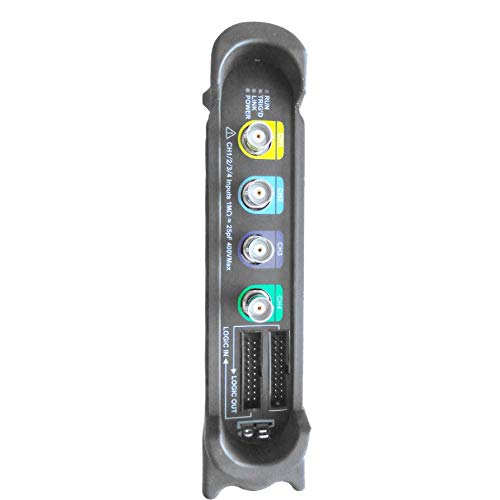
This image shows the left side panel of the DSO3104A, which houses the primary input and output connectors. From top to bottom, these include: four BNC connectors for analog oscilloscope channels (CH1, CH2, CH3, CH4), clearly labeled with color-coded rings. Below these are two multi-pin connectors for Logic In and Logic Out, used for the 16-channel logic analyzer functionality. A warning label indicates input impedance and maximum voltage for channels 1-4.
4.3. Connectivity Panel (Right Side)
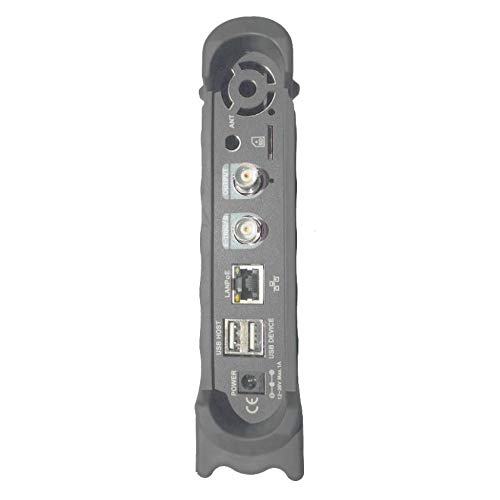
This image illustrates the right side panel of the DSO3104A, featuring various connectivity ports. From top to bottom, these include: an antenna connector (ANT), a BNC output for the function/arbitrary waveform generator (OUTPUT), another BNC connector (likely for external trigger or reference), a LAN/PoE port for network connectivity and optional power over Ethernet, a USB HOST port, a USB DEVICE port for PC connection, a DC power input jack, and a power switch. A cooling fan vent is also visible at the top.
5. Pengaturan
Follow these steps to set up your Hantek DSO3104A:
- Instalasi Perangkat Lunak: Before connecting the device, install the Hantek oscilloscope software on your computer. The software supports Windows 7, Windows 8, and Windows 10. Refer to the provided software CD or download instructions.
- Sambungan Daya: Connect the provided power adapter to the DC power input jack on the right side panel of the oscilloscope. Plug the adapter into a suitable power outlet.
- Koneksi USB: Connect the oscilloscope to your computer using the supplied USB cable. Use the USB DEVICE port on the oscilloscope and a free USB port on your computer.
- Nyalakan: Flip the power switch on the right side panel to the 'ON' position. The device should power on, and your computer should detect it.
- Koneksi Probe: Connect the oscilloscope probes to the desired BNC input channels (CH1-CH4) on the left side panel. Ensure a secure connection.
- Logic Analyzer Connection (Optional): If using the logic analyzer, connect the logic analyzer cables to the 'LOGIC IN' and 'LOGIC OUT' ports and to your target circuit.
- Koneksi Jaringan (Opsional): For network control or PoE functionality, connect an Ethernet cable to the LAN/PoE port.
5.1. Multi-Device Connection Example

This diagram illustrates a network setup where multiple Hantek oscilloscopes can be connected to a single computer. The oscilloscopes are connected to a PoE switch, which provides both data and power. The PoE switch then connects to the computer, allowing for centralized control and data acquisition from multiple devices. Fiber-optic communication is also shown as an option for extended distances.
6. Petunjuk Pengoperasian
Once the software is installed and the device is connected, launch the Hantek application on your computer. The software interface is designed to be similar to a traditional benchtop oscilloscope, providing intuitive control over the device's functions.
6.1. Fungsi Osiloskop
- Pemilihan Saluran: Enable or disable the 4 analog channels (CH1-CH4) as needed.
- Kontrol Vertikal: Sesuaikan volumetage per division (V/DIV) and coupling (AC/DC/GND) for each channel. The device offers 1mV-10V/DIV sensitivity.
- Kontrol Horizontal: Adjust time base (s/DIV) to control the sweep speed.
- Memicu: Configure trigger source (CH1-CH4, EXT), mode (Edge, Pulse, Video, Slope, Timeout), and level to stabilize waveforms.
- Pengukuran: Utilize over 20 automatic measurement functions (Vpp, Vmax, Vmin, Vavg, RMS, Frequency, Period, Rise Time, Fall Time, etc.) and dynamic cursor tracking.
- Tampilan Bentuk Gelombang: Options include waveform averaging, afterglow, lightness control, reverse, and mathematical operations (add, subtract, multiply, divide, X-Y display).
- FFT Spectrum Analyzer: Perform frequency domain analysis using the built-in FFT function.
- PASS/FAIL Test: Set up criteria for automated waveform comparison against defined masks.
- Rekaman: Continuous waveform recording and replay function with 200Hz recording bandwidth.
6.2. Logic Analyzer Functions
The integrated 16-channel logic analyzer allows for digital signal analysis. Connect your digital signals to the 'LOGIC IN' port and configure the software for threshold levels and trigger conditions to capture and analyze digital waveforms.
6.3. Function/Arbitrary Waveform Generator
The 1-channel function/arbitrary waveform generator (OUTPUT port) can produce various standard waveforms and user-defined arbitrary waveforms. With a 200MSa/s DDS and 12-bit vertical resolution, it is useful for testing circuits with specific input signals.
7. Instalasi dan Penggunaan Perangkat Lunak
The Hantek DSO3104A operates in conjunction with dedicated PC software. The software is compatible with Windows 7, Windows 8, and Windows 10 operating systems.
- Instalasi: Insert the provided software CD or download the latest version from the official Hantek websitus. Ikuti petunjuk di layar untuk menyelesaikan instalasi.
- Instalasi Driver: During software installation, ensure that the necessary USB drivers for the oscilloscope are also installed.
- Ekspor Data: Waveform data can be exported to various formats such as EXCEL, BMP, and JPG for further analysis or documentation.
- SCPI Protocol: The device supports SCPI protocol, allowing for programmatic control and integration into automated test systems.
8. Pemeliharaan
Proper maintenance ensures the longevity and accuracy of your DSO3104A.
- Pembersihan: Use a soft, dry cloth to clean the exterior of the device. For stubborn dirt, a slightly damp Kain dengan deterjen lembut dapat digunakan, pastikan tidak ada cairan yang masuk ke dalam perangkat.
- Penyimpanan: Saat tidak digunakan, simpan osiloskop di lingkungan yang bersih dan kering, jauh dari sinar matahari langsung dan suhu ekstrem.
- Kalibrasi Probe: Periodically check and calibrate your oscilloscope probes according to their respective manuals to ensure accurate measurements.
- Pembaruan Perangkat Lunak: Regularly check the Hantek webSitus untuk pembaruan perangkat lunak dan firmware guna memastikan kinerja optimal dan akses ke fitur-fitur baru.
9. Penyelesaian masalah
If you encounter issues with your DSO3104A, refer to the following common troubleshooting steps:
- Perangkat Tidak Terdeteksi:
- Ensure the USB cable is securely connected to both the oscilloscope (USB DEVICE port) and the computer.
- Verify that the oscilloscope is powered on.
- Check if the USB drivers are correctly installed. Reinstall the software if necessary.
- Cobalah port USB lain di komputer Anda atau kabel USB lain.
- Tidak ada tampilan bentuk gelombang:
- Ensure probes are correctly connected to the input channels and the circuit under test.
- Check the vertical (V/DIV) and horizontal (s/DIV) settings in the software; they might be set too high or too low for the signal.
- Adjust the trigger level and mode to ensure a stable trigger.
- Verify that the input signal is within the device's specifications.
- Perangkat Lunak Rusak/Terhenti:
- Pastikan sistem operasi Anda sudah diperbarui.
- Tutup aplikasi lain yang memakan banyak sumber daya yang sedang berjalan di komputer Anda.
- Reinstall the Hantek software.
- Pengukuran yang Tidak Akurat:
- Perform probe compensation if applicable.
- Ensure the probes are correctly attenuated (e.g., 1X, 10X) and the software settings match.
- Check for external interference or noise in the measurement environment.
10. Spesifikasi
The following table provides detailed technical specifications for the Hantek DSO3104A. For a comprehensive comparison across the DSO3000 series, refer to the image below.
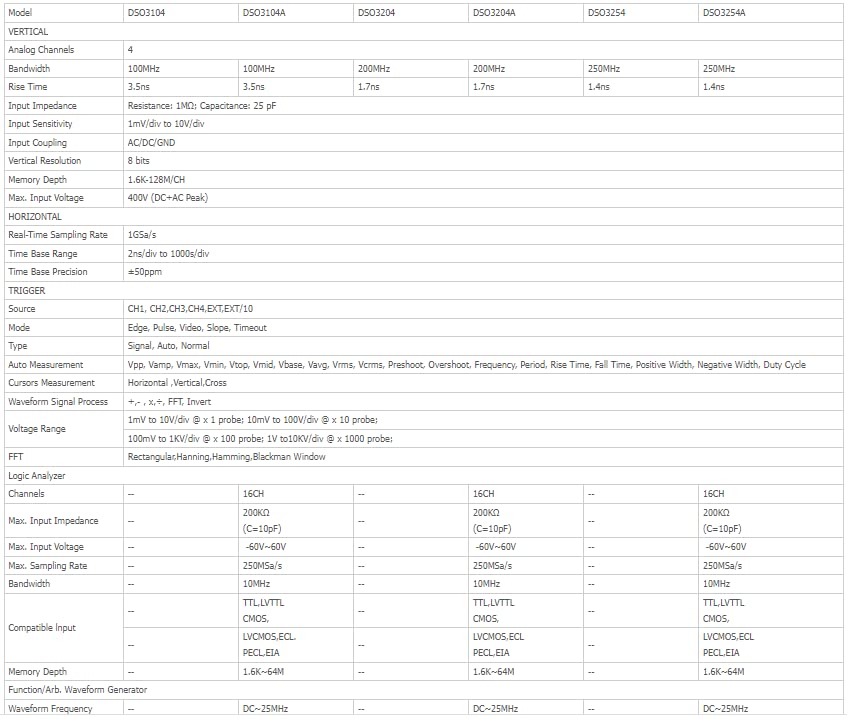
This image presents a detailed comparison table of specifications for various models within the Hantek DSO3000 series, including DSO3104, DSO3104A, DSO3204, DSO3204A, DSO3254, and DSO3254A. Key parameters listed include Analog Channels, Bandwidth, Rise Time, Input Impedance, Input Sensitivity, Vertical Resolution, Input Coupling, Max. Input Voltage, Real-Time Sampling Rate, Time Base Range, Trigger functions, Measurement functions, Waveform Signal Process, Logic Analyzer channels, and Function/Arb. Waveform Generator capabilities. The DSO3104A model is highlighted with 4 analog channels, 100MHz bandwidth, 3.5ns rise time, 1GSa/s sampling rate, and 16 logic analyzer channels.
| Fitur | Spesifikasi |
|---|---|
| Pabrikan | Hantek |
| Nomor Model | Q-DSO3104A |
| Berat Barang | 1.5 kg |
| Dimensi Produk | Ukuran 16.5x3.5x19.5 cm |
| Warna | Hitam |
| Bahan | Akrilonitril Butadiena Stirena (ABS) |
| Apatage | 1 watt |
| Sistem Pengukuran | Metrik |
| Akurasi Pengukuran | 0.3% |
| Sertifikasi | CE, ISO 9001, RoHS |
| Negara Asal | Cina |
11. Garansi dan Dukungan
For warranty information and technical support, please refer to the documentation provided with your purchase or visit the official Hantek websitus. Simpan struk pembelian Anda sebagai bukti pembelian untuk klaim garansi.
Hantek provides support for software updates and technical inquiries. Contact their customer service for assistance with any operational issues or product defects.