
Perkenalan
This manual provides comprehensive instructions for the Veho Kuzo Sports Smart Watch F1S. Please read this manual carefully before using your device to ensure proper operation and to maximize its features. Keep this manual for future reference.

Gambar: Depan view of the Veho Kuzo Sports Smart Watch F1S, showcasing its round display and rugged design.
Informasi Keselamatan
Always follow basic safety precautions when using this device to reduce the risk of injury, electric shock, fire, or damage to the product.
- Jangan mencoba membongkar atau memodifikasi perangkat.
- Jauhkan perangkat dari suhu ekstrem dan sinar matahari langsung.
- Hindari memaparkan perangkat pada benturan keras atau terjatuh.
- Konsultasikan dengan profesional medis sebelum memulai program olahraga baru, terutama jika Anda memiliki kondisi kesehatan sebelumnya.
- The device is water-resistant (IP68) but not waterproof for diving or high-pressure water activities.
Isi Paket
Pastikan semua barang ada di dalam kotak:
- Veho Kuzo Sports Smart Watch F1S (Black)
- Magnetic Charging Cradle (USB-A)
- Panduan Pengguna Multibahasa
Pengaturan
1. Mengisi Daya Jam Tangan Pintar
Before first use, fully charge your Veho Kuzo F1S Smart Watch.
- Connect the magnetic charging cradle to a USB-A power source (e.g., computer USB port, wall adapter).
- Align the magnetic pins of the cradle with the charging contacts on the back of the watch. The watch will snap into place and display a charging indicator.
- Charge for approximately 2 hours for a full charge. A full charge provides up to 15 days of typical use.

Image: Graphic illustrating the 15-day battery life of the Veho Kuzo F1S Smart Watch.
2. Menginstal Aplikasi Pendamping
To unlock all features and synchronize data, download the official companion app on your smartphone.
- The app is compatible with Apple iOS and Android devices.
- Pencarian untuk "Kuzo" or "Veho Kuzo" in your device's app store.
- Install the app and follow the on-screen instructions to create an account.
3. Memasangkan dengan Ponsel Pintar Anda
After installing the app, pair your watch with your phone via Bluetooth.
- Pastikan Bluetooth diaktifkan di ponsel cerdas Anda.
- Open the companion app and navigate to the device pairing section.
- Turn on your Veho Kuzo F1S Smart Watch.
- Select your watch from the list of available devices in the app.
- Konfirmasikan permintaan pemasangan pada jam tangan dan telepon pintar Anda.

Image: A smartphone displaying the Veho Kuzo companion app, showing health and activity data.
Petunjuk Pengoperasian
Navigasi Dasar
The Veho Kuzo F1S features a 1.3-inch AMOLED touchscreen and physical buttons for navigation.
- Layar sentuh: Geser ke atas, bawah, kiri, atau kanan untuk menavigasi menu dan widget. Ketuk untuk memilih item.
- Tombol Samping: Use the physical buttons on the side of the watch to return to the home screen, access sports modes, or other quick functions.
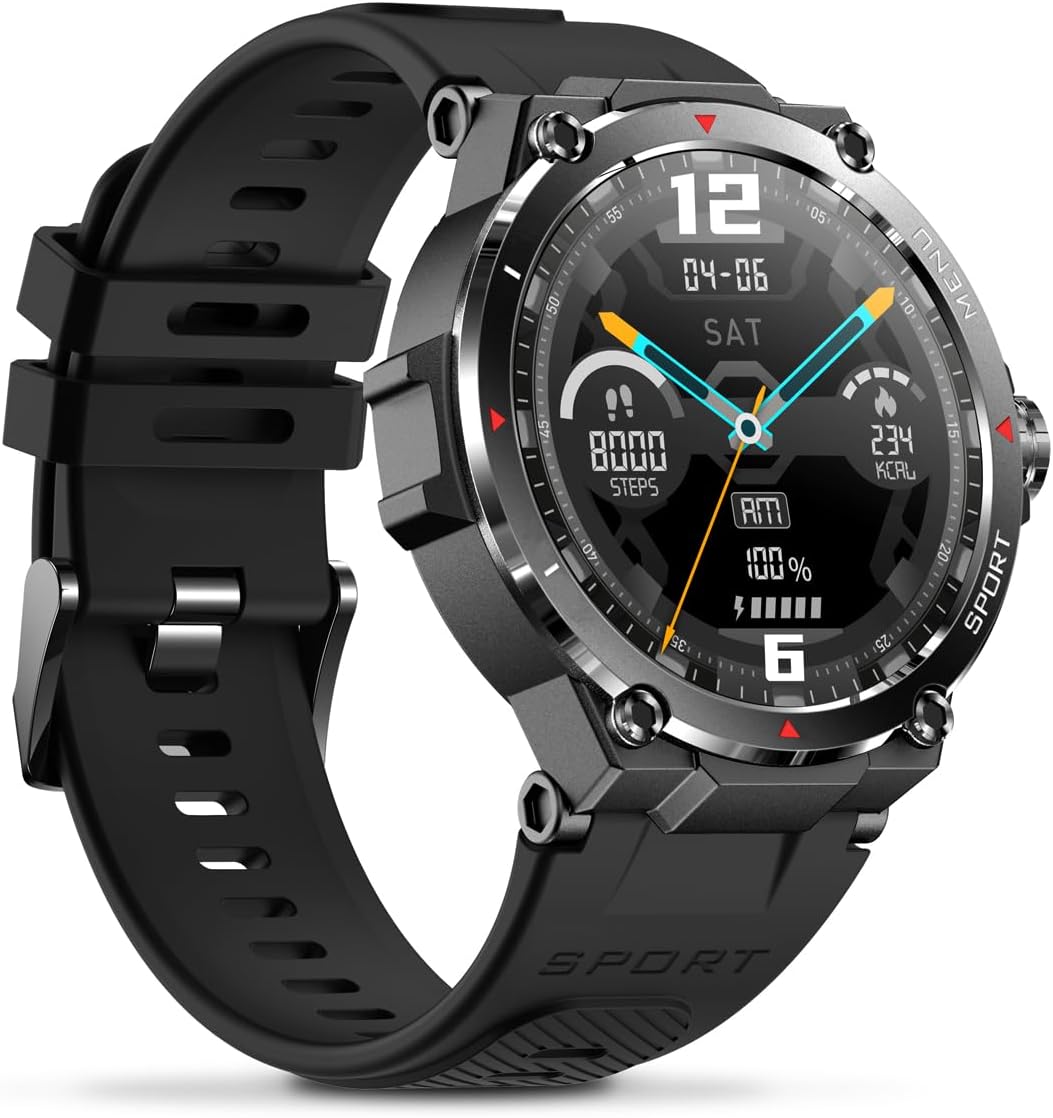
Gambar: Samping view of the Veho Kuzo F1S Smart Watch, highlighting the control buttons and rugged casing.
Pelacakan Kesehatan dan Kebugaran
The watch continuously monitors various health and fitness metrics.
- Denyut Jantung: 24/7 heart rate monitoring. View data waktu nyata pada jam tangan atau tren terperinci dalam aplikasi.
- Oksigen Darah: Ukur kadar oksigen darah Anda.
- Pelacak Aktivitas: Tracks steps, calories burned, and distance covered. Supports walking, running, and cycling.
- Pemantau Tidur: Monitors daily, weekly, and monthly sleep patterns, detailing deep sleep, light sleep, and awake times.
- Bahasa Indonesia: Built-in 3-mode GPS (GPS+Beidou+Glonass) and Assisted GPS (AGPS) for accurate outdoor performance tracking and live map positioning. Compatible with STRAVA.

Image: The Veho Kuzo F1S Smart Watch displaying heart rate monitoring data.
Fitur Cerdas
- Pemberitahuan: Receive push notifications from apps like WhatsApp, Twitter, Facebook, LinkedIn, Skype, YouTube, Messenger, and Instagram directly on your watch.
- Kontrol Musik: Control music playback (volume, skip tracks, play/pause) on your paired smartphone directly from the watch.
- Fungsi Waktu: Access alarm, timer, intermittent timer, stopwatch, and countdown functions.
- Temukan Telepon: Use your watch to locate your paired smartphone.
- News/Weather App: Integrated news and weather application functionality.
- Tampilan Jam yang Dapat Disesuaikan: Choose from hundreds of different watch face designs through the companion app.
Pemeliharaan
Pembersihan
Untuk menjaga penampilan dan fungsi jam tangan:
- Bersihkan jam tangan dan talinya secara teratur dengan kain lembut dan kering.amp kain.
- Hindari penggunaan bahan kimia keras atau pembersih abrasif.
- Pastikan kontak pengisian daya bersih dan kering sebelum pengisian daya.
Tahan Air (IP68)
The Veho Kuzo F1S Smart Watch has an IP68 rating, meaning it is water-resistant in fresh water up to a maximum depth of 1.5 meters for up to 30 minutes, and is protected from dust.
- Do not use the watch for diving, snorkeling, or high-speed water sports.
- Avoid exposing the watch to hot water, steam, or detergents.
- Keringkan jam tangan secara menyeluruh setelah terkena air.
Perawatan Baterai
- Isi daya jam tangan secara teratur untuk menjaga kesehatan baterai.
- Hindari menguras baterai secara menyeluruh secara sering.
- Simpan jam tangan di tempat yang sejuk dan kering jika tidak digunakan dalam jangka waktu lama.
Penyelesaian Masalah
If you encounter issues with your Veho Kuzo F1S Smart Watch, refer to the following common solutions:
- Jam tidak menyala: Ensure the watch is fully charged. Connect it to the charging cradle and check for the charging indicator.
- Tidak dapat dipasangkan dengan telepon:
- Pastikan Bluetooth diaktifkan pada ponsel dan jam tangan Anda.
- Pastikan jam tangan berada dalam jangkauan telepon Anda.
- Mulai ulang jam tangan dan ponsel Anda.
- Cobalah untuk melepaskan dan memasangkan kembali perangkat melalui aplikasi.
- Data kesehatan yang tidak akurat:
- Pastikan jam tangan dikenakan dengan pas di pergelangan tangan Anda, tetapi tidak terlalu ketat.
- Bersihkan sensor di bagian belakang jam.
- Environmental factors and skin conditions can affect accuracy.
- Notifikasi tidak muncul:
- Periksa pengaturan notifikasi aplikasi di ponsel Anda dan di dalam aplikasi pendampingnya.
- Pastikan jam tangan terhubung ke ponsel Anda melalui Bluetooth.
Untuk bantuan lebih lanjut, silakan merujuk ke bagian dukungan atau hubungi layanan pelanggan.
Spesifikasi
| Nama Model | Pesawat tempur F1S |
| Nomor Model | VSW-001-F1S-B (164426) |
| Menampilkan | 1.3" AMOLED Touchscreen |
| Resolusi | 360 x 360 piksel |
| Chipset | Dialogue14695, PPGHX3690 |
| Ingatan | ROM 128MB + RAM 2MB |
| Bahasa Indonesia: Bluetooth | Bahasa Inggris v5.1 |
| Kapasitas Baterai | Baterai Lithium-polimer 300mAh |
| Waktu Kerja | Hingga 15 hari |
| Waktu Siaga | Hingga 21 hari |
| Waktu Pengisian Daya | Sekitar 2 jam |
| Jenis Pengisian Daya | USB-A to Magnetic Charging Cradle |
| Tahan Air | IP68 (up to 1.5 meters for 30 minutes in fresh water) |
| Sistem GPS | 3-mode (GPS+Beidou+Glonass) |
| Ukuran | Ukuran 46 x 12.9 mm |
| Berat | 51 gram |
| Lebar Tali | ukuran 22mm |
| Panjang Tali | ukuran 260mm |
| Kompatibilitas OS | Bahasa Indonesia: Android, iOS |
| Bahasa yang Didukung | All major languages (replicates paired smartphone language) |
Garansi dan Dukungan
The Veho Kuzo Sports Smart Watch F1S comes with a limited warranty. Please refer to the warranty card included in your package or visit the official Veho websitus untuk mengetahui syarat dan ketentuan garansi secara terperinci.
Dukungan Pelanggan
For technical support, troubleshooting, or warranty claims, please contact Veho customer service through their official websitus atau informasi kontak yang disediakan dalam dokumentasi produk Anda.
- Dukungan online: www.veho-world.com/support (Mantanamp(tautan sebenarnya mungkin berbeda)
- E-mail: support@veho-world.com (Examp(email, alamat email sebenarnya mungkin berbeda)