
1. Pendahuluan
Thank you for choosing the Zedamsan 100W 27000mAh Laptop Power Bank. This high-capacity portable charger is designed to provide reliable and fast power to your laptops, smartphones, tablets, and other USB-powered devices. With its advanced features and robust design, it ensures you stay charged wherever you go. Please read this manual carefully before using the product to ensure proper operation and to maximize its lifespan.
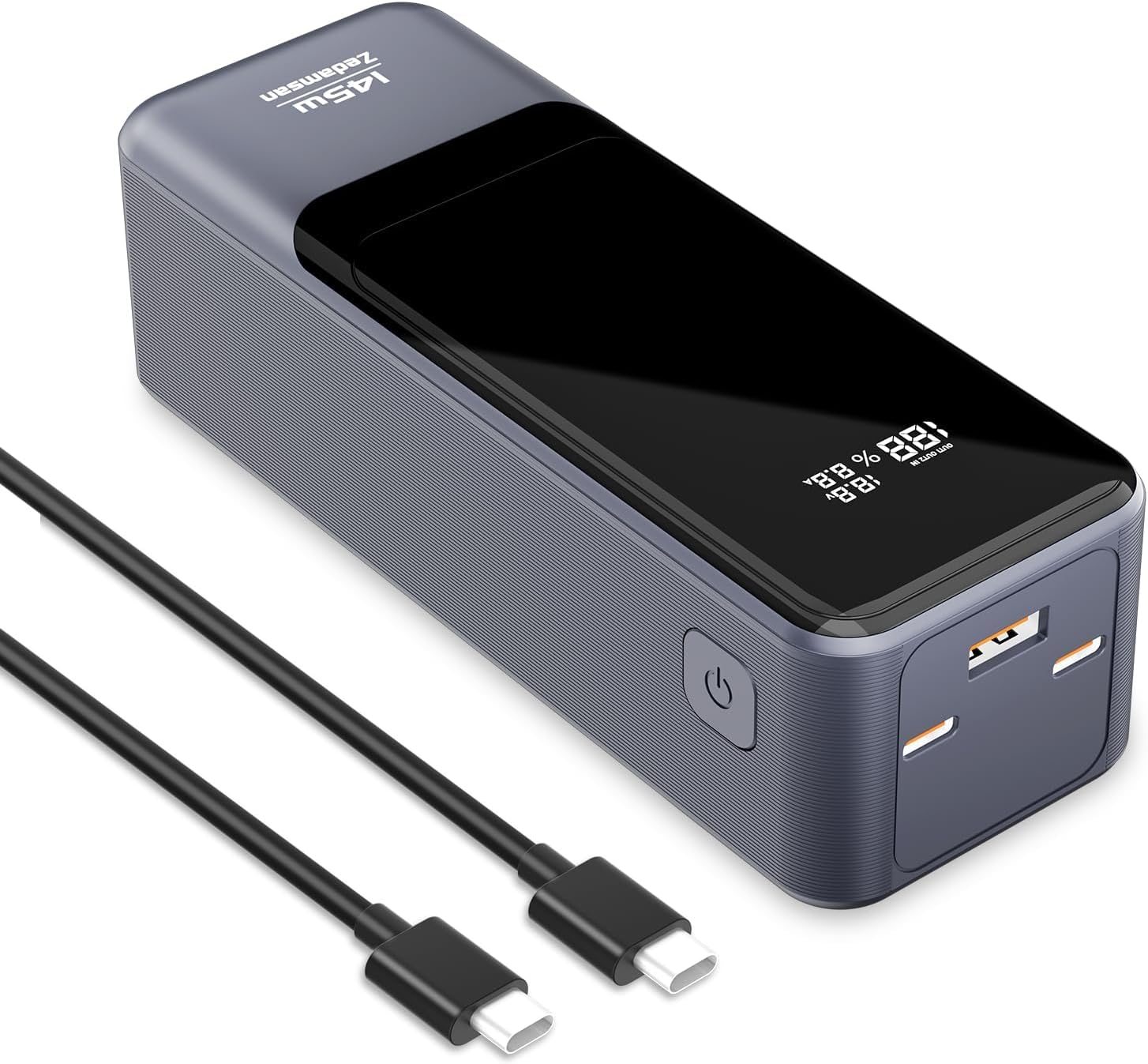
Image: The Zedamsan 100W 27000mAh Laptop Power Bank, showcasing its sleek design and included USB-C cables.
2. Produk Lebihview
Fitur Utama:
- Baterai Kapasitas Tinggi 27000mAh: Provides extended runtime for multiple device charges, airline-approved for travel.
- Extremely Fast Charging Speed: 145W total output, with up to 100W from a single USB-C port, enabling rapid charging for laptops and other devices.
- Simultaneous 3-Ports Charging: Equipped with two USB-C ports and one USB-A port for charging up to three devices concurrently.
- Tampilan Digital Cerdas: Real-time monitoring of remaining battery life, input, and output power levels.
- Desain Ramping dan Portabel: Desain ringkas untuk kemudahan portabilitas.
- Perlindungan Keamanan: Built-in safeguards against over-current, overcharging, overheating, and short-circuits.
Isi Paket:
- Zedamsan 100W 27000mAh Power Bank x 1
- Type-C to Type-C Fast Charging Cable x 1
- Panduan Pengguna x 1
- Kantong Perjalanan x 1

Image: The complete package contents, including the power bank, USB-C cable, user manual, and travel pouch.
3. Spesifikasi
| Fitur | Spesifikasi |
|---|---|
| Nomor Model | 983SP-145W |
| Kapasitas Baterai | 27000mAh / 97.2Wh |
| Keluaran USB-C1/C2 | Up to 100W Max (each) |
| Output USB-A | Hingga 45W Maksimal |
| Jumlah Keluaran | 145W Max |
| Masukan (USB-C) | Hingga 100W Maksimal |
| Ukuran | Ukuran 12.34x5.33x5.33 cm |
| Berat | 560 gram |
| Warna | Hitam & Perak |
4. Petunjuk Keselamatan Penting
- Jangan biarkan power bank terkena suhu ekstrem (panas atau dingin), sinar matahari langsung, atau lingkungan lembab.
- Jangan membongkar, memodifikasi, atau memperbaiki perangkat sendiri. Serahkan perbaikan kepada teknisi servis yang berkualifikasi.
- Hindari menjatuhkan, membenturkan, atau memaparkan power bank pada benturan keras.
- Keep away from water, fire, and flammable materials.
- Gunakan hanya kabel dan adaptor pengisian daya yang bersertifikat.
- Jangan gunakan power bank jika rusak, bengkak, atau bocor.
- Jauhkan dari jangkauan anak-anak.
- Buang bank daya secara bertanggung jawab sesuai dengan peraturan setempat.
5. Memulai
Pengisian Awal Power Bank:
- Untuk performa optimal, isi daya power bank hingga penuh sebelum penggunaan pertama.
- Connect the included Type-C to Type-C cable to one of the USB-C ports on the power bank.
- Connect the other end of the cable to a compatible USB-C wall charger (100W recommended for fastest charging).
- The digital display will show the charging status and current input power. A full charge from 0% to 100% typically takes approximately 1.2 hours with a 100W charger.

Image: The power bank being recharged, illustrating its 100W two-way fast charging capability.
6. Operasi
Mengisi Daya Perangkat Anda:
- Hubungkan kabel pengisi daya perangkat Anda ke port yang sesuai (USB-C atau USB-A) pada power bank.
- Hubungkan ujung kabel yang lain ke perangkat Anda.
- Power bank akan secara otomatis mulai mengisi daya perangkat Anda. Layar digital akan menampilkan persentase baterai yang tersisa.tage and the current output power.
- For optimal fast charging, use the USB-C ports for compatible laptops and high-power devices.

Image: The power bank simultaneously charging a laptop, smartphone, and earbuds, demonstrating its 3-port capability.
Memahami Tampilan Digital:
Layar digital pintar ini memberikan informasi real-time tentang status power bank:
- Persen Bateraitage: Menunjukkan level daya baterai yang tersisa.
- Daya Masukan/Keluaran: Menampilkan vol saat initage (V) dan amperage (A) for both charging the power bank (input) and charging connected devices (output). This allows you to monitor the charging speed.

Image: The power bank's digital display showing 100W max output and the charging progress of various devices like laptops, tablets, and phones.
Kompatibilitas Universal:
The Zedamsan power bank is compatible with a wide range of devices, including but not limited to:
- Port USB-C: MacBook Pro/Air, Dell XPS, ThinkPad, iPad Pro, iPhone 15 Pro, Nintendo Switch, Steam Deck, Rog Ally.
- Port USB-A: Samsung S23/S22/Note 20, AirPods Pro, Apple Watch, Galaxy Buds.
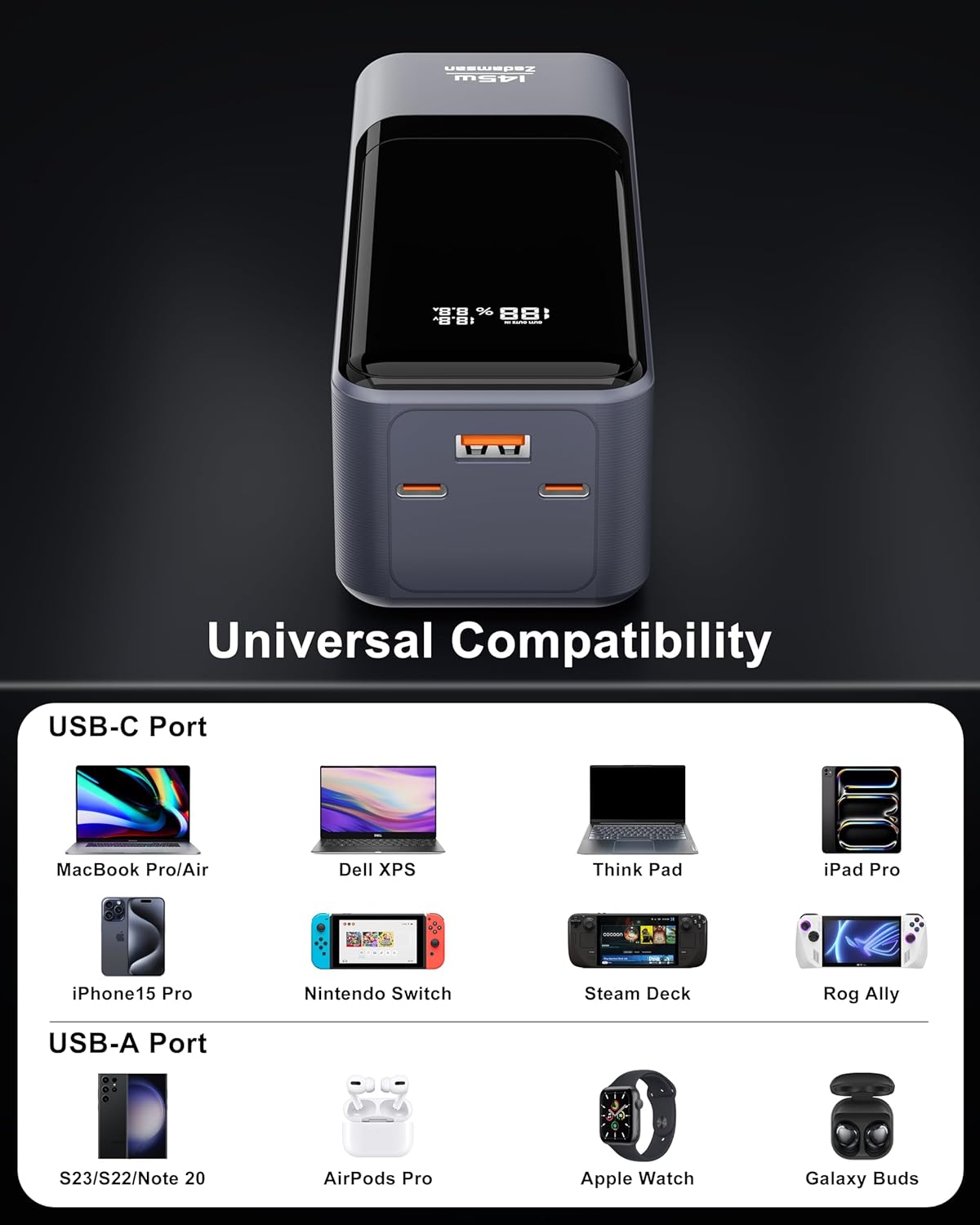
Image: A visual representation of the power bank's universal compatibility with various USB-C and USB-A devices.
7. Perawatan dan Pemeliharaan
- Bersihkan power bank dengan kain lembut dan kering. Jangan gunakan pembersih atau pelarut abrasif.
- Simpan bank daya di tempat yang sejuk dan kering, jauhkan dari sinar matahari langsung dan suhu ekstrem.
- If not used for extended periods, charge the power bank to approximately 50-70% every three months to maintain battery health.
- Avoid overcharging or completely draining the battery frequently, as this can reduce its lifespan.
8. Penyelesaian masalah
- Power bank tidak mengisi daya: Ensure the charging cable and wall adapter are functioning correctly and are properly connected. Try a different cable or adapter.
- Perangkat tidak mengisi daya dari power bank: Check if the power bank has sufficient charge. Ensure the cable connecting the device is secure and undamaged. Try a different port or cable.
- Pengisian daya lambat: Verify that your device and cable support fast charging. Ensure the power bank has enough charge. Some devices may limit charging speed if they are already partially charged or if they are in use.
- Tampilan digital tidak berfungsi: Press the power button briefly to activate the display. If it remains off, the battery might be completely drained or there could be an internal issue.
- Power bank shuts off unexpectedly: This could indicate a low battery level or an overload protection activation. Recharge the power bank. If the issue persists, contact customer support.
9. Garansi dan Dukungan Pelanggan
Untuk informasi garansi, dukungan teknis, atau pertanyaan terkait produk lainnya, silakan merujuk ke situs resmi produsen. websitus atau hubungi layanan pelanggan mereka secara langsung. Simpan tanda terima pembelian Anda sebagai bukti pembelian untuk klaim garansi.