
Perkenalan
Thank you for choosing the Hodozzy A3475 Android Car Radio. This device is designed to enhance your driving experience with advanced features such as Android 13 operating system, wireless CarPlay and Android Auto, GPS navigation, Bluetooth connectivity, and a high-resolution touch screen. This manual provides essential information for the safe installation, proper operation, and effective maintenance of your new car stereo. Please read this manual thoroughly before installation and use, and keep it for future reference.
Informasi Keselamatan
- Instalasi Profesional Direkomendasikan: Karena kompleksitas sistem kelistrikan mobil, pemasangan oleh profesional sangat disarankan untuk mencegah kerusakan pada unit atau kendaraan Anda.
- Catu Daya: Ensure the unit is connected to a 12V DC power supply with a negative ground. Incorrect voltage dapat menyebabkan kerusakan.
- Pengkabelan: Carefully follow all wiring diagrams. Incorrect wiring can lead to malfunctions, electrical shorts, or fire.
- Keselamatan Berkendara: Jangan mengoperasikan unit dengan cara yang mengganggu Anda saat mengemudi. Selalu utamakan keselamatan jalan.
- Suhu: Hindari memaparkan unit pada suhu ekstrem atau sinar matahari langsung dalam jangka waktu lama.
- Kelembaban: Jauhkan unit dari air dan kelembapan berlebihan.
- Pembersihan: Gunakan kain yang lembut dan kering untuk membersihkan. Jangan gunakan pembersih atau pelarut yang bersifat abrasif.
Isi Paket
Please check the contents of your package against the list below. If any items are missing or damaged, contact your retailer.

Image: The packaging list showing the main unit, power cable, RCA cable, rear camera input cable, GPS antenna, USB cable, mounting bracket, user manual, AHD rear camera, and microphone. Dimensions of the main unit are also shown: 178mm (7.0 inch) width, 102mm (4.0 inch) height, 70mm (2.7 inch) depth, and 25mm (0.9 inch) bezel depth.
- Hodozzy A3475 Main Unit
- Kabel listrik
- RCA Input/Output Cable
- Kabel Input Kamera Mundur
- Antena GPS
- Kabel USB (x2)
- Braket Pemasangan
- User Manual (dokumen ini)
- Kamera Belakang AHD
- Mikrofon Eksternal
Produk Selesaiview
The Hodozzy A3475 is a 7-inch double din Android car stereo featuring an 8-core processor, 2GB RAM, and 64GB ROM for smooth performance. It runs on Android 13 and offers a high-resolution IPS touchscreen.

Image: Visual representation of the car stereo's core specifications: Android 13 operating system, 2GB RAM + 64GB ROM memory, 8-core processor, and integrated GPS navigation with WiFi connectivity.
Fitur Utama:
- Sistem Operasi: Android 13
- Prosesor: 8 inti
- Ingatan: RAM 2GB + ROM 64GB
- Menampilkan: 7-inch IPS Capacitive Touch Screen (1280*720 resolution)
- Konektivitas: Wireless CarPlay, Wireless Android Auto, Mirror Link, Bluetooth 5.0, Wi-Fi, USB, AUX, TF Card
- Navigasi: Built-in GPS module with offline map support
- Suara: DSP (Digital Sound Processor) 36-band, Radio FM/RDS
- Masukan: AHD Rear Camera input, Dash CAM input, 2 USB inputs
- Keluaran: Amplifier/Sub-woofer audio output
- Kontrol: Dukungan Kontrol Roda Kemudi
Koneksi Panel Belakang:

Image: The rear panel of the Hodozzy A3475 unit, displaying various connection ports including power, RCA input/output, reversing camera input, USB, GPS antenna, and radio antenna ports.
- Konektor Kabel Daya
- RCA Input/Output Connectors
- Membalikkan Input Kamera
- USB Cable Connectors (x2)
- Masukan Antena GPS
- Masukan Antena Radio
Instalasi
Peringatan: Incorrect installation can cause damage to the unit or your vehicle. It is highly recommended to have this unit installed by a qualified professional.
Daftar Periksa Pra-Instalasi:
- Lepaskan terminal negatif baterai kendaraan sebelum memulai pekerjaan kelistrikan apa pun.
- Ensure the mounting dimensions (178mm x 100mm) are compatible with your vehicle's double din opening.
- Gather all necessary tools (wire strippers, crimpers, screwdrivers, electrical tape, multimeter).
Diagram Pengkabelan (Umum):
Refer to the included wiring diagram for specific connections. The main connections typically include:
- Kawat Kuning: Tegangan konstan 12V (Baterai +)
- Kabel Merah: ACC (Switched 12V, Ignition)
- Kabel Hitam: Tanah (Sasis -)
- Orange/Illumination Wire: Hubungkan ke sirkuit penerangan kendaraan (opsional).
- Reverse Gear Wire: Connect to the vehicle's reverse light circuit for automatic camera display.
- Kabel Pembicara: Connect to your vehicle's speakers (Front Left +, Front Left -, etc.).
- Antena GPS: Pasang di lokasi yang jelas view dari langit.
- Antena Radio: Hubungkan ke antena radio kendaraan.
- Kabel USB: Route to an accessible location for connecting USB devices.
- Kamera Belakang: Install the AHD rear camera at the back of the vehicle and route its cable to the unit's reversing camera input.
Pemasangan:
Use the provided mounting brackets to secure the unit into your vehicle's double din opening. Ensure the unit is firmly seated and does not obstruct any vehicle controls or airbags.
Pengaturan Awal
- Nyalakan: After installation, reconnect the vehicle's battery and turn on the ignition. The unit should power on automatically.
- Bahasa dan Waktu: Follow the on-screen prompts to select your preferred language, time zone, and date settings.
- Koneksi Wi-Fi: Pergi ke Pengaturan > Jaringan & Internet > Wifi gratis to connect to an available Wi-Fi network or your phone's hotspot. This is necessary for online maps, app downloads, and system updates.
- Kalibrasi GPS: Ensure the GPS antenna is properly connected and placed. The system will automatically acquire satellite signals for navigation.
Petunjuk Pengoperasian
Tampilan dan Antarmuka Pengguna
The 7-inch IPS capacitive touch screen offers a clear and responsive interface. You can customize the look and feel of your stereo with various wallpapers and user interface themes.
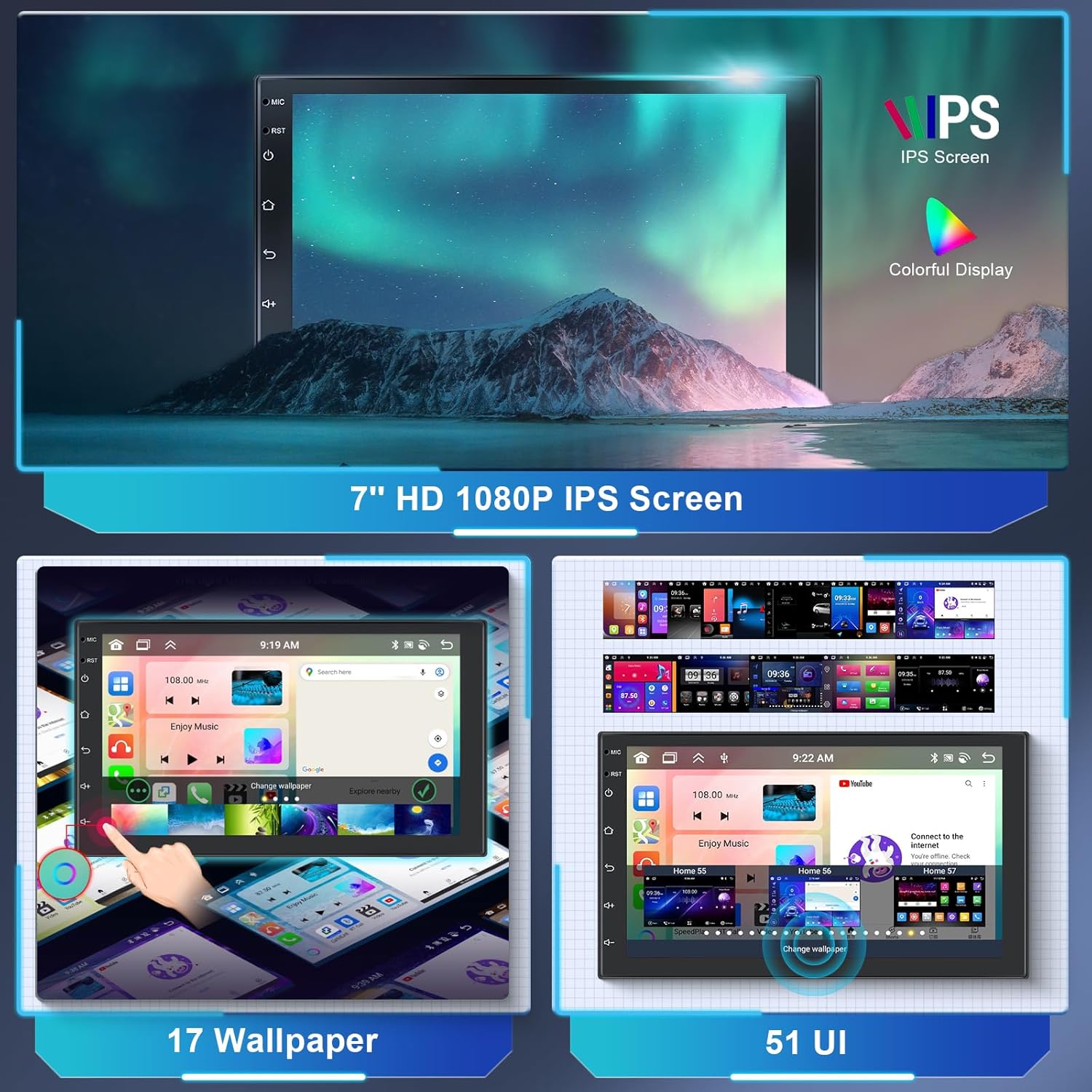
Image: The 7-inch HD 1080P IPS screen displaying various wallpaper options and different user interface layouts, highlighting customization capabilities.
- Layar Beranda: Akses aplikasi dan widget yang sering digunakan.
- Laci Aplikasi: Geser ke atas atau ketuk ikon aplikasi untuk view semua aplikasi yang diinstal.
- Pengaturan: Access system settings for audio, display, network, and more.
- Kustomisasi: Navigasi ke Pengaturan > Menampilkan to change wallpapers and UI themes.
Wireless CarPlay & Android Auto & Mirror Link
Connect your smartphone wirelessly or via USB to access CarPlay or Android Auto for navigation, music, calls, and messages. The Mirror Link function allows you to display your phone's screen directly on the car stereo.

Image: The car stereo screen displaying the interfaces for Wireless CarPlay and Wireless Android Auto, showing phone applications like navigation, music, and communication.
- For Wireless CarPlay/Android Auto:
- Pastikan Bluetooth dan Wi-Fi di ponsel Anda diaktifkan.
- On the car stereo, open the "CarLink" or similar app.
- Hubungkan ponsel Anda dengan stereo mobil melalui Bluetooth.
- Confirm the connection on both devices. CarPlay or Android Auto should launch automatically.
- Untuk tautan mirror:
- Open the "Mirror Link" app on the stereo.
- Follow the on-screen instructions to connect your Android or iOS device, typically involving a USB connection and enabling USB debugging (for Android) or trusting the device (for iOS).
GPS Navigation & Wi-Fi
The unit comes with a built-in GPS module and pre-installed offline map applications. Connect to Wi-Fi for online maps, traffic updates, and downloading additional apps from the Play Store.

Image: The car stereo displaying GPS navigation maps and icons for various navigation applications. Also shown is a graphic representing WiFi connectivity in a car.
- Peta Offline: Access the pre-installed map application. You may need to download specific regional map data via Wi-Fi for offline use.
- Peta Daring: Connect to Wi-Fi or a mobile hotspot to use online navigation apps like Google Maps, Waze, etc.
- Hotspot Wi-Fi: The unit supports 3G/4G hotspot connectivity from your smartphone.
Fungsi Bluetooth
Modul Bluetooth 5.0 bawaan memungkinkan panggilan bebas genggam dan streaming audio nirkabel.

Image: The car stereo screen displaying a phone dialer interface, indicating Bluetooth hands-free calling functionality. A smartphone is shown below, connected via Bluetooth.
- Pasangan: Go to the Bluetooth app on the stereo. Enable Bluetooth on your phone and search for the stereo (e.g., "Hodozzy A3475"). Pair the devices.
- Panggilan Bebas Genggam: Once paired, you can make and receive calls directly from the stereo's screen. The external microphone ensures clear audio.
- Musik Bluetooth: Alirkan audio dari telepon Anda ke stereo mobil.
Radio FM/RDS
Tune into your favorite FM radio stations. The RDS (Radio Data System) function displays station information, song titles, and other data where available.

Image: The car stereo screen displaying the FM radio interface, showing frequency (87.50 MHz) and RDS information. A microphone is visible in the background, indicating audio input capabilities.
- Pemindaian Otomatis: Gunakan fungsi pemindaian otomatis untuk menemukan dan menyimpan stasiun yang tersedia.
- Penyetelan Manual: Sesuaikan frekuensi secara manual untuk menemukan stasiun tertentu.
- Preset: Simpan stasiun favorit Anda ke tombol yang telah ditetapkan untuk akses cepat.
DSP Sound Adjustment
The integrated 36-band Digital Sound Processor (DSP) allows for precise audio customization, including equalization, balance, fader, and subwoofer control.

Image: The car stereo screen displaying a detailed graphic equalizer interface for DSP sound adjustment, showing multiple frequency bands and gain controls. A sound mixing board is in the background.
- Access the EQ app to adjust frequency bands, Q adjustments, and gain levels.
- Choose from preset equalizer curves (e.g., Classic, Pop, Rock) or create and save your own custom settings.
- Adjust subwoofer level and other audio parameters for optimal sound.
Kontrol Roda Kemudi (SWC)
The unit supports original steering wheel controls, allowing you to manage audio and other functions without taking your hands off the wheel.

Image: The car stereo screen showing the interface for programming steering wheel controls. A steering wheel with hands is depicted below, illustrating the use of these controls.
- Akses pengaturan SWC di menu sistem.
- Follow the on-screen instructions to map your vehicle's steering wheel buttons to corresponding functions on the stereo (e.g., volume up/down, track skip, mode).
Fungsi Kamera Mundur
When connected to the reverse gear, the car stereo automatically displays the rear camera feed, assisting with parking and reversing maneuvers.

Image: The car stereo screen displaying a reverse camera view of a parking lot with dynamic parking guidelines. A small image of a car reversing with a camera icon is shown below.
- Ensure the AHD rear camera is properly installed and connected to the unit's "Reversing Camera Input" and the vehicle's reverse light power.
- Saat kendaraan dipindahkan ke gigi mundur, tampilan akan secara otomatis beralih ke kamera. view.
USB, AUX, and TF Card
The unit provides multiple options for media playback and connectivity.
- Masukan USB: Connect USB drives for media playback (audio/video) or charging devices.
- Masukan Audio AUX: Hubungkan sumber audio eksternal melalui input AUX.
- Kartu TF: Insert a TF (MicroSD) card for additional storage and media playback.
Fungsi Layar Terpisah
The split-screen feature allows you to run two applications simultaneously on the 7-inch display, for example, navigation on one side and music on the other.
- To activate, open an app, then long-press the recent apps button or swipe up and hold (depending on UI) to enter split-screen mode.
- Select a second app to display alongside the first.
Pemeliharaan
- Membersihkan Layar: Gunakan kain lembut bebas serat untuk menyeka layar dengan lembut. Untuk noda membandel, usap layar dengan lembut.ampBasahi kain dengan air atau cairan pembersih yang aman untuk layar. Hindari bahan kimia keras.
- Pembaruan Perangkat Lunak: Periodically check for system software updates via the settings menu when connected to Wi-Fi. Updates can improve performance and add new features.
- Hindari Kondisi Ekstrim: Protect the unit from extreme heat, cold, and direct prolonged sunlight, which can affect its lifespan and performance.
- Penggantian Sekring: If the unit loses power, check the fuse located on the power cable. Replace it with a fuse of the same amperage rating only.
Penyelesaian Masalah
| Masalah | Kemungkinan Penyebab | Larutan |
|---|---|---|
| Tidak Ada Daya | Sambungan listrik longgar; Sekring putus; Kabel terpasang tidak benar. | Check power cable connections (Yellow, Red, Black). Verify fuse integrity and replace if necessary. Consult wiring diagram. |
| Tidak Ada Suara | Volume too low; Mute activated; Incorrect speaker wiring; DSP settings. | Increase volume. Check if mute is active. Verify speaker connections. Adjust DSP/EQ settings. |
| GPS Tidak Berfungsi | GPS antenna not connected or poorly placed; No satellite signal. | Pastikan antena GPS terhubung dengan aman dan ditempatkan di lokasi dengan pandangan yang jelas. view of the sky. Wait for signal acquisition. |
| Bluetooth Tidak Terhubung | Bluetooth off on phone/stereo; Incorrect pairing process. | Pastikan Bluetooth diaktifkan pada kedua perangkat. Hapus pemasangan sebelumnya dan pasangkan kembali. |
| Kamera Belakang Tidak Menampilkan Gambar | Camera not connected; Reverse trigger wire not connected; Faulty camera. | Check camera input connection. Verify the reverse trigger wire is correctly connected to the vehicle's reverse light. Test camera if possible. |
| Layar Sentuh Tidak Responsif | Gangguan perangkat lunak sementara; Gangguan pelindung layar. | Restart the unit (turn off ignition and restart). Remove any thick screen protectors. If issue persists, contact support. |
Spesifikasi

Image: The car stereo screen displaying a clear IPS touchscreen interface, highlighting its responsive touch and 2.5D curved glass design.
| Fitur | Detil |
|---|---|
| Merek | hodozzy |
| Nomor Model | Nomor telepon A3475 |
| Sistem Operasi | Android 13 |
| Prosesor | 8 inti |
| RAM | 2 GB |
| Bahasa Indonesia: ROM | 64 GB |
| Ukuran Layar | 7 inci |
| Jenis Tampilan | Layar Sentuh Kapasitif IPS |
| Resolusi | 1280*720 |
| Konektivitas | Auxiliary, Bluetooth (5.0), RCA, USB, Wi-Fi |
| Fitur Khusus | DAB (support), RDS, DSP (36-band EQ), GPS Navigation, Wireless CarPlay, Wireless Android Auto, Mirror Link, Steering Wheel Control, Reverse Camera Input |
| Daya Keluaran | 4 x 45 Watts (RMS), 180 Watts (Peak) |
| Mode Keluaran Audio | Stereo |
| Format Audio yang Didukung | WAV, WMA, MP3, etc. |
| Format Video yang Didukung | MKV, AVI, MP4, MDV, etc. |
| Ukuran Instalasi | 178mm x 100mm (Double Din) |
| ID FCC | 29149-A2747 |
| ID IC | 29149-A2747 |
Garansi dan Dukungan
For warranty information, please refer to the documentation provided at the time of purchase or contact your retailer. For technical support, troubleshooting assistance, or inquiries about replacement parts, please contact Hodozzy customer service through the retailer's platform or the official Hodozzy weblokasi.
Harap siapkan nomor model Anda (A3475) dan detail pembelian saat menghubungi dukungan.