
SUNOL T16
SUNOL T16 Wireless Earbuds User Manual
Model: T16 | Brand: SUNOL
Perkenalan
The SUNOL T16 Wireless Earbuds are designed for an active lifestyle, offering high-quality audio and convenient features. These Bluetooth headphones provide up to 48 hours of total playtime with their wireless charging case, featuring an LED power display for easy monitoring. With earhooks for a secure fit and water resistance, they are ideal for workouts, running, and various sports activities. The built-in microphone with noise cancellation ensures clear calls.
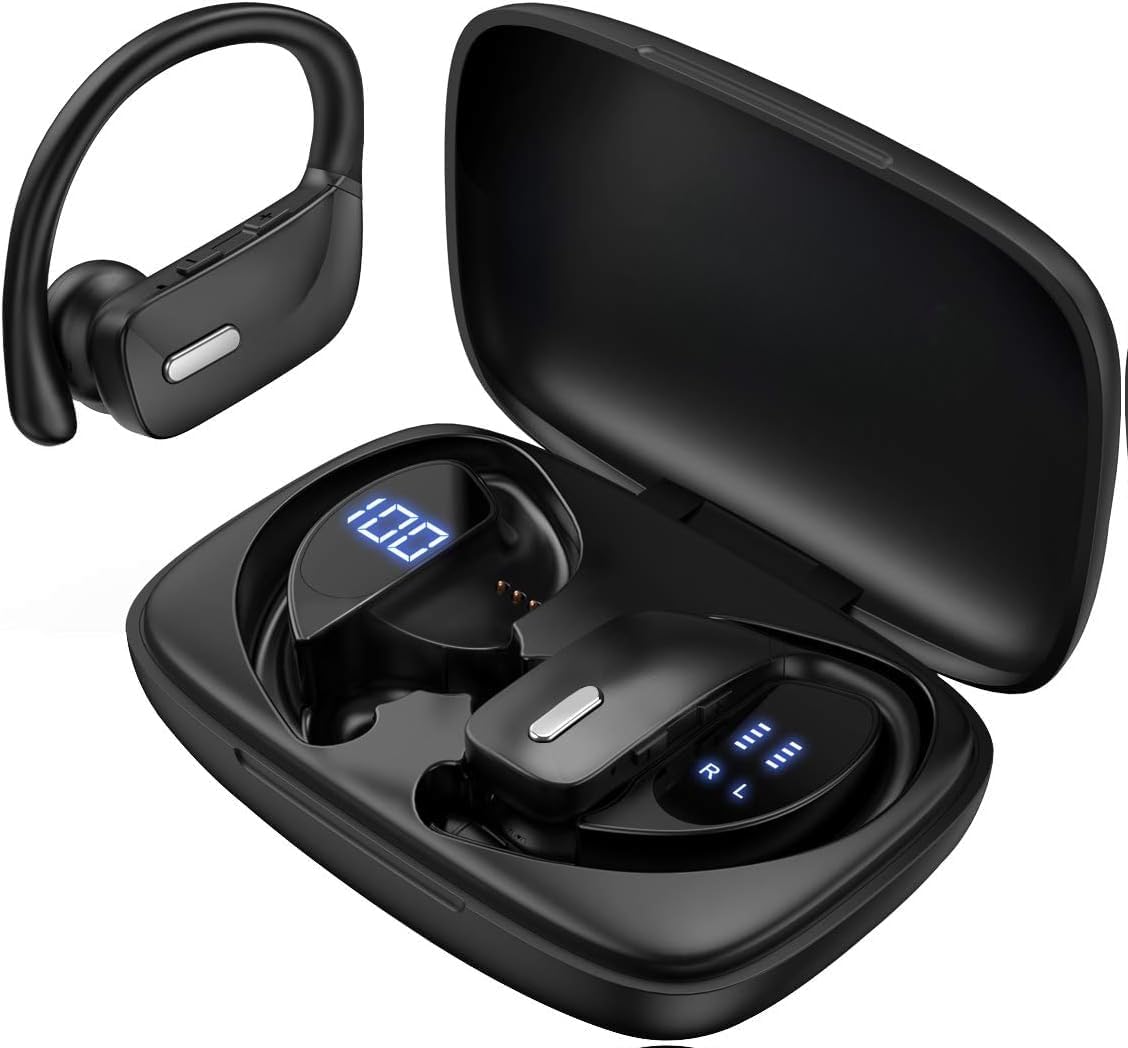
Image: The SUNOL T16 Wireless Earbuds with their charging case, showcasing the digital display.
Apa yang ada di dalam kotak
- SUNOL T16 Wireless Earbuds (Left and Right)
- Casing Pengisian Daya Nirkabel
- Kabel Pengisian Daya USB-C
- 3 Pairs of Ear Caps (S, M, L)
Spesifikasi
| Fitur | Detil |
|---|---|
| Nama Model | T16 |
| Teknologi Konektivitas | Nirkabel (Bluetooth 5.0) |
| Jangkauan Bluetooth | Hingga 10 meter |
| Masa Pakai Baterai Earbud | Hingga 9 jam (sekali pengisian daya) |
| Total Waktu Bermain (dengan casing) | Hingga 48 jam |
| Opsi Pengisian Daya | Wireless Charging, USB-C Charging |
| Ukuran Driver Audio | Driver Dinamis 10 mm |
| Rentang Frekuensi | 20 Hz - 20,000 Hz |
| Impedansi | Tegangan 40 ohm |
| Kontrol Kebisingan | Peredam Kebisingan Aktif |
| Mikropon | Built-in with Noise Cancellation |
| Tingkat Tahan Air | Tahan Air |
| Jenis Kontrol | Touch, Siri Voice Assistant |
| Penempatan Telinga | Over Ear (dengan earhook) |
| Bahan | Akrilonitril Butadiena Stirena (ABS) |
| Berat Barang | 6.4 ons |

Image: Diagram illustrating the premium stereo sound quality and Bluetooth 5.0 connectivity.
Pengaturan
1. Mengisi Daya Earbud dan Casing
The charging case supports both wireless charging and USB-C charging. The impressive 9 hours of listening time on a single charge for the sports wireless headphones are extended to a remarkable 48 hours of play time with the included charging case.
- To charge the case, connect a USB-C cable to the charging port on the back of the case, or place it on a compatible wireless charging pad.
- Letakkan earbud ke dalam slot masing-masing di wadah pengisi daya. Pastikan earbud terpasang dengan benar untuk memulai pengisian daya.
- The smart LED digital power display on the case will show the remaining battery level of the charging case and the individual earbuds. The percentage in the middle indicates the case battery, while the battery icons on both sides indicate the left and right earbud charge levels.

Image: The charging case with its LED display showing battery levels for the case and individual earbuds.

Image: Diagram illustrating the battery life: 15 min charge for 1 hour playtime, 8 hours on a single charge, and 48 hours with the charging case.
2. Memasangkan dengan Perangkat Anda
The earbuds automatically enter pairing mode when removed from the charging case.
- Buka casing pengisi daya dan lepaskan kedua earbud. Earbud akan otomatis menyala dan masuk ke mode berpasangan.
- On your mobile device (smartphone, tablet, laptop), go to the Bluetooth settings.
- Pencarian untuk available devices. You should see "T16" or "S8" appear in the list.
- Select "T16" or "S8" to connect. Once connected, you will hear an audio prompt, and the earbuds will be ready for use.

Image: Diagram showing the earbuds automatically pairing with mobile phones.
Video: Official product video demonstrating the unboxing, charging, and Bluetooth pairing process of the SUNOL T16 Wireless Earbuds.
Petunjuk Pengoperasian
Mengenakan Earbud
The T16 earbuds are designed with flexible earhooks to ensure a secure and comfortable fit, especially during physical activity. Gently place the earbud into your ear canal and adjust the earhook over the top of your ear until it feels stable and comfortable. Experiment with the included ear cap sizes to find the best fit for optimal sound and comfort.

Image: A woman wearing the SUNOL T16 earbuds, demonstrating their secure fit for an active lifestyle.
Kontrol Sentuh
The earbuds feature physical buttons for precise control of various functions:
- Putar/Jeda: Ketuk satu kali pada salah satu earbud.
- Jawab/Tutup Panggilan: Ketuk sekali pada salah satu earbud selama panggilan.
- Lagu Sebelumnya: Ketuk dua kali pada earbud kiri.
- Lagu Berikutnya: Ketuk dua kali pada earbud kanan.
- Active Voice Assistant (Siri): Ketuk tiga kali pada salah satu earbud.
- Tolak Panggilan: Tekan lama salah satu earbud saat ada panggilan masuk.
- Penyesuaian Volume: Use the dedicated volume buttons on the earbuds.

Image: Diagram detailing the physical buttons and their functions, including volume adjustment, play/pause, call management, and voice assistant activation.
Pemeliharaan
To ensure the longevity and optimal performance of your SUNOL T16 Wireless Earbuds, follow these maintenance guidelines:
- Pembersihan: Regularly wipe the earbuds and charging case with a soft, dry, lint-free cloth. For ear caps, remove them and clean with mild soap and water, then dry thoroughly before reattaching.
- Tahan Air: While water-resistant, avoid submerging the earbuds in water. Dry them completely if they get wet from sweat or rain before placing them back in the charging case.
- Penyimpanan: Saat tidak digunakan, simpan earbud di dalam wadah pengisi dayanya untuk melindungi dan menjaga dayanya tetap terisi. Simpan di tempat yang sejuk dan kering, jauhkan dari suhu ekstrem.
- Port Pengisian Daya: Jaga agar port pengisian daya USB-C terbebas dari debu dan kotoran.
Penyelesaian Masalah
If you encounter any issues with your SUNOL T16 Wireless Earbuds, try the following solutions:
- Earbud tidak dapat dipasangkan:
- Pastikan kedua earbud terisi penuh.
- Place earbuds back in the case, close the lid, wait a few seconds, then open and remove them again.
- Matikan Bluetooth di perangkat Anda, lalu hidupkan kembali dan coba pasangkan lagi.
- Forget or remove the "T16" or "S8" device from your device's Bluetooth list and attempt to pair from scratch.
- Hanya satu earbud yang berfungsi:
- Pastikan kedua earbud terisi dayanya.
- Place both earbuds back in the charging case, close the lid, and then take them out simultaneously.
- Jika masalah berlanjut, coba setel ulang earbud Anda.
- Kualitas suara buruk:
- Ensure the earbuds are properly seated in your ears and the ear caps provide a good seal.
- Check the audio source device's volume and sound settings.
- Move closer to your connected device to avoid interference or exceeding the 10-meter Bluetooth range.
- Clean the earbud speakers and ear caps.
- Casing pengisi daya tidak mengisi daya:
- Pastikan kabel USB-C terhubung dengan aman ke casing dan sumber daya.
- Coba kabel USB-C atau adaptor daya lainnya.
- Jika menggunakan pengisian daya nirkabel, pastikan casing diposisikan dengan benar pada bantalan pengisi daya.
Garansi dan Dukungan
For warranty information and technical support, please refer to the documentation included with your product or contact the manufacturer, SUNOL, directly through their official webmelalui situs web atau saluran layanan pelanggan. Simpan struk pembelian Anda sebagai bukti pembelian untuk klaim garansi apa pun.
Ask a question about this manual
Ask about setup, troubleshooting, compatibility, parts, safety, or missing instructions. Manuals+ will review the question and use this page’s manual context to help answer it.