Perkenalan
Terima kasih sudah membeliasing the Kogan MX10 Pro Cordless Stick Vacuum Cleaner. This manual provides important information regarding the safe operation, maintenance, and troubleshooting of your new appliance. Please read this manual thoroughly before use and retain it for future reference.
The Kogan MX10 Pro is designed for efficient cleaning of various surfaces, featuring powerful suction, a brushless motor, and a HEPA filtration system for a cleaner home environment.
Petunjuk Keselamatan
To reduce the risk of fire, electric shock, or injury, always observe basic safety precautions when using an electrical appliance.
- Baca semua petunjuk sebelum menggunakan alat ini.
- Jangan gunakan di luar ruangan atau pada permukaan basah.
- Jangan biarkan digunakan sebagai mainan. Perhatian yang cermat diperlukan saat digunakan oleh atau di dekat anak-anak.
- Gunakan hanya sesuai petunjuk dalam manual ini. Gunakan hanya aksesori yang direkomendasikan produsen.
- Jangan gunakan dengan kabel atau steker yang rusak. Jika alat tidak berfungsi sebagaimana mestinya, terjatuh, rusak, ditinggalkan di luar ruangan, atau terjatuh ke dalam air, kembalikan ke pusat servis.
- Jangan menarik atau membawa dengan kabel, menggunakan kabel sebagai pegangan, menutup pintu dengan kabel, atau menarik kabel di sekitar tepi atau sudut yang tajam. Jangan menjalankan alat di atas kabel. Jauhkan kabel dari permukaan yang panas.
- Jangan mencabut dengan menarik kabelnya. Untuk mencabut, pegang stekernya, bukan kabelnya.
- Jangan memegang steker atau peralatan dengan tangan basah.
- Jangan masukkan benda apa pun ke dalam lubang. Jangan gunakan jika lubang tersumbat; jauhkan dari debu, serat, rambut, dan apa pun yang dapat mengurangi aliran udara.
- Jauhkan rambut, pakaian longgar, jari, dan semua bagian tubuh dari celah dan bagian yang bergerak.
- Jangan mengambil apa pun yang terbakar atau berasap, seperti rokok, korek api, atau abu panas.
- Jangan gunakan untuk mengambil cairan yang mudah terbakar, seperti bensin, atau gunakan di area di mana cairan tersebut mungkin ada.
- Berhati-hatilah saat membersihkan tangga.
- Jangan gunakan tanpa cangkir debu dan/atau filter pada tempatnya.
- Mencegah start yang tidak disengaja. Pastikan sakelar dalam posisi mati sebelum menghubungkan ke unit baterai, mengambil atau membawa alat.
- Isi ulang daya hanya dengan pengisi daya yang ditentukan oleh produsen. Pengisi daya yang cocok untuk satu jenis baterai dapat menimbulkan risiko kebakaran jika digunakan dengan baterai lain.
- Dalam kondisi yang tidak diinginkan, cairan dapat keluar dari baterai; hindari kontak. Jika terjadi kontak secara tidak sengaja, bilas dengan air. Jika cairan mengenai mata, segera cari bantuan medis. Cairan yang keluar dari baterai dapat menyebabkan iritasi atau luka bakar.
Produk Selesaiview & Komponen
Familiarize yourself with the parts of your Kogan MX10 Pro Cordless Stick Vacuum Cleaner.

Figure 1: Fully assembled Kogan MX10 Pro Cordless Stick Vacuum Cleaner, showing the main unit, extension wand, and motorized brush head.

Figure 2: Kogan MX10 Pro with icons indicating 25000Pa suction power, up to 45 minutes battery life, dust detection & adaptive suction, motorized roller brush, and touchscreen display.
Isi Paket:
- Main Vacuum Unit (with dust bin and motor)
- Tongkat Ekstensi
- Kepala Sikat Bermotor
- Detachable Li-ion Battery (2000mAh)
- Adaptor Daya/Pengisi Daya
- Dok yang Terpasang di Dinding
- Alat Celah
- Alat Kuas 2-in-1
- Panduan Pengguna
Pengaturan
Perakitan:
- Masukkan tongkat ekstensi ke unit penyedot debu utama hingga berbunyi klik dan terpasang dengan aman.
- Pasang kepala sikat bermotor ke ujung lain dari tongkat ekstensi, pastikan terpasang dengan aman hingga berbunyi klik.
- Insert the detachable Li-ion battery into the battery slot on the main unit until it locks.
Mengisi Baterai:
- Hubungkan adaptor daya ke port pengisian daya pada baterai atau dok yang terpasang di dinding.
- Plug the adapter into a power outlet. The LCD touchscreen will display the charging status.
- For first use, fully charge the battery (approximately 4-5 hours).
Wall-Mounted Dock Installation:
- Choose a suitable location near a power outlet for convenient storage and charging.
- Mark the drilling points for the dock on the wall.
- Bor lubang dan masukkan sumbat dinding (jika perlu).
- Secure the wall-mounted dock using screws.
- Place the vacuum cleaner onto the dock for storage and charging.
Petunjuk Pengoperasian
Menyalakan/Mematikan:
- Tekan tombol daya pada gagang untuk menghidupkan penyedot debu.
- Tekan tombol daya lagi untuk mematikannya.
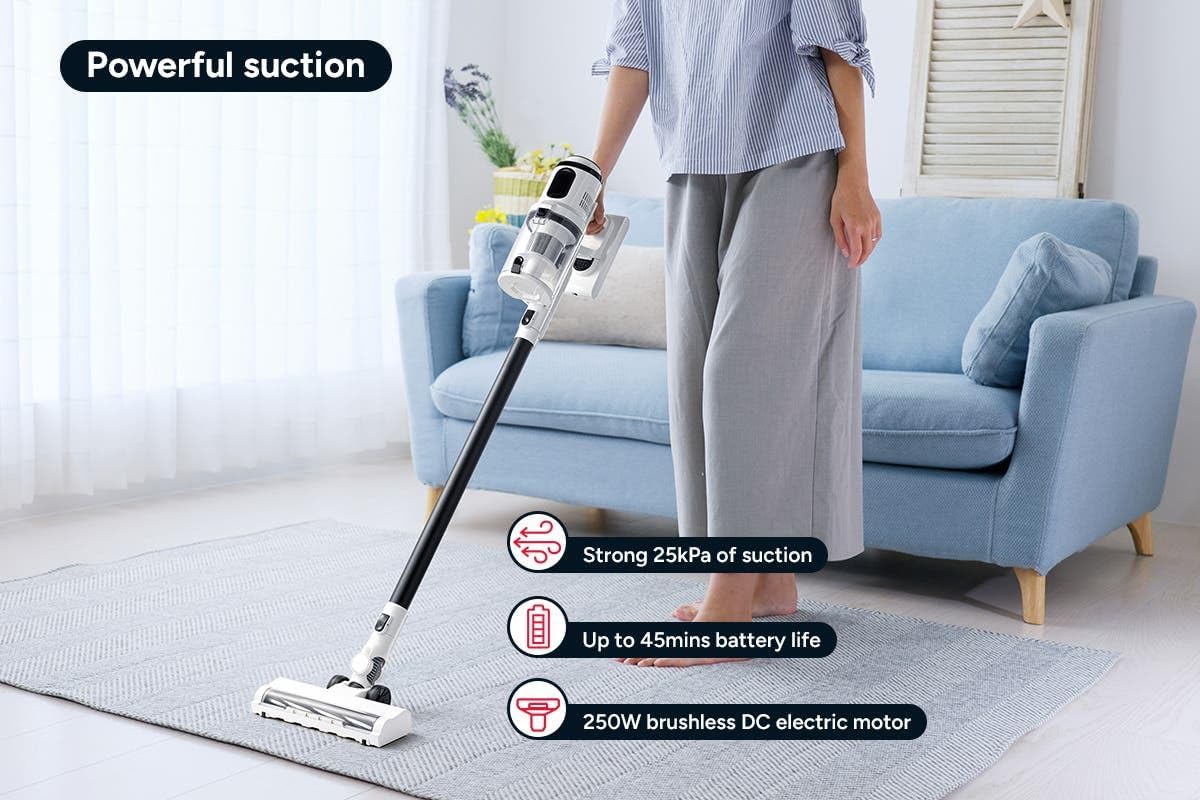
Figure 3: The Kogan MX10 Pro in use, highlighting its powerful 25kPa suction, long battery life, and efficient 250W brushless motor.
Suction Modes & LCD Touchscreen:

Figure 4: The LCD touchscreen provides real-time information on battery level, suction mode, and other operational indicators.
- The LCD touchscreen displays battery status, current suction level, and other relevant information.
- Tap the mode button on the touchscreen to switch between different suction modes (e.g., Eco, Standard, Max).
- The vacuum features dust detection, which automatically adjusts suction power based on the amount of dirt detected.

Figure 5: The brush head detecting dust on a hard floor, demonstrating the automatic suction adjustment feature.
Menggunakan Lampiran:
- Kepala Sikat Bermotor: Ideal for carpets and hard floors, providing powerful agitation to lift dirt.
- Alat celah: Sangat cocok untuk celah sempit, sudut, dan area yang sulit dijangkau.
- Alat Kuas 2-in-1: Use the brush for dusting delicate surfaces or slide the brush back for upholstery and larger debris.
- To change attachments, press the release button on the current attachment and pull it off. Then, push the desired attachment onto the main unit or extension wand until it clicks.
Pemeliharaan
Perawatan rutin memastikan kinerja optimal dan memperpanjang umur penyedot debu Anda.
Mengosongkan Wadah Debu:
- It is recommended to empty the dust bin after each use or when the MAX fill line is reached.
- Hold the main unit over a rubbish bin.
- Press the dust bin release button to open the bottom flap and allow debris to fall out.
- The ejection mechanism ensures dirt and dust are removed in a singular motion.

Figure 6: Demonstrating the easy bin emptying process by pressing the release button to open the dust bin flap.
Membersihkan Filter:
The Kogan MX10 Pro features a cyclone filter system and a washable HEPA filter to ensure maximum performance and trap fine dust and allergens.

Figure 7: The HEPA filter captures up to 99.97% of fine dust and allergens.
- Twist and pull to remove the filter assembly from the dust bin.
- Pisahkan filter HEPA dan filter jaring logam.
- Rinse the HEPA filter and metal mesh filter under cold running water.
- Allow all filter components to air dry completely for at least 24 hours before reassembling and placing back into the vacuum. Important: Ensure all parts are completely dry before reinstallation to prevent damage.
Membersihkan Kepala Sikat:
- Periodically check the brush head for tangled hair or debris.
- To remove the brush roll, locate the release tab on the side of the brush head and open it.
- Carefully pull out the brush roll.
- Gunakan gunting atau alat pembersih untuk memotong dan menghilangkan rambut atau serat yang kusut.
- Slide the brush roll back into place and secure the release tab.
Penyelesaian Masalah
| Masalah | Kemungkinan Penyebab | Larutan |
|---|---|---|
| Mesin penyedot debu tidak menyala | Battery not charged; Battery not properly installed; Power button not pressed correctly. | Charge the battery fully; Ensure battery is securely clicked into place; Press the power button firmly. |
| Daya hisap rendah | Dust bin full; Filters clogged; Blockage in nozzle, wand, or hose; Brush roll tangled. | Empty the dust bin; Clean or replace filters; Check for and remove any blockages; Clean the brush roll. |
| Rol sikat tidak berputar | Brush roll tangled with hair/debris; Brush roll not properly installed; Obstruction in brush head. | Clean the brush roll; Reinstall brush roll correctly; Remove any obstructions. |
| Baterai tidak mengisi daya | Charger not properly connected; Power outlet not working; Damaged charger or battery. | Ensure charger is securely plugged into battery/dock and outlet; Test outlet with another device; Contact Kogan support if charger or battery is damaged. |
Spesifikasi
| Fitur | Detil |
|---|---|
| Merek | Kogan |
| Model | MX10 Pro (KAVACSTM10P) |
| Daya Hisap | 25kPa |
| Motor | Motor Tanpa Sikat 250W |
| Baterai | 2000mAh Detachable Li-ion |
| Tingkat Kebisingan | 80dB |
| Jenis Filter | HEPA (Dapat Dicuci) |
| Fitur Khusus | Lightweight, Cordless, LCD Touchscreen, Dust Detection, Cyclone Filter System |
| Berat Barang | 3.47 kg |
| Permukaan yang Direkomendasikan | Lantai Keras, Karpet |
Garansi & Dukungan
For warranty information, technical support, or any inquiries regarding your Kogan MX10 Pro Cordless Stick Vacuum Cleaner, please visit the official Kogan website or contact Kogan customer support directly.
You can find more information and contact details on the Kogan store page: Kogan Official Store