
SUNOL K8
GM20 True Wireless Earbuds User Manual
Model: K8
Perkenalan
Thank you for choosing the SUNOL GM20 True Wireless Earbuds. This manual provides detailed instructions on how to set up, operate, and maintain your earbuds to ensure optimal performance and longevity. Please read this manual thoroughly before using the product.
Produk Selesaiview

Image: The GM20 True Wireless Earbuds in orange, shown with their matching charging case. The charging case features an LED display indicating battery percentage.
The GM20 True Wireless Earbuds are designed for a superior audio experience with advanced features:
- Teknologi Bluetooth 5.3: Ensures faster pairing, more stable connection, and lower power consumption with an effective range of up to 10 meters.
- Mikrofon Terintegrasi: High-quality microphone with environmental noise reduction for clear hands-free calls.
- Pemutaran yang Diperpanjang: Up to 48 hours of total playback time with the 600mAh charging case, which can recharge the earbuds four times.
- Display LED: The charging case features an LED display to show the power levels of both the earbuds and the charging case.
- Desain tahan air: IPX8 waterproof nano-coating makes the earbuds suitable for various activities, including sports.
- Cocok dan Nyaman: Ergonomic in-ear design with multiple ear tip sizes for prolonged comfortable wear.
Apa yang ada di dalam kotak
Upon opening your GM20 True Wireless Earbuds package, you should find the following items:
- GM20 True Wireless Earbuds (Left and Right)
- Kotak Pengisian Daya
- Kabel Pengisian Daya
- Multiple sizes of Ear Tips
- User Manual (dokumen ini)
Pengaturan
1. Mengisi Daya Earbud dan Casing
Sebelum penggunaan pertama, pastikan earbud dan casing pengisi daya terisi penuh.
- Place the earbuds into the charging case. Ensure they are correctly seated; the LED display on the case will show charging status.
- Connect the charging cable to the charging port on the case and to a USB power source. The LED display will indicate the charging progress of the case.
- A full charge for the case typically takes a few hours. The earbuds will charge automatically when placed inside the powered case.

Image: The GM20 charging case displaying "100" on its LED screen, indicating a full charge. An earbud is shown next to it, ready for use.
2. Memasangkan dengan Perangkat Anda (Pemasangan Satu Langkah)
Earbud GM20 memiliki fitur pemasangan otomatis untuk kenyamanan.
- Pasangan Awal:
- Buka casing pengisi daya dan keluarkan kedua earbud. Earbud akan otomatis menyala dan masuk ke mode berpasangan.
- Pada perangkat Anda (ponsel pintar, tablet, dll.), aktifkan Bluetooth.
- Pencarian untuk Bluetooth devices and select "GM20 TWS" from the list.
- Setelah terhubung, Anda akan mendengar nada konfirmasi, dan earbud siap digunakan.
- Penyandingan ulang: The earbuds will automatically connect to the last paired device when taken out of the charging case.
- If the earbuds do not connect automatically, ensure Bluetooth is enabled on your device and select "GM20 TWS" from your Bluetooth settings.
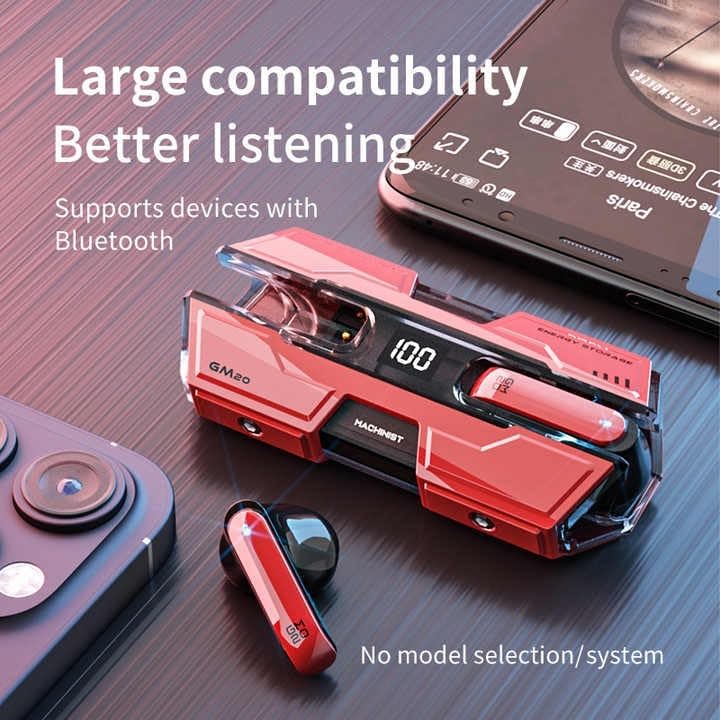
Image: The GM20 earbuds and charging case positioned near a smartphone, emphasizing their broad compatibility with Bluetooth-enabled devices.
Petunjuk Pengoperasian
Kontrol Earbud
The GM20 earbuds feature a multifunction button on each earbud for easy control of audio playback and calls.
| Tindakan | Fungsi |
|---|---|
| Tekan Sekali (Earbud Kiri/Kanan) | Putar/Jeda Musik, Jawab/Akhiri Panggilan |
| Tekan Dua Kali (Earbud Kiri) | Lagu Sebelumnya |
| Tekan Dua Kali (Earbud Kanan) | Lagu Berikutnya |
| Tekan Lama (2 detik) | Tolak Panggilan, Aktifkan Asisten Suara |
| Tekan Lama (5 detik) | Daya Hidup/Mati |
Mengenakan Earbud
For optimal sound quality and comfort, ensure the earbuds are properly seated in your ears. Experiment with the different sizes of ear tips provided to find the best fit for your ears.

Gambar: Sebuah ledakan view diagram of an earbud, illustrating its internal components such as the 13mm moving coil and composite diaphragm, which contribute to high-resolution sound.
Pemeliharaan
Proper maintenance will extend the life of your GM20 earbuds.
- Pembersihan: Bersihkan earbud dan wadah pengisi daya secara teratur dengan kain lembut, kering, dan bebas serat. Jangan gunakan pembersih abrasif atau pelarut.
- Tahan Air: The earbuds are IPX8 waterproof, meaning they are protected against prolonged immersion in water. However, the charging case is not waterproof. Avoid exposing the charging case to liquids. Always ensure earbuds are dry before placing them back in the charging case.
- Penyimpanan: Saat tidak digunakan, simpan earbud di dalam wadah pengisi dayanya untuk melindungi dan menjaga dayanya tetap terisi. Simpan di tempat yang sejuk dan kering, jauhkan dari suhu ekstrem.
- Perawatan Baterai: Untuk menjaga daya tahan baterai, hindari mengosongkan daya earbud dan wadah pengisi daya sepenuhnya terlalu sering. Isi daya secara teratur, meskipun tidak digunakan terus-menerus.
Penyelesaian Masalah
If you encounter issues with your GM20 earbuds, try the following solutions:
- Earbud tidak dapat dipasangkan:
- Pastikan kedua earbud terisi penuh.
- Matikan Bluetooth pada perangkat Anda, lalu hidupkan kembali.
- Forget "GM20 TWS" from your device's Bluetooth settings and attempt to re-pair.
- Masukkan kembali earbud ke dalam wadahnya, tutup penutupnya, tunggu beberapa detik, lalu buka dan coba lagi.
- Tidak ada suara atau volume rendah:
- Periksa tingkat volume pada perangkat dan earbud Anda.
- Pastikan earbud terhubung dengan benar ke perangkat Anda.
- Bersihkan segala kotoran dari jaring speaker earbud.
- Sound distortion or crackling:
- Pastikan earbud berada dalam jangkauan Bluetooth 10 meter dari perangkat Anda.
- Reduce interference by moving away from other wireless devices or strong electromagnetic fields.
- Coba pasangkan ulang earbud.
- Earbud tidak mengisi daya:
- Pastikan kabel pengisian daya tersambung dengan aman ke casing dan sumber daya.
- Periksa apakah port pengisian daya pada casing bersih dan bebas dari kotoran.
- Cobalah kabel pengisi daya atau adaptor daya yang lain.
Spesifikasi
| Fitur | Detil |
|---|---|
| Nama Model | K8 |
| Versi Bluetooth | 5.3 |
| Jangkauan Bluetooth | 10 Meter |
| Daya Tahan Baterai (Earbud) | Approx. 8-10 hours (single charge) |
| Daya Tahan Baterai (dengan Kotak Pengisi Daya) | Hingga 48 Jam |
| Kapasitas Baterai Kotak Pengisian Daya | 600 mAh |
| Tingkat Tahan Air | IPX8 (khusus Earbud) |
| Respon Frekuensi | 20 Hz - 20 kHz |
| Impedansi | Tegangan 32 ohm |
| Metode Kontrol | Sentuh/Tombol |
| Bahan | Akrilonitril Butadiena Stirena (ABS) |
| Berat Barang | 14.4 ons (kemasan total) |
Garansi dan Dukungan
For warranty information and customer support, please refer to the documentation included with your purchase or visit the official SUNOL website. If you experience any issues not covered in this manual, please contact SUNOL customer service for assistance.
Harap simpan bukti pembelian Anda untuk klaim garansi.
Ask a question about this manual
Ask about setup, troubleshooting, compatibility, parts, safety, or missing instructions. Manuals+ will review the question and use this page’s manual context to help answer it.