
Perkenalan
Terima kasih sudah membeliasing the VISULAPEX V3 Mini Portable Projector. This manual provides essential information for setting up, operating, and maintaining your projector. Please read it thoroughly before use to ensure optimal performance and longevity of the device.

Gambar: Depan view of the VISULAPEX V3 Mini Portable Projector, showcasing desainnya yang ringkas.
Produk Selesaiview
Fitur Utama
- Desain Kompak dan Portabel: Measures 14.5 x 12 x 7 cm and weighs 505g, making it easy to carry and set up in various locations.
- Dual-Band 5G/2.4G WiFi: Enables fast and stable wireless screen mirroring from compatible devices.
- Resolusi Asli 720P: Supports Full HD 1080P input for clear and vibrant images.
- 9000 Lumens Brightness: Provides a bright display with an 8000:1 contrast ratio.
- Proyeksi Lemparan Pendek: Achieves a 33-inch screen from 1 meter distance, with projection sizes from 33 to 140 inches (0.8m to 3m distance).
- Konektivitas Luas: Includes HDMI, USB, AV, and 3.5mm audio ports, along with Bluetooth 5.0.
- Perlindungan Mata: Utilizes diffuse light source technology to reduce eye strain.
Isi Paket
The VISULAPEX V3 projector package includes:
- VISULAPEX V3 Mini Portable Projector
- Adaptor Daya
- Kabel HDMI
- Peralatan Pembersih
- Panduan Pengguna
- Kontrol Jarak Jauh
- Kaki Tiga

Image: The VISULAPEX V3 projector being held in a hand, demonstrating its small and portable size.
Petunjuk Pengaturan
1. Penempatan
Position the projector on a stable, flat surface or mount it using the included tripod. Ensure there is adequate ventilation around the device. The optimal projection distance ranges from 0.8 meters to 3 meters, yielding screen sizes from 33 to 140 inches.

Image: Diagram illustrating projection distances and corresponding screen sizes, from 20 inches at 1 meter to 300 inches at 9 meters.
2. Koneksi Daya
- Connect the power adapter to the projector's DC input port.
- Hubungkan adaptor daya ke stopkontak di dinding.
3. Fokus dan Koreksi Keystone
After powering on, adjust the focus ring on the projector lens until the image is clear. Use the keystone correction feature to adjust for trapezoidal distortion if the projector is not perfectly perpendicular to the screen. This can be done via the projector's menu or a dedicated adjustment on the device.
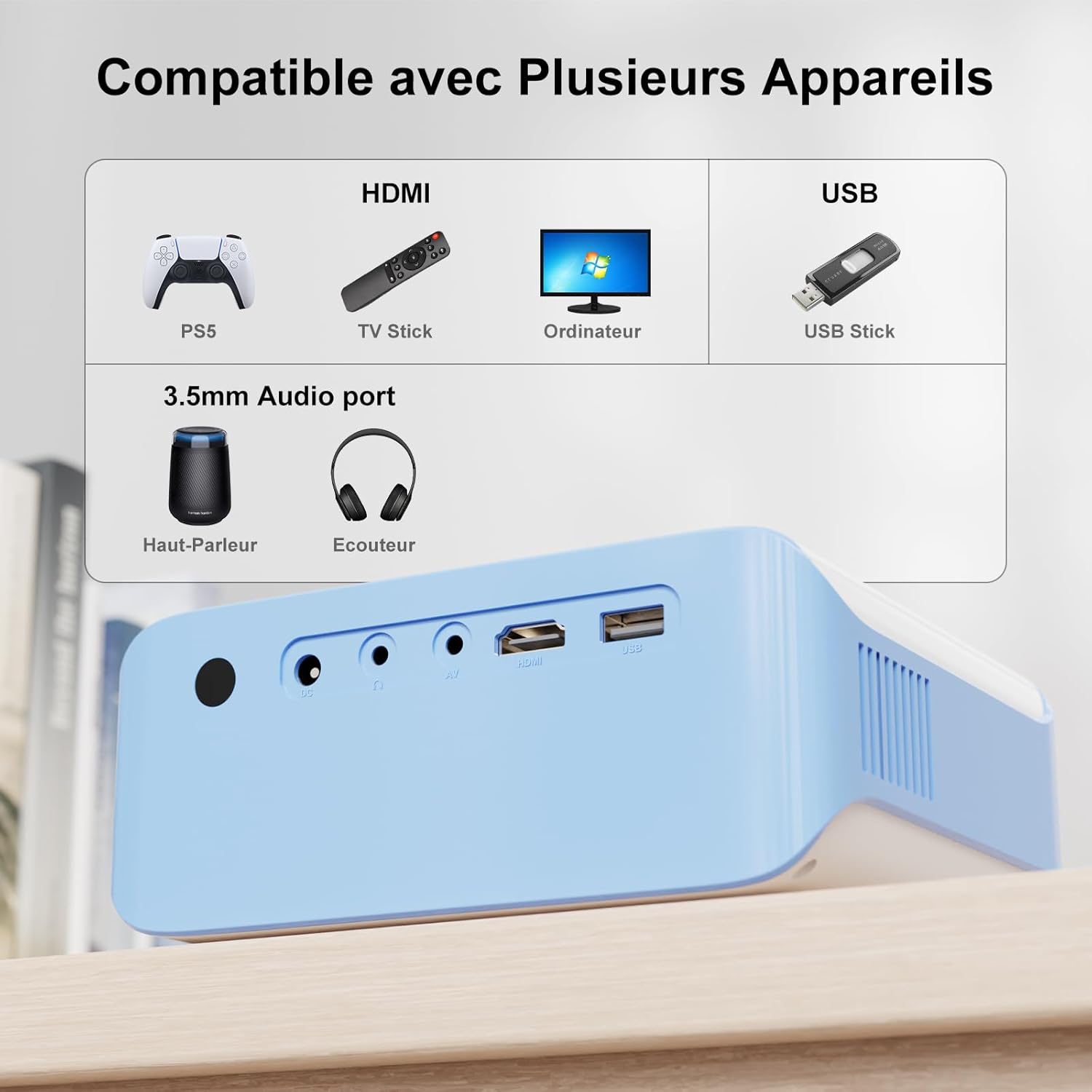
Image: Illustration showing keystone correction and focus adjustment mechanisms on the projector.
Petunjuk Pengoperasian
1. Daya Hidup/Mati
- Tekan tombol daya pada proyektor atau kendali jarak jauh untuk menghidupkan atau mematikan perangkat.
2. Pemilihan Sumber
Use the 'Source' button on the remote or projector to select the desired input source (e.g., HDMI, USB, AV, Screen Mirroring).
3. Screen Mirroring (5G WiFi)
The projector supports 5G/2.4G WiFi for wireless screen mirroring from iOS, Android, and Windows 10 devices. Navigate to the 'Screen Mirroring' option in the projector's menu and follow the on-screen instructions to connect your device.

Image: A projector displaying a mirrored screen from a smartphone and laptop, highlighting 5G WiFi connectivity.
4. Fungsi Zoom
The projection screen can be reduced up to 50% by adjusting the zoom function in the projector's settings, without needing to move the projector physically.
Konektivitas
The VISULAPEX V3 projector offers multiple connectivity options:
- HDMI: Connect devices such as PCs, TV Sticks, game consoles (e.g., PS5).
- Kabel USB: Play media directly from USB drives or connect devices like Firestick.
- DARI: Untuk perangkat lama dengan output AV.
- Jack Audio 3.5mm: Hubungkan speaker eksternal atau headphone.
- Bluetooth 5.0: Connect to Bluetooth speakers or headphones for enhanced audio.
Catatan: Due to copyright restrictions, streaming services like Netflix, Amazon Prime, and Disney+ cannot be directly mirrored from smartphones. Please use a TV Stick (e.g., Firestick, Chromecast) connected via HDMI to play content from these applications.

Gambar: Close-up view of the projector's input/output ports, including HDMI, USB, AV, and 3.5mm audio.

Image: The projector wirelessly connected to a Bluetooth speaker and headphones, demonstrating Bluetooth 5.0 functionality.
Pemeliharaan
1. Pembersihan
- Lensa: Gunakan perlengkapan pembersih yang disediakan atau kain lembut bebas serat yang dirancang khusus untuk lensa optik. Jangan gunakan pembersih abrasif.
- Luar: Lap bagian luar proyektor dengan kain lembut dan kering. Hindari penggunaan cairan pembersih langsung pada perangkat.
- Port Ventilasi: Ensure ventilation ports are clear of dust and obstructions to prevent overheating.
2. Penyimpanan
When not in use, store the projector in a cool, dry place, away from direct sunlight and extreme temperatures. Protect the lens with its cover.
Penyelesaian Masalah
Tidak Ada Gambar atau Kualitas Gambar Buruk
- Periksa Daya: Pastikan proyektor terhubung dengan benar ke sumber daya dan dalam keadaan menyala.
- Sumber Masukan: Verify that the correct input source (HDMI, USB, AV) is selected.
- Fokus/Keystone: Adjust the focus ring and keystone correction for a clear, rectangular image.
- Koneksi kabel: Ensure all cables (HDMI, AV) are securely connected. Try a different cable if possible.
- Resolusi: Confirm that the input device's resolution is compatible with the projector (up to 1920x1080 supported).
Tidak Ada Suara
- Volume: Check the projector's volume settings and the volume of the connected source device.
- Keluaran Audio: If using external speakers, ensure they are properly connected via the 3.5mm audio jack or Bluetooth.
- Perangkat Sumber: Some source devices may require manual selection of audio output to HDMI or external speakers.
Wireless Screen Mirroring Issues
- Koneksi wifi: Pastikan proyektor dan perangkat Anda terhubung ke jaringan WiFi 5G atau 2.4G yang sama.
- Kesesuaian: Confirm your device supports screen mirroring (e.g., Miracast for Android/Windows, AirPlay for iOS).
- App Restrictions: Remember that some streaming apps (Netflix, Amazon Prime, Disney+) do not support direct screen mirroring due to copyright protection. Use a streaming stick.
Projector Shuts Off Unexpectedly
- Terlalu panas: Ensure proper ventilation. Clear any obstructions from the air vents. Allow the projector to cool down.
- Catu Daya: Check the power adapter and cable for damage. Ensure a stable power source.
Spesifikasi
| Fitur | Spesifikasi |
|---|---|
| Nomor Model | V3 |
| Resolusi Asli | 1280 x 720 piksel |
| Resolusi yang Didukung Max | 1920 x 1080 piksel (HD Penuh) |
| Kecerahan | 9000 Lumens (ANSI not specified, typical marketing lumens) |
| Rasio Kontras | 8000:1 |
| Teknologi Konektivitas | Bluetooth 5.0, HDMI, 3.5mm Jack, USB, Wi-Fi (5G/2.4G) |
| Sumber Cahaya Kehidupan | 90,000 Jam |
| Jarak Proyeksi | 1 to 9 meters (Optimal: 0.8m to 3m) |
| Ukuran Proyeksi | 20 to 300 inches (Optimal: 33 to 140 inches) |
| Dimensi (P x L x T) | Ukuran 14.5x12x7 cm |
| Berat | 1.01 Kilograms (505g mentioned in feature bullets, using the more specific spec) |
| Konsumsi Daya | 40 Watt |
| Jenis Tampilan | LED, LCD |
| Jenis Kontrol | Button Control, Remote Control |
Garansi dan Dukungan
Informasi Garansi
The VISULAPEX V3 Mini Portable Projector comes with a 30-day return policy for any reason. Please refer to your purchase documentation for specific warranty terms and conditions.
Dukungan Pelanggan
For technical assistance, product inquiries, or warranty claims, please contact our customer service team. We offer 24-hour customer service and technical support.
E-mail: customerservice-visulapex@outlook.com

Image: Icons representing 24-hour customer service, 30-day return policy, and technical support.