
1. Informasi Keselamatan Penting
Harap baca semua petunjuk keselamatan dan pengoperasian dengan saksama sebelum menggunakan televisi Anda. Simpan petunjuk ini untuk referensi di kemudian hari.
- Sumber Daya: Connect the TV only to the type of power source indicated on the marking label.
- Ventilasi: Pastikan ventilasi yang baik. Jangan halangi lubang ventilasi apa pun.
- Air dan Kelembaban: Jangan biarkan TV terkena hujan atau kelembapan. Jangan gunakan di dekat air.
- Pembersihan: Unplug the TV from the wall outlet before cleaning. Use a soft, dry cloth. Do not use liquid or aerosol cleaners.
- Penempatan: Letakkan TV di permukaan yang stabil dan rata. Hindari meletakkannya di bawah sinar matahari langsung atau di dekat sumber panas.
- Petir: Cabut TV saat terjadi badai petir atau saat tidak digunakan dalam jangka waktu lama.
2. Isi Paket
Pastikan semua item yang tercantum di bawah ini termasuk dalam paket TV Anda:
- coocaa ROKU 50R5G 50-inch UHD Smart LED TV
- Kontrol Jarak Jauh dengan Baterai
- Meja TV (2 buah)
- Sekrup Berdiri
- Kabel listrik
- Panduan Memulai Cepat (manual ini)
3. Pengaturan
3.1 Membongkar dan Memasang Stand
Carefully remove the TV from its packaging. It is recommended to have two people for this process. Place the TV face down on a soft, clean surface to prevent screen damage.
Untuk memasang dudukan TV:
- Sejajarkan setiap bagian dudukan dengan slot yang sesuai di bagian bawah TV.
- Amankan dudukan menggunakan sekrup yang tersedia. Pastikan sekrup terpasang dengan kuat.
Alternatively, for wall mounting, consult a professional installer and use a VESA-compatible wall mount (not included).

This image illustrates the coocaa Roku TV seamlessly integrated into a modern living room environment, mounted on a light blue wall. The TV is positioned above a minimalist wooden TV cabinet, demonstrating a typical installation scenario.
3.2 Menghubungkan Daya dan Pengaturan Awal
- Hubungkan kabel daya ke input daya TV dan kemudian ke stopkontak di dinding.
- Tekan tombol daya pada remote control atau TV.
- Follow the on-screen instructions to complete the initial Roku OS setup, including language selection, country, and channel scanning for the triple tuner (satellite, cable, or antenna).
3.3 Koneksi Jaringan
To access Smart TV features and streaming services, connect your TV to the internet:
- Wifinya: During initial setup or via the Settings menu, select 'Network' and then 'Wireless'. Choose your Wi-Fi network from the list and enter the password.
- Jaringan LAN (Ethernet): Hubungkan kabel Ethernet dari router Anda ke port LAN di bagian belakang TV. TV akan otomatis mendeteksi koneksi kabel tersebut.
4. Mengoperasikan TV Anda
4.1 Roku OS Home Screen
The Roku OS home screen provides quick access to all your entertainment. It combines linear TV and streaming services into one intuitive interface.

This image shows the coocaa Roku TV from the front, powered on and displaying its intuitive home screen. The screen features icons for popular streaming services like Netflix, Disney+, Apple TV, and live TV options, alongside inputs for cable box and game console. A '2023 Heimkino Innovation Award' badge is visible on the bottom left bezel.
- Saluran Streaming: Access popular apps like Netflix, Disney+, and Apple TV.
- Siaran langsung TV: Watch broadcast television via the integrated triple tuner.
- Masukan: Easily switch between connected devices (e.g., game console, cable box).
- Mencari: Use the cross-channel search to find content by title, actor, or genre.
4.2 Menggunakan Kontrol Jarak Jauh
The user-friendly remote control provides all necessary functions:
- Papan Navigasi: Use the arrow buttons to navigate menus and select items.
- Tombol Oke: Konfirmasi pilihan.
- Tombol Home: Return to the Roku OS home screen.
- Tombol Kembali: Kembali ke layar sebelumnya.
- Peluncuran Instan: Replay the last few seconds of video.
- Tombol Akses Cepat: Tombol khusus untuk layanan streaming populer.
- Pencarian Suara: Use the voice search feature for hands-free control (if supported by remote model).
4.3 Sumber Masukan
Hubungkan perangkat eksternal ke TV Anda menggunakan port yang tersedia:
- HDMI: The TV features three HDMI inputs for connecting devices like Blu-ray players, game consoles, or set-top boxes.
- Kabel USB: One USB port is available for media playback or Timeshift functions.
- Keluaran Audio Digital: Untuk menghubungkan ke sistem audio eksternal.
4.4 Fitur Smart TV
Your coocaa Roku TV offers a wide range of smart features:
- Layanan Streaming: Access pre-installed apps like Netflix, Disney+, Apple TV, and more.
- Dukungan Asisten Suara: Compatible with Apple AirPlay, Apple Home, Alexa, and Google Home for integrated smart home control.
- Aplikasi Seluler Roku: Control your TV, use voice search, and listen to audio via headphones using the free Roku app for iOS and Android devices.
4.5 Pengaturan Audio dan Video
Optimalkan Anda viewpengalaman ing:
- Mode Gambar: Select from various picture modes (e.g., Standard, Movie, Sport) or customize brightness, contrast, and color settings.
- Dukungan HDR: Enjoy enhanced contrast and color with HDR10 and HLG content.
- Mode Suara: Choose sound modes (e.g., Standard, Music, Speech) or adjust equalizer settings for optimal audio.
5. Pemeliharaan
5.1 Membersihkan TV Anda
Untuk menjaga tampilan dan kinerja TV:
- Cabut TV sebelum dibersihkan.
- Gunakan kain yang lembut, kering, dan tidak berbulu untuk membersihkan layar dan kabinet.
- Untuk noda membandel, oleskan sedikitampen the cloth with water. Never spray cleaner directly onto the TV.
- Hindari penggunaan pembersih abrasif, lilin, atau pelarut.
5.2 Pembaruan Perangkat Lunak
Your Roku TV automatically checks for and installs software updates when connected to the internet. These updates provide new features, performance improvements, and bug fixes. Ensure your TV remains connected to the internet for timely updates.
6. Penyelesaian masalah
Jika Anda mengalami masalah dengan TV Anda, lihat solusi umum berikut:
| Masalah | Solusi yang mungkin |
|---|---|
| Tidak Ada Daya | Periksa apakah kabel daya tersambung dengan benar ke TV dan stopkontak. Coba stopkontak lain. |
| Tidak Ada Gambar, tapi Ada Suara | Pastikan sumber input yang benar telah dipilih. Periksa sambungan kabel ke perangkat eksternal. |
| Tidak Ada Suara, tetapi Ada Gambar | Periksa level volume dan status bisu. Pastikan sistem audio eksternal terhubung dengan benar dan menyala. |
| Tidak Dapat Terhubung ke Wi-Fi | Verify your Wi-Fi password. Restart your router and modem. Move the TV closer to the router or use a wired connection. |
| Kontrol Jarak Jauh Tidak Berfungsi | Ganti baterainya. Pastikan tidak ada penghalang antara remote dan TV. |
7. Spesifikasi
Detailed technical specifications for the coocaa ROKU 50R5G TV:

This image displays the official product data sheet (Produktdatenblatt) for the coocaa 50R5G television. It provides comprehensive technical specifications, including energy efficiency class, power consumption, screen resolution, panel technology, and guaranteed software/spare parts availability, as per EU regulations.
| Parameter | Nilai |
|---|---|
| Merek | coocaa |
| Model Name / Item Model Number | 50R5G |
| Sistem Operasi | Sistem Operasi Roku |
| Ukuran Layar | 50 Inci (126 cm) |
| Teknologi Tampilan | LCD LED |
| Resolusi | 3840 x 2160 piksel (4K UHD) |
| Rasio Aspek | 16:9 |
| Refresh Rate (Standard) | 50Hz |
| Konektivitas | Wi-Fi, LAN (Ethernet), 3x HDMI, 1x USB |
| Fitur Khusus | Integrated Speaker, HDR10, HLG, Triple Tuner |
| Layanan Internet yang Didukung | Netflix, Disney+, Apple TV, Prime Video, RTL+ |
| Dimensi Produk (W x H x D) | 110 cm x 65 cm x 9 cm (kira-kira) |
| Kelas Efisiensi Energi (SDR) | G |
| Konsumsi Daya (SDR) | 70.0 W / 70 kWh / 1000 jam |
| Kelas Efisiensi Energi (HDR) | G |
| Konsumsi Daya (HDR) | 103 W / 103 kWh / 1000 jam |
| Pembaruan Perangkat Lunak/Firmware Terjamin | 8 years (from end of market placement) |
| Ketersediaan Suku Cadang Terjamin | 7 years (from end of market placement) |
| Dukungan Produk Terjamin | 7 tahun |
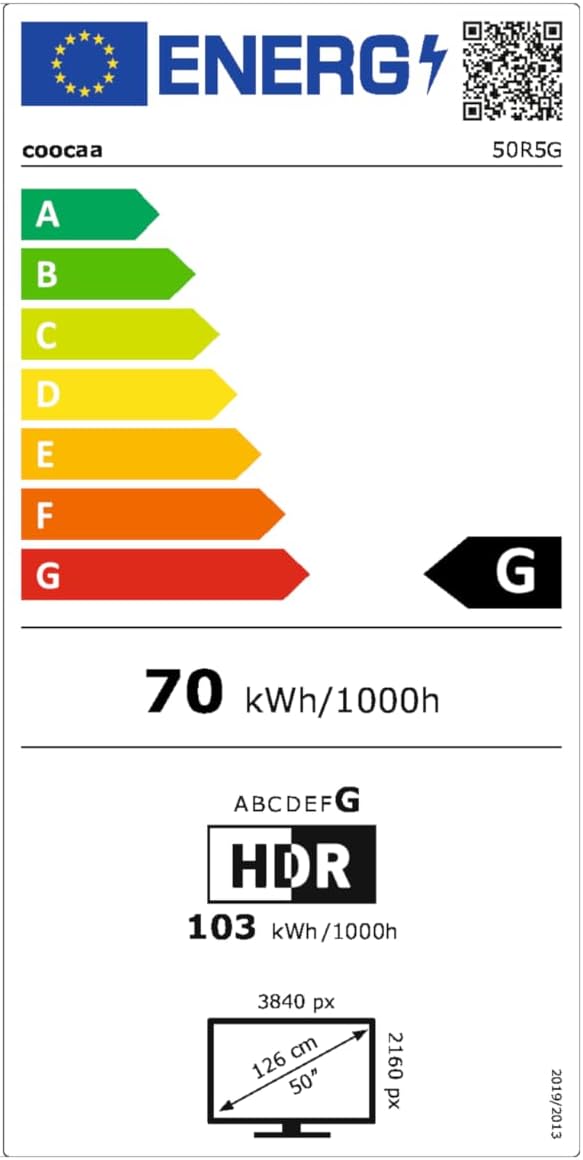
This image presents the EU Energy Label for the coocaa 50R5G TV. It indicates an energy efficiency class of 'G' for both Standard Dynamic Range (SDR) and High Dynamic Range (HDR) content, with power consumption values of 70 kWh/1000h for SDR and 103 kWh/1000h for HDR. The label also shows the screen size of 50 inches (126 cm) and resolution of 3840x2160 pixels. A QR code is included for accessing the EPREL database: Tautan Basis Data EPREL
8. Garansi dan Dukungan
Your coocaa ROKU 50R5G TV comes with a manufacturer's warranty. Please refer to the official product documentation for specific terms and conditions.
- General Warranty Period: 2 tahun dari tanggal pembelian.
- Dukungan Produk: Guaranteed for 7 years.
- Suku cadang: Guaranteed availability for 7 years after the product is no longer placed on the market.
- Pembaruan Perangkat Lunak: Guaranteed for 8 years after the product is no longer placed on the market.
For technical assistance or warranty claims, please contact coocaa customer support through their official websitus atau pengecer tempat produk dibeli.