
1. Pendahuluan
Thank you for choosing the MAIRDI M890DBTC Wireless Headset. This manual provides detailed instructions for setting up, operating, and maintaining your headset to ensure optimal performance and longevity. Please read this manual thoroughly before use.

Bagian depan yang detail view of the MAIRDI M890DBTC Wireless Headset, showcasing its over-ear design, adjustable headband, and microphone boom.
2. Isi Paket
Verifikasi bahwa semua item ada dalam paket Anda:
- MAIRDI M890DBTC Bluetooth Headset x1
- Kabel Pengisian USB x1
- Panduan Pengguna x1
3. Produk Lebihview
3.1 Komponen Headset
- Ikat Kepala yang Dapat Disesuaikan
- Padded Earmuffs
- Rotatable Microphone Boom (330-degree)
- Tombol Daya
- Tombol Volume Naik/Turun
- Tombol Multifungsi (MFB)
- Tombol Bisu
- Lampu Indikator LED
- Charging Port (Mini USB)
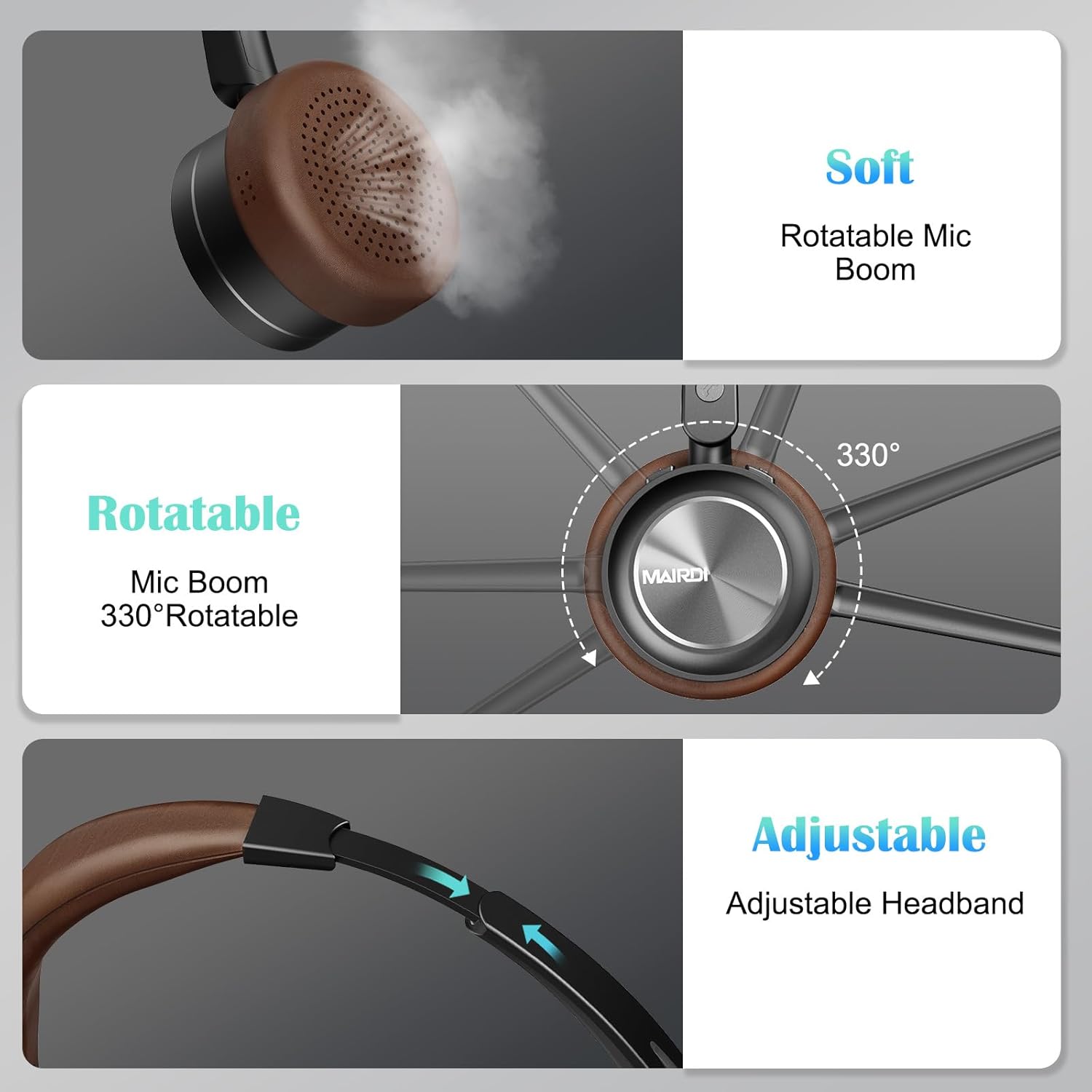
A visual breakdown of the MAIRDI M890DBTC headset's comfort features, including soft earpads, a 330-degree rotatable microphone boom, and an adjustable stainless steel headband.
4. Pengaturan dan Pengisian Daya
4.1 Biaya Awal
Before first use, fully charge the headset. Connect the provided USB charging cable to the headset's Mini USB port and a power source (e.g., computer USB port or USB wall adapter). The LED indicator will show charging status and turn off or change color when fully charged (approximately 2 hours).
4.2 Daya Hidup/Mati
- Nyalakan: Tekan dan tahan Tombol Daya selama 3 detik hingga indikator LED berkedip biru.
- Matikan: Tekan dan tahan Tombol Daya selama 3 detik hingga indikator LED berkedip merah lalu mati.
5. Petunjuk Pengoperasian
5.1 Pemasangan Bluetooth
- Pastikan headset dimatikan.
- Tekan dan tahan Tombol Daya selama kurang lebih 5-7 detik hingga indikator LED berkedip merah dan biru secara bergantian. Ini menandakan mode pemasangan (pairing mode).
- On your device (smartphone, PC, laptop), enable Bluetooth and search for available devices.
- Select "MAIRDI M890DBTC" from the list of found devices.
- Setelah terhubung, indikator LED akan berkedip biru perlahan.
5.2 Konektivitas Multipoint
The MAIRDI M890DBTC supports connecting to two Bluetooth devices simultaneously.
- Pair the headset with the first device (e.g., smartphone) as described in Section 5.1.
- Nonaktifkan Bluetooth pada perangkat pertama. Headset akan kembali memasuki mode pemasangan.
- Pair the headset with the second device (e.g., laptop).
- Aktifkan kembali Bluetooth pada perangkat pertama. Headset akan terhubung secara otomatis ke kedua perangkat.

The MAIRDI M890DBTC headset connected simultaneously to a smartphone and a laptop, illustrating its multipoint pairing capability for stable connection with two devices.
5.3 Manajemen Panggilan
- Menjawab/Mengakhiri Panggilan: Tekan Tombol Multifungsi (MFB) sekali.
- Tolak Panggilan: Tekan dan tahan MFB selama 2 detik.
- Panggil Ulang Nomor Terakhir: Tekan dua kali MFB.
- Bisukan/Suarakan Mikrofon: Press the Mute Button once during a call. The LED indicator on the microphone will illuminate when muted.

An image depicting a person wearing the MAIRDI M890DBTC headset, highlighting the noise-canceling microphone feature and the mute button functionality. Visual representation of sound waves before and after noise cancellation is included.
5.4 Kontrol Volume
- Volume Naik: Tekan tombol Volume Naik (+).
- Volume Turun: Tekan tombol Volume Turun (-).
6. Pemeliharaan
- Bersihkan headset secara teratur dengan kain lembut dan kering.
- Avoid exposing the headset to extreme temperatures, humidity, or corrosive substances.
- Simpan headset di tempat yang sejuk dan kering saat tidak digunakan.
- Do not attempt to disassemble or repair the headset yourself, as this will void the warranty.
7. Penyelesaian masalah
Headset 7.1 Tidak Menyala
- Ensure the headset is fully charged. Connect it to a power source and allow it to charge for at least 30 minutes before attempting to power on again.
7.2 Tidak Dapat Dipasangkan dengan Perangkat
- Pastikan headset berada dalam mode pemasangan (LED berkedip merah dan biru bergantian).
- Pastikan Bluetooth diaktifkan pada perangkat Anda dan berada dalam jarak 10 meter (33 kaki) dari headset.
- Cobalah untuk memulai ulang headset dan perangkat Anda.
- Clear the Bluetooth pairing list on your device and attempt to pair again.
7.3 Tidak Ada Suara atau Kualitas Suara Buruk
- Periksa tingkat volume pada headset dan perangkat Anda yang terhubung.
- Ensure the headset is properly connected to your device. Re-pair if necessary.
- Move closer to your device to avoid interference or range issues.
- If using with a PC, ensure the MAIRDI M890DBTC is selected as the default audio input/output device in your sound settings.
7.4 Mikrofon Tidak Berfungsi
- Ensure the microphone is not muted (check the LED indicator on the microphone boom).
- Verify that the microphone boom is positioned correctly towards your mouth.
- Periksa pengaturan audio perangkat Anda untuk memastikan mikrofon headset dipilih sebagai perangkat input.
8. Spesifikasi
| Model | M890DBTC |
| Teknologi Konektivitas | Nirkabel (Bluetooth 5.1) |
| Jangkauan Bluetooth | Hingga 20 meter (60 kaki) |
| Daya Tahan Baterai (Waktu Bicara) | Hingga 30 jam |
| Daya Tahan Baterai (Waktu Siaga) | Hingga 200 jam |
| Waktu Pengisian Daya | Sekitar 2 jam |
| Mikropon | Advanced Noise-Canceling |
| Ukuran Pengemudi Speaker | ukuran 40mm |
| Rentang Frekuensi | 20 Hz - 20,000 Hz |
| Berat | 0.21 Kilogram (7.4 ons) |
| Bahan | Kulit, Plastik, Baja Tahan Karat |

The MAIRDI M890DBTC headset positioned over a circuit board, illustrating its advanced Bluetooth 5.1 technology and 40mm speaker drivers for high-definition audio.
9. Garansi dan Dukungan
MAIRDI products are designed for reliability and performance. For warranty information or technical support, please refer to the contact details provided on the MAIRDI official webSimpan bukti pembelian Anda di situs web atau dokumen pembelian Anda. Simpan bukti pembelian Anda untuk klaim garansi.
Untuk bantuan lebih lanjut, silakan kunjungi MAIRDI Store on Amazon.