
1. Pendahuluan
This manual provides detailed instructions for the setup, operation, and maintenance of your edaiser Swivel Keyboard Case. Please read this manual thoroughly before using the product to ensure proper function and longevity. This keyboard case is designed to enhance your iPad mini experience by providing a physical keyboard and trackpad, along with robust protection and versatile viewsudut ing.
2. Isi Paket
- edaiser Swivel Keyboard Case
- Kabel Pengisian Daya USB-C
- Panduan Pengguna
3. Kompatibilitas
Casing keyboard ini dirancang khusus untuk model iPad berikut:
- 2021 iPad mini 6th Generation (8.3-inch)Nomor Model: A2567, A2568, A2569
- 2024 iPad mini 7th Generation (8.3-inch)Nomor Model: A2993, A2995, A2996
To verify your iPad model number, check the back of your iPad or go to Settings > General > About > Model Number.

Image: Compatible iPad models and their model numbers.
4. Fitur Produk
4.1 Putaran dan Rotasi
The keyboard case features a 360-degree rotatable hinge and 180-degree fold, allowing for multiple viewing and typing modes:
- Mode Laptop: Standard laptop-like setup for typing.
- Modus Berdiri: Ideal for watching videos or presentations.
- Mode Tenda: Suitable for touch-based interactions or drawing.
- Mode Tablet: Fold the keyboard back for a traditional tablet experience.

Image: iPad mini in laptop mode, demonstrating swivel and rotation.

Image: Different usage modes of the keyboard case.
4.2 RGB Backlit Keyboard and Trackpad
The integrated keyboard features RGB backlighting for comfortable typing in low-light conditions. The precision trackpad supports multi-touch gestures for enhanced navigation within iPadOS.
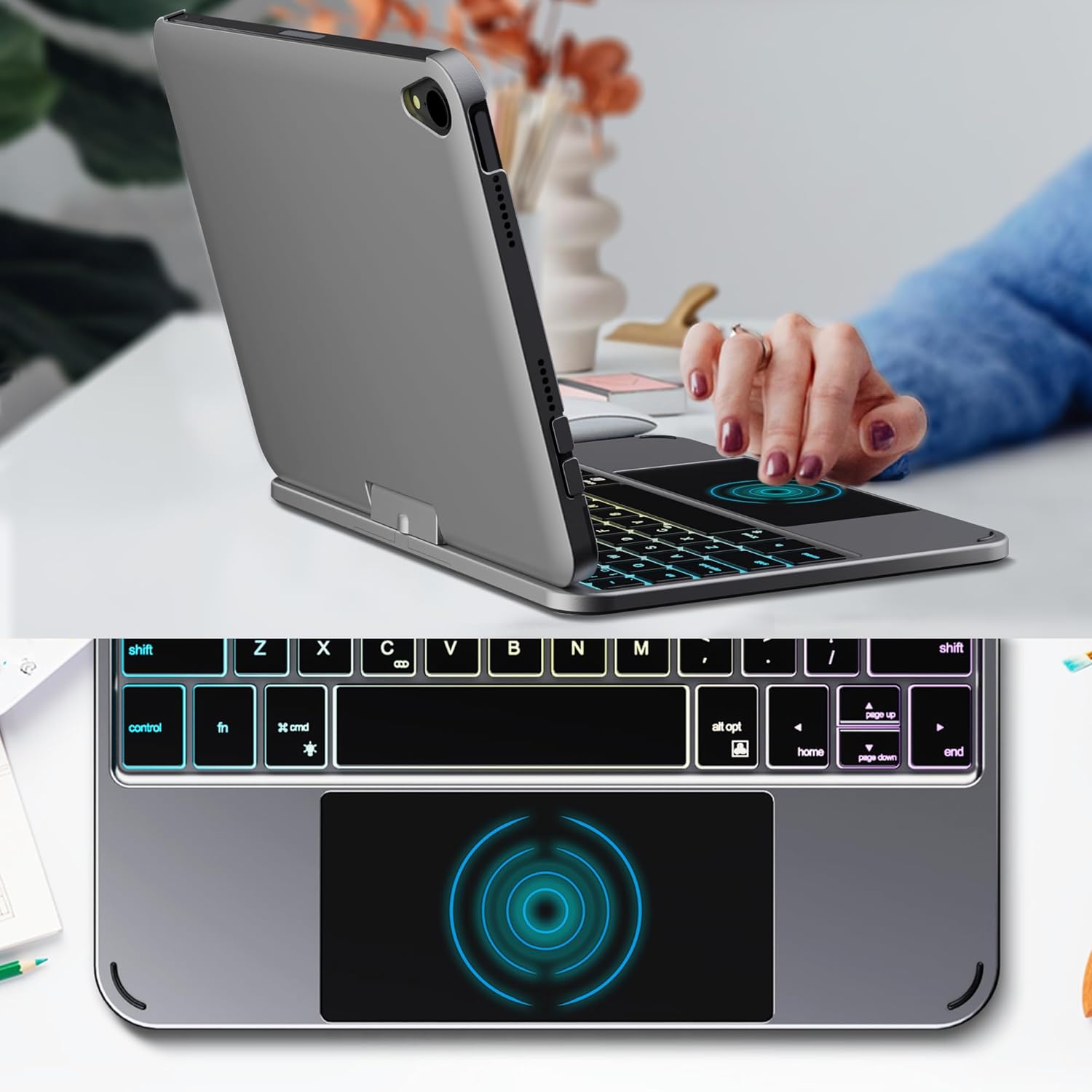
Image: Backlit keyboard and trackpad in use.

Image: Keycap and touchpad dimensions, and available colors.
4.3 Protection and Design
The case provides comprehensive protection for your iPad mini, safeguarding it from scratches and minor impacts. It features precise cutouts for the camera, charging port, and speakers.

Image: Case features and drop protection illustration.
5. Petunjuk Penyiapan
5.1 Installing Your iPad mini
- Gently align your iPad mini with the case.
- Press the iPad firmly into the case until it is securely seated. Ensure all edges are properly covered and ports/buttons are accessible.
Video: Demonstrates the installation of the iPad mini into the keyboard case, followed by usage in laptop mode, trackpad interaction, and backlight activation.
5.2 Pemasangan Bluetooth
- Nyalakan keyboard: Locate the power button on the keyboard and press it to turn on the device.
- Activate Bluetooth on the keyboard: Press the "Fn" key and the "C" key simultaneously to activate Bluetooth pairing mode. The Bluetooth indicator light will flash.
- Open iPad Settings: Di iPad Anda, buka Pengaturan > Bahasa Indonesia: Bluetooth.
- Menghubungkan: In the Bluetooth device list, find "iPad keyboard" and tap to connect. A pairing request may appear; confirm it.
- The Bluetooth indicator light on the keyboard will stop flashing once successfully paired.
Video: Demonstrates the rotation of the iPad within the case, various usage modes, and the Bluetooth pairing process for the keyboard.
6. Petunjuk Pengoperasian
6.1 Fungsi Keyboard
The keyboard includes standard keys and function keys specific to iPadOS:
- Fn + C: Activates Bluetooth pairing mode.
- Fn + ikon Bola Lampu: Toggles keyboard backlight on/off and cycles through brightness levels.
- Fn + RGB icon: Changes backlight color (if multiple colors are supported).
- Kunci rumah: Returns to the iPad home screen.
- Kunci pencarian: Activates iPad search.
- Tombol volume: Adjusts iPad volume.
- Tombol kontrol media: Play/Pause, Previous Track, Next Track.
6.2 Gerakan Trackpad
The trackpad supports various multi-touch gestures for efficient navigation:
- Ketuk satu jari: Left-click.
- Ketuk dengan dua jari: Right-click (context menu).
- Gulir dua jari: Scroll up/down or left/right.
- Gesek ke atas dengan tiga jari: Go to the home screen.
- Three-finger swipe up and hold: Open the App Switcher.
- Geser tiga jari ke kiri/kanan: Switch between open apps.
- Cubit untuk memperbesar: Zoom in/out on content.
7. Pengisian Daya dan Baterai
The keyboard case is powered by a built-in rechargeable battery. Use the provided USB-C cable to charge the keyboard.
- Kapasitas Baterai: 500 mAh
- Waktu Siaga: Hingga 90 hari
- Waktu Kerja: Up to 180 hours (without backlight)
- Indikator Pengisian Daya: The LED indicator will show charging status.
Connect the USB-C cable to the charging port on the keyboard and the other end to a USB power adapter (not included).

Image: Battery specifications and charging port location.
8. Pemeliharaan
- Jauhkan casing keyboard dari cairan dan suhu ekstrem.
- Bersihkan casing dan keyboard dengan kain lembut.amp kain. Hindari bahan kimia keras.
- Jangan mencoba membongkar produk.
9. Penyelesaian masalah
9.1 Keyboard Tidak Terhubung melalui Bluetooth
- Pastikan keyboard dihidupkan dan terisi penuh.
- Pastikan Bluetooth diaktifkan di iPad Anda.
- Press "Fn" + "C" on the keyboard to enter pairing mode.
- Hapus perangkat tersebut dari pengaturan Bluetooth iPad Anda dan coba pasangkan kembali.
- Mulai ulang iPad dan keyboard Anda.
9.2 Tombol Tidak Merespons
- Check the battery level of the keyboard.
- Pastikan keyboard terhubung dengan benar melalui Bluetooth.
- Bersihkan area sekitar tombol untuk membuang segala kotoran.
9.3 Trackpad Not Working
- Pastikan keyboard terhubung melalui Bluetooth.
- Periksa pengaturan iPad: Pengaturan > Umum > Trackpad & Mouse to ensure it's enabled and sensitivity is adjusted.
- Mulai ulang iPad dan keyboard Anda.
10. Spesifikasi
| Fitur | Spesifikasi |
|---|---|
| Merek | edaiser |
| Nomor Model | edaiser Swivel 83ATS |
| Model yang Kompatibel | Apple iPad mini 6th Gen (8.3-inch), iPad mini 7th Gen (A17 Pro) |
| Konektivitas | Bahasa Indonesia: Bluetooth |
| Jenis Papan Ketik | Compact with RGB Backlight |
| Papan tombol pelacak | Integrated, Multi-touch |
| Sumber Daya | Bertenaga Baterai |
| Kapasitas Baterai | 500 mAh |
| Waktu Siaga | Hingga 90 hari |
| Waktu Kerja | Hingga 180 jam (tanpa lampu latar) |
| Port Pengisian Daya | USB Tipe C |
| Jumlah Kunci | 64 |
| Keycap Size | Ukuran 11.5 x 12.9 mm |
| Ukuran Touchpad | Ukuran 98.4 x 49.7 mm |
11. Garansi dan Dukungan
For warranty information and customer support, please refer to the official edaiser websitus web atau hubungi layanan pelanggan mereka secara langsung. Simpan struk pembelian Anda untuk klaim garansi.