
1. Pendahuluan
The PROHEAR 037 Bluetooth 5.0 Hearing Protection Headphones are designed to provide effective noise reduction while allowing for wireless audio streaming and call management. These headphones are ideal for use in noisy environments such as workshops, during lawn mowing, or snowblowing, ensuring your hearing is protected while you remain connected and entertained.
2. Informasi Keselamatan
Always prioritize your hearing safety. Ensure the headphones are worn correctly to achieve the stated Noise Reduction Rating (NRR). Prolonged exposure to noise levels above 85dB can cause permanent hearing damage.
- Ensure a proper seal around your ears for maximum noise reduction.
- Do not modify the headphones, as this may compromise their protective capabilities.
- Keep the headphones away from extreme temperatures and liquids.

3. Isi Paket
Upon opening your PROHEAR 037 package, you should find the following items:
- PROHEAR 037 Hearing Protection Headphones
- Kabel Pengisian Daya USB
- Black Leather Carry Bag
- User Manual (dokumen ini)

4. Fitur Produk
The PROHEAR 037 headphones are equipped with advanced features for superior performance and user convenience:
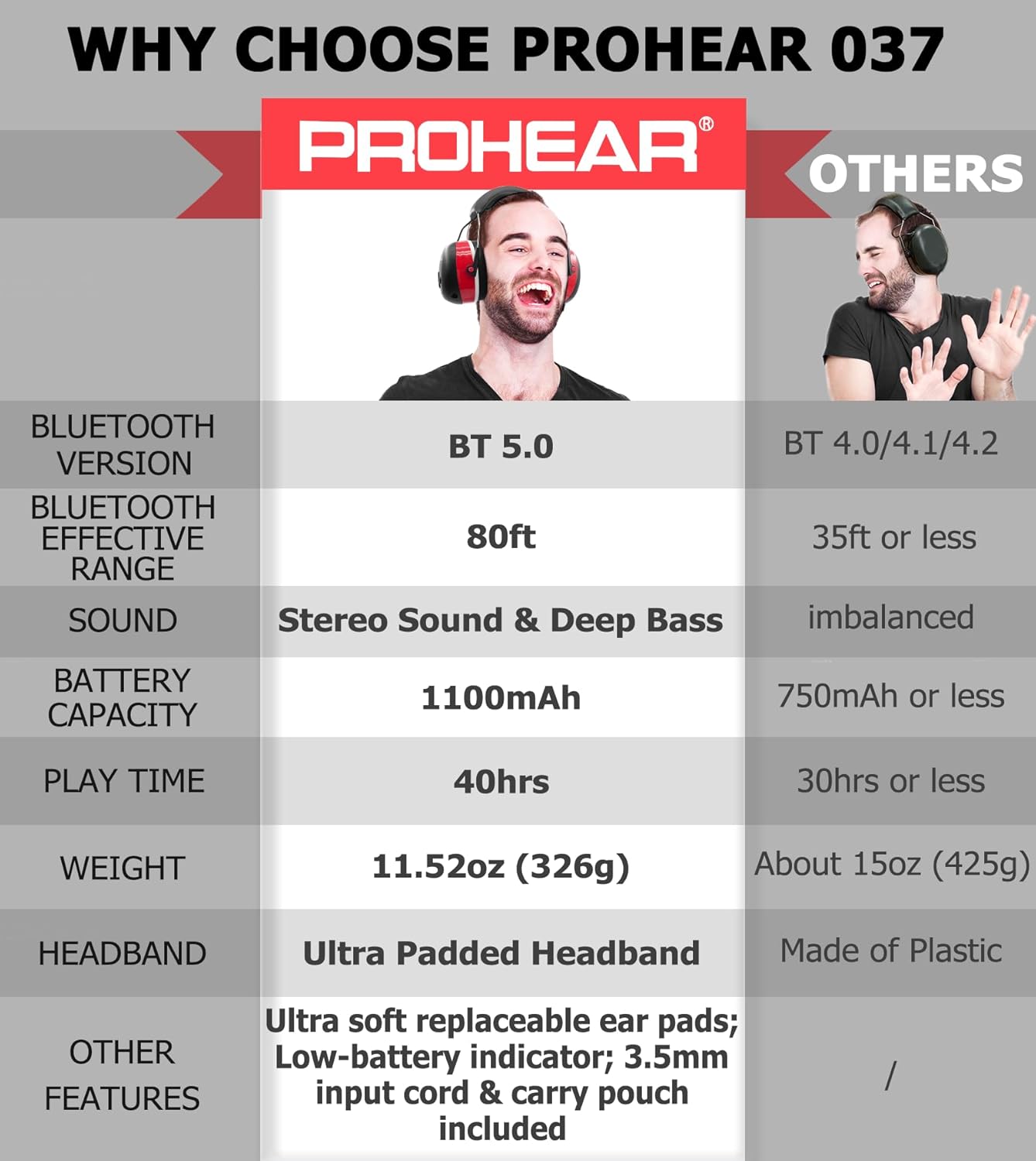
- Teknologi Bluetooth 5.0: Provides a stable and fast wireless connection with an effective range of up to 80 feet.
- 25dB Noise Reduction Rating (NRR): Effectively protects your hearing in loud environments.
- Suara Stereo Berkualitas Tinggi: Enjoy clear audio for music and calls.
- Daya Tahan Baterai yang Lama: Built-in 1100mAh rechargeable lithium battery offers up to 40 hours of playtime.
- Desain yang nyaman: Features an ultra-padded headband and soft, breathable ear pads for extended wear.
- Kontrol yang Mudah Digunakan: Intuitive buttons allow for volume adjustment, track skipping, and call management without removing the muffs.
- Mikrofon internal: Untuk komunikasi bebas genggam.
- Mode Berkabel: Includes a 3.5mm connector for continuous use even when the battery is depleted.

5. Pengaturan
5.1. Mengisi Daya Headphone
Before first use, fully charge your PROHEAR 037 headphones.
- Hubungkan kabel pengisi daya USB yang tersedia ke port pengisian daya pada headphone.
- Plug the other end of the USB cable into a compatible USB power source (e.g., computer USB port, power bank, or car charger).
- Indikator LED akan menunjukkan status pengisian daya (lihat bagian indikator LED untuk detailnya).
- Setelah terisi penuh, lepaskan kabel pengisi daya.

5.2. Pemasangan Bluetooth
Untuk menghubungkan headphone Anda ke perangkat berkemampuan Bluetooth:
- Ensure the headphones are powered off. Press and hold the Power/Multi-function button until the LED indicator flashes blue and red, indicating pairing mode.
- Pada perangkat Anda (ponsel pintar, tablet, dll.), aktifkan Bluetooth dan cari perangkat yang tersedia.
- Select "PROHEAR 037" from the list of devices.
- Setelah terhubung, indikator LED akan menunjukkan lampu biru menyala terus.
6. Petunjuk Pengoperasian
6.1. Kontrol Atasview
The control buttons are located on the right earcup for easy access.

- Power/Multi-function Button (Center 'M' button):
- Tekan dan tahan: Hidupkan/Matikan daya
- Single press: Play/Pause music, Answer/End call
- Double press: Redial last number
- Triple press: Activate voice assistant (if supported by device)
- Volume Up Button ('+' button): Tekan sekali untuk menaikkan volume.
- Volume Down Button ('-' button): Tekan sekali untuk mengecilkan volume.
- Next Track Button ('>' button): Single press to skip to the next song.
- Previous Track Button ('<' button): Single press to go to the previous song.
6.2. Mode Kabel
If the battery is low or you prefer a wired connection, use the included 3.5mm audio cable. Simply plug one end into the headphone's audio jack and the other into your audio device. In wired mode, controls on the headphones may be limited, and you will operate audio playback directly from your connected device.

7. Adjustability and Comfort
The PROHEAR 037 headphones are designed for a comfortable and secure fit for various head sizes.
- Penyesuaian ikat kepala: Gently slide the earcups up or down along the metal frame to adjust the headband length until the earcups comfortably cover your ears.
- Ear Pad Seal: Ensure the soft ear pads create a complete seal around your ears to maximize noise reduction. The ultra-padded headband and soft ear pads are designed to reduce pressure during long periods of wear.


8. Pemeliharaan
Proper care will extend the life and performance of your PROHEAR 037 headphones:
- Pembersihan: Usap bagian penutup telinga dan ikat kepala dengan kain lembut.amp kain. Jangan gunakan bahan kimia keras atau pembersih abrasif.
- Penyimpanan: Store the headphones in the provided carry bag when not in use to protect them from dust and damage. Keep them in a cool, dry place.
- Penggantian Bantalan Telinga: The ear pads are designed to be snap-in for easy maintenance and replacement.
9. Penyelesaian masalah
If you encounter issues with your PROHEAR 037 headphones, try the following solutions:
- Tidak Ada Daya: Pastikan headphone terisi penuh. Sambungkan ke sumber daya menggunakan kabel USB.
- Tidak Dapat Dipasangkan melalui Bluetooth:
- Pastikan headphone dalam mode pemasangan (LED berkedip biru dan merah).
- Ensure Bluetooth is enabled on your device and it is within the 80ft range.
- Lupakan perangkat tersebut dari pengaturan Bluetooth ponsel Anda dan coba pasangkan lagi.
- Mulai ulang headphone dan perangkat Anda.
- Kualitas Suara Buruk:
- Check the Bluetooth connection strength; move closer to your device.
- Pastikan bantalan telinga menempel rapat di sekitar telinga Anda.
- Test with a different audio source or in wired mode.
- Mikrofon Tidak Berfungsi: Ensure the microphone is not obstructed and the headphones are correctly oriented (microphone near your face). Check device settings for microphone input.
10. Spesifikasi
| Fitur | Spesifikasi |
|---|---|
| Model | PROHEAR 037 |
| Versi Bluetooth | 5.0 |
| Peringkat Pengurangan Kebisingan (NRR) | 25dB |
| Kapasitas Baterai | 1100 mAh |
| Waktu bermain | Hingga 40 jam |
| Waktu Pengisian Daya | Sekitar 4 jam |
| Range Nirkabel | Hingga 80 kaki |
| Berat | 11.52 oz (326g) |
11. Garansi dan Dukungan
PROHEAR products are manufactured to high-quality standards. For warranty information, product support, or to inquire about replacement parts, please refer to the warranty card included in your package or visit the official PROHEAR websitus. Harap simpan bukti pembelian Anda untuk klaim garansi.