
FOYCOY D8
FOYCOY D8 Bluetooth Headphones User Manual
Model: D8
1. Pendahuluan
Thank you for choosing the FOYCOY D8 Bluetooth Headphones. These wireless earbuds are designed for an active lifestyle, offering extended playtime, secure fit, and high-fidelity audio. This manual provides detailed instructions on how to set up, operate, maintain, and troubleshoot your headphones to ensure optimal performance.

Image: The FOYCOY D8 Bluetooth Headphones, showing both earbuds and the charging case with its LED display.
2. Isi Paket
Pastikan semua item ada dalam paket Anda:
- FOYCOY D8 Wireless Earbuds (Left and Right)
- 2600mAh Wireless Charging Case
- Kabel Pengisian Daya USB-C
- User Manual (dokumen ini)
- Additional Eartips (S, M, L sizes; M size pre-installed)

Image: An illustration showing the FOYCOY D8 earbuds, charging case, USB-C cable, and different sized eartips included in the package.
3. Produk Lebihview
The FOYCOY D8 headphones feature an ergonomic design with over-ear earhooks for a secure and comfortable fit, ideal for sports and active use. The charging case provides extended battery life and doubles as a power bank.
Komponen Earbud:
- Tombol Multi-fungsi: Untuk mengontrol musik, panggilan, dan asisten suara.
- Mikropon: Built-in for clear calls.
- Pengisian Kontak: Untuk pengisian daya di dalam wadah.
- kait telinga: Provides secure fit over the ear.
- Tip jaringan: Soft silicone for in-ear comfort and sound isolation.
Komponen Casing Pengisi Daya:
- Tampilan Daya LED: Menunjukkan persentase baterai yang tersisatage of the case and charging status of individual earbuds.
- Port Input USB-C: Untuk mengisi daya casing.
- Port Keluaran USB: To use the case as a power bank for other devices.
- Area Pengisian Daya Nirkabel: For wireless charging of the case.

Gambar: Sebuah visualisasiview of the FOYCOY D8 headphones and their charging case, illustrating features such as extended playtime, wireless charging, and power bank capability.
4. Pengaturan
4.1 Initial Charge & Preparation
Sebelum digunakan pertama kali, pastikan earbud dan wadah pengisi daya terisi penuh.
- Remove Insulating Film: Locate and remove the protective insulating film from the charging contacts on both earbuds. The headphones will not turn on or charge if these films are not removed.
- Ajukan Kasus: Connect the charging case to a power source using the provided USB-C cable or place it on a wireless charging pad. The LED display will show the charging progress.
- Isi daya earbud: Place both earbuds into the charging case. Ensure they are properly seated; the LED display on the case will show their charging status.
Penting: If the charging case is over-discharged (shows "0"), it may take 15-30 minutes for the LED display to update after plugging in the power supply.

Image: The charging case displaying its battery percentage and the charging status of the earbuds.
4.2 Memilih dan Memakai Ujung Earphone
Selecting the correct eartip size is crucial for comfort, secure fit, and optimal sound quality.
- Pilih Eartips: Experiment with the included S, M, and L sized eartips to find the pair that provides the best seal and comfort for your ears. The M size is pre-installed.
- Install Eartips: Gently attach the chosen eartips to the earbuds.
- Wear Earbuds: Place the earbud into your ear canal.
- Adjust Earhooks: Guide the adjustable earhook over your ear to secure the earbud in place. Ensure a snug and comfortable fit for stability during movement.

Image: Instructions on selecting the correct eartip size and properly wearing the earbuds with the earhooks for a secure fit.
4.3 Memasangkan dengan Perangkat Anda
The FOYCOY D8 headphones feature one-step auto pairing for convenience.
- Nyalakan: Keluarkan kedua earbud dari casing pengisi daya. Earbud akan otomatis menyala dan masuk ke mode berpasangan.
- Aktifkan Bluetooth: Pada telepon pintar, tablet, atau perangkat lain yang mendukung Bluetooth, buka pengaturan Bluetooth.
- Menghubungkan: Pencarian untuk "D8" in the list of available devices and select it to connect. Once connected, you will hear a confirmation tone, and the earbuds will be ready for use.
The earbuds are compatible with most Bluetooth-enabled devices, including Android smartphones, iPhone series, iPads, MacBooks, computers, and smart TVs.

Image: A visual guide to the one-step auto pairing process, showing the earbuds in their case and the Bluetooth connection screen on a smartphone.
5. Petunjuk Pengoperasian
5.1 Daya Hidup/Mati
- Nyalakan: Keluarkan earbud dari wadah pengisi daya. Earbud akan menyala secara otomatis.
- Matikan: Place the earbuds back into the charging case. They will automatically power off and begin charging. Alternatively, long press the multi-function button for 2 seconds to manually power off.
5.2 Kontrol Musik
- Putar/Jeda: Click the multi-function button once on either the Left (L) or Right (R) earbud.
- Lagu Berikutnya: Quick-click the Right (R) earbud's multi-function button twice.
- Lagu Sebelumnya: Quick-click the Left (L) earbud's multi-function button twice.
- Volume Naik: Long press the Right (R) earbud's multi-function button.
- Volume Turun: Long press the Left (L) earbud's multi-function button.
5.3 Kontrol Panggilan
- Menjawab/Mengakhiri Panggilan: Click the multi-function button once on either L/R earbud.
- Tolak Panggilan: Long press the multi-function button for 2 seconds on either L/R earbud.
5.4 Aktivasi Asisten Suara
- Aktifkan Asisten Suara (Siri, Google Assistant, dll.): Quick-click the multi-function button three times on either L/R earbud.

Image: A comprehensive guide to the on-device button controls for music playback, call handling, and activating voice assistants.
5.5 Mono & Binaural Modes
The earbuds support both stereo and mono modes:
- Modus Binaural: Use both earbuds simultaneously for a full stereo sound experience.
- Mode Mono: Use either the left or right earbud independently. This allows you to keep one earbud charging while using the other, or to remain aware of your surroundings.
5.6 Charging the Earbuds & Case
- Pengisian Penyumbat Telinga: Place the earbuds into the charging case. They will automatically begin charging. The case's LED display will show the charging status of each earbud.
- Case Charging (USB-C): Connect the provided USB-C cable to the charging case's USB-C input port and to a power adapter (not included). The LED display will show the case's battery percentage.
- Case Charging (Wireless): Place the charging case on a compatible wireless charging pad (not included). Ensure the case is centered on the pad for efficient charging.
A full charge provides approximately 9 hours of listening time for the earbuds, and the 2600mAh charging case can provide multiple recharges for a total playtime of up to 120 hours.
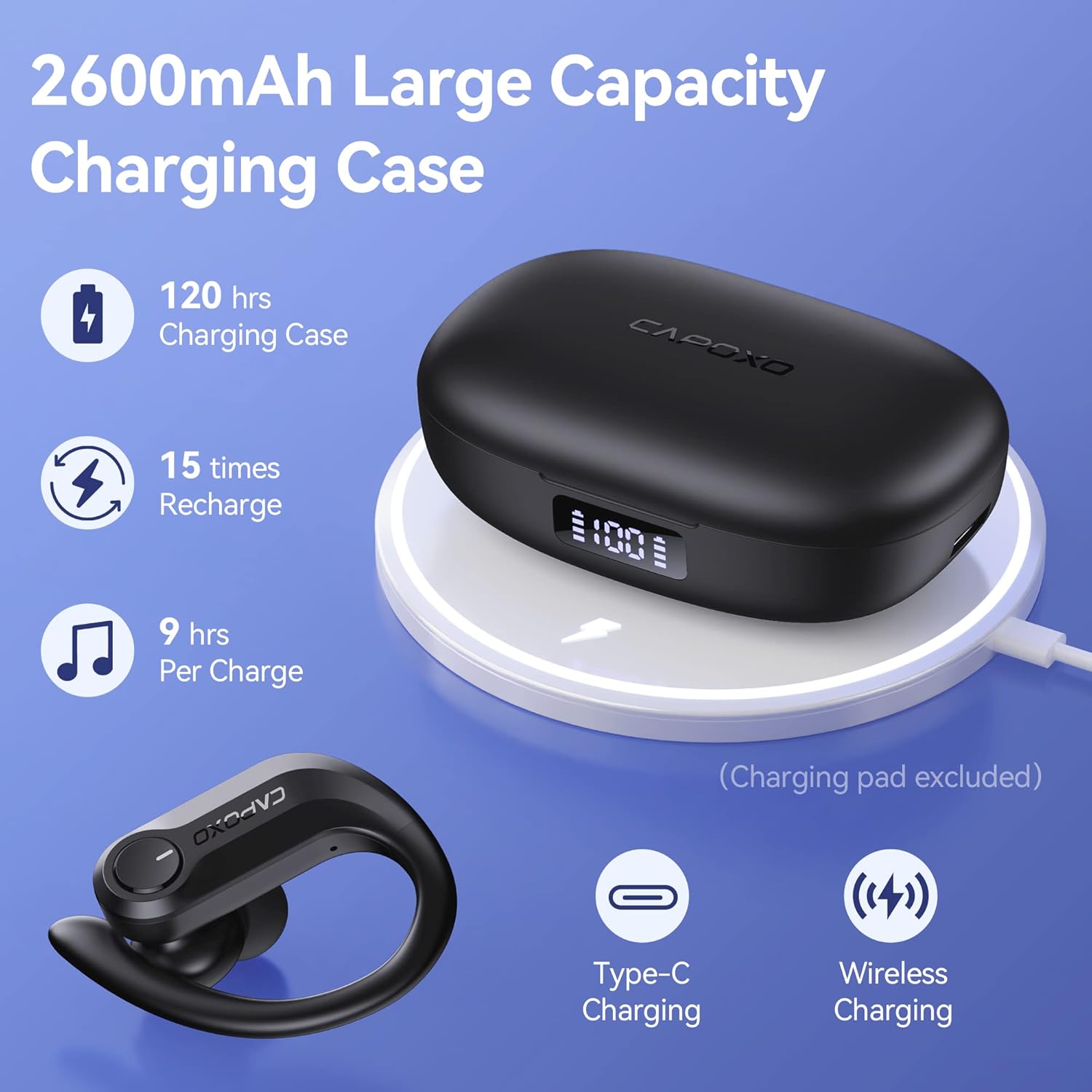
Image: The charging case highlighting its large capacity, extended playtime, and support for both Type-C and wireless charging.
5.7 Menggunakan Kotak Pengisian Daya sebagai Power Bank
The 2600mAh charging case can also function as an emergency power bank for your mobile phone or other small devices.
- Hubungkan Perangkat: Use a USB cable (not included) to connect your device to the USB output port on the right side of the charging case.
- Pengisian daya: The charging case will begin to charge your connected device. The LED display will show the remaining power of the case.

Image: The charging case being used as an emergency power bank to charge a smartphone.
6. Pemeliharaan
6.1 Pembersihan
- Bersihkan earbud secara teratur, terutama bagian eartip dan kontak pengisi daya, dengan kain yang lembut, kering, dan tidak berbulu.
- If the wireless earbuds cannot be charged, try wiping the pins and points with an alcohol cloth to remove any residue.
- Jangan gunakan bahan kimia keras atau bahan abrasif untuk membersihkan.
6.2 Penyimpanan
- Simpan earbud dalam wadah pengisi dayanya saat tidak digunakan untuk melindunginya dan menjaga dayanya tetap terisi.
- Simpan perangkat di tempat yang sejuk dan kering, jauhkan dari suhu ekstrem dan sinar matahari langsung.
- Charge the charging case at least once every two weeks to prevent over-discharge, even if not in regular use.
6.3 Tahan Air (IPX7)
The FOYCOY D8 earbuds are IPX7 waterproof, meaning they can withstand submersion in up to 1 meter of water for 30 minutes. This makes them suitable for workouts, running, and other activities where they may be exposed to sweat or light rain.
- Jangan sengaja merendam earbud dalam jangka waktu lama atau kedalaman melebihi spesifikasi.
- The charging case is not waterproof. Keep it dry.
- Pastikan earbud kering sebelum memasukkannya kembali ke dalam wadah pengisian daya untuk mencegah kerusakan pada kontak pengisian daya.

Image: The earbuds demonstrating their IPX7 waterproof capability, suitable for active use.
7. Penyelesaian masalah
Masalah Umum & Solusinya:
| Masalah | Kemungkinan Penyebab | Larutan |
|---|---|---|
| Earbuds do not turn on or charge when taken out of case. | Protective insulating film still on charging contacts. | Remove the insulating film from the charging points on both earbuds. Place them back in the case to activate. |
| No pairing name "D8" shown on phone, but charging case shows 100%. | Earbuds not activated or charging contacts are dirty. | Ensure insulating films are removed. Wipe the charging pins and points on the earbuds and in the case with an alcohol cloth. Place earbuds back in case, then remove to re-enter pairing mode. |
| Earbud tidak dapat diisi dayanya. | Dirty charging contacts or improper placement. | Wipe the charging pins on the earbuds and the charging points in the case with an alcohol cloth. Ensure earbuds are correctly seated in the case. |
| Charging case LED display shows "0" even when plugged in. | Charging case is over-discharged. | Wait 15-30 minutes after plugging in the power supply; the LED display will update. |
| Connection drops frequently (especially with iPhone). | Interference or software issue. | Try resetting the earbuds to factory settings (see below). Ensure no other devices are interfering with the Bluetooth signal. Update your phone's operating system if available. |
7.1 How to Restore Factory Default Settings
This action will delete all pairing data between the earbuds and your devices. Perform this if you experience persistent connection issues or wish to clear previous pairings.
- Langkah 1: Place both earbuds into the charging case. Ensure they are in the charging status.
- Langkah 2: Hold the multi-function button on keduanya earbuds for 8 seconds. The earbuds will flash Red & Blue light alternately for 3 seconds, indicating that both earbuds have been reset completely.
- Langkah 3: Pick up the earbuds to turn them on. Activate the Bluetooth setting on your device, search for "D8", and select it to connect.
If the issue persists, repeat the steps above.
8. Spesifikasi
| Fitur | Detil |
|---|---|
| Nama Model | D8 |
| Teknologi Konektivitas | Nirkabel (Bluetooth) |
| Versi Bluetooth | 5.3 (from A+ content) |
| Komponen yang Termasuk | Kotak Pengisi Daya, Kabel |
| Bahan | Plastik, Karet, Silikon |
| Penggunaan Khusus | Sport, Music, Exercising |
| Perangkat yang Kompatibel | Bluetooth-enabled devices (Android, iPhone, iPad, Mac Book, PC, Smart TV) |
| Jenis Kontrol | Media Control (On-device Button) |
| Tingkat Tahan Air | Tahan Air IPX7 |
| Daya Tahan Baterai (Earbud) | Kira-kira 9 jam sekali pengisian |
| Total Waktu Bermain (dengan casing) | Hingga 120 jam |
| Kapasitas Baterai Kotak Pengisian Daya | 2600 mAh |
| Fitur Casing Pengisian Daya | USB-C Input, USB Output (Power Bank), Wireless Charging, Dual LED Power Display |
| Bentuk Lubang Suara | Over-Ear (with earhooks) |
| Penempatan Telinga | Di Telinga |
| Kontrol Kebisingan | Passive Noise Cancellation (In-ear design) |
| Dimensi Produk | 6.93x6.93x11.06 inci |
| Berat Barang | 7.4 ons |
9. Garansi & Dukungan
For warranty information or technical support, please refer to the contact details provided with your purchase or visit the official FOYCOY websitus. Simpan bukti pembelian Anda untuk klaim garansi.