
1. Pendahuluan
Thank you for choosing the SANODESK S1Q Electric Standing Desk. This desk is designed to provide a versatile and ergonomic workspace, allowing you to easily switch between sitting and standing positions. Its robust construction and intelligent features aim to enhance your comfort and productivity. Please read this manual thoroughly before assembly and operation to ensure safe and correct use of your new desk.
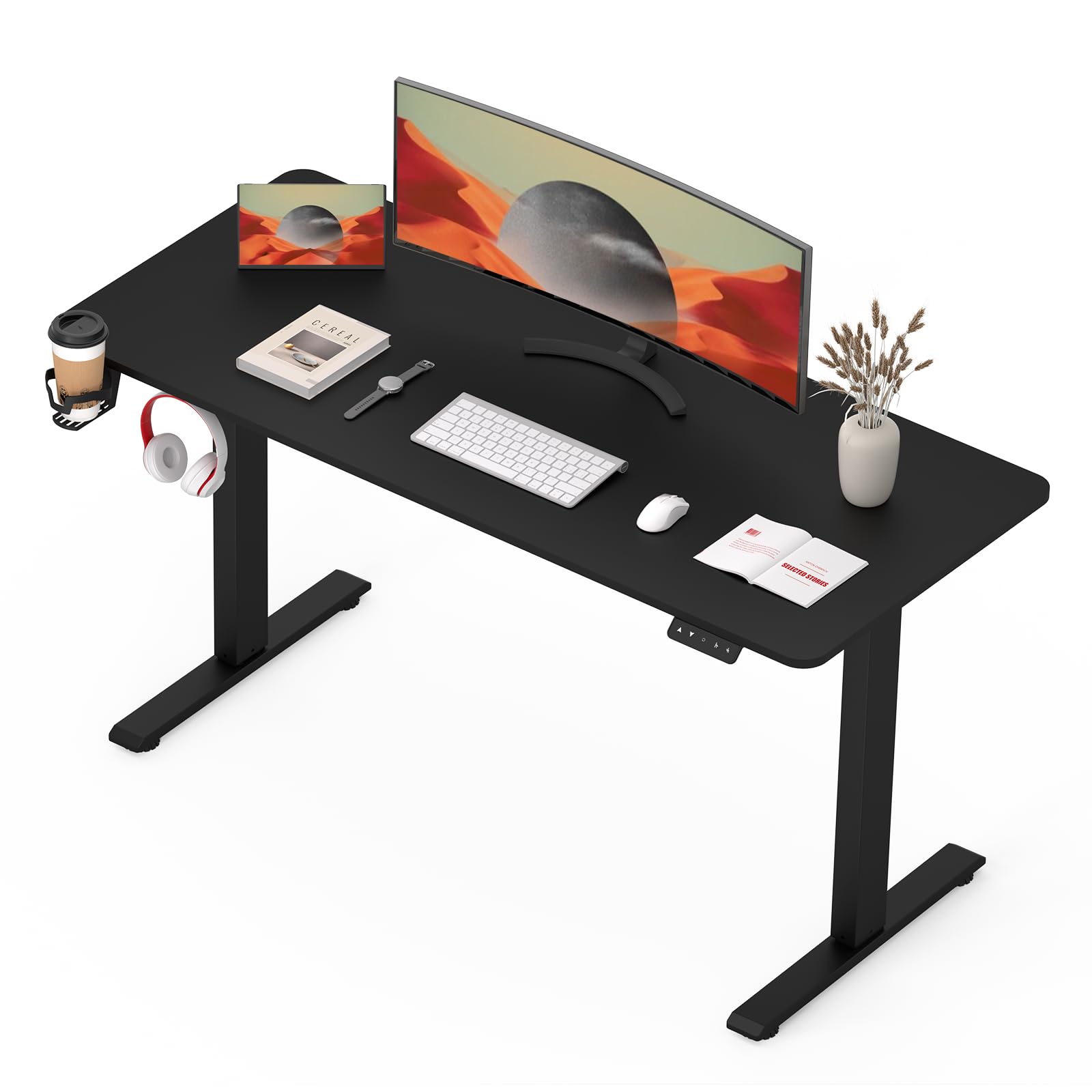
Image: The SANODESK S1Q Electric Standing Desk, showcasing desain minimalisnya dan ample workspace, equipped with dual monitors and a comfortable chair.
2. Petunjuk Keselamatan
To ensure safe operation and prolong the lifespan of your SANODESK S1Q, please observe the following safety guidelines:
- Pastikan semua komponen terpasang dengan kencang sebelum digunakan.
- Jauhkan anak-anak dan hewan peliharaan dari meja selama pengoperasian untuk mencegah cedera.
- Jangan membebani meja secara berlebihan. Kapasitas berat maksimum adalah 70 kg (154 lbs).
- Hindari menaruh cairan langsung pada panel kontrol atau komponen motor.
- Jangan membongkar atau memodifikasi komponen listrik meja. Hubungi personel yang berkualifikasi untuk perbaikan.
- Ensure there are no obstructions in the desk's path during height adjustment. The anti-collision system is designed to prevent damage, but manual checks are recommended.
- Only use the power adapter supplied with the desk.

Image: Detail of the desk's safe round corner design and environmental certifications (CARB, TSCA Title VI), highlighting product safety and quality.
3. Petunjuk Perakitan
While the SANODESK S1Q is designed for straightforward assembly, it is recommended to have two people for certain steps. Please ensure all parts are present before beginning.
3.1 Isi Paket
Before assembly, verify that you have received all the following components:
- Permukaan Meja (1)
- Leg Columns (2)
- Kaki (2)
- Kotak Kontrol (1)
- Handset/Control Panel (1)
- Adaptor Daya (1)
- Kabel Listrik (1)
- Hardware Kit (screws, Allen wrenches, cable ties)
3.2 Langkah Perakitan
- Bongkar Komponen: Keluarkan semua bagian dari kemasan dengan hati-hati dan letakkan pada permukaan yang bersih dan lembut untuk mencegah goresan.
- Attach Feet to Leg Columns: Securely fasten the feet to the bottom of each leg column using the provided screws.
- Attach Leg Columns to Desktop: Place the desktop upside down. Attach the leg columns to the pre-drilled holes on the underside of the desktop. Ensure they are aligned correctly.
- Pasang Kotak Kontrol: Mount the control box to the designated area under the desktop using the provided screws.
- Hubungkan Kabel: Connect the motor cables from the leg columns to the control box. Connect the handset cable to the control box. Finally, connect the power adapter to the control box.
- Mount Handset: Attach the control panel to the front edge of the desktop in a comfortable position.
- Manajemen Kabel: Use the included cable ties to organize and secure all cables, preventing them from dangling or getting caught.
- Flip the Desk: With assistance, carefully flip the desk upright onto its feet.
- Penyalaan Awal: Sambungkan kabel daya ke stopkontak di dinding.
4. Petunjuk Pengoperasian
The SANODESK S1Q features an intuitive control panel for easy height adjustment and memory functions.
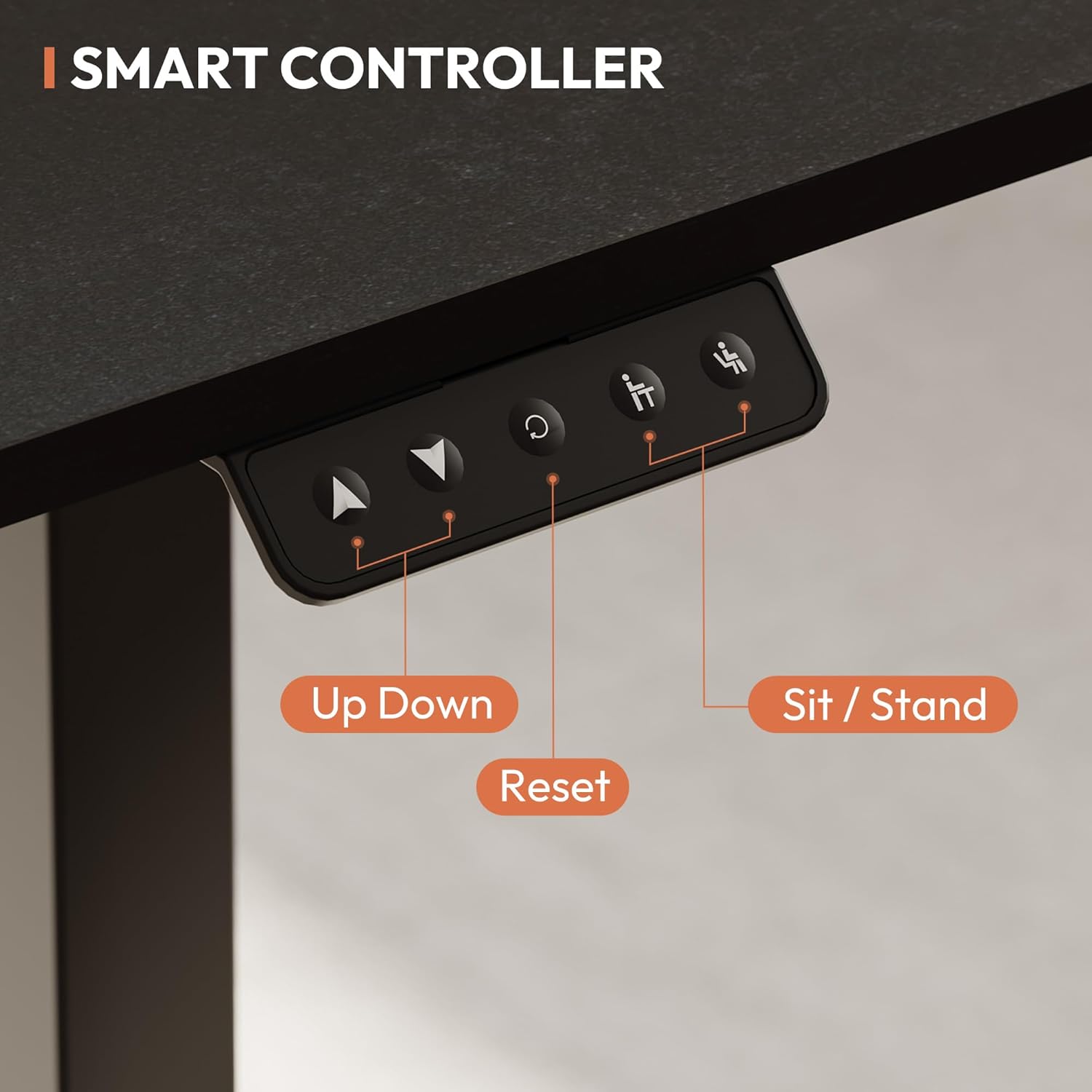
Image: The smart controller of the SANODESK S1Q, showing the clearly labeled buttons for height adjustment, reset, and two memory presets for sitting and standing positions.
4.1 Penyesuaian Tinggi Dasar
- Tekan dan tahan tombol Atas (▲) tombol untuk menaikkan meja.
- Tekan dan tahan tombol Turun (▼) tombol untuk menurunkan meja.
- Lepaskan tombol pada ketinggian yang Anda inginkan.

Image: Comparison of two SANODESK desks demonstrating the height adjustment range from a minimum of 71 cm to a maximum of 116 cm, accommodating various user heights.
4.2 Preset Memori
The control panel features two memory preset keys (labeled with a sitting and standing icon) to store your preferred sitting and standing heights.
- Tetapkan Posisi Memori:
- Sesuaikan ketinggian meja sesuai keinginan Anda menggunakan tombol Naik/Turun.
- Tekan tombol "M" button (or the button with a circle icon, depending on model variation) once. The display will show "S-".
- Within 3 seconds, press one of the preset buttons (sitting or standing icon). The display will show "S-1" or "S-2" to confirm the height is saved.
- Mengingat Posisi Memori:
- Simply press the desired preset button (sitting or standing icon). The desk will automatically move to the saved height.
4.3 Fungsi Reset
If the desk encounters an error or does not operate correctly, a reset may be required.
- Tekan dan tahan tombol Reset (R) button (or the button with a circle icon, if it functions as reset) for approximately 5 seconds until the desk moves to its lowest position and then slightly back up. Release the button. The desk is now reset.
4.4 Sistem Anti-Tabrakan
The SANODESK S1Q is equipped with an anti-collision system to prevent damage. If the desk encounters an obstruction during height adjustment, it will automatically stop and reverse slightly. Remove the obstruction before resuming operation.
The desk operates with an ultra-quiet motor, typically below 51 dB, ensuring a distraction-free environment.

Image: A visual representation of the desk's quiet operation, indicating noise levels below 50 dB, which is quieter than typical office sounds.
5. Pemeliharaan
Perawatan rutin memastikan umur panjang dan kinerja optimal meja Anda.
- Pembersihan: Usap permukaan meja dan bingkai dengan kain lembut.amp kain. Hindari pembersih abrasif atau bahan kimia keras.
- Manajemen Kabel: Periodically check and reorganize cables to prevent tangles and damage.
- Pengencang: Periksa semua sekrup dan baut secara berkala untuk memastikan semuanya kencang. Kencangkan kembali jika perlu.
- Pemeriksaan Motor: Listen for any unusual noises during operation. If you detect any, discontinue use and contact support.
6. Penyelesaian masalah
If you encounter issues with your SANODESK S1Q, refer to the following common problems and solutions:
| Masalah | Kemungkinan Penyebab | Larutan |
|---|---|---|
| Meja tidak bergerak. | Power cable disconnected, control box issue, motor issue. | Check power connections. Perform a reset (see Section 4.3). If problem persists, contact support. |
| Meja bergerak tidak rata atau menimbulkan suara yang tidak biasa. | Beban lebih, sambungan longgar, penyumbatan. | Reduce weight on desk. Check all connections. Perform a reset. Ensure no obstructions. |
| Sistem anti-tabrakan sering aktif. | Obstruction in path, sensor sensitivity. | Ensure clear path for desk movement. |
| Preset memori tidak berfungsi. | Preset tidak disimpan dengan benar. | Re-save your desired memory positions (see Section 4.2). |
7. Spesifikasi
Key technical specifications for the SANODESK S1Q Electric Standing Desk:
- Nama Model: Set EP1E
- Merek: SANODESK
- Dimensi Desktop: 110 cm x 60 cm (kira-kira 43.31 x 23.62 inci)
- Kisaran Penyesuaian Tinggi: 71 cm (28 inches) to 117 cm (46 inches)
- Kapasitas Berat Maksimal: 70 kg (154 pon)
- Tingkat Kebisingan: Di bawah 51 dB
- Warna: Hitam
- Fitur: Electric height adjustment, 2 memory presets, anti-collision system, quiet operation.
- GTIN/UPC: 810072847669
- ASIN: B0CMPSX4TN

Image: The SANODESK S1Q demonstrating its robust build and 60kg load capacity, indicating strong support for various office equipment.
8. Garansi & Dukungan
SANODESK is committed to providing high-quality products. For warranty information, technical support, or any questions regarding your S1Q Electric Standing Desk, please refer to the contact information provided at the point of purchase or visit the official SANODESK weblokasi.
Please have your model number (Set EP1E) and ASIN (B0CMPSX4TN) ready when contacting support.