
Perkenalan
Thank you for choosing the ACEZUK M01 Car Jump Starter. This device is designed to provide a reliable emergency start for your vehicle, act as a portable power bank, and offer a multi-mode LED flashlight. Please read this manual carefully before use to ensure proper operation and safety.
Komponen Produk
The ACEZUK M01 package includes the following items:
- Alat Pemantik Mobil ACEZUK M01
- Baterai Cerdas Clamp(Merah dan Hitam)
- Kabel Pengisian Daya USB-C
- Panduan Pengguna
- Storage Pouch (Note: A storage case is not included with this model.)

Image: Contents of the ACEZUK M01 package. This image displays the jump starter unit, smart battery clamps, a USB-C charging cable, the user manual, and a soft storage pouch.
Spesifikasi
| Merek | ASEPUK |
| Model | Pesawat M01 |
| Arus Puncak | 6000A |
| Kapasitas Baterai | 12800 mAh |
| Jil.tage | 12 Volt |
| Kompatibilitas Mesin | Hingga 7.0L Bensin, 5.5L Diesel |
| Komposisi Sel Baterai | Ion Litium |
| Berat Barang | 730 gram |
| Jenis Kecocokan Kendaraan | Cocok untuk semua umur |

Image: The 2.5-inch LCD screen on the ACEZUK M01 jump starter. The screen clearly shows the battery charge level, input/output indicators, and alerts for extreme temperatures, ensuring the device is ready for use.
Pengaturan dan Pengisian
Biaya Awal
Before first use, fully charge the ACEZUK M01 jump starter. Connect the provided USB-C charging cable to the device's Type-C input port and a suitable USB power adapter (not included). The LCD screen will indicate the charging status. A full charge is recommended for optimal performance.
Memeriksa Tingkat Baterai
The 2.5-inch LCD screen displays the current battery percentage. It is recommended to maintain the battery level above 25% for successful jump starts. Recharge the device when the battery level is low.
Instruksi Pengoperasian: Menyalakan Kendaraan dengan Bantuan Kabel Jumper
Ikuti langkah-langkah ini dengan cermat untuk menghidupkan kendaraan Anda dengan bantuan kabel jumper:
- Connect Smart Cable: Masukkan baterai pintar clamp cable into the jump starter's output port. Ensure a secure connection.
- Lampirkan Clamps ke Baterai: Hubungkan positif (+) cl . merahamp to the positive (+) terminal of your vehicle's battery. Connect the black negative (-) clamp ke terminal negatif (-) baterai kendaraan Anda.
- Nyalakan Kendaraan: Suatu ketika clamps are securely connected and the smart cable indicator shows a ready state (refer to the smart cable's indicator lights for specific signals), start your vehicle's engine.
- Hapus Clamps: Setelah mesin menyala, segera lepaskan smart lock.amps from the vehicle battery terminals, then disconnect the smart cable from the jump starter.
Penting: Always remove the clamps from the car battery immediately after the engine starts to prevent damage to the jump starter or vehicle.
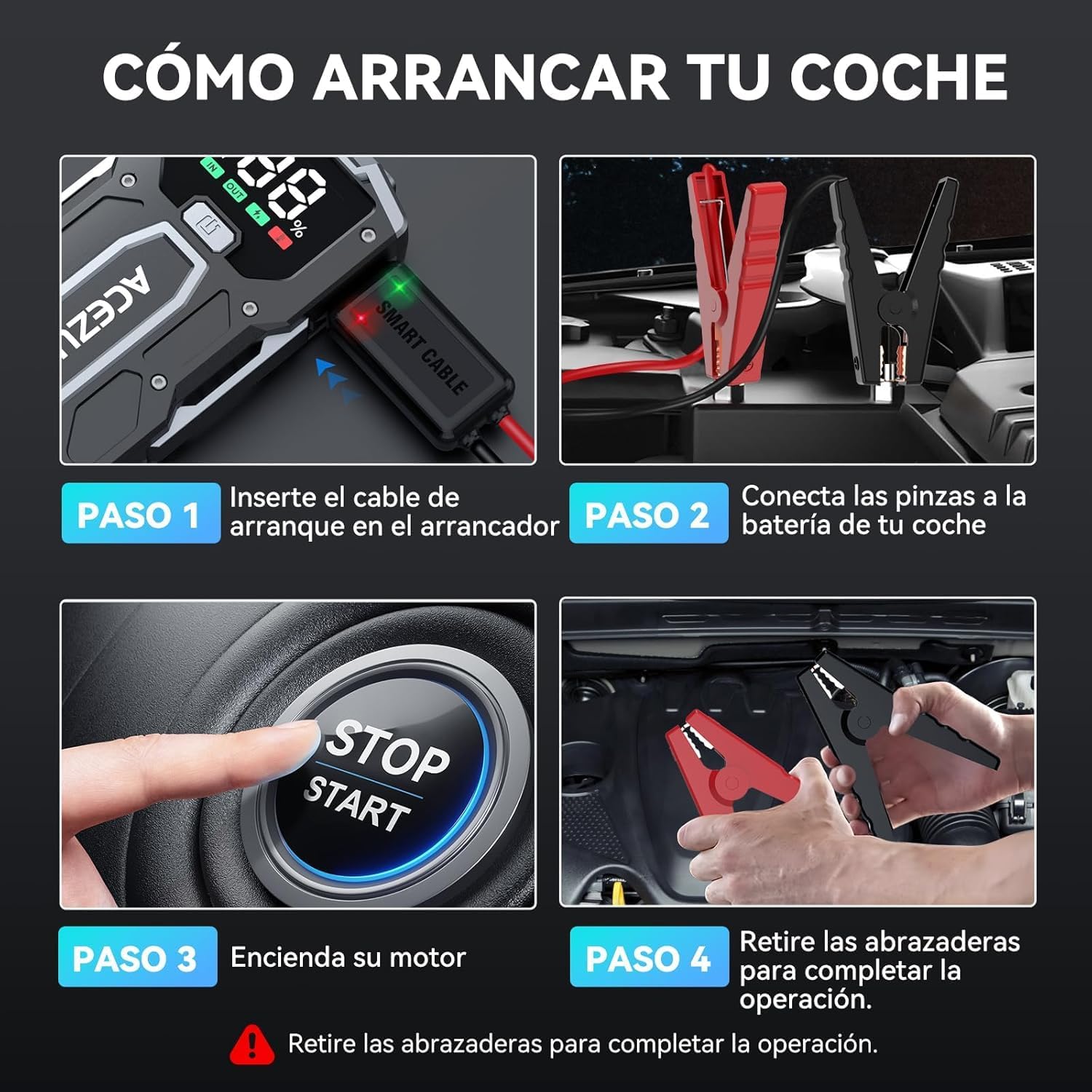
Image: A visual guide demonstrating the four steps to jump start a car. Step 1 shows inserting the smart cable into the jump starter. Step 2 shows connecting the clamps to the car battery. Step 3 shows starting the car engine. Step 4 shows removing the clamps after the car starts.

Image: The ACEZUK M01 jump starter connected to a vehicle battery. The image highlights its 6000A peak current capability and compatibility with 7.0L gasoline and 5.5L diesel engines, operating at 12V.
Fungsi Power Bank
The ACEZUK M01 can also function as a 12800mAh portable power bank to charge your electronic devices.
- Pelabuhan Keluaran: It features a USB output port (5V/2.4A) for charging smartphones, tablets, e-readers, and other USB-powered devices.
- Port Masukan: The Type-C port (5V/2A, 9V/2A) is used for recharging the jump starter itself.
Simply connect your device's charging cable to the USB output port on the jump starter to begin charging.

Image: The ACEZUK M01 jump starter acting as a power bank, simultaneously charging a smartphone and a tablet. This illustrates its 12800mAh capacity and compatibility with various USB-chargeable devices like game consoles, phones, iPads, drones, earphones, smartwatches, and cameras.
Fungsi Senter LED
The M01 includes a built-in LED flashlight with three modes for various situations:
- Penerangan: Standard steady light for general visibility.
- Fast Strobe: Rapid flashing light for signaling or attracting attention.
- Kilatan Lambat (SOS): Slow, rhythmic flashing for emergency signaling.
To activate and cycle through the flashlight modes, press the dedicated flashlight button on the device.

Image: The ACEZUK M01 jump starter highlighting its multifunctional LED flashlight. The image shows the three available modes: Illumination, Slow Flash (SOS), and Rapid Flashing, useful for various outdoor and emergency scenarios.
Fitur Keamanan
The ACEZUK M01 is equipped with 8 types of intelligent safety protections to ensure safe operation and prevent damage:
- Perlindungan Anti-Percikan Api
- Perlindungan Polaritas Balik
- Proteksi Arus Lebih
- Perlindungan Suhu Tinggi
- Perlindungan Pengisian Berlebih
- Proteksi Over-discharge
- Berlebihantage Perlindungan
- Anti-interference Protection
The smart battery clamps feature an indicator that provides audible warnings and flashing lights in case of incorrect connection or other issues.

Image: A diagram detailing the 8 intelligent safety protections integrated into the smart clamps. These protections include safeguards against overheating, overcharging, over-discharging, overvoltage, short circuits, reverse polarity, and anti-interference, ensuring a secure jump start.
Pemeliharaan
- Isi Ulang Secara Teratur: To prolong battery life, recharge the jump starter at least once every three months, even if not in use.
- Penyimpanan: Simpan perangkat di tempat yang sejuk dan kering, jauhkan dari sinar matahari langsung dan suhu ekstrem.
- Pembersihan: Gunakan kain lembut dan kering untuk membersihkan perangkat. Jangan gunakan bahan kimia keras atau bahan abrasif.
- Periksa Kabel: Periodically inspect the smart clamps and cables for any signs of damage or wear. Replace if necessary.
Penyelesaian Masalah
Perangkat Tidak Menyala
- Ensure the device is charged. Check the LCD screen for battery level.
- If the battery is low, recharge the unit.
Vehicle Does Not Start
- Periksa apakah smart clamps are correctly connected to the vehicle battery terminals (red to positive, black to negative).
- Ensure the smart cable is fully inserted into the jump starter.
- Verify that the jump starter's battery level is above 25%.
- Jika smart clamp indicator shows an error, refer to the indicator's specific meaning (e.g., reverse polarity, short circuit) and correct the issue.
- The vehicle's battery might be severely discharged or damaged. In such cases, the jump starter may not be able to start the vehicle.
Power Bank Tidak Mengisi Daya Perangkat
- Pastikan alat jump starter memiliki daya yang cukup.
- Verify that the charging cable is properly connected to both the jump starter's USB output and your device.
- Cobalah kabel atau perangkat pengisian daya lain untuk menyingkirkan masalah pada kabel atau perangkat.
Garansi dan Dukungan
For warranty information or technical support, please refer to the contact details provided with your purchase or visit the official ACEZUK websitus. Harap simpan bukti pembelian Anda untuk klaim garansi.