
Infinix Hot 40i (X6528B)
Panduan Pengguna Infinix Hot 40i
Model: Hot 40i (X6528B)
1. Produk Lebihview
The Infinix Hot 40i is a feature-rich smartphone designed for daily communication and multimedia consumption. It boasts a 6.6-inch HD+ display, a powerful 50MP Dual AI rear camera, and a 32MP crystal-clear front camera. Equipped with a 5000 mAh battery and 18W fast charging, it ensures extended usage. The device runs on Android 13 and supports dual Nano SIM cards.

Gambar 1.1: Depan dan belakang view of the Infinix Hot 40i smartphone, showcasing modul layar dan kameranya.

Gambar 1.2: Depan view of the Infinix Hot 40i, highlighting the 6.6-inch HD+ display and the punch-hole front camera.
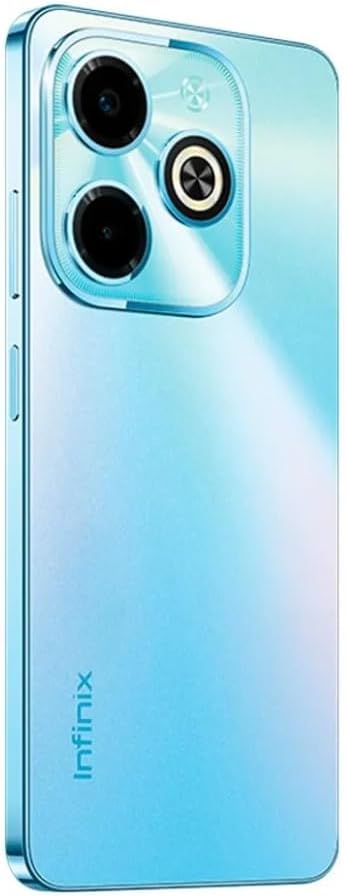
Gambar 1.3: Belakang view of the Infinix Hot 40i, showing the 50MP Dual AI camera setup and the Infinix branding.
2. Panduan Pengaturan
2.1 Unboxing dan Pemeriksaan Awal
Setelah membuka kemasan, pastikan semua komponen ada dan tidak rusak. Isi kemasan standar meliputi:
- Infinix Hot 40i Smartphone
- Adaptor Daya
- Headset
- Sarung Telepon
- Pelindung Layar
- Kabel USB (Tipe-C)
2.2 Pemasangan Kartu SIM dan Kartu microSD
The Infinix Hot 40i supports dual Nano SIM cards. Locate the SIM tray on the side of the device. Use the provided SIM ejector tool to open the tray. Insert your Nano SIM cards into the designated slots with the gold contacts facing down. If you wish to expand storage, insert a microSD card into its dedicated slot (if available on your model). Gently push the tray back into the device until it clicks into place.
2.3 Panduan Pengaktifan dan Pengaturan Awal
Press and hold the power button located on the side of the phone until the Infinix logo appears. Follow the on-screen instructions to complete the initial setup. This includes selecting your language, connecting to a Wi-Fi network, setting up your Google account, and configuring security features like fingerprint unlock or facial recognition.
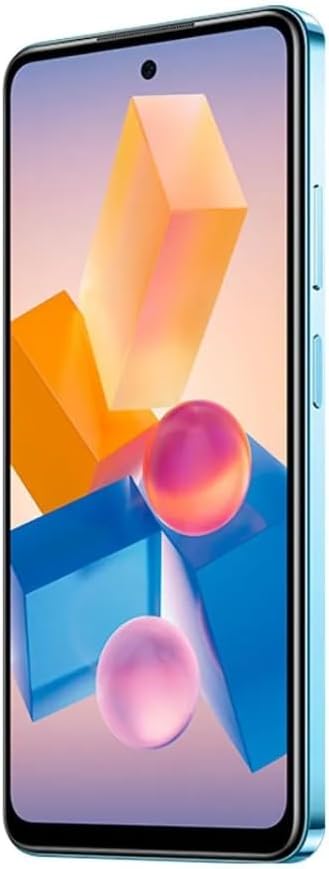
Gambar 2.1: Sisi view of the Infinix Hot 40i, showing the power button and volume rocker, typically located on the right side.
3. Petunjuk Pengoperasian
3.1 Navigasi Dasar
The Infinix Hot 40i operates on Android 13. Use touch gestures for navigation:
- Mengetuk: Pilih item atau buka aplikasi.
- Geser: Gulir layar atau daftar.
- Mencubit: Memperbesar atau memperkecil foto dan web halaman.
- Tekan lama: Akses menu kontekstual atau pindahkan ikon.
3.2 Penggunaan Kamera
The device features a 50MP Dual AI Rear Camera and a 32MP Crystal-Clear Front Camera. To open the camera, tap the camera icon on your home screen or lock screen. Select between photo, video, portrait, and other modes. Tap the shutter button to capture images or start/stop video recording. Utilize the AI features for enhanced photo quality.
3.3 Mengisi Daya Perangkat
Connect the provided USB Type-C cable to the phone's charging port and the other end to the power adapter. Plug the power adapter into a wall outlet. The phone supports 18W Fast Charge technology for quicker charging times. Avoid using non-certified chargers to prevent damage to the battery or device.
3.4 Fitur Keamanan
The Infinix Hot 40i includes a side-mounted fingerprint unlock sensor for quick and secure access. To set up, navigate to Pengaturan > Keamanan > Sidik Jari and follow the prompts to register your fingerprints. Other security options include facial recognition, PIN, pattern, and password locks.
4. Pemeliharaan dan Perawatan
4.1 Membersihkan Perangkat Anda
Gunakan kain lembut dan bebas serat untuk membersihkan layar dan bodi ponsel. Untuk noda membandel, gosok perlahan.ampBasahi kain dengan air atau cairan pembersih layar yang dirancang khusus untuk elektronik. Hindari penggunaan bahan kimia keras, bahan abrasif, atau kelembapan berlebihan, karena dapat merusak perangkat.
4.2 Perawatan Baterai
To prolong battery life, avoid exposing the phone to extreme temperatures. Do not fully discharge the battery regularly; it is recommended to keep the charge between 20% and 80%. Use only the original charger and cable provided with the device.
4.3 Pembaruan Perangkat Lunak
Regularly check for and install software updates to ensure optimal performance, security, and access to new features. You can check for updates by going to Pengaturan > Sistem > Pembaruan sistem.
5. Penyelesaian masalah
5.1 Masalah Umum dan Solusinya
- Perangkat tidak menyala: Ensure the battery is charged. Connect the charger and wait a few minutes before attempting to power on again. If it still doesn't turn on, perform a forced restart by holding the power button for 10-15 seconds.
- Aplikasi mogok atau membeku: Close the problematic app and reopen it. If the issue persists, clear the app's cache (Pengaturan > Aplikasi > [Nama Aplikasi] > Penyimpanan > Hapus cache) atau instal ulang aplikasinya.
- Daya tahan baterai buruk: Reduce screen brightness, disable unnecessary background apps, turn off Wi-Fi/Bluetooth when not in use, and limit location services. Check battery usage in Pengaturan > Baterai untuk mengidentifikasi aplikasi yang menghabiskan banyak daya.
- Masalah konektivitas jaringan: Toggle Airplane mode on and off. Restart the device. Check if your SIM card is properly inserted. Contact your network provider if the issue persists.
- Sensor sidik jari tidak berfungsi: Pastikan jari Anda bersih dan kering. Daftarkan ulang sidik jari Anda di Pengaturan > Keamanan > Sidik Jari.
5.2 Reset Pabrik
Peringatan:
A factory reset will erase all data on your phone, including apps, photos, and settings. Back up important data before proceeding. To perform a factory reset, go to Pengaturan > Sistem > Opsi reset > Hapus semua data (reset pabrik) dan konfirmasikan pilihan Anda.
6. Spesifikasi
| Fitur | Detil |
|---|---|
| Nama Model | Panas 40i |
| Nomor Model | X6528B |
| Sistem Operasi | Android 13.0 |
| Menampilkan | 6.6 Inches HD+ (720 x 1612 Resolution) |
| Tingkat Penyegaran | 90Hz |
| RAM | 8GB (Up to 16GB Extended RAM) |
| Penyimpanan Internal | 256 GB |
| Kamera Belakang | 50MP Dual AI Camera |
| Kamera Depan | 32MP Crystal-Clear Front Camera |
| Kapasitas Baterai | 5000 mAh |
| Pengisian daya | Pengisian Cepat 18W |
| Konektivitas | Bluetooth, Wi-Fi, Cellular |
| Dukungan SIM | SIM Nano Ganda |
| Soket Audio | 3.5 mm |
| Dimensi (P x L x T) | Ukuran 16.36x7.56x0.83 cm |
| Berat | 190 gram |
| Warna | Palm Blue |
7. Garansi dan Dukungan
Specific warranty terms and conditions for the Infinix Hot 40i are typically provided with the product packaging or available on the official Infinix webSilakan merujuk ke sumber daya ini untuk informasi terperinci mengenai cakupan garansi, durasi, dan prosedur klaim.
For technical support, troubleshooting assistance beyond this manual, or service inquiries, please contact Infinix customer support through their official channels. Contact information can usually be found on the manufacturer's websitus atau dalam dokumentasi yang disertakan dengan perangkat Anda.
Note: Information regarding specific warranty periods or support contact details was not available in the provided product data. Please consult the manufacturer's official resources.
Dokumen Terkait - Hot 40i (X6528B)
 |
Panduan Pengguna Infinix HOT 40i Panduan pengguna untuk ponsel pintar Infinix HOT 40i, model X6528B. Panduan ini memberikan informasi penting tentang pengoperasian perangkat, keamanan, dan pemecahan masalah. |
 |
Panduan Pengguna Infinix HOT 40i X6528B - Panduan Ponsel Buku panduan pengguna resmi untuk ponsel Infinix HOT 40i (model X6528B). Mencakup fitur ponsel, pemasangan kartu SIM/SD, pengisian daya, spesifikasi RF, informasi SAR, dan tindakan pencegahan keselamatan. |
 |
Panduan Pengguna Infinix HOT 40i - Informasi Produk dan Kepatuhan Buku panduan pengguna untuk ponsel Infinix HOT 40i (Model X6528B), termasuk detail produk dan pernyataan kesesuaian dengan Arahan UE 2014/53/EU. Akses penuh ke buku panduan memerlukan pembelian. |
 |
Panduan Pengguna Infinix HOT 40i Panduan pengguna untuk ponsel Infinix HOT 40i, memberikan petunjuk tentang pengoperasian, keselamatan, pemasangan kartu SIM/SD, dan pembuangan. |
 |
Infinix HOT 40i (X6528) User Manual Comprehensive user manual for the Infinix HOT 40i smartphone, covering device layout, SIM/SD card installation, charging instructions, and regulatory compliance. |
 |
Panduan Pengguna Infinix HOT 40i X6528 Panduan pengguna untuk Infinix HOT 40i (model X6528), yang mencakup komponen telepon, pemasangan kartu SIM/SD, pengisian daya, dan informasi kepatuhan FCC. |
Ask a question about this manual
Ask about setup, troubleshooting, compatibility, parts, safety, or missing instructions. Manuals+ will review the question and use this page’s manual context to help answer it.