
SKMEI 2243
Panduan Pengguna Jam Tangan Olahraga Digital SKMEI Model 2243
Your guide to operating and maintaining your SKMEI watch.
Perkenalan
Thank you for choosing the SKMEI Digital Sports Watch Model 2243. This watch combines analog and digital displays with multiple functions designed for active lifestyles. Please read this manual carefully to understand the features and proper operation of your new timepiece.

Gambar: Depan view dari Jam Tangan Olahraga Digital SKMEI Model 2243, yang ditampilkanasing tampilan analog dan digitalnya.
Komponen dan Tombol Jam Tangan
Biasakan diri Anda dengan tombol-tombol jam tangan dan fungsi utamanya:
- Tombol Lampu (Kiri Atas): Mengaktifkan lampu latar EL untuk penerangan.
- Tombol Mode (Kiri Bawah): Berganti-ganti antara berbagai mode (Waktu, Kronograf, Alarm, Hitung Mundur, Waktu Dunia).
- Tombol Mulai/Berhenti (Kanan Atas): Digunakan untuk memulai/menghentikan fungsi dalam mode Kronograf, dan menyesuaikan pengaturan.
- Tombol Reset (Kanan Bawah): Digunakan untuk mengatur ulang fungsi dalam mode Kronograf, dan menyesuaikan pengaturan.

Gambar: Sudut view of the watch highlighting the four control buttons on the sides of the case.

Image: Diagram illustrating the Start/Stop, Light, Mode, and Reset buttons on the watch case.
Pengaturan
1. Pengaturan Waktu dan Tanggal Awal
- Dalam mode waktu normal, tekan tombol Tombol Mode repeatedly until the digital display shows the time setting interface (usually indicated by flashing digits).
- Gunakan Tombol Mulai/Berhenti to select the digit or setting you wish to adjust (e.g., seconds, hour, minute, year, month, day).
- Gunakan Tombol Reset to increase the value of the selected digit. Hold to rapidly advance.
- Setelah semua pengaturan sudah benar, tekan tombol Tombol Mode untuk keluar dari mode pengaturan.
2. Penyesuaian Jarum Analog
Jarum jam analog biasanya disinkronkan dengan waktu digital. Jika tidak sinkron:
- Dalam mode waktu normal, tekan dan tahan Tombol Mode for several seconds until the analog setting mode is activated (this may vary by model, refer to specific on-screen prompts).
- Gunakan Tombol Mulai/Berhenti or Tombol Reset to move the analog hands forward or backward until they match the digital time.
- Tekan tombol Tombol Mode untuk mengonfirmasi dan keluar.
3. Format 12/24 Jam
In time setting mode, when the hour digits are flashing, press the Tombol Reset untuk beralih antara format 12 jam (dengan indikator AM/PM) dan format 24 jam.
Petunjuk Pengoperasian
1. Kronograf (Stopwatch)
- Tekan tombol Tombol Mode until 'STW' or 'CHRONO' appears on the digital display.
- Tekan tombol Tombol Mulai/Berhenti untuk memulai stopwatch.
- Tekan tombol Tombol Mulai/Berhenti lagi untuk berhenti.
- Tekan tombol Tombol Reset untuk mengatur ulang stopwatch ke nol.
2. Alarm Function (Up to 5 Alarms)
- Tekan tombol Tombol Mode until 'ALM' appears on the digital display.
- Tekan tombol Tombol Mulai/Berhenti to select the alarm number (AL1, AL2, etc.).
- Tekan dan tahan tombol Tombol Reset to enter alarm setting mode (digits will flash).
- Gunakan Tombol Mulai/Berhenti untuk memilih jam atau menit.
- Gunakan Tombol Reset untuk menyesuaikan waktu.
- Tekan tombol Tombol Mode untuk keluar dari mode pengaturan.
- Untuk menghidupkan/mematikan alarm, dalam mode alarm, tekan tombol Tombol Mulai/Berhenti to select the alarm, then press the Tombol Reset to toggle its status.
3. Penghitung Waktu Mundur
- Tekan tombol Tombol Mode until 'TMR' or 'CD' appears on the digital display.
- Tekan dan tahan tombol Tombol Reset to enter countdown setting mode.
- Gunakan Tombol Mulai/Berhenti untuk memilih jam, menit, atau detik.
- Gunakan Tombol Reset untuk menyesuaikan waktu.
- Tekan tombol Tombol Mode untuk keluar dari mode pengaturan.
- Tekan tombol Tombol Mulai/Berhenti untuk memulai atau menjeda hitungan mundur.
- Saat dijeda, tekan tombol Tombol Reset untuk mengatur ulang timer ke waktu awal yang telah ditetapkan.
4. Waktu Dunia
- Tekan tombol Tombol Mode until 'WT' or 'WORLD' appears on the digital display.
- Gunakan Tombol Mulai/Berhenti or Tombol Reset untuk berganti-ganti zona waktu.
5. EL Lampu Latar
Tekan tombol Tombol Lampu (Top Left) to illuminate the digital display for a few seconds in low-light conditions.

Image: The watch display illuminated by the EL backlight, showing clear visibility in the dark.
Tahan Air
This watch is rated 50M water resistant. This means it is suitable for handwashing, rain, and short swimming sessions. It is bukan suitable for diving, snorkeling, or hot water activities (e.g., hot showers, saunas) as steam can penetrate the seals.
- Jangan menekan tombol apa pun saat jam tangan terendam air.
- Ensure the crown (if present) is pushed in completely before exposure to water.

Image: The watch partially submerged in water, demonstrating its 50M water resistance capability.
Pemeliharaan
1. Pembersihan
Wipe the watch case and strap regularly with a soft, dry cloth. For silicone straps, a damp Kain dengan sabun lembut dapat digunakan, diikuti dengan pengeringan menyeluruh.
2. Penggantian Baterai
The watch uses a C battery (included). When the display dims or functions become erratic, it may be time for a battery replacement. It is recommended to have the battery replaced by a qualified watch technician to ensure proper sealing and maintain water resistance.
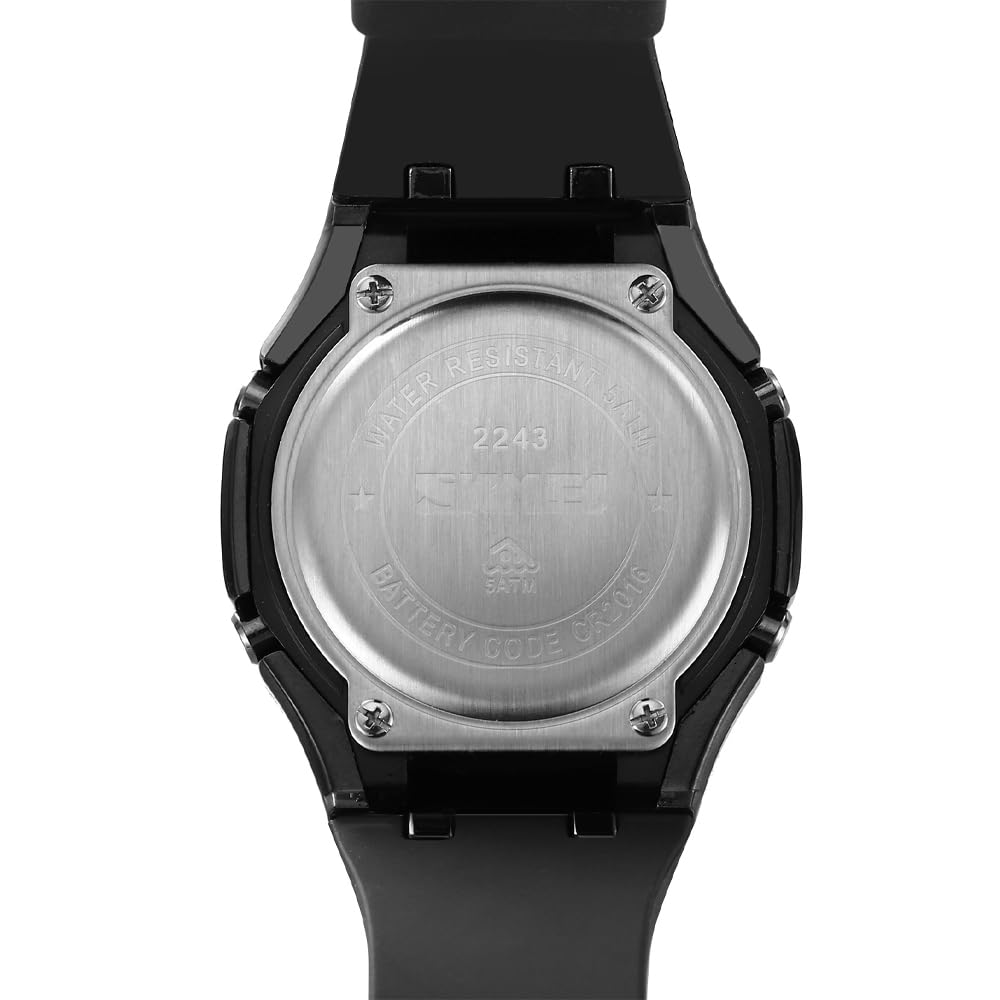
Image: The stainless steel back cover of the watch, indicating the battery code and water resistance rating.

Gambar: Detail view of the watch's stainless steel back cover, emphasizing its quality and construction.
3. Penyimpanan
Saat tidak digunakan dalam jangka waktu lama, simpan jam tangan di tempat yang sejuk dan kering, terhindar dari sinar matahari langsung dan suhu ekstrem.
Penyelesaian Masalah
- Layar Digital Kosong: Check battery. If new, ensure battery is correctly installed.
- Jarum Jam Analog Tidak Sesuai dengan Waktu Digital: Follow the analog hand adjustment procedure in the Setup section.
- Tombol Tidak Responsif: A soft reset may be required. In some cases, removing and reinserting the battery can resolve this (seek professional help).
- Pengawasan Air Dalam: Segera bawa jam tangan tersebut ke tempat perbaikan jam tangan profesional. Jangan mencoba mengeringkannya sendiri.
Spesifikasi
| Fitur | Detil |
|---|---|
| Nomor Model | 2243 |
| Jenis Tampilan | Analog-Digital |
| Bahan Kasus | ABS + Paduan Seng |
| Bahan Tali | Silica Gel (Silicone) |
| Diameter Kasus | 44.7 mm |
| Ketebalan casing | 13.5 mm |
| Lebar Tali/Lug | 26 mm |
| Tahan Air | 50 juta (5 ATM) |
| Jenis Gerakan | Kuarsa |
| Jenis Baterai | 1 baterai C (termasuk) |
| Berat Barang | 76.2 gram |

Image: Visual representation of the watch's dimensions, including case height, width, and strap width.

Image: Close-up of the watch face, emphasizing the scratch-proof hardness glass for clarity and protection.

Image: Close-up of the watch's secure and comfortable clasp mechanism.
Garansi dan Dukungan
Informasi Garansi
This SKMEI watch comes with a 6-month limited warranty from the date of purchase. The warranty covers manufacturing defects under normal use. It does not cover damage resulting from improper use, accidents, unauthorized repairs, or normal wear and tear.
Dukungan Pelanggan
Untuk pertanyaan apa pun, bantuan teknis, atau klaim garansi, silakan hubungi dukungan pelanggan SKMEI melalui pengecer tempat jam tangan tersebut dibeli atau kunjungi situs web resmi SKMEI. websitus untuk informasi kontak.
Ask a question about this manual
Ask about setup, troubleshooting, compatibility, parts, safety, or missing instructions. Manuals+ will review the question and use this page’s manual context to help answer it.