
IPRO IPRO P1
Buku Panduan Pengguna Ponsel IPRO P1 GSM 2G
Model: IPRO P1
Perkenalan
This manual provides comprehensive instructions for the IPRO P1 GSM 2G Mobile Phone. Designed for ease of use, particularly for seniors, this phone features large buttons, a clear display, and essential functions. Please read this manual carefully before using your device to ensure proper operation and maintenance.
Apa yang ada di dalam kotak
Saat membuka kotak, harap verifikasi bahwa semua item berikut disertakan:
- 1 x IPRO P1 Mobile Phone
- 1 x Pengisi Daya Micro-USB
- 1 x Baterai
- 1 x Panduan Pengguna
Pengaturan
1. Memasang Kartu SIM dan Baterai
- Lepaskan penutup belakang telepon dengan hati-hati.
- Insert your 2G GSM SIM card(s) into the designated SIM card slot(s). This phone supports Dual SIM.
- Insert the battery into the battery compartment, ensuring the gold contacts align with the phone's terminals.
- Pasang kembali penutup belakang hingga terkunci dengan aman dan berbunyi klik.
2. Mengisi Baterai
Sebelum digunakan pertama kali, isi daya baterai ponsel hingga penuh.
- Connect the Micro-USB charger cable to the charging port on the phone.
- Hubungkan pengisi daya ke stopkontak.
- The charging indicator on the phone will show the charging status. Once fully charged, disconnect the charger.

Gambar 1: Depan dan belakang view of the IPRO P1 mobile phone, showcasing its compact design and textured back cover.
Petunjuk Pengoperasian
1. Daya Hidup/Mati
- To power on: Press and hold the Power/End Call button (usually red) until the screen lights up.
- To power off: Press and hold the Power/End Call button until the power off options appear, then select "Power off".
2. Melakukan Panggilan
- Masukkan nomor telepon menggunakan papan tombol.
- Press the Call button (usually green) to initiate the call.
- To end a call, press the Power/End Call button.
3. Sending SMS Messages
- Buka menu "Pesan" dari layar utama.
- Pilih "Tulis pesan" atau "SMS baru".
- Masukkan pesan Anda menggunakan papan tombol.
- Masukkan nomor telepon penerima atau pilih dari kontak.
- Pilih "Kirim".
4. Using Key Features

Gambar 2: The IPRO P1 phone with visual representations of its core functionalities, including communication, settings, multimedia, and utility features.
- Radio FM: Plug in headphones (not included) to use as an antenna, then navigate to the FM Radio application.
- Kamera: Access the camera application from the menu to take photos. The phone has a basic camera.
- Bluetooth dapat digunakan untuk berbagai keperluan, seperti: Enable Bluetooth in the settings menu to connect to compatible devices like headsets.
- Senter: The phone features a powerful LED flashlight. It can usually be activated by a dedicated button or a long press of a specific key (refer to quick guide or on-screen prompts).
- Jam Alarm: Set alarms through the "Clock" or "Alarm" application.
- Calendar & Calculator: Basic utility applications are available in the menu.

Gambar 3: The IPRO P1 phone demonstrating its powerful LED flashlight feature, illuminating a dark path.
Pemeliharaan
- Pembersihan: Gunakan kain lembut dan kering untuk membersihkan permukaan ponsel. Hindari cairan pembersih atau bahan abrasif.
- Perawatan Baterai: Do not expose the battery to extreme temperatures. If the phone will not be used for an extended period, charge it periodically to maintain battery health.
- Penyimpanan: Simpan ponsel di tempat yang sejuk dan kering, jauhkan dari sinar matahari langsung dan kelembapan.
- Hindari Tetes: While durable, avoid dropping the phone to prevent damage to internal components or the screen.
Penyelesaian Masalah
| Masalah | Kemungkinan Penyebab | Larutan |
|---|---|---|
| Telepon tidak menyala | Baterai lemah atau tidak dimasukkan dengan benar. | Isi daya baterai. Pastikan baterai terpasang dengan benar. |
| Tidak dapat membuat atau menerima panggilan | No SIM card, SIM card not active, or out of network coverage. | Ensure SIM card is inserted and active. Check network signal strength. Contact your service provider. |
| Kualitas panggilan buruk | Sinyal jaringan lemah atau terjadi gangguan. | Move to an area with better signal. Avoid using near other electronic devices. |
| Baterai cepat habis | Frequent use, background applications, or old battery. | Kurangi kecerahan layar. Tutup aplikasi yang tidak digunakan. Pertimbangkan untuk mengganti baterai jika sudah tua. |
| Layar tidak responsif | Gangguan perangkat lunak. | Lepaskan dan pasang kembali baterai untuk memulai ulang ponsel. |
Spesifikasi
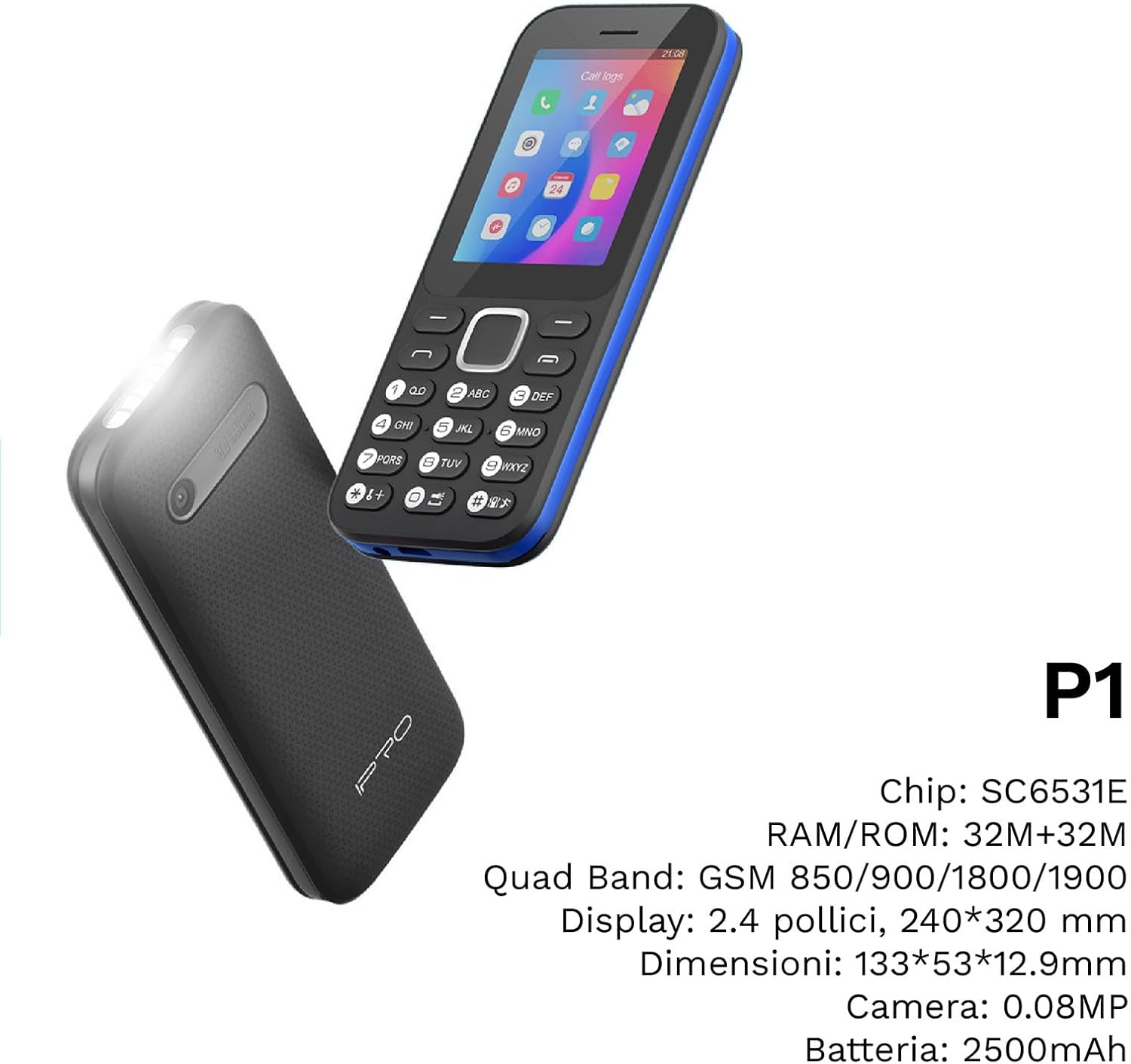
Gambar 4: Sebuah sudut view of the IPRO P1 phone, accompanied by a summary of its technical specifications.
- Jaringan: 2G GSM Quad Band (850/900/1800/1900 MHz)
- Chipset: SC6531E
- Menampilkan: 2.4-inch Color Display (240 x 320 resolution)
- RAMnya: 4MB
- ROM: 4MB
- Memori yang Dapat Diperluas: Mendukung hingga 16 GB (kartu microSD tidak termasuk)
- SIM: Dukungan SIM Ganda
- Konektivitas: Bahasa Indonesia: Bluetooth
- Fitur: Camera, FM Radio, MP3, MP4, Alarm Clock, Calendar, Calculator, Integrated Games, LED Flashlight
- Baterai: Lithium-Ion 2500 mAh
- Bahasa: Spanyol, Inggris, Prancis, Italia, Portugis
- Warna: Hitam
- Dimensi Produk: Ukuran 133x53x12.9 mm
- Berat: Sekitar 200 gram

Gambar 5: A close-up of the IPRO P1's screen, illustrating its 2.4-inch display size for clear viewing.
Garansi dan Dukungan
IPRO offers technical service and customer support for two years from the date of purchase. This warranty covers manufacturing defects but does not include artificial damage.
For support, please contact IPRO customer service through the details provided on the product packaging or the official IPRO website. When contacting support, please have your product model number (IPRO P1) and purchase details ready.

Gambar 6: A visual representation of the IPRO P1 phone's target audience, showing various seniors comfortably interacting with mobile devices, highlighting its user-friendly design.

Gambar 7: Display of the IPRO P1 phone in two color variants: classic black and a version with a distinctive blue trim.
Ask a question about this manual
Ask about setup, troubleshooting, compatibility, parts, safety, or missing instructions. Manuals+ will review the question and use this page’s manual context to help answer it.