
1. Pendahuluan
Thank you for choosing the COMFEE' MDDPE-50DEN7 Dehumidifier. This powerful appliance is designed to efficiently remove excess moisture from your indoor environment, preventing mold, mildew, and improving overall air quality. With a dehumidification capacity of up to 50 liters per day and a large 6-liter water tank, it is ideal for large rooms, cellars, and basements up to 116 square meters. Please read this manual thoroughly before operation to ensure safe and optimal performance.

The Comfee dehumidifier effectively eliminates humidity and dries clothes, contributing to a healthier indoor environment.
2. Informasi Keselamatan
Selalu ikuti tindakan pencegahan keselamatan dasar saat menggunakan peralatan listrik untuk mengurangi risiko kebakaran, sengatan listrik, dan cedera.
- Pastikan catu daya sesuai dengan voltage yang ditentukan pada label peringkat unit.
- Jangan mengoperasikan dehumidifier dengan kabel atau steker yang rusak.
- Jauhkan perangkat dari air dan cairan lainnya. Jangan merendam perangkat di dalam air.
- Jangan menghalangi lubang masuk atau keluar udara. Jaga jarak minimal 20 cm di sekitar unit.
- Cabut unit sebelum membersihkan atau melakukan perawatan apa pun.
- Alat ini menggunakan refrigeran R290. Jangan melubangi sirkuit refrigeran.
- Jauhkan anak-anak dan hewan peliharaan dari unit selama pengoperasian.
3. Produk Lebihview
3.1 Komponen

The Comfee MDDPE-50DEN7 Dehumidifier, showcasing its sleek white design and integrated water tank.
- Panel Kontrol
- Ventilasi udara
- Saluran Masuk Udara (dengan filter yang dapat dicuci)
- Tangki Air (kapasitas 6 Liter)
- Casters for mobility
- Pegangan Samping
- Drainage Port (for continuous drainage)
- Pump Drainage Port (if applicable)
3.2 Fitur Utama
Sebuah selesaiview of the dehumidifier's main features, including its capacity for large spaces, comfort mode, mobility, timer, safety features, tank size, filter, and eco-friendly refrigerant.
- Dehumidifikasi yang Efisien: Absorbs up to 50 liters of moisture per day, suitable for areas up to 116㎡.
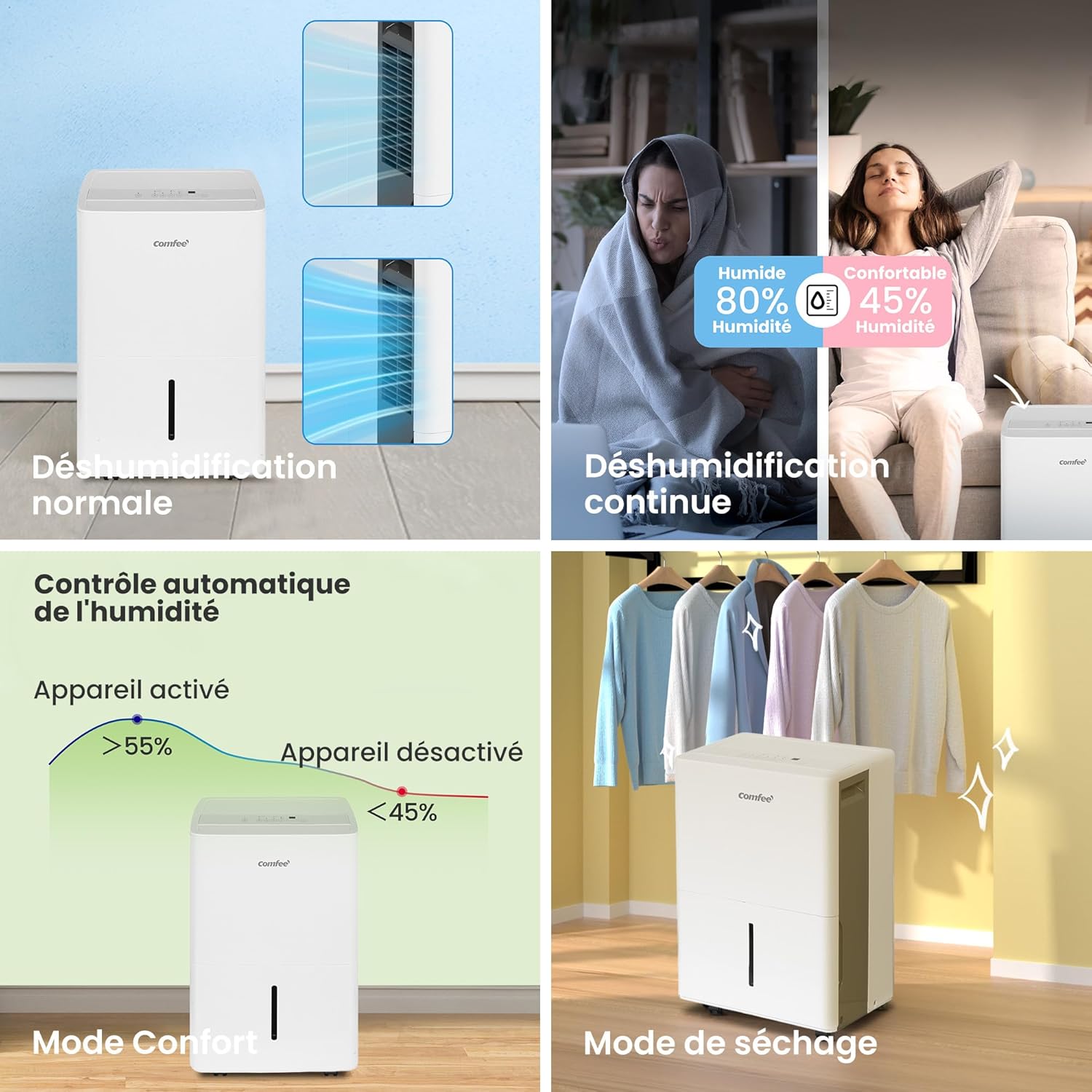
- Beberapa Mode Pengoperasian: Normal, Continuous, Drying (Laundry), and Smart modes for versatile use.
- Opsi Drainase Fleksibel: Choose between the 6-liter water tank, continuous drainage via a hose (not included), or integrated pump drainage.
- Fungsi Ramah Pengguna: Includes a 24-hour timer and an automatic shut-off feature when the water tank is full, preventing overflow.
- Mobilitas yang Ditingkatkan: Equipped with side handles and smooth-rolling casters for easy relocation.
- Peningkatan Kualitas Udara: Helps reduce pollutants, mold, and musty odors, contributing to a healthier living environment.
4. Pengaturan
4.1 Pembongkaran dan Penempatan
- Keluarkan dehumidifier dari kemasannya dengan hati-hati.
- Place the unit upright on a flat, stable surface. Allow it to stand upright for at least 24 hours before plugging it in, especially if it was transported on its side. This allows the refrigerant to settle.
- Ensure there is at least 20 cm (8 inches) of clear space around all sides of the unit for proper airflow.
- Position the unit away from heat sources, direct sunlight, and sources of excessive moisture.
4.2 Pilihan Drainase

The dehumidifier offers three convenient drainage options: using the removable water tank, continuous drainage with a hose, or pump drainage for elevated discharge.
- Drainase Tangki Air: The unit will collect water in the integrated 6-liter tank. When the tank is full, the unit will automatically shut off and an indicator light will illuminate. Carefully remove and empty the tank, then reinsert it securely.
- Drainase Berkelanjutan: For extended operation without emptying the tank, connect a standard garden hose (not included) to the continuous drainage port at the back of the unit. Ensure the hose is sloped downwards to allow gravity drainage into a floor drain or suitable receptacle.
- Pompa Drainase: (If applicable to your model) For situations where water needs to be drained upwards or over a longer distance, connect a suitable hose to the pump drainage port. Refer to the specific instructions for pump operation in the full manual.

The dehumidifier is equipped with practical casters, allowing for easy movement and positioning within your home.
5. Petunjuk Pengoperasian
5.1 Panel Kontrol Selesaiview

The control panel provides intuitive access to all dehumidifier functions, including mode selection, timer, and humidity settings.
- Pump Function Button: Activates or deactivates the integrated pump for drainage.
- Comfort Mode Button: Sets the humidity level automatically between 45% and 55% for optimal comfort.
- Filter Indicator Reset: Resets the filter cleaning reminder.
- Continuous Dehumidification Button: Activates continuous operation regardless of humidity level.
- Two-Speed Fan (Turbo) Button: Adjusts fan speed between low and high (Turbo).
- Timer Control Button: Mengatur timer hidup/mati selama 24 jam.
- Humidity Adjustment Buttons: Meningkatkan atau menurunkan tingkat kelembapan yang diinginkan.
- Tombol On/Off: Menyalakan atau mematikan unit.
- Tampilan digital: Menampilkan kelembapan saat ini, kelembapan yang diatur, pengaturan pengatur waktu, dan kode kesalahan.
Mode Pengoperasian 5.2

The dehumidifier offers various modes to suit different needs, from standard operation to specialized drying and intelligent humidity control.
- Modus Normal: The unit operates to reach and maintain the user-set humidity level.
- Modus terus menerus: The unit runs continuously, regardless of the humidity level, for maximum moisture removal. Ideal for very damp kondisi.
- Drying Mode (Laundry): Designed to quickly dry clothes. The unit operates at high fan speed and continuous dehumidification.
- Smart Mode (Comfort Mode): Automatically adjusts operation to maintain indoor humidity between 45% and 55%, providing an optimal comfort level.
6. Pemeliharaan
Perawatan rutin memastikan umur panjang dan efisiensi dehumidifier Anda.
6.1 Membersihkan Filter Udara
Filter udara harus dibersihkan setiap dua minggu sekali atau lebih sering tergantung pada penggunaan dan kualitas udara. Filter yang kotor dapat mengurangi efisiensi dan menyebabkan unit bekerja lebih keras.
- Matikan unit dan cabut dari stopkontak.
- Lepaskan filter udara dari bagian belakang unit.
- Cuci filter dengan air sabun hangat. Bilas hingga bersih.
- Biarkan filter mengering sepenuhnya sebelum dipasang kembali.
- Once reinserted, press the "Filter" button on the control panel to reset the filter cleaning reminder.
6.2 Membersihkan Tangki Air
Empty and clean the water tank regularly to prevent mold and mildew growth.
- Matikan unit dan cabut stekernya.
- Lepaskan tangki air dengan hati-hati.
- Kosongkan air yang telah terkumpul.
- Wash the tank with mild detergent and water. Rinse thoroughly.
- Keringkan tangki sepenuhnya sebelum memasangnya kembali ke dalam unit.
6.3 Penyimpanan
Jika menyimpan alat pengering udara untuk jangka waktu yang lama:
- Kosongkan dan bersihkan tangki air.
- Bersihkan saringan udara.
- Bungkus kabel listrik dengan rapi.
- Simpan unit tegak di tempat yang sejuk dan kering, jauhkan dari sinar matahari langsung dan suhu ekstrem.
7. Penyelesaian masalah
Sebelum menghubungi layanan pelanggan, lihat panduan pemecahan masalah berikut untuk masalah umum.
| Masalah | Kemungkinan Penyebab | Larutan |
|---|---|---|
| Unit tidak menyala. | Tidak ada daya; Tangki air penuh atau tidak terpasang dengan benar. | Check power connection; Empty and reinsert water tank securely. |
| Tidak ada air yang terkumpul. | Tingkat kelembapan terlalu rendah; Filter udara tersumbat; Suhu ruangan terlalu rendah. | Increase target humidity or select Continuous mode; Clean air filter; Ensure room temperature is above 5°C (41°F). |
| Unit berisik. | Unit tidak berada di permukaan yang rata; Filter udara tersumbat. | Letakkan di permukaan yang datar; Bersihkan filter udara. |
| Embun beku pada kumparan. | Suhu ruangan terlalu rendah. | Unit ini memiliki fungsi pencairan es otomatis. Jika embun beku masih ada, naikkan suhu ruangan. |
8. Spesifikasi

Key dimensions and certifications for the Comfee dehumidifier, including its use of R290 refrigerant.
| Atribut | Nilai |
|---|---|
| Nomor Model | MDDPE-50DEN7 |
| Kapasitas Dehumidifikasi | 50 Liter/Hari |
| Volume Tangki Air | 6 liter |
| Ukuran Ruangan yang Direkomendasikan | Luas 101-116 m² |
| Kapasitas Aliran Udara | 353 m³/jam |
| Konsumsi Daya | 1060 Watt |
| Dimensi (P x L x T) | Ukuran 28.2x39.2x61.6 cm |
| Berat | 23.3 kg |
| Pendingin | R290 (Alami) |
| Jumlah Kecepatan Kipas | 2 |
| Fitur Khusus | Continuous Draining, Automatic Defrost, Digital Display, Anti-overflow, Automatic Shut-off |
9. Garansi dan Dukungan
For warranty information and customer support, please refer to the warranty card included with your product or visit the official Comfee websitus. Simpan struk pembelian Anda sebagai bukti pembelian untuk klaim garansi apa pun.
Pabrikan: Midea Europe
For further assistance, you may contact Comfee customer service through their official channels.