
RODOT KR2201W+KT1002-AB-4
RODOT WiFi Smart Switch User Manual
Model: KR2201W+KT1002-AB-4
1. Produk Lebihview
The RODOT WiFi Smart Switch is a versatile home automation device designed to provide remote control and smart scheduling for your electrical appliances and lighting. It combines Wi-Fi connectivity with 433MHz RF remote control capabilities, offering multiple ways to manage your home devices.

Image: The RODOT WiFi Smart Switch module shown with its accompanying 433MHz RF remote control and a smartphone displaying the Smart Life app interface.
Apa yang Termasuk:
- 1 x Tuya Smart Wi-Fi & RF Receiver (Smart Switch Module)
- 1 x Long-distance 433Mhz RF Remote Control
2. Pengaturan dan Instalasi
2.1 Diagram Pengkabelan
Proper wiring is crucial for safe and effective operation. Ensure power is disconnected before proceeding with any wiring. The smart switch module connects between your power source (AC 90-250V) and the appliance or light fixture.

Image: A clear diagram illustrating the input (AC 90-250V) and output connections for the RODOT WiFi Smart Switch module, showing how it integrates with a light bulb circuit.
2.2 App Download and Wi-Fi Pairing
To enable smart control features, download the free Kehidupan Cerdas or Aplikasi Pintar TUYA from your device's app store (iOS App Store or Google Play Store). Follow the in-app instructions to add your RODOT WiFi Smart Switch to your home Wi-Fi network. Ensure your Wi-Fi network is 2.4GHz, as the device does not support 5GHz networks during initial pairing.
2.3 RF Remote Pairing
The included 433MHz RF remote control can be paired with the smart switch module for direct control without Wi-Fi. The video below demonstrates the pairing process for different modes:
Video: This video demonstrates the unboxing of the RODOT Smart Switch and the various RF remote pairing modes, including toggle, latching, jog, and reset procedures. It visually guides users through the button press sequences for each mode.
RF Pairing Modes:
- Beralih Mode: Click the button on the smart switch module twice, then press any button on the RF remote once. Each press of the remote button will toggle the connected device on/off.
- Mode Penguncian: Click the button on the smart switch module three times, then press button 'A' on the RF remote once (for ON) and button 'B' once (for OFF).
- Modus Joging: Click the button on the smart switch module four times, then press any button on the RF remote once. The connected device will turn on only while the remote button is held down.
- Reset RF Pairing: Click the button on the smart switch module eight times to clear all paired RF remote controls.
3. Mengoperasikan Smart Switch
3.1 Kontrol Jarak Jauh Aplikasi
Once paired with the Smart Life or TUYA Smart App, you can remotely control your connected appliances from anywhere with an internet connection. The app allows for instant on/off control, status feedback, and advanced automation.

Image: A smartphone screen displaying the Smart Life app, showing device controls and options for smart home automation.
Kontrol Jarak Jauh RF 3.2
Use the included 433MHz RF remote control for convenient local control of your smart switch. Depending on the pairing mode (Toggle, Latching, or Jog), the remote buttons will perform different actions as described in the RF Remote Pairing section.

Gambar: Detail view of the 433MHz RF remote control, highlighting its compact design and two control buttons (A and B).
3.3 Kontrol Suara
The RODOT WiFi Smart Switch is compatible with popular voice assistants like Amazon Alexa and Google Home. After linking your Smart Life/TUYA Smart account with your voice assistant, you can control your devices using simple voice commands, such as "Alexa, turn on the living room light" or "Hey Google, turn off the fan."
3.4 Fungsi Pengatur Waktu & Jadwal
Utilize the Smart Life/TUYA Smart App to set up various timing schedules for your connected appliances. This includes countdown timers, scheduled on/off times, and recurring schedules, allowing for automated control and energy efficiency.
3.5 Aplikasi Luas
The smart switch is designed for broad compatibility with various household appliances and lamps. It can be used to control ceiling lamps, cabinet lights, wall lamps, meja lamps, fans, electric kettles, LED spotlights, and more, making it a versatile solution for smart home integration.

Image: An illustration showing various applications of the smart switch, including controlling ceiling fans, wall lamps, cabinet lights, and desk lamps, demonstrating its flexibility in expanding a lighting system.
4. Pemeliharaan
The RODOT WiFi Smart Switch is designed for durability and requires minimal maintenance. To ensure optimal performance and longevity:
- Simpan perangkat di lingkungan yang kering, jauhkan dari kelembapan dan suhu ekstrem.
- Bersihkan bagian luar dengan kain lembut dan kering. Jangan gunakan bahan kimia keras atau pembersih abrasif.
- Pastikan ventilasi yang memadai jika dipasang di ruang tertutup.
- For the RF remote, replace the 12V 23A battery when its performance degrades. (Battery not included with product).
5. Penyelesaian masalah
If you encounter issues with your RODOT WiFi Smart Switch, consider the following common solutions:
- Perangkat Tidak Merespons:
- Check power supply to the smart switch module.
- Verify the connected appliance or light fixture is working correctly.
- Ensure the RF remote battery is not depleted.
- Masalah Konektivitas Wi-Fi:
- Confirm your Wi-Fi network is 2.4GHz. The device does not support 5GHz.
- Pastikan sakelar pintar berada dalam jangkauan router Wi-Fi Anda.
- Restart your Wi-Fi router and the smart switch module.
- Attempt to re-pair the device with the Smart Life/TUYA Smart App.
- RF Remote Not Pairing/Working:
- Ensure the RF remote has a fresh 12V 23A battery.
- Repeat the RF pairing steps carefully as shown in the video in Section 2.3.
- If multiple remotes are causing interference, try resetting the smart switch's RF pairing (click button 8 times) and re-pairing only the desired remote.
For more detailed troubleshooting steps, please refer to the official User Guide PDF: RODOT WiFi Smart Switch User Guide (PDF).
6. Spesifikasi
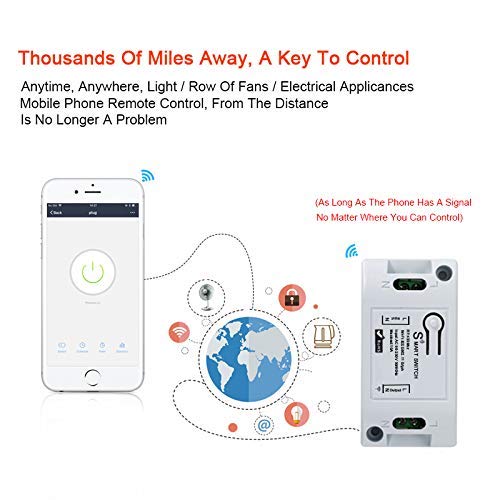
Image: An infographic detailing the dimensions of the smart switch module and RF remote, along with key features like 433MHz RF and various applications.
| Fitur | Detil |
|---|---|
| Receiver Model Number | KR2201W-4 |
| Masukan Voltage | Tegangan listrik 90-250V |
| Max Saat Ini | 10A |
| Tipe Nirkabel | Wi-Fi 2.4GHz (IEEE 802.11 b/g/n) |
| Receiver Product Size | 3.19x1.64x1.01 inci |
| Transmitter Model Number | KT1002-AB-4 |
| Operating RF Frequency | 433MHz |
| Coded System | 1527 Learning Code |
| Pemancar Bekerja Voltage | Tegangan DC12V |
| Jarak Pengoperasian Nirkabel | 400m (Ruang Kosong) |
| Bahan Kontak | Tembaga |
| Pabrikan | RODOT |
| Tanggal Pertama Tersedia | 1 Februari 2021 |
7. Garansi dan Dukungan
For comprehensive warranty information and customer support, please refer to the official product documentation. A detailed User Guide is available in PDF format:
You can also visit the official RODOT Store on Amazon for more products and support: RODOT Store.
Ask a question about this manual
Ask about setup, troubleshooting, compatibility, parts, safety, or missing instructions. Manuals+ will review the question and use this page’s manual context to help answer it.