
RADIOMASTER Ranger 2.4GHz ELRS Module Combo Package
RadioMaster Ranger 2.4GHz ELRS Module Combo Package User Manual
Model: Ranger 2.4GHz ELRS Module Combo Package
1. Pendahuluan
This user manual provides comprehensive instructions for the safe and effective operation of your RadioMaster Ranger 2.4GHz ELRS Module Combo Package. Please read this manual thoroughly before using the product to ensure proper setup, operation, and maintenance. This package is designed to provide a complete solution for integrating ExpressLRS technology into your radio system.
2. Informasi Keselamatan
Always operate the Ranger module and associated equipment in a safe and responsible manner. Failure to follow safety guidelines can result in damage to the product, property, or personal injury.
- Pastikan semua koneksi aman sebelum menyalakan perangkat.
- Do not expose the module to water or extreme temperatures.
- Only use approved power sources and accessories.
- Jauhkan dari jangkauan anak-anak. Usia yang disarankan untuk penggunaan adalah 18 tahun ke atas.
- Do not attempt to disassemble or modify the module, as this will void the warranty.
- Operate within legal frequency limits and regulations in your region.
3. Isi Paket
The RadioMaster Ranger 2.4GHz ELRS Module Combo Package includes the following items:
- 1 x Ranger Module
- 2 x RP1 ExpressLRS Receivers
- 1 x RP2 ExpressLRS Receiver
- Micro and Nano Adapters
- Antena Moxon
- T-Antena
- CRSF Cable (for compatible Futaba radios)

Figure 3.1: All components included in the Ranger Combo Package, including the module, receivers, adapters, and antennas.
4. Produk Lebihview
The Ranger module is a high-performance 2.4GHz ELRS (ExpressLRS) external module designed for use with compatible radio transmitters. It features a rugged CNC case and an OLED display for easy configuration and status monitoring.
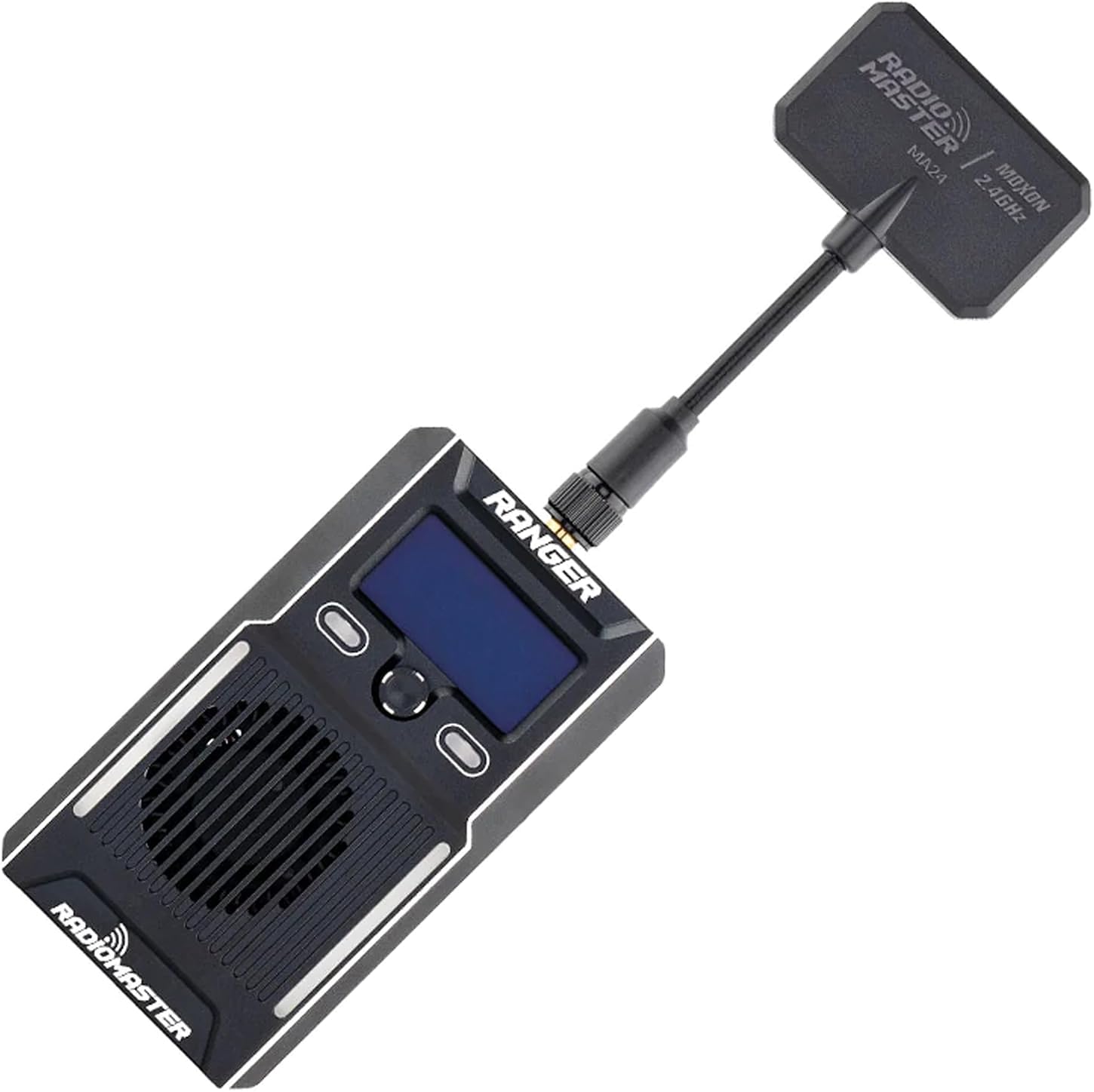
Gambar 4.1: Depan view of the Ranger module with the Moxon antenna attached, showing the OLED display and control buttons.
4.1 Fitur Utama
- Tampilan OLED: Provides clear information on module status, settings, and telemetry.
- Rugged CNC Case: Durable construction for enhanced protection.
- Akselerometer bawaan: For potential future features or advanced telemetry.
- Tarif Paket: Supports high packet rates up to F-1000Hz for low latency communication.
- Daya Keluaran: Up to 1 Watt (1000mW) power output for extended range.
- Konektivitas: Integrated Wifi and Bluetooth support for firmware updates and configuration.
- Sistem Pendinginan: High-efficiency cooling system to maintain optimal performance.
- Navigasi: 5-Direction Nav key and customizable shortcut buttons for intuitive control.
4.2 Port dan Konektor

Gambar 4.2: Sisi view of the Ranger module showing the USB-C port, USB-A port, and XT30 power input.
- Konektor Antena: SMA connector for attaching the included Moxon or T-antenna.
- Port USB-C: For connecting to a computer for firmware updates and configuration.
- Port USB-A: (Functionality may vary, typically for external device connection or power output).
- XT30 Power Input: For external power supply when required, especially for high power output.
5. Pengaturan
This section guides you through the initial setup of your Ranger ELRS module and receivers.
5.1 Pemasangan Modul
- Pilih Adaptor: Choose the appropriate Micro or Nano adapter for your radio transmitter's module bay.
- Pasang Adaptor: Securely attach the selected adapter to the Ranger module.
- Pasang Antena: Screw the Moxon or T-antenna onto the SMA connector on the top of the Ranger module. Ensure it is finger-tight.
- Sisipkan Modul: Carefully insert the Ranger module with the adapter into your radio transmitter's module bay. Ensure it clicks into place securely.
- CRSF Cable (Optional): If using a compatible Futaba radio, connect the provided CRSF cable between the module and the radio as per your radio's instructions.

Figure 5.1: The Ranger module connected to its antenna, with RP1 and RP2 receivers shown, representing a typical setup.
5.2 Pengikatan Penerima
To establish communication between the Ranger module and the RP1/RP2 receivers, they must be bound. Refer to the ExpressLRS official documentation for detailed binding procedures, as these can vary based on firmware versions. Generally, the process involves:
- Power on the Ranger module and navigate to the ELRS menu on your radio.
- Select the 'Bind' option.
- Power cycle the receiver three times rapidly. The receiver's LED should flash indicating bind mode.
- Setelah terhubung, LED pada penerima akan menyala terus-menerus, menandakan koneksi berhasil.
6. Petunjuk Pengoperasian
Once the module and receivers are set up and bound, you can begin operating your RC model.
6.1 Operasi Dasar
- Nyalakan: Turn on your radio transmitter. The Ranger module will power on automatically if correctly installed.
- Periksa Status: Observe the OLED display on the Ranger module for status indicators such as connected receivers, packet rate, and power output.
- Status Penerima: Ensure the LED on your RP1/RP2 receiver is solid, indicating a stable connection.
- Pemeriksaan Pra-Penerbangan: Always perform thorough pre-flight checks, including range testing and control surface verification, before operating any model.
6.2 Fitur Lanjutan
The Ranger module supports various advanced ExpressLRS features. Access these through the ELRS Lua script on your radio transmitter (if supported) or via the ExpressLRS Configurator software.
- Packet Rate Adjustment: Configure the packet rate (e.g., 250Hz, 500Hz, F-1000Hz) based on your application's latency requirements.
- Power Output Adjustment: Adjust the RF power output (e.g., 10mW, 100mW, 500mW, 1000mW) to optimize range and minimize interference.
- Wifi/Bluetooth Configuration: Use Wifi or Bluetooth for wireless firmware updates and configuration via the ExpressLRS web antarmuka.
- Tombol yang Dapat Disesuaikan: Utilize the customizable shortcut buttons on the module for quick access to frequently used functions.
7. Pemeliharaan
Proper maintenance ensures the longevity and reliable performance of your RadioMaster Ranger module.
- Pembersihan: Use a soft, dry cloth to clean the module's exterior. Do not use liquid cleaners or solvents.
- Penyimpanan: Simpan modul di tempat yang sejuk dan kering, jauhkan dari sinar matahari langsung dan suhu ekstrem.
- Pembaruan Firmware: Regularly check for and install the latest ExpressLRS firmware updates for both the module and receivers to benefit from new features and bug fixes. Use the official ExpressLRS Configurator for this process.
- Perawatan Antena: Handle antennas carefully. Avoid bending or stressing the antenna connector.
8. Penyelesaian masalah
This section addresses common issues you might encounter with your Ranger ELRS module.
| Masalah | Kemungkinan Penyebab | Larutan |
|---|---|---|
| Modul tidak menyala. | Incorrect installation; Radio not providing power; Faulty module. | Ensure module is fully seated in the bay. Check radio's module bay settings. Try external XT30 power. Contact support if issue persists. |
| Receivers not binding. | Incorrect binding procedure; Firmware mismatch; Receiver too far from module. | Review binding steps in section 5.2. Ensure module and receiver firmware versions are compatible. Bring receiver closer to module during binding. |
| Poor range or signal loss. | Antenna not properly attached; Low power output setting; Environmental interference. | Check antenna connection. Increase power output in ELRS settings. Avoid operating near large metal objects or strong RF sources. |
| OLED display is blank or frozen. | Firmware issue; Power instability. | Reboot the radio. Attempt to reflash the module firmware. Ensure stable power supply. |
9. Spesifikasi
| Fitur | Detil |
|---|---|
| Nama Produk | RadioMaster Ranger 2.4GHz ELRS Module Combo Package |
| Merek | RADIOMASTER |
| Frekuensi | 2.4 GHz |
| Protokol | ExpressLRS (ELRS) |
| Output Daya Maksimum | 1 Watt (1000mW) |
| Tarif Paket | Up to F-1000Hz |
| Menampilkan | Layar OLED |
| Konektivitas | USB-C, USB-A, XT30, Wifi, Bluetooth |
| Bahan Kasus | CNC Machined |
| Negara Asal | Cina |
| Usia yang Direkomendasikan | 18 tahun ke atas |
10. Garansi dan Dukungan
RadioMaster products are manufactured to high quality standards. For warranty information and technical support, please refer to the official RadioMaster websitus atau hubungi dealer resmi Anda.
- Jaminan: Specific warranty terms and conditions are available on the manufacturer's official websitus. Simpan bukti pembelian Anda untuk klaim garansi.
- Dukungan Teknis: For technical assistance, firmware updates, or advanced troubleshooting, visit the official ExpressLRS project website or the RadioMaster support portal.
- Pengembalian: Refer to the retailer's return policy for details on product returns.