
Artillery Sidewinder X4 Plus
Panduan Pengguna Printer 4D Artillery Sidewinder X3 Plus
Model: Sidewinder X4 Plus
1. Pendahuluan
The Artillery Sidewinder X4 Plus is a high-speed 3D printer designed for efficient and precise additive manufacturing. Equipped with Klipper firmware and a powerful 64-bit high-frequency processor, it achieves impressive print speeds and acceleration. Its robust structure, large build volume, and advanced features make it suitable for a wide range of printing applications.
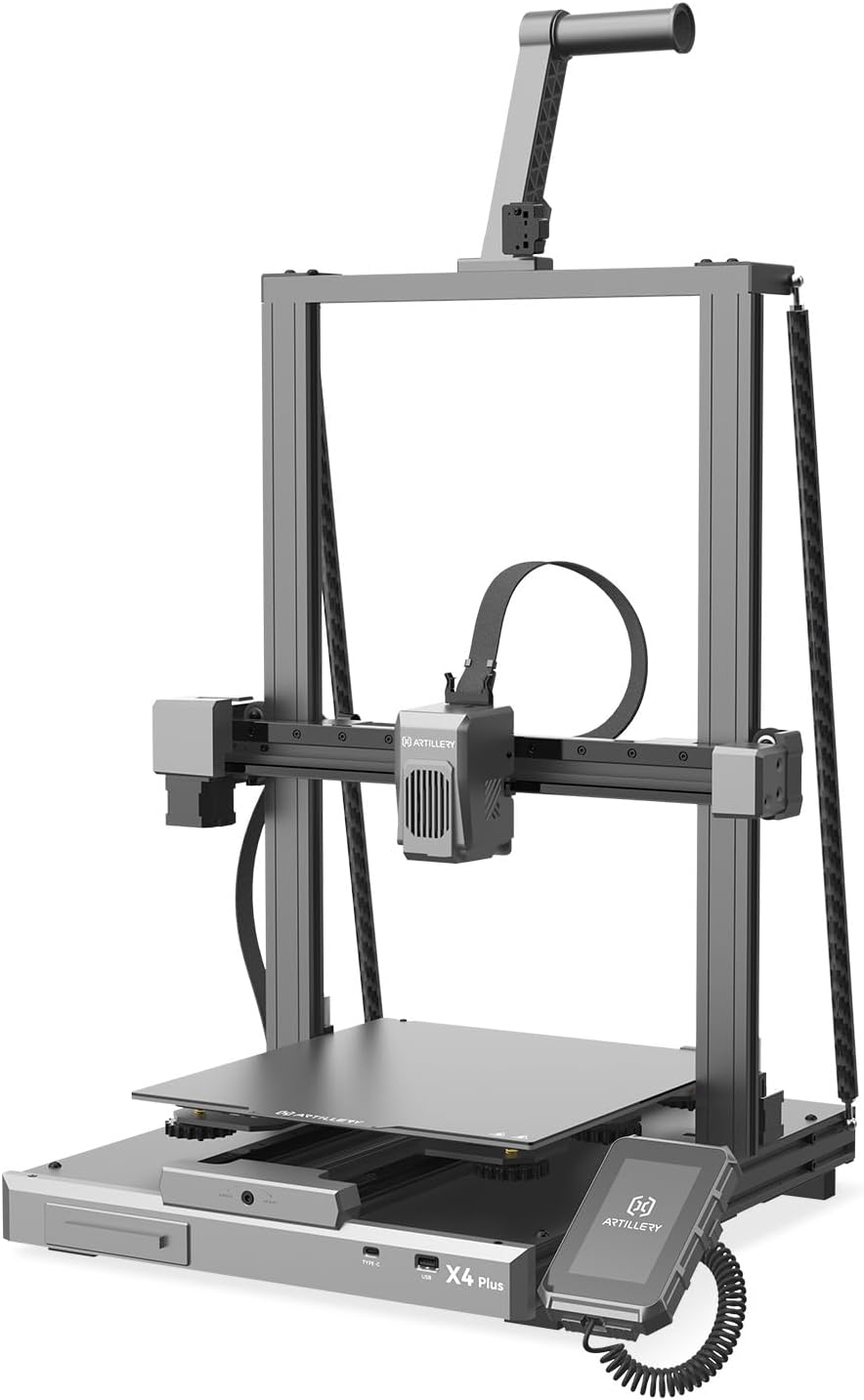
Figure 1: Artillery Sidewinder X4 Plus 3D Printer overview.
2. Pengaturan dan Perakitan
The Sidewinder X4 Plus comes 95% pre-assembled, simplifying the initial setup process. Follow these steps to complete the assembly and prepare your printer for its first use.
- Buka kemasan semua komponen dari kemasannya.
- Carefully place the main base unit on a stable surface.
- Attach the gantry frame to the base unit, ensuring all connections are secure.
- Install the filament holder and any other accessories as per the included quick start guide.
- Hubungkan kabel listrik dan hidupkan printer.
- Perform the initial bed leveling procedure as prompted by the printer's interface.

Figure 2: Visual guide for the printer assembly process.
3. Petunjuk Pengoperasian
3.1 Pencetakan Kecepatan Tinggi
The Sidewinder X4 Plus boasts a maximum print speed of 500 mm/s and an acceleration of 12,000 mm/s². For optimal results at high speeds, it is recommended to use fast filament types.

Figure 3: Illustration of the printer's high-speed capabilities.

Figure 4: Demonstrates 10X faster printing with no loss in quality, and the effect of Pressure Advance & Input Shaping.
3.2 Volume Cetak Besar
With a maximum build size of 11.8 x 11.8 x 15.7 inches (300x300x400mm), the Sidewinder X4 Plus is ideal for printing larger models. The stable triangular structure, reinforced by a rear side tie bar, effectively reduces vibration during printing, ensuring stability for large prints.

Figure 5: Depiction of the extra-large build platform and its dimensions.

Figure 6: Illustrates the larger print volume capability, suitable for more model printing.
3.3 XY-Axis Linear Guides
The printer incorporates metal linear rails on the X and Y axes, providing highly accurate and smooth linear motion. This design ensures precise positioning and stability of the print head, leading to more accurate print results and improved wear resistance compared to traditional rubber rollers.

Figure 7: Close-up of the XY-Metal Linear Guide Rail system.

Gambar 8: Rinci view and explanation of the linear rail system on X and Y axes.
3.4 Extruder and Cooling System
The printer features an optimized dual-motor, dual-Z-axis motion structure with a direct extruder. An 8,000 rpm cooling system ensures efficient melting and rapid cooling of filament. The all-metal hotend supports printing temperatures up to 300°C, allowing compatibility with various filaments like PLA, TPU, PETG, ABS, and Nylon.

Figure 9: Illustration of the 8000 rpm efficient cooling fans.

Figure 10: Depiction of the all-metal automatic cleaning hotend, supporting 300°C printing.

Figure 11: Explanation of the new integrated extruder with high temperature metal nozzles and powerful heat dissipation.
3.5 Perataan Alas Cetak Otomatis
The 121-point auto-leveling system uses a high-precision sensor to collect deviation data across the print bed, automatically compensating for any unevenness of the hotbed. This ensures a perfect first layer and consistent print quality.

Figure 12: Visual representation of the 121-point auto bed leveling process.
3.6 Connectivity and Control
The Sidewinder X4 Plus supports remote printing and slice preview, allowing for convenient operation from a computer or phone via WiFi link. The Klipper firmware's Resonance Compensation function intelligently adjusts motion control during X/Y-axis acceleration, reducing overflow and print resonance for smoother, clearer models.

Figure 13: Demonstrates remote printing and slice preview kemampuan.

Figure 14: Highlights the Klipper firmware features, including Resonance Compensation for improved print quality.

Figure 15: Shows additional features like flexible magnetic build plate and filament run-out detection.
4. Pemeliharaan
Regular maintenance ensures the longevity and optimal performance of your 3D printer. Perform the following tasks periodically:
- Bersihkan Alas Cetak: After each print, clean the print surface with isopropyl alcohol to remove any residue and ensure good adhesion for future prints.
- Inspeksi Nosel: Periksa nozzle secara berkala untuk melihat apakah ada penyumbatan atau keausan. Ganti jika perlu.
- Lumasi Bagian yang Bergerak: Apply a small amount of lubricant to the linear rails and Z-axis lead screws every few months to ensure smooth movement.
- Pembersihan Kipas: Use compressed air to clean dust from the cooling fans to maintain efficient cooling.
- Pembaruan Firmware: Check the official Artillery webKunjungi situs web untuk memeriksa pembaruan firmware yang tersedia guna memastikan printer Anda memiliki fitur terbaru dan perbaikan bug.
5. Penyelesaian masalah
This section addresses common issues you might encounter with your Artillery Sidewinder X4 Plus. For more detailed troubleshooting, refer to the official Artillery support resources.
| Masalah | Kemungkinan Penyebab | Larutan |
|---|---|---|
| Printer Halted / Error Messages | Firmware issue, loose connection, or component failure. | Restart the printer. Check all cable connections. If persistent, consult Artillery support for firmware reinstallation or component diagnosis. |
| Daya Rekat Lapisan Pertama yang Buruk | Unleveled bed, dirty print surface, incorrect nozzle Z-offset. | Perform auto bed leveling. Clean the print surface thoroughly. Adjust Z-offset during the first layer of a test print. |
| Extrusion Issues (Clogging, Under-extrusion) | Nozzle clog, incorrect temperature, filament tangle, worn extruder gear. | Perform a cold pull to clear the nozzle. Verify print temperature settings. Ensure filament spool unwinds freely. Inspect and clean extruder gears. |
| Warped Prints | Insufficient bed adhesion, drafts, incorrect bed temperature. | Ensure proper bed adhesion (e.g., glue stick, hairspray). Print in an enclosed environment or away from drafts. Adjust bed temperature according to filament type. |
6. Spesifikasi
Key technical specifications for the Artillery Sidewinder X4 Plus 3D Printer:
- Dimensi Produk: 19 x 20 x 25.6 inci (48.26 x 50.8 x 65.02 cm)
- Berat Barang: 30 pon (13.6 kg)
- Volume Bangun: 11.8 x 11.8 x 15.7 inci (300 x 300 x 400 mm)
- Kecepatan Cetak: Up to 500 mm/s (recommended with fast filament)
- Percepatan: 12,000 mm/d²
- Perangkat Lunak: Klipper
- Prosesor: 64-bit high-frequency processor
- Jenis Ekstruder: Pengekstrusi Penggerak Langsung
- Hotend Temperature: Hingga 300°C
- Filamen yang Didukung: PLA, TPU, PETG, ABS, Nylon
- Penyamarataan: 121-point Automatic Bed Leveling
- Konektivitas: WiFi Link, USB
- Bahan Bingkai: Aluminium
- Warna: Abu-abu gelap

Gambar 16: Dimensi lebih dariview of the Artillery Sidewinder X4 Plus.
7. Garansi dan Dukungan
For warranty information, technical support, and service inquiries, please contact Artillery customer service. You can often find detailed support resources, FAQs, and contact information on the official Artillery websitus web atau toko merek mereka.
Visit the official Artillery Store for more information: Artillery Store on Amazon
Dokumen Terkait - Sidewinder X4 Plus
 |
Sidewinder X4 Pro 3D Printer User Manual Comprehensive user manual for the Artillery Sidewinder X4 Pro 3D Printer, covering setup, operation, maintenance, and troubleshooting. |
 |
Panduan Pengguna Printer 4D Artillery Sidewinder X3 Plus Panduan pengguna komprehensif untuk printer 3D Artillery Sidewinder X4 Plus, mencakup pengaturan, pengoperasian, konfigurasi perangkat lunak, pencetakan, perawatan, dan pemecahan masalah. Termasuk instruksi terperinci dan pedoman keselamatan. |
 |
Panduan Pengguna Printer 4D Artillery Sidewinder X3 Plus Comprehensive user manual for the Artillery Sidewinder X4 Plus 3D Printer, covering installation, operation, maintenance, and troubleshooting. Learn about the equipment's features, interfaces, and printing process. |
 |
Manual Pengguna Printer 3D Artillery Sidewinder X4 Pro V2.1 Panduan pengguna komprehensif untuk printer 3D Artillery Sidewinder X4 Pro, mencakup pengaturan, pengoperasian, konfigurasi perangkat lunak, pencetakan, perawatan, dan informasi hukum. |
 |
Buku Panduan Pengguna Artileri Sidewinder X4 Plus V2.0 This user manual provides comprehensive guidance for the Artillery Sidewinder X4 Plus 3D printer, covering setup, operation, software configuration, printing, and maintenance. Learn to effectively use your 3D printer with detailed instructions and essential information. |
 |
Manual Instalasi Printer 3D Artillery Sidewinder X1 Panduan instalasi langkah demi langkah untuk printer 3D Artillery Sidewinder X1, meliputi perakitan modul, penggunaan alat, pemasangan kabel, dan pengaturan awal untuk pencetakan optimal. |
Ask a question about this manual
Ask about setup, troubleshooting, compatibility, parts, safety, or missing instructions. Manuals+ will review the question and use this page’s manual context to help answer it.