
1. Pendahuluan
This manual provides detailed instructions for the safe and efficient operation of your JORLAI 9-in-1 Turntable, Model T408. This versatile audio system combines a 3-speed turntable with a CD player, cassette player, AM/FM radio, Bluetooth connectivity, USB/SD/MMC playback, 3.5mm Aux-in, and RCA-out ports. Please read this manual thoroughly before use and retain it for future reference.
2. Fitur Produk
- 9-in-1 Multimedia System: Enjoy music from vinyl records, CDs, cassette tapes, AM/FM radio, USB drives, SD/MMC cards, and Bluetooth-enabled devices.
- Pemutar Piringan Hitam 3 Kecepatan: Supports 33⅓, 45, and 78 RPM records, accommodating various vinyl sizes (7, 10, and 12 inches).
- Konektivitas Bluetooth Nirkabel: Stream audio wirelessly from your smartphone, tablet, or other Bluetooth devices to the turntable's built-in speakers.
- Speaker Stereo bawaan: Integrated speakers provide clear audio output without the need for external equipment.
- Radio AM/FM: Tune into your favorite radio stations for news, music, and entertainment.
- USB/SD/MMC Playback & Recording: Memutar audio digital files from USB drives or SD/MMC cards. Record vinyl to MP3 format on USB/SD.
- Aux-in & RCA-out: Connect external audio sources via the 3.5mm Aux-in jack or output audio to external amplifiers and speakers using the RCA-out ports.
- Kontrol Jarak Jauh: Conveniently operate the system from a distance.
3. Apa yang ada di dalam kotak
Saat membongkar kemasan, pastikan semua barang yang tercantum di bawah ini ada dan dalam kondisi baik:
- JORLAI 9-in-1 Turntable Main Unit
- Kontrol Jarak Jauh
- Manual Instruksi
- Adaptor 45 RPM
- Kabel listrik
4. Pengaturan
4.1 Pembongkaran dan Penempatan
- Keluarkan unit dengan hati-hati dari kemasannya.
- Place the turntable on a stable, level surface away from direct sunlight, heat sources, and excessive dust or moisture.
- Pastikan ventilasi yang memadai di sekitar unit.
4.2 Sambungan Daya
- Connect the power cable to the AC input on the back of the unit.
- Colokkan ujung kabel daya lainnya ke stopkontak dinding standar.
4.3 Inspeksi Awal
- Remove any protective packaging materials from the turntable platter and tonearm.
- Ensure the stylus protector is removed from the needle before playing records.
5. Petunjuk Pengoperasian
5.1 Kontrol Umum
Locate the main power button, volume control, and mode selection buttons on the front panel of the unit. Use the mode button to switch between Phono (Vinyl), CD, Cassette, Radio, Bluetooth, USB, SD, and Aux-in modes.

Gambar 1: Lebihview of the JORLAI 9-in-1 Turntable's multimedia functions.
5.2 Pengoperasian Turntable (Mode Phono)
- Angkat penutup debu.
- Tempatkan piringan hitam di piring meja putar.
- Select the appropriate speed (33⅓, 45, or 78 RPM) using the speed selector switch. For 45 RPM records, place the included 45 RPM adapter on the spindle.
- Gently lift the tonearm using the cue lever and position the stylus over the desired track on the record.
- Lower the cue lever to slowly drop the stylus onto the record. Playback will begin.
- Sesuaikan volume dengan preferensi Anda.
- At the end of the record, the auto-stop function may stop the platter rotation (if enabled). Manually return the tonearm to its rest.
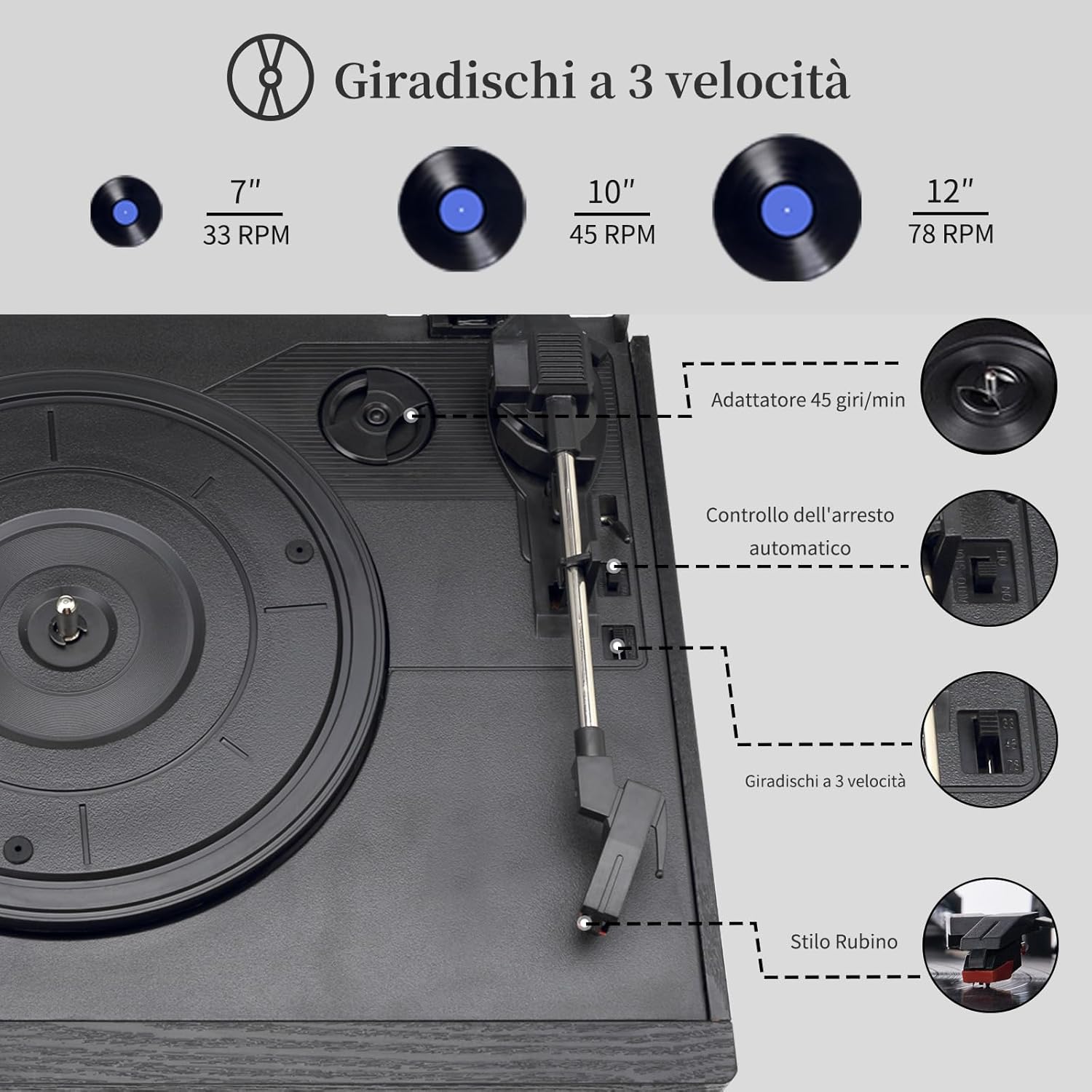
Figure 2: Turntable components including speed selector and auto-stop control.
5.3 CD Player Operation (CD Mode)
- Press the Mode button to select CD mode.
- Tekan tombol Eject untuk membuka baki CD.
- Letakkan CD dengan sisi label menghadap ke atas ke dalam baki.
- Close the CD tray. The unit will read the CD and begin playback automatically or display the track count.
- Use the Play/Pause, Skip, and Stop buttons to control playback.

Figure 3: CD player and cassette deck.
5.4 Cassette Player Operation (Tape Mode)
- Press the Mode button to select Tape mode.
- Masukkan pita kaset ke dalam dek kaset.
- Tekan tombol Putar untuk memulai pemutaran.
- Use the Fast Forward, Rewind, and Stop buttons to control playback.
5.5 AM/FM Radio Operation (Radio Mode)
- Press the Mode button to select Radio mode.
- Perpanjang antena FM untuk penerimaan yang lebih baik.
- Use the Tuning knob to scan for desired AM or FM stations.

Figure 4: AM/FM Radio function.
5.6 Bluetooth Connectivity (Bluetooth Mode)
- Press the Mode button to select Bluetooth mode. The unit will enter pairing mode, indicated by a flashing Bluetooth indicator.
- Pada perangkat Anda yang mendukung Bluetooth (smartphone, tablet), aktifkan Bluetooth dan cari perangkat yang tersedia.
- Select "JORLAI" from the list of devices to pair.
- Once paired, you can stream audio from your device to the turntable.

Figure 5: Connecting a device via Bluetooth.
5.7 USB/SD/MMC Playback (USB/SD Mode)
- Insert a USB drive into the USB port or an SD/MMC card into the corresponding slot.
- Press the Mode button to select USB or SD mode.
- Perangkat ini akan secara otomatis mendeteksi dan memutar audio yang kompatibel. files (misalnya, MP3).
- Use the playback controls (Play/Pause, Skip) to navigate your music.

Figure 6: USB and SD/MMC card playback options.
5.8 Koneksi Aux-in
- Connect an external audio device (e.g., MP3 player, smartphone) to the 3.5mm Aux-in jack using an audio cable (not included).
- Press the Mode button to select Aux-in mode.
- Kontrol pemutaran dari perangkat eksternal Anda.
5.9 RCA-out Connection
- Untuk menghubungkan pemutar piringan hitam ke perangkat eksternal amplifier or powered speakers, use an RCA cable (not included).
- Connect the RCA-out ports on the back of the turntable to the corresponding input ports on your external audio equipment.
- Ensure the external equipment is set to the correct input source.

Figure 7: RCA Line Out connection to external speakers.
5.10 Kontrol Jarak Jauh
The included remote control allows for convenient operation of various functions, including power on/off, mode selection, volume adjustment, and playback controls for CD, USB, and SD modes. Ensure the remote has working batteries and is pointed towards the unit's sensor.

Figure 8: Using the remote control.
6. Pemeliharaan
6.1 Membersihkan Unit
- Selalu cabut unit dari stopkontak sebelum membersihkan.
- Gunakan kain lembut dan kering untuk menyeka permukaan eksterior. Jangan gunakan pembersih abrasif, lilin, atau pelarut.
- Keep the dust cover closed when not in use to prevent dust accumulation on the turntable platter and stylus.
6.2 Perawatan Stylus
- The stylus is a delicate component. Handle it with care.
- Bersihkan stylus secara berkala menggunakan sikat lembut, gosok perlahan dari belakang ke depan.
- Ganti stylus jika Anda melihat penurunan kualitas suara atau keausan yang terlihat.
7. Penyelesaian masalah
Jika Anda mengalami masalah, silakan lihat masalah dan solusi umum berikut sebelum menghubungi dukungan.
| Masalah | Kemungkinan Penyebab | Larutan |
|---|---|---|
| Tidak ada daya | Kabel daya tidak tersambung; Stopkontak tidak berfungsi | Pastikan kabel daya tersambung dengan benar; Coba stopkontak lain. |
| Tidak ada suara | Volume too low; Incorrect mode selected; External speakers not connected/powered | Increase volume; Select correct mode; Check external speaker connections and power. |
| Pemutar piringan tidak berputar | Auto-stop engaged; Drive belt dislodged | Check auto-stop switch; Contact support if drive belt is suspected. |
| Bluetooth tidak berpasangan | Unit tidak dalam mode pemasangan; Perangkat terlalu jauh; Gangguan | Ensure unit is in Bluetooth mode and flashing; Move device closer; Avoid strong electromagnetic interference. |
| CD/Cassette/USB/SD not playing | Media inserted incorrectly; Incompatible file format; Dirty media | Reinsert media correctly; Check file format compatibility; Clean media. |
8. Spesifikasi
| Fitur | Spesifikasi |
|---|---|
| Merek | JORLAI |
| Nama Model | T408DEBL-JOWI (T408) |
| Kecepatan Rotasi Maks | 78 Putaran per menit |
| Komponen yang Termasuk | Built-in Speakers, CD Player |
| Fitur Khusus | Bluetooth Connectivity, AM/FM Radio, Multiformat Playback (Vinyl, CD, Cassette, USB/SD/MMC) |
| Gaya | Anggurtage |
| Warna | Hitam |
| Perangkat yang Kompatibel | Speakers, Headphones, MP3 Player, AV Receiver, Smartphone, Tablet, Amppengangkat |
| Tipe Motor | Motor AC |
| Format Sinyal | Tingkat garis |
| Sumber Daya | Listrik Kabel |
| Teknologi Konektivitas | Bahasa Indonesia: Bluetooth |
| Dimensi Barang (PxLxT) | 25.8L x 19.5W x 32Tcm |
| Negara Asal | Cina |
9. Garansi dan Dukungan
Your JORLAI 9-in-1 Turntable is designed for reliable performance. In case of any issues, please refer to the troubleshooting section first.
- Kebijakan Pengembalian: The product is eligible for a 14-day return period from the date of purchase. Please refer to your retailer's return policy for specific details.
- Dukungan Pelanggan: JORLAI is committed to product quality and customer satisfaction. If you have any questions about our products or require assistance, please contact JORLAI customer support.