
Perkenalan
The ASUS Prime A620-PLUS WIFI6 motherboard is engineered to support AMD Ryzen 7000-series and 8000-series processors, offering a robust foundation for PC DIY builders and users. This manual provides essential information for setup, operation, and maintenance of your motherboard, ensuring optimal performance and stability.
Informasi Keselamatan
Always observe the following safety precautions when handling your motherboard:
- Putuskan daya sebelum pemasangan atau pemeliharaan.
- Gunakan gelang anti-statis untuk mencegah kerusakan akibat pelepasan muatan elektrostatik (ESD).
- Pegang motherboard pada bagian tepinya untuk menghindari menyentuh komponen sensitif.
- Pastikan ventilasi yang tepat di dalam casing PC Anda untuk mencegah panas berlebih.
- Jauhkan motherboard dari kelembaban dan suhu ekstrem.
Isi Paket
Verifikasi bahwa semua item ada dalam paket motherboard Anda:
- ASUS Prime A620-PLUS WIFI6 Motherboard
- Panduan Pengguna
- I / O Shield
- Kabel SATA 6 Gb/s
- Paket Sekrup M.2
- Antena Wi-Fi
- DVD Dukungan (untuk driver dan utilitas)
Tata Letak Motherboard
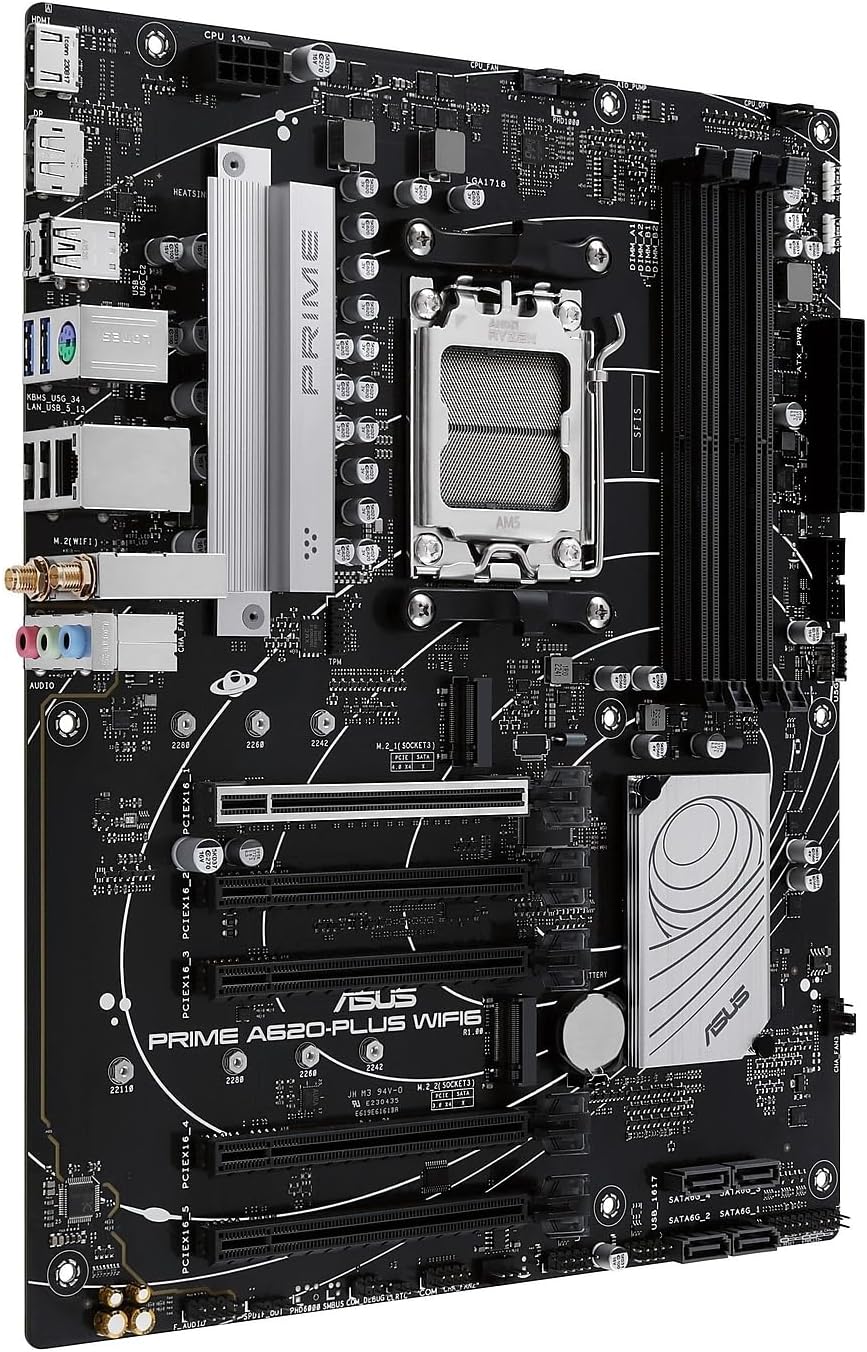
Familiarize yourself with the key components and connectors on your ASUS Prime A620-PLUS WIFI6 motherboard.

Gambar 1: Atas-bawah view of the ASUS Prime A620-PLUS WIFI6 Motherboard, highlighting the CPU socket, RAM slots, and PCIe slots.
Gambar 2: Sudut view dari motherboard, menunjukkanasing the rear I/O panel with various ports including USB, HDMI, DisplayPort, and audio jacks.
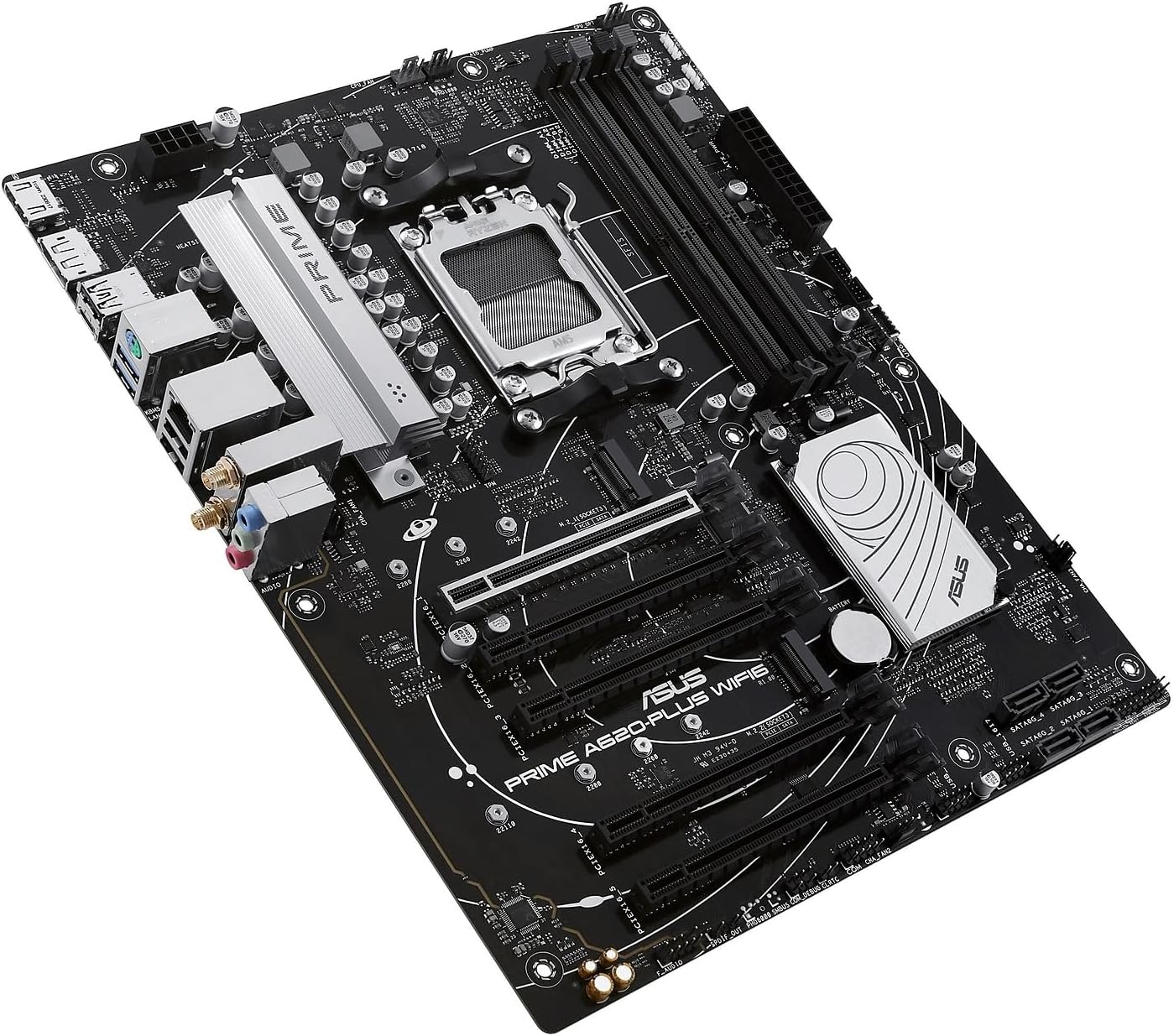
Figure 3: A different angled perspective of the motherboard, providing a clearer view of the M.2 slots and SATA ports.
- Soket CPU (AM5): Located centrally, this socket supports AMD Ryzen 7000-series/ 8000-series processors.
- Slot DIMM DDR5: Four slots for DDR5 memory modules, supporting up to 192GB.
- Slot PCIe 4.0 x16: Untuk kartu grafis dan kartu ekspansi lainnya.
- Slot M.2 Ganda: Untuk SSD NVMe berkecepatan tinggi.
- SATA 6Gbps Ports: For traditional SATA hard drives and SSDs.
- Panel I/O Belakang: Includes DisplayPort, HDMI, USB 5Gbps Type-C, USB Type-A, Realtek 1Gb Ethernet, and audio jacks.
- Wi-Fi 6 Module: Terintegrasi untuk konektivitas nirkabel.
Pengaturan
1. CPU Installation (AM5 Socket)
- Buka tuas soket CPU.
- Align the CPU with the socket's triangle mark and carefully place it into the socket. Do not force it.
- Tutup tuas untuk mengamankan CPU.
2. Instalasi RAM (DDR5)
- Buka klip di kedua ujung slot DDR5 DIMM.
- Sejajarkan takik pada modul memori dengan takik di slot DIMM.
- Tekan dengan kuat kedua ujung modul memori hingga klip terpasang pada tempatnya.
3. Storage Installation (Dual M.2, SATA)
- SSD M.2: Insert the M.2 SSD into the slot at an angle, then push it down and secure it with the provided M.2 screw.
- Drive SATA: Connect SATA data cables from your drives to the SATA 6Gbps ports on the motherboard. Connect power cables from your power supply to the drives.
4. Graphics Card Installation (PCIe 4.0)
- Buka pengunci pada slot PCIe 4.0 x16.
- Sejajarkan kartu grafis Anda dengan slot dan tekan dengan kuat hingga terkunci pada tempatnya.
- Amankan kartu grafis ke casing PC Anda dengan sekrup.
5. Koneksi Daya
- Hubungkan konektor daya ATX 24-pin dari catu daya Anda ke motherboard.
- Connect the 8-pin ATX 12V power connector (CPU power) to the motherboard.
6. Sambungan Panel Depan
Connect your PC case's front panel cables (power button, reset button, USB ports, audio jacks, etc.) to the corresponding headers on the motherboard. Refer to the motherboard layout diagram for precise locations.
Pengoperasian
1. Pengaturan BIOS/UEFI
Saat pertama kali boot, tekan tombol MENGHAPUS key to enter the BIOS/UEFI setup utility. This intuitive graphical interface allows you to configure system settings, including:
- Memory Overclocking: Adjust DDR5 memory speeds for enhanced performance.
- Opsi Booting: Set boot priority for your operating system drive.
- Boot Aman: Enable for enhanced security, especially for Windows 11 installations.
- Kontrol Kipas: Fine-tune fan speeds for optimal cooling and noise levels using Fan Xpert 2+.
2. Instalasi Driver
For optimal performance and functionality, install the latest drivers. The included support DVD contains necessary drivers and utilities. Alternatively, download the latest versions from the official ASUS support weblokasi.
- Kotak Persenjataan: This ASUS software simplifies driver updates, system monitoring, and Aura Sync RGB control.
3. Jaringan
- Wi-Fi 6: Connect to wireless networks for high-speed internet access. Ensure the included Wi-Fi antenna is properly installed.
- Realtek 1Gb Ethernet: Untuk koneksi jaringan kabel yang stabil.
4.Audio
- Peredam Kebisingan AI Dua Arah: Utilize this feature to reduce background noise from both microphone input and audio output, enhancing communication clarity during gaming or video conferences.
5. Aura Sync RGB Lighting
The motherboard features onboard Addressable Gen 2 headers. Connect compatible RGB LED strips and devices to these headers and synchronize lighting effects using the Aura Sync software for a personalized aesthetic.
Pemeliharaan
- Pembersihan: Bersihkan debu dari motherboard dan komponen secara teratur menggunakan udara bertekanan. Pastikan sistem dimatikan dan dicabut sebelum membersihkan.
- Pembaruan BIOS: Periksa dukungan ASUS secara berkala website for BIOS/UEFI updates. Updating the BIOS can improve system stability, compatibility, and performance. Follow the instructions provided by ASUS carefully during the update process.
- Pembaruan Driver: Keep your drivers updated using Armoury Crate or by regularly checking the ASUS support website. Updated drivers ensure optimal performance and compatibility with new software and hardware.
Penyelesaian Masalah
Jika Anda mengalami masalah dengan motherboard Anda, pertimbangkan langkah-langkah pemecahan masalah umum berikut:
- Tidak Ada Daya/Tidak Bisa Booting:
- Check all power connections (24-pin ATX, 8-pin ATX 12V).
- Pastikan catu daya berfungsi dengan benar.
- Verify that the CPU and RAM are properly seated.
- Masalah Tampilan:
- Ensure the graphics card is fully seated in its PCIe slot.
- Check display cable connections to both the graphics card/motherboard and monitor.
- Uji dengan kabel tampilan atau monitor yang berbeda jika memungkinkan.
- Ketidakstabilan/Kerusakan Sistem:
- Perbarui BIOS/UEFI ke versi terbaru.
- Pastikan semua driver sudah diperbarui.
- Jalankan alat diagnostik memori untuk memeriksa kesalahan RAM.
- Pantau suhu CPU dan GPU untuk mencegah panas berlebih.
- Masalah Konektivitas Jaringan:
- For Wi-Fi, ensure antennas are connected and drivers are installed.
- For Ethernet, check the cable connection and ensure network drivers are installed.
- Reset your router/modem.
Spesifikasi
| Fitur | Detil |
|---|---|
| Merek | ASUS |
| Nama Model | PRIME A620-PLUS WIFI6 |
| Soket CPU | Soket AM5 |
| Prosesor yang Kompatibel | AMD Ryzen 7000-series/ 8000-series processors |
| Jenis Chipset | AMD A620 AM5 |
| Teknologi Memori RAM | DDR5 |
| Kecepatan Jam Memori | 7600 MHz (OC) |
| Kapasitas Penyimpanan Memori | 192 GB (Maks) |
| Slot PCIe | 1 x PCIe 4.0x16, 2x PCIe 4.0x1 |
| Slot M.2 | Dual M.2 Slots |
| Port SATA | 4 x SATA 6Gbps ports |
| Konektivitas Nirkabel | Wi-Fi 6 |
| Eternet | Realtek 1Gb Ethernet |
| Suara | Two-Way AI Noise Cancelation |
| Ukuran | 12x9.6x1.6 inci |
| Berat Barang | 1.8 pon |
Garansi dan Dukungan
ASUS provides comprehensive warranty and support for its products. For detailed warranty terms, technical assistance, and driver downloads, please visit the official ASUS support weblokasi:
You may also contact ASUS customer service for further assistance.