
1. Pendahuluan
Thank you for choosing the MONODEAL DV68 Bone Conduction Headphones. These headphones are designed to provide a comfortable and safe listening experience, especially during sports and outdoor activities. Utilizing advanced bone conduction technology and Bluetooth 5.3, they deliver clear audio while keeping your ears open to ambient sounds. The integrated smart light enhances visibility and safety during nighttime use.
2. Isi Paket
Silakan periksa paket untuk item berikut:
- MONODEAL DV68 Bone Conduction Headphones
- Kabel Pengisi Daya Magnetik
- Panduan Pengguna
- Earplugs (optional, for enhanced sound isolation)
3. Produk Lebihview
Familiarize yourself with the components of your MONODEAL DV68 headphones.
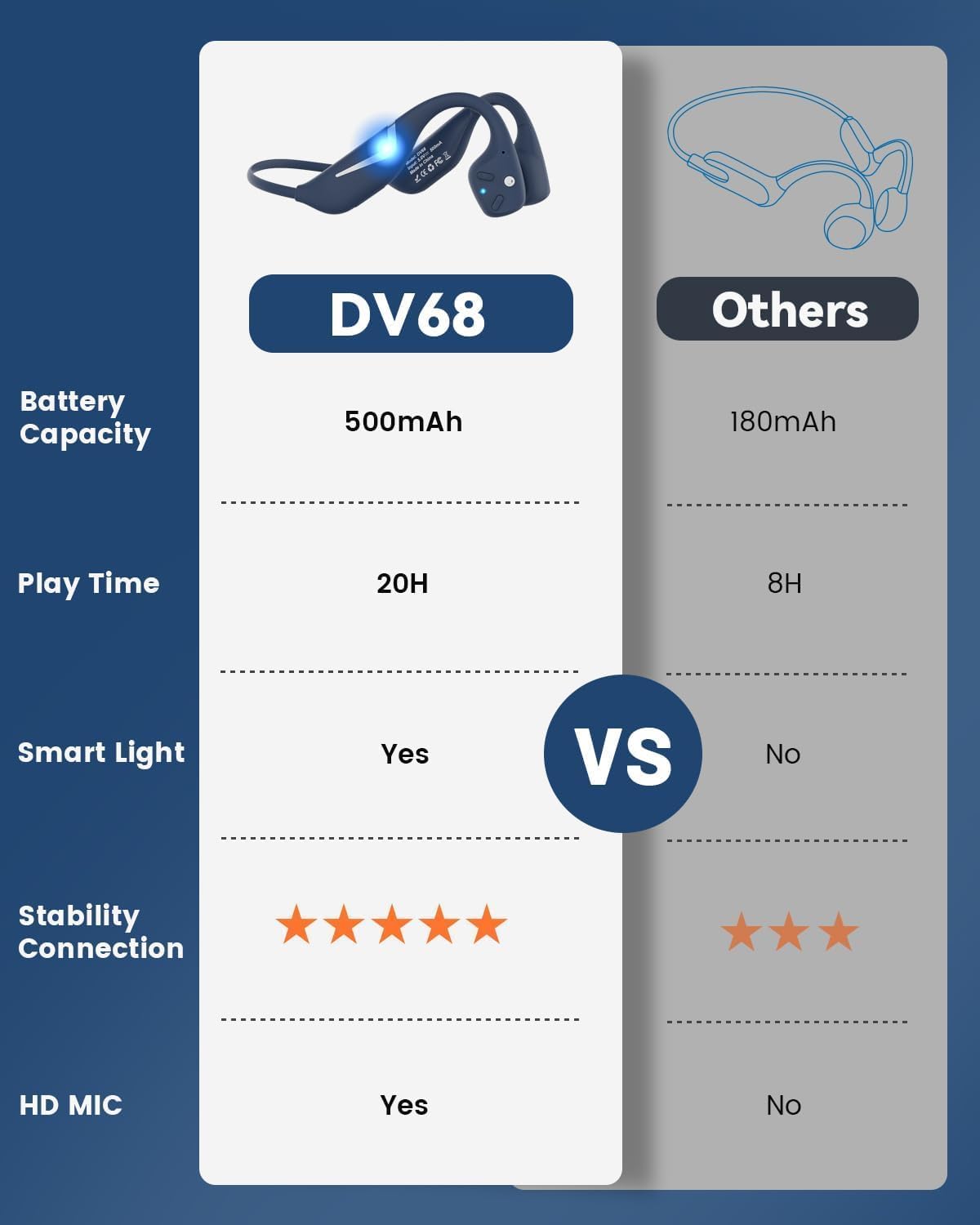
Figure 3.1: MONODEAL DV68 Bone Conduction Headphones, showing the overall design.

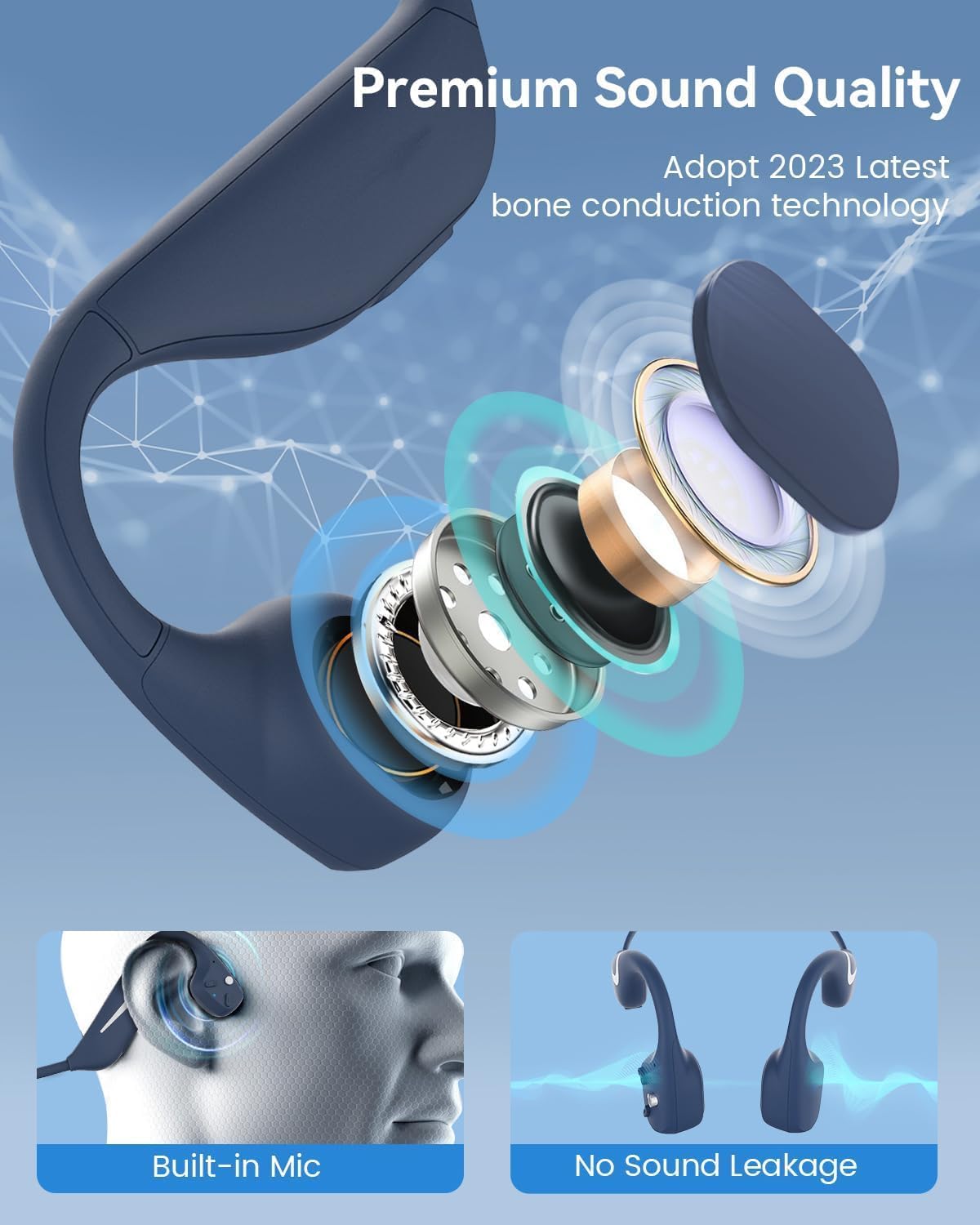
Gambar 3.2: Meledak view illustrating the bone conduction transducer and built-in microphone.
3.1 Kontrol dan Port
Gambar 3.3: Sisi view of the headphones highlighting the control buttons.

Gambar 3.4: Tampilan jarak dekat view of the magnetic charging port.
The headphones feature physical buttons for power, volume, and playback control. The magnetic charging port is located on one of the ear pieces for convenient charging.
4. Spesifikasi
| Fitur | Spesifikasi |
|---|---|
| Nomor Model | DV68 |
| Versi Bluetooth | 5.3 |
| Kapasitas Baterai | 500 mAh |
| Waktu bermain | Hingga 20 jam |
| Peringkat Tahan Air | IP67 (Sweat, rain, and splash resistant) |
| Berat | 34 gram |
| Rentang Frekuensi | 20 Hz - 20,000 Hz |
| Teknologi Konektivitas | Nirkabel (Bluetooth) |
| Jenis Penggerak Audio | Konduksi Tulang |
| Fitur Khusus | Smart LED Light, Built-in Microphone, Multipoint Pairing |

Gambar 4.1: Lebihview of key features including Open-Ear design, IP67 Waterproofing, 500mAh Battery, Bluetooth V5.3, Lightweight, HD Microphone, Multipoint Pairing, and RGB Light.
5. Pengaturan
5.1 Mengisi Daya Headphone
Sebelum digunakan pertama kali, isi daya headphone Anda hingga penuh.
- Hubungkan kabel pengisian daya magnetik ke port pengisian daya pada headphone.
- Hubungkan ujung kabel lainnya ke adaptor daya USB (tidak disertakan) atau port USB komputer.
- Indikator LED akan menunjukkan status pengisian daya. Pengisian daya penuh biasanya memakan waktu sekitar 2 jam.

Figure 5.1: Illustration of 20-hour battery life and quick charge feature (10 minutes charging for 2 hours playtime).
5.2 Pemasangan Bluetooth
Untuk menghubungkan headphone Anda ke perangkat:
- Pastikan headphone dimatikan.
- Tekan dan tahan tombol Daya hingga indikator LED berkedip merah dan biru, yang menandakan mode pemasangan.
- Pada perangkat Anda (ponsel pintar, tablet, komputer), aktifkan Bluetooth dan cari perangkat yang tersedia.
- Select "MONODEAL DV68" from the list of found devices.
- Setelah terhubung, indikator LED akan berubah menjadi biru pekat atau berkedip biru perlahan.
The headphones support multipoint pairing, allowing connection to two devices simultaneously. Refer to your device's Bluetooth settings for managing multiple connections.
6. Petunjuk Pengoperasian
6.1 Daya Hidup/Mati
- Nyalakan: Tekan dan tahan tombol Daya selama 3 detik.
- Matikan: Tekan dan tahan tombol Daya selama 5 detik.
6.2 Pemutaran Musik
- Putar/Jeda: Tekan tombol Multifungsi sekali.
- Lagu Berikutnya: Press and hold the Volume + button for 2 seconds.
- Lagu Sebelumnya: Press and hold the Volume - button for 2 seconds.
- Volume Naik: Tekan tombol Volume +.
- Volume Turun: Tekan tombol Volume -.
6.3 Manajemen Panggilan
- Menjawab/Mengakhiri Panggilan: Tekan tombol Multifungsi sekali.
- Tolak Panggilan: Tekan dan tahan tombol Multifungsi selama 2 detik.
- Asisten Suara: Tekan dua kali tombol Multifungsi.
6.4 Smart LED Light
The headphones feature a smart LED light for enhanced visibility during nighttime activities.
- Nyalakan/Matikan Lampu: Refer to the specific button combination in your quick start guide (usually a dedicated light button or a long press of a volume button).
- The light can cycle through different colors (e.g., blue, green, red) to increase your safety and visibility.

Figure 6.1: A runner demonstrating the smart LED light feature for night safety.
7. Pemeliharaan
7.1 Pembersihan
To maintain hygiene and product longevity:
- After sweating or intense workouts, gently wipe the headphones with a damp kain atau lap basah.
- Hindari penggunaan bahan kimia keras atau pembersih abrasif.
7.2 Penyimpanan
- Simpan headphone di tempat yang sejuk dan kering, jauhkan dari sinar matahari langsung dan suhu ekstrem.
- When not in use, it is recommended to store them in their original packaging or a protective case.
7.3 Tahan Air
The MONODEAL DV68 headphones are IP67 rated, meaning they are resistant to sweat, rain, and splashes. However, they are not suitable for swimming or submersion in water.

Figure 7.1: A person exercising with the headphones, demonstrating their IP67 water resistance against sweat and rain. Note: Not for swimming.
8. Penyelesaian masalah
Jika Anda mengalami masalah dengan headphone Anda, silakan lihat solusi umum berikut:
- Tidak Ada Daya:
Ensure the headphones are fully charged. Connect them to the charging cable and a power source. - Tidak Dapat Dipasangkan:
Make sure the headphones are in pairing mode (LED flashing red and blue). Turn off Bluetooth on other nearby devices that may have previously connected. Try restarting both the headphones and your device. - Tidak Ada Suara/Volume Rendah:
Check the volume levels on both the headphones and your connected device. Ensure the headphones are properly positioned on your cheekbones. If using earplugs, ensure they are correctly inserted. - Koneksi Intermiten:
Ensure your device is within the Bluetooth range (up to 15 meters) and there are no significant obstacles between the headphones and your device. Avoid strong electromagnetic interference. - Kualitas Panggilan Buruk:
Ensure the microphone is not obstructed. Move to an area with better network reception for your phone.
9. Garansi dan Dukungan
9.1 Informasi Garansi
MONODEAL provides a Garansi 2 tahun for the DV68 Bone Conduction Headphones from the date of purchase. This warranty covers manufacturing defects and ensures the product meets its specified performance. Please retain your proof of purchase for warranty claims.
9.2 Dukungan Pelanggan
For further assistance, technical support, or warranty inquiries, please contact MONODEAL customer service through the retailer where you purchased the product or visit the official MONODEAL websitus untuk informasi kontak.