
1. Pendahuluan
Welcome to the instruction manual for your Podofo Wireless WiFi Backup Camera. This manual provides essential information for the proper installation, operation, and maintenance of your device. Please read this manual thoroughly before using the camera to ensure optimal performance and longevity.
2. Produk Lebihview
2.1 Isi Paket
Verifikasi bahwa semua item yang tercantum di bawah ini disertakan dalam paket Anda:
- 1 x Kamera Cadangan Nirkabel
- 1 x Kabel Daya Tipe-C
- 1 x Pengisi Daya
- 1 x Antena
- 1 x Panduan Pengguna
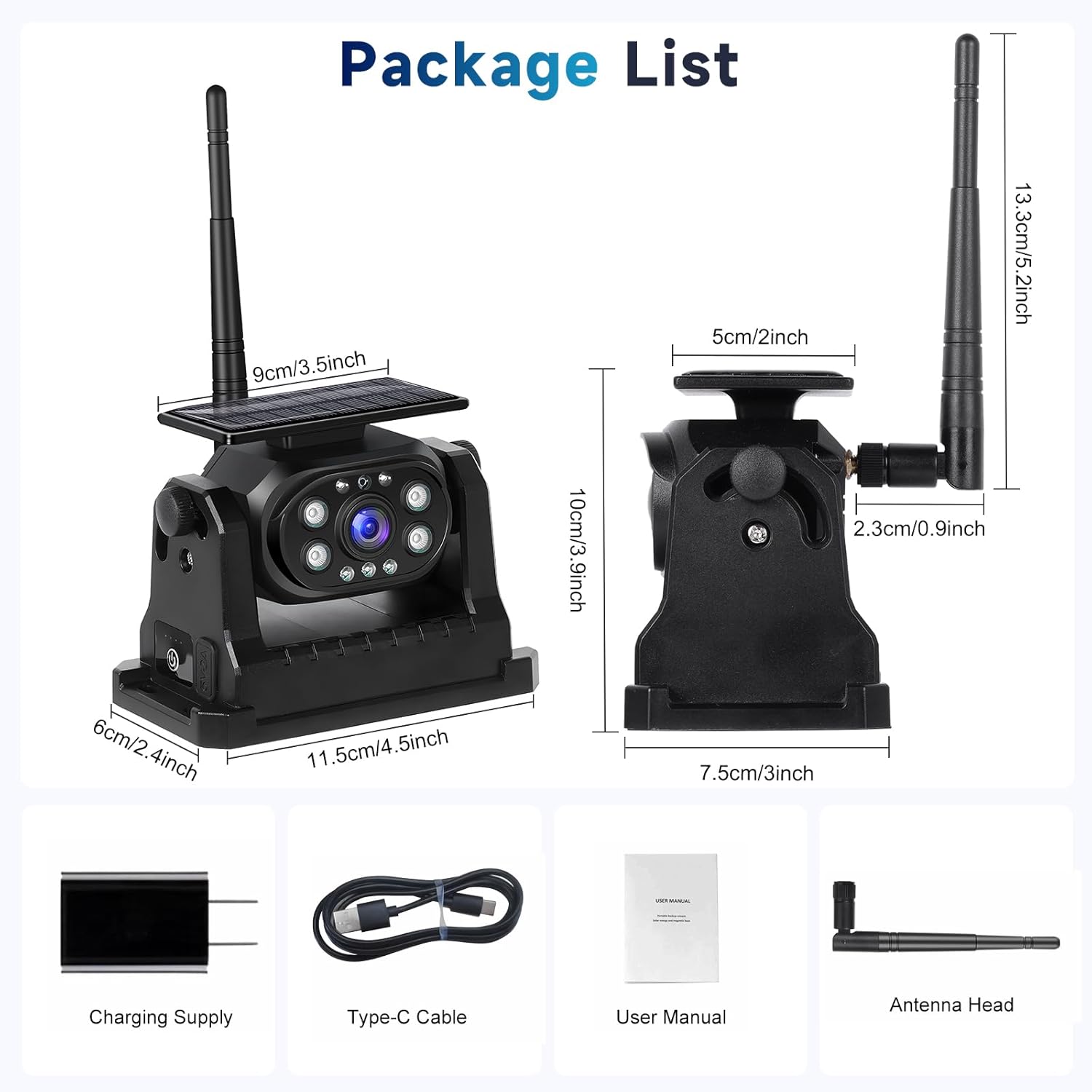
This image details the items included in the package: the wireless backup camera, Type-C power cable, charger, antenna, and user manual. It also provides key dimensions of the camera and antenna.
2.2 Fitur Utama
The Podofo Wireless WiFi Backup Camera offers the following features:
- Stable 2.4G WiFi Signal: Utilizes 2.4GHz WiFi technology for a clear image and low latency, ensuring a reliable connection within a 200-meter range.
- 1080P HD Image & Night Vision: Provides a clear 1080P HD display and excellent night vision capabilities for visibility in low-light conditions.
- IP68 Tahan Air: Designed with an IP68 waterproof rating, allowing it to function reliably even when exposed to rain or moisture.
- Rechargeable with Large Battery Capacity: Features a built-in 10000 mAh battery, supporting both Type-C and solar charging methods for extended operation up to 10 hours.
- Magnetic Base & Easy Installation: Equipped with a magnetic base for direct attachment to vehicle iron surfaces, simplifying installation without the need for complex wiring or drilling.
- Aplikasi Luas: Suitable for various vehicle types including cars, trucks, trailers, RVs, and utility vehicles.

This image shows the Podofo Wireless WiFi Backup Camera, highlighting its solar charging panel, adjustable antenna, and the live video feed displayed on a smartphone, indicating its wireless operation.
3. Pengaturan
3.1 Mengisi Daya Kamera
Before initial use, ensure the camera is fully charged. The camera supports two charging methods:
- Pengisian Tenaga Surya: Position the camera so its solar panel is exposed to direct sunlight. This method provides continuous charging during daylight hours.
- Pengisian Tipe-C: Connect the provided Type-C power cable to the camera's charging port and a suitable power source (e.g., car charger, USB adapter).

This image illustrates the camera's dual charging capabilities: solar charging via its integrated panel and wired charging through the Type-C port.
3.2 Instalasi
The camera features a magnetic base for easy, non-permanent installation:
- Identify a suitable flat, metallic surface on your vehicle (e.g., rear bumper, trailer frame) where the camera can be securely attached.
- Ensure the surface is clean and free of debris to maximize magnetic adhesion.
- Place the camera's magnetic base firmly onto the chosen metallic surface.
- Adjust the camera angle as needed for optimal rear view cakupan.

This visual guide outlines the simple four-step process for setting up and using the camera: installing and powering it on, downloading the 'MH Cam' app, connecting to the camera's WiFi, and finally viewing the live camera image on your smartphone.
3.3 Pengunduhan dan Koneksi Aplikasi
Ke view the camera feed, you need to download the companion app and connect to the camera's WiFi network:
- Unduh Aplikasi: Pencarian untuk "MH Cam" in your smartphone's App Store (iOS) or Google Play Store (Android) and install it.
- Nyalakan Kamera: Tekan tombol daya pada kamera untuk menyalakannya.
- Connect to Camera WiFi: On your smartphone, go to WiFi settings and connect to the WiFi network broadcast by the camera. The network name will typically start with "MH_" followed by a series of characters.
- Buka Aplikasi: Launch the "MH Cam" app. The camera feed should automatically appear.
4. Petunjuk Pengoperasian
4.1 Menghidupkan/Mematikan
- Untuk menghidupkan: Tekan dan tahan tombol daya pada kamera hingga lampu indikator menyala.
- Untuk mematikan: Tekan dan tahan tombol daya lagi hingga lampu indikator mati.
4.2 Viewing the Camera Feed
Once connected to the camera's WiFi and with the "MH Cam" app open, the live video feed will be displayed on your smartphone. Ensure your phone remains within the camera's WiFi range for a stable connection.

This diagram demonstrates the stable 2.4GHz WiFi connection of the camera, showing how the camera transmits its feed wirelessly to a smartphone, enabling clear and reliable monitoring.
4.3 Penglihatan Malam
The camera is equipped with automatic night vision. In low-light conditions, the camera will automatically switch to night vision mode, providing a clear black and white image to assist with reversing.

This image demonstrates the camera's clear night vision feature, showing how it provides detailed visibility even in low-light conditions, crucial for nighttime reversing.
4.4 Reversing Aid Lines
The "MH Cam" app allows you to toggle reversing aid lines on or off, providing visual guidance for parking and maneuvering. Access this option within the app's settings.

This image displays the user interface within the 'MH Cam' app, demonstrating the ability to easily switch the reversing aid lines on or off, providing flexible assistance for parking and maneuvering.
5. Pemeliharaan
5.1 Pembersihan
Bersihkan lensa kamera dan panel surya secara teratur dengan kain lembut dan halus.amp cloth to ensure clear image quality and efficient solar charging. Avoid abrasive cleaners or materials that could scratch the surfaces.
5.2 Perawatan Baterai
The camera's 10000 mAh battery is designed for long endurance. To prolong battery life, avoid fully discharging the battery frequently. Utilize solar charging whenever possible to maintain charge levels.
5.3 Pelapisan kedap air
The camera has an IP68 waterproof rating, meaning it is protected against dust and can withstand immersion in water up to 1.5 meters for 30 minutes. While designed for outdoor use, avoid prolonged submersion or high-pressure water jets directly on the camera.

The image visually confirms the camera's IP68 waterproof rating, showing it operating effectively while exposed to water, ensuring durability in various weather conditions.
6. Penyelesaian masalah
If you encounter issues with your Podofo Wireless WiFi Backup Camera, refer to the following common problems and solutions:
- No Image on App / WiFi Disconnection:
- Pastikan kamera dalam keadaan menyala dan baterainya terisi penuh.
- Verify your smartphone is connected to the camera's WiFi network (e.g., "MH_XXXX").
- Move your smartphone closer to the camera to ensure you are within the effective WiFi range.
- Restart both the camera and the "MH Cam" app.
- Image Quality is Poor:
- Bersihkan lensa kamera untuk menghilangkan kotoran atau noda.
- Pastikan tidak ada penghalang yang menghalangi kamera. view.
- Check if the camera is in night vision mode (black and white image is normal for night vision).
- Kamera Tidak Mengisi Daya:
- For solar charging, ensure the solar panel is exposed to direct sunlight and is clean.
- For Type-C charging, ensure the cable and charger are properly connected and functional. Try a different Type-C cable or power adapter if available.
- Magnetic Base Not Holding Securely:
- Ensure the mounting surface on the vehicle is metallic and clean.
- Avoid mounting on painted or coated surfaces that may reduce magnetic strength.
7. Spesifikasi
Below are the technical specifications for the Podofo Wireless WiFi Backup Camera:
| Fitur | Spesifikasi |
|---|---|
| Model | B0CWL9ZHTT |
| Resolusi | 1080P HD (1280 pixels effective fixed resolution) |
| Peringkat Tahan Air | Tingkat IP68 |
| Kapasitas Baterai | 10000 mAh |
| Frekuensi WiFi | 2.4 GHz |
| Viewsudut ing | 114 degrees (real angle) |
| Perangkat yang Kompatibel | Telepon pintar |
| Jenis Instalasi | Surface Mount (Magnetic Base) |
| Jil.tage | 12 Volt |
| Teknologi Sensor Optik | Bahasa Indonesia: CMOS |
| Dimensi Produk | 8P x 8L x 8T sentimeter |
8. Garansi dan Dukungan
8.1 Informasi Garansi
Podofo products are designed for reliability and performance. For specific warranty terms and conditions applicable to your region, please refer to the product packaging or the official Podofo websitus. Simpan struk pembelian Anda sebagai bukti pembelian untuk klaim garansi apa pun.
8.2 Dukungan Pelanggan
If you require further assistance, have questions not covered in this manual, or need technical support, please contact Podofo customer service through the platform where you purchased the product. For Amazon purchases, you can typically contact the seller directly:
- Go to your Amazon order history.
- Locate your purchase of the Podofo Wireless WiFi Backup Camera.
- Click on the seller's name (Podofo) and then select the option to "Ask a question" or "Contact Seller."

This image provides a visual guide on how to contact Podofo for support through the Amazon platform, by clicking on the seller's name and then selecting the 'Ask a question' option.


