
Perkenalan
This manual provides detailed instructions for the safe and effective operation of your WOUXUN KG-R56 VHF Professional Radio. Please read this manual thoroughly before using the device to ensure proper function and to prevent damage.
Produk Selesaiview
The WOUXUN KG-R56 is a compact and robust professional VHF transceiver designed for authorized users, operating within the 66-88 MHz frequency range. It features 256 memory channels, advanced menu functions, and integrated USB Type-C charging. The device is compliant with current R&TTE RED CE standards.
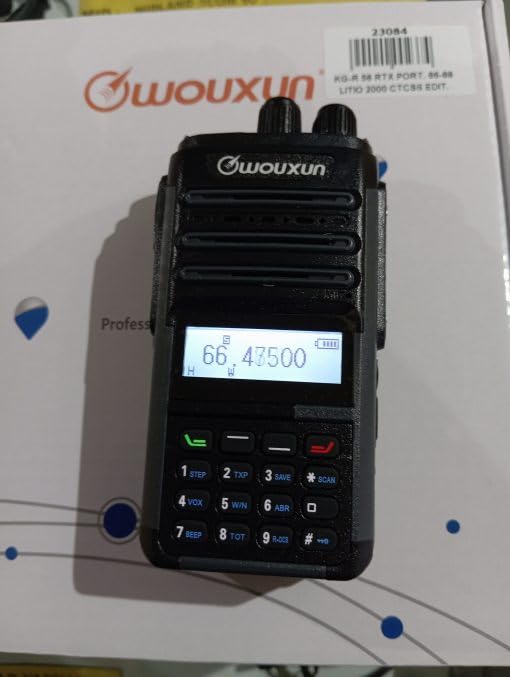
Image: WOUXUN KG-R56 VHF Professional Radio. This image shows the front view dari radio tersebut, menyoroti layarnya, keypad, dan koneksi antenanya.
Isi Paket
Verifikasi bahwa semua item yang tercantum di bawah ini ada dalam paket Anda:
- KG-R56 Transceiver
- 7.4V - 2000 mAh Lithium-Ion Battery Pack
- Pengisi daya
- Catu Daya 220V
- Flexible Rubber Antenna
- Klip Sabuk
- User Manual (in original language)
- Sertifikasi
Pengaturan
1. Pemasangan Baterai
- Sejajarkan baterai dengan alur di bagian belakang radio.
- Geser unit baterai ke atas hingga terkunci dengan aman dan berbunyi klik.
- Untuk melepaskannya, tekan kait pelepas baterai (jika ada) dan geser baterai ke bawah.
2. Mengisi Baterai
The KG-R56 features an integrated USB Type-C port for convenient charging.
- Connect a USB Type-C cable to the radio's USB-C port.
- Connect the other end of the cable to the provided charger or a compatible USB power source.
- The charging indicator light on the radio will show the charging status.
- A full charge typically takes several hours. Avoid overcharging the battery.
3. Memasang Antena
- Screw the flexible rubber antenna clockwise onto the antenna connector on top of the radio until it is finger-tight.
- Jangan mengencangkan antena terlalu kencang.
4. Memasang Klip Sabuk
- Gunakan sekrup yang disediakan untuk memasang klip sabuk ke area yang ditentukan di bagian belakang radio.
Petunjuk Pengoperasian
1. Daya Hidup/Mati
Rotate the Power/Volume knob clockwise to turn the radio on. Rotate it counter-clockwise until a click is heard to turn it off.
2. Menyesuaikan Volume
After powering on, continue rotating the Power/Volume knob to adjust the audio output level to your preference.
3. Pemilihan Saluran
Use the Up/Down arrow keys or the rotary encoder (if present) to select the desired channel or frequency. The display will show the selected channel number, frequency, or channel name.
4. Mengirim dan Menerima
- Untuk mengirimkan pesan, tekan dan tahan tombol Push-To-Talk (PTT) di sisi radio. Bicaralah dengan jelas ke mikrofon.
- Lepaskan tombol PTT untuk menerima.
- Always ensure the channel is clear before transmitting to avoid interference.
5. Navigasi Menu
The KG-R56 features an advanced menu system for managing various radio functions.
- Tekan tombol MENU tombol untuk masuk ke menu utama.
- Use the Up/Down arrow keys to scroll through the available menu options.
- Tekan MENU lagi atau OK (if available) to select an option.
- Use the Up/Down keys to change settings within a selected option.
- Tekan EXIT or KEMBALI to return to the previous menu or exit the menu system.
Fitur Utama
- Pengkodean/Dekode DTMF: Supports DTMF tones for advanced signaling capabilities.
- CTCSS/DCS: Includes 50 CTCSS groups and 105 DCS groups for selective calling. These can be customized via PC programming software.
- CTCSS/DCS Scanner: Automatically detects CTCSS/DCS tones on a received signal.
- Panduan Suara: Provides audible prompts for menu navigation and function selection, enhancing user experience.
- Channel Name Display: Allows for editing and displaying custom channel names for easier identification.
- Battery Capacity Inquiry: Check the current battery level directly from the radio.
- Dapat diprogram PC: Customize radio settings, frequencies, and channels using dedicated PC software.
- Selectable Bandwidth: Choose between various channel spacing options (5K/6.25K/10K/12.5K/25K).
- Reverse Frequency Function: Quickly switch between transmit and receive frequencies for specific operations.
- Multiple Scan Modes (TO/CO/SE): Offers various scanning options for monitoring channels efficiently.
- Mode Tampilan: Switch between displaying Frequency, Channel Number, or Channel Name.
- TOT (Time-Out Timer): Prevents excessively long transmissions by limiting transmission duration.
- Busy Channel Lockout (BCLO): Prevents transmission on an occupied channel, avoiding interference.
- Keypad Lock (Automatic/Manual): Prevents accidental key presses and setting changes.
- Wired Clone Function: Copy settings and configurations from one radio to another using a cable.
- Pengisian Daya USB Tipe-C: Conveniently charge the radio via a standard USB-C port.
Pemeliharaan
Pembersihan
Bersihkan permukaan radio dengan kain lembut dan kering.amp Jangan gunakan bahan kimia keras, pembersih abrasif, atau pelarut, karena dapat merusak kain.asing. Ensure the USB-C port cover is closed when not charging to protect against dust and moisture.
Perawatan Baterai
- Isi daya baterai hingga penuh sebelum penggunaan awal.
- Jangan biarkan baterai terkena suhu ekstrem (panas atau dingin).
- Jika radio tidak akan digunakan dalam jangka waktu lama, lepaskan baterai dan simpan di tempat yang sejuk dan kering.
- Use only WOUXUN approved battery packs and chargers to ensure safety and optimal performance.
Penyelesaian Masalah
| Masalah | Kemungkinan Penyebab | Larutan |
|---|---|---|
| Radio tidak menyala. | Baterai lemah atau tidak terpasang dengan benar. | Isi daya baterai atau pasang kembali dengan benar. |
| Tidak dapat mengirim. | Busy Channel Lockout (BCLO) active; incorrect frequency/channel; low battery. | Wait for the channel to clear; verify frequency/channel settings; charge battery. |
| No reception or weak signal. | Antenna not attached correctly; squelch level too high; out of range. | Check antenna connection; adjust squelch level; move closer to transmitting station. |
| Papan tombol tidak responsif. | Kunci keypad aktif. | Disable keypad lock (refer to operating instructions for specific key combination). |
| USB-C charging not working. | Cable or charger faulty; port dirty. | Try a different USB-C cable/charger; carefully clean the port if visibly dirty. |
| Audio output is distorted. | Volume too high; weak signal; speaker damage. | Adjust volume; check signal strength; contact support if speaker is damaged. |
Spesifikasi Teknis
- Model: KG-R56
- Rentang Frekuensi: Frekuensi 66-88MHz
- Jumlah Saluran: 256
- Jarak Saluran: 5K/6.25K/10K/12.5K/25K
- Modulasi: FM F3E
- Volume Operasitage: Tegangan DC 7.4V
- Daya Keluaran RF: 5W/1W (dapat dipilih)
- Sensitivitas Penerima: 0.25 µV (12 dB SINAD)
- Squelch Sensitivitas: <0.16 μV
- Daya Keluaran Audio: 500 mW at 8 ohms
- Jenis Baterai: 7.4V - 2000 mAh Lithium-Ion Pack
- Arus Siaga: 50mA
- Suhu Operasional: -30°C hingga +60°C
- Dimensi (T x L x D): 105 x 63 x 39 mm (without antenna and battery)
- Berat: 250 g (with battery and antenna)
- Peringkat Perlindungan Internasional: IP54 (Protected from limited dust ingress and water spray from any direction)
- Tingkat Tahan Air: Not designed for immersion in water.
- Fitur Khusus: Weather-resistant, USB rechargeable
Catatan: Spesifikasi dapat berubah tanpa pemberitahuan.
Informasi Keselamatan
- Do not operate the radio in explosive atmospheres (e.g., near flammable gases, dust particles, or metallic powders).
- Jangan memodifikasi radio. Modifikasi tanpa izin dapat membatalkan garansi Anda dan melanggar peraturan yang berlaku.
- Keep the radio away from medical devices (e.g., pacemakers) to avoid potential interference.
- Use only WOUXUN approved accessories, including batteries and chargers.
- Do not expose the radio to direct sunlight for extended periods or to extreme heat sources.
- Dispose of batteries properly according to local environmental regulations.
- While rated IP54 for weather resistance, this device is not designed for immersion in water. Avoid exposing it to heavy rain or submersion.
Garansi dan Dukungan
For warranty information or technical support, please contact your authorized WOUXUN dealer or the point of purchase. Keep your purchase receipt as proof of purchase.
For further assistance, you may visit the official WOUXUN website or consult the contact information provided in your original product packaging.