
Stemedu ESP32-2432S028R
ESP32-2432S028R 2.8-inch TFT LCD Display User Manual
Model: ESP32-2432S028R | Brand: Stemedu
1. Pendahuluan
This manual provides comprehensive instructions for the Stemedu ESP32-2432S028R 2.8-inch TFT LCD Display module. This development board integrates a low-power dual-core 32-bit CPU with Bluetooth and WiFi capabilities, making it suitable for a wide range of embedded applications, including IoT projects, sensor experiments, and mobile control systems.
1.1. Apa yang ada di dalam kotak
- 1 x ESP32-2432S028R 2.8-inch TFT LCD Display Module
- 1 x Touch Pen (color may vary)
- 1 x Kabel Mikro USB
- 1 x Jumper Wire Set

Image 1.1: The package contents include the ESP32-2432S028R module, a touch pen, a Micro USB cable, and jumper wires.
2. Fitur Utama
- Low-power dual-core 32-bit CPU, with integrated Bluetooth and WIFI dual-core processor.
- Equipped with 520 KB SRAM and 32Mbit SPI Flash.
- Features an ILI9341 drive chip for the TFT LCD display.
- Supports various interfaces including UART, SPI, I2C, and PWM (up to 2Mbps).
- Includes a TF card slot, supporting up to 4GB storage.
- Compatible with popular development environments such as Arduino IDE, Micropython, Mixly, and ESP IDE.
3. Spesifikasi Teknis
| Spesifikasi | Nilai |
|---|---|
| Prosesor | Dual-core 32-bit CPU (240 MHz) |
| RAM | SRAM 520 KB |
| Memori Flash | 32Mbit SPI Flash |
| Konektivitas Nirkabel | Bluetooth, WiFi |
| Ukuran Layar | 2.8 inci |
| Resolusi Tampilan | 240 x 320 piksel |
| Penggerak Tampilan | ILI9341 |
| Tipe Sentuh | Sentuhan Resistif |
| Antarmuka yang Didukung | UART, SPI, I2C, PWM (2Mbps) |
| Penyimpanan Eksternal | TF card slot (max 4GB) |
| Sistem Operasi | FreeRTOS with LwIP |
| Masukan Daya | Mikro USB |
| Ukuran | Sekitar 4.76 x 3.15 x 1.18 inci |
| Berat | Sekitar 3.52 ons |

Gambar 3.1: Atas-bawah view of the ESP32-2432S028R board, highlighting key components and interfaces like the ESP-WROOM-32 module, TF card slot, and USB ports.
4. Setup and Initial Power-On
To begin using your ESP32-2432S028R module, connect it to a power source using the provided Micro USB cable. The module can be powered directly from a computer's USB port or a compatible USB power adapter.
Video 4.1: Demonstration of powering on the ESP32-2432S028R module via Micro USB and initial display functionality, including touch interaction with various UI elements like buttons, charts, and selectors.
Upon successful power-on, the display will illuminate, and a default interface or boot screen will appear. The resistive touchscreen allows for interaction using the included touch pen or a suitable stylus.
5. Basic Operation and Touch Interface
The 2.8-inch TFT LCD features a resistive touch screen, enabling user interaction with on-screen elements. Use the provided touch pen for precise input. The display supports various graphical user interface (GUI) elements, which can be programmed and customized.

Image 5.1: The touchscreen interface showing examples of interactive elements such as buttons, keyboards, sliders, and dialog boxes.
The video in Section 4.1 also demonstrates the responsiveness of the touch interface, showcasing navigation through different control types, visual displays, and selectors like calendars and dropdown menus.
6. Pemrograman dan Pengembangan
The ESP32-2432S028R is designed for flexible development and supports multiple programming environments. This allows users to develop custom applications and interfaces for the module.
6.1. Supported Development Environments
- Arduino IDE: A popular open-source electronics platform for writing code and uploading it to the board.
- Micropython: A lean and efficient implementation of the Python 3 programming language optimized to run on microcontrollers.
- Campuran: A graphical programming environment based on Blockly, suitable for beginners.
- IDE ESP: Espressif's official Integrated Development Environment for ESP32 series chips.
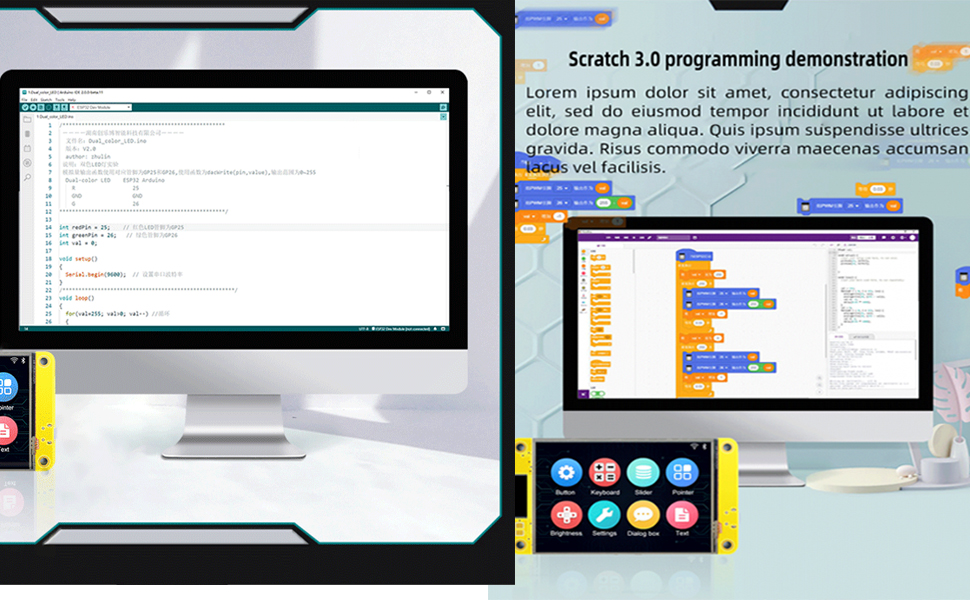
Gambar 6.1: Contohample of a graphical programming interface, such as Scratch 3.0, being used to program the ESP32 module.
6.2. Uploading Code to the Board
Code can be uploaded to the ESP32-2432S028R board using either the Arduino IDE or the Espressif Download Tool. Ensure the correct drivers are installed for your operating system to recognize the board's serial port.

Image 6.2: Visual guide demonstrating the two primary methods for uploading firmware: via Arduino IDE and using the Espressif Download Tool, including driver installation notes.
For detailed programming guides and sample code, refer to the official documentation provided by Stemedu or the respective development environment communities.
7. Penyelesaian masalah
- Layar Tidak Menyala: Ensure the Micro USB cable is securely connected to both the module and a working power source. Try a different USB cable or power adapter.
- Tidak Ada Respons Sentuhan: Verify that the display is properly initialized in your code. For resistive touchscreens, ensure the touch pen is making firm contact.
- Kesalahan Pengunggahan: Check that the correct COM port is selected in your IDE/tool and that the necessary drivers (e.g., CH340 driver) are installed. Ensure the board is in bootloader mode if required by your upload method.
- Masalah Konektivitas WiFi/Bluetooth: Confirm that your code correctly initializes and configures the WiFi or Bluetooth module. Check for proper antenna connection if applicable.
8. Perawatan dan Pemeliharaan
- Penanganan: Pegang modul pada bagian tepinya untuk menghindari menyentuh komponen elektronik yang sensitif.
- Pembersihan: Use a soft, dry, lint-free cloth to clean the display surface. Avoid abrasive cleaners or solvents.
- Penyimpanan: Simpan modul di tempat yang sejuk dan kering, jauhkan dari sinar matahari langsung dan suhu ekstrem.
- Perlindungan: Protect the display from scratches and impacts. Avoid applying excessive pressure to the screen.
9. Informasi Garansi
Specific warranty details for the Stemedu ESP32-2432S028R module are typically provided at the point of purchase or on the manufacturer's official website. Please retain your proof of purchase for any warranty claims. For general warranty inquiries, contact Stemedu customer support.
10. Dukungan Pelanggan
For technical assistance, troubleshooting, or further information regarding your ESP32-2432S028R module, please visit the official Stemedu website or contact their customer support team. Online resources, forums, and community support may also be available for ESP32 development boards.
Stemedu Official Store: Kunjungi Toko
Dokumen Terkait - ESP32-2432S028R
 |
Panduan Pengguna Modul Layar ESP32-32E 2.8 inci (E32R28T & E32N28T) Comprehensive user manual for the 2.8-inch ESP32-32E display module (models E32R28T and E32N28T), covering resource description, software development, hardware instructions, schematics, and precautions. Includes details on ESP32-WROOM-32E, ILI9341 display, XPT2046 touch controller, and various interfaces. |
 |
Panduan Pengguna Modul Tampilan ESP2.8-32E 32 inci Panduan pengguna untuk Modul Layar ESP32-32E 2.8 inci, mencakup deskripsi sumber daya, instruksi perangkat lunak dan perangkat keras, serta tindakan pencegahan penggunaan. Detailnya meliputi modul ESP32-WROOM-32E, pengontrol LCD ILI9341, komunikasi SPI, konversi USB-ke-serial, dan berbagai diagram rangkaian. |
 |
SmarElex 2.8-inch TFT LCD Display with Resistive Touch (ILI9341, SPI) Comprehensive guide to the SmarElex 2.8-inch TFT LCD display module featuring the ILI9341 driver, 240x320 resolution, resistive touch (XPT2046), and SPI interface. Includes hardware connection details and Arduino demo code for embedded systems and DIY projects. |
 |
Panduan Pengguna Layar Elecrow CrowPanel ESP32 Panduan pengguna untuk tampilan HMI Elecrow CrowPanel ESP32, yang merinci isi paket, tata letak antarmuka, spesifikasi teknis, dan petunjuk keselamatan. |
 |
Lembar Data Modul Tampilan Cerdas Seri 4D Systems gen4-ESP32 Lembar data untuk modul tampilan cerdas Seri 4D Systems gen4-ESP32, yang dilengkapi prosesor ESP32-S3R8, berbagai ukuran layar (2.4" hingga 3.5"), opsi sentuh, dan konektivitas yang luas. Termasuk spesifikasi, perangkat keras, dan lainnya.viewdan informasi pemrograman. |
 |
ESP32 2.8-inch Smart Display (NM Miner) User Guide Technical specifications and features of the ESP32 2.8-inch Smart Display (NM Miner), including mining capabilities and interface details. |
Ask a question about this manual
Ask about setup, troubleshooting, compatibility, parts, safety, or missing instructions. Manuals+ will review the question and use this page’s manual context to help answer it.