
1. Pendahuluan
Thank you for choosing the MAIRDI M890DCBTENC Bluetooth Headset. This manual provides essential information for setting up, operating, and maintaining your headset to ensure optimal performance and longevity. Please read this manual carefully before using the product.

Image 1: MAIRDI M890DCBTENC Bluetooth Headset.
Fitur Utama:
- Konektivitas yang Sempurna: Bluetooth V5.2 for stable and fast wireless connections.
- Audio HD: APTX and low latency technology for high-fidelity sound.
- AI Noise-Canceling Microphone: Dual-mic technology filters out 98% of background noise for crystal-clear calls.
- Daya Tahan Baterai Lebih Lama: Up to 40 hours of talk and music time on a single charge.
- Pemasangan Multititik: Connects to two devices simultaneously (e.g., PC/laptop and mobile phone).
- Comfort & Adjustability: 330-degree rotatable microphone boom, adjustable headband, and super soft leather ear cushions.
- Pengisian Serbaguna: Includes a charging stand with an in-built Bluetooth receiver for plug-and-play PC connectivity, or charge via USB cable.
2. Apa yang ada di dalam kotak
Upon opening your MAIRDI M890DCBTENC Bluetooth Headset package, you should find the following items:
- MAIRDI M890DCBTENC Bluetooth Headset
- Charging Base (with integrated Bluetooth receiver)
- Kabel Pengisian Daya USB
- Panduan Pengguna
- Kantong Pembawa
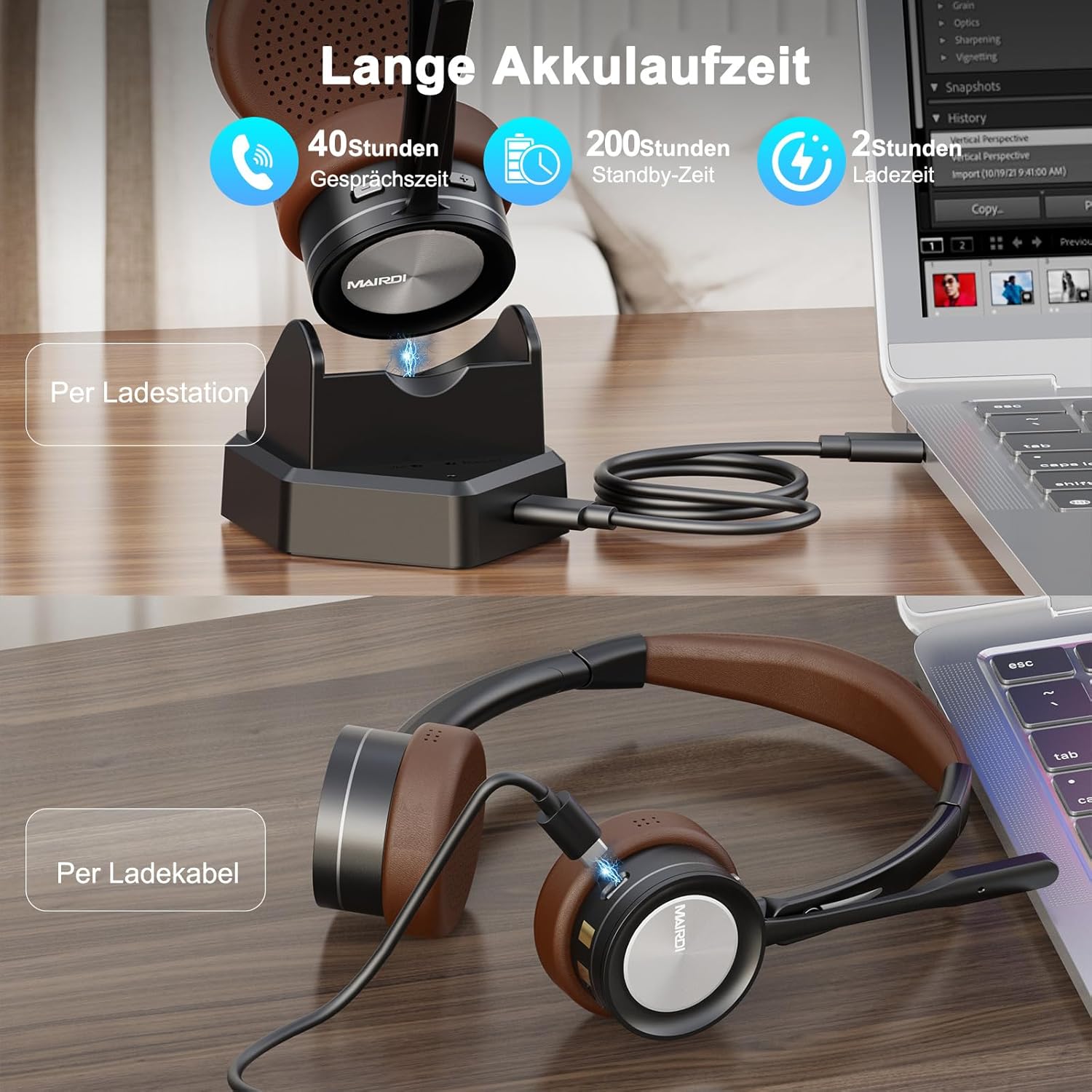
Image 2: The MAIRDI M890DCBTENC Headset with its charging base and USB cable.
3. Pengaturan
3.1 Pengisian Awal
Before first use, fully charge your headset. Connect the USB charging cable to the charging base and a power source (e.g., computer USB port or wall adapter). Place the headset on the charging base. The indicator light will show charging status.

Image 3: The headset can be charged via the charging station or directly with the USB cable.
3.2 Menghubungkan ke Perangkat
Your headset offers two primary connection methods: via the charging base (with integrated Bluetooth receiver) for PCs without Bluetooth, or directly via Bluetooth to any compatible device.
3.2.1 Connecting via Charging Base (for PC)
- Connect the charging base to your PC's USB port using the provided USB cable. The base acts as a plug-and-play Bluetooth receiver.
- Turn on the headset. It will automatically attempt to pair with the connected charging base.
- Once connected, your PC should recognize the headset as an audio device. Select it as your input/output device in your system's sound settings.
3.2.2 Connecting via Bluetooth (Direct)
- Ensure the headset is powered on and in pairing mode (usually indicated by a flashing LED).
- On your device (PC, laptop, Mac, smartphone), go to Bluetooth settings.
- Pencarian untuk available devices and select "MAIRDI M890DCBTENC" from the list.
- Once paired, the headset's LED indicator will show a steady light.

Image 4: The headset supports multipoint pairing, allowing simultaneous connection to a laptop and a smartphone.
3.3 Pemasangan Multipoint
The headset supports connecting to two Bluetooth devices simultaneously. After pairing with the first device, put the headset back into pairing mode and connect to the second device. The headset will manage audio switching between the two connected devices.
4. Petunjuk Pengoperasian
4.1 Daya Hidup/Mati
- Untuk menghidupkan perangkat, geser sakelar daya ke posisi 'ON'.
- Untuk mematikan daya, geser sakelar daya ke posisi 'OFF'.
4.2 Manajemen Panggilan
- Menjawab/Mengakhiri Panggilan: Tekan tombol multifungsi sekali.
- Tolak Panggilan: Press and hold the multi-functional button for 2 seconds.
- Mikrofon Bisu: Press the mute button on the microphone boom. An audible prompt will indicate 'Mute On' or 'Mute Off'.

Image 5: The headset features a microphone with noise cancellation and a dedicated mute button.
4.3 Volume Control & Music Playback
- Volume Naik/Turun: Use the dedicated volume buttons on the earcup.
- Putar/Jeda: Tekan tombol multifungsi sekali.
- Lagu Berikutnya: Tekan dan tahan tombol 'Volume Naik'.
- Lagu Sebelumnya: Tekan dan tahan tombol 'Volume Turun'.
4.4 Penyesuaian Mikrofon
The microphone boom can be rotated 330 degrees to position it optimally for your voice or to move it out of the way when not in use. Ensure the microphone is positioned close to your mouth for best voice pickup and noise cancellation.

Image 6: The headset features a soft earpad, 330° rotatable microphone arm, and an adjustable headband for comfort.
4.5 Busy Light Indicator
The headset features a busy light indicator to signal to others when you are on a call or in a meeting, helping to minimize interruptions.
5. Pemeliharaan
To ensure the longevity and optimal performance of your MAIRDI M890DCBTENC headset, follow these maintenance guidelines:
- Pembersihan: Gunakan kain lembut dan kering untuk membersihkan headset dan dudukan pengisi daya. Hindari penggunaan bahan kimia keras atau bahan abrasif.
- Penyimpanan: When not in use, store the headset in the provided carry pouch or on the charging base to protect it from dust and damage.
- Perawatan Baterai: Avoid fully discharging the battery frequently. Charge the headset regularly, even if not in daily use, to maintain battery health.
- Kondisi Lingkungan: Do not expose the headset to extreme temperatures, humidity, or direct sunlight. Keep it away from water and other liquids.
6. Penyelesaian masalah
Jika Anda mengalami masalah dengan headset Anda, lihat masalah dan solusi umum berikut:
| Masalah | Solusi yang mungkin |
|---|---|
| Headset tidak menyala. | Ensure the headset is fully charged. Connect it to the charging base or directly via USB cable. |
| Tidak dapat dipasangkan dengan perangkat. | Ensure the headset is in pairing mode (flashing LED). Turn off and on Bluetooth on your device. Move the headset closer to the device. Clear previous Bluetooth connections on your device. |
| Tidak ada audio atau kualitas audionya buruk. | Check volume levels on both the headset and your connected device. Ensure the headset is selected as the default audio input/output device. Re-pair the headset. |
| Mikrofon tidak berfungsi. | Ensure the microphone is not muted. Check that the headset is selected as the default microphone in your device's sound settings. Position the microphone boom correctly. |
| Daya tahan baterai pendek. | Ensure the headset is fully charged before use. Battery life can vary based on usage patterns and volume levels. |
7. Spesifikasi
| Fitur | Detil |
|---|---|
| Merek | MAIRDI |
| Nomor Model | M890DCBTENC |
| Warna | Cokelat |
| Teknologi Konektivitas | Nirkabel (Bluetooth) |
| Versi Bluetooth | 5.2 |
| Penempatan Telinga | Di Telinga |
| Kontrol Kebisingan | Isolasi Suara |
| Mikropon | AI Noise-Canceling, 330° Rotatable |
| Daya Tahan Baterai (Rata-rata) | 40 Jam |
| Rentang Frekuensi | 20 Hz - 20,000 Hz |
| Jenis Penggerak Audio | Driver Dinamis |
| Jenis Kontrol | Kontrol Volume, Remote |
| Perangkat yang Kompatibel | PC, Laptop, Desktop, Mac, Smartphone, Cell Phone |
| Berat Barang | 0.53 Kilogram |
| Bahan | Kulit (bantalan telinga) |
8. Garansi dan Dukungan
For warranty information and customer support, please refer to the official MAIRDI webKunjungi situs web atau hubungi pengecer Anda. Simpan struk pembelian Anda sebagai bukti pembelian untuk klaim garansi.
9. Video Produk
Bluetooth Headset with Microphone for PC
Video 1: Sebuah overview of the MAIRDI Bluetooth Headset with Microphone for PC, highlighting its features and design.