
Perkenalan
Welcome to your Mooyran SP01 Remote Control. This manual provides essential instructions for the setup, operation, and maintenance of your remote control, designed specifically for use with a Mooyran Galaxy Projector. Please read this manual thoroughly before using the product to ensure proper functionality and to prevent damage.
Pengaturan
1. Pemasangan Baterai
Locate the battery compartment on the back of the remote control. Open the compartment cover. Insert the required batteries (typically AAA, not included) according to the polarity indicators (+ Dan -) inside the compartment. Close the cover securely.
2. Pairing with Projector
Ensure your Mooyran Galaxy Projector is powered on and within range. Most projectors require a specific pairing sequence. Refer to your projector's user manual for detailed instructions on how to enter pairing mode. Once the projector is in pairing mode, press and hold the designated pairing button on the remote control (if available) or follow the on-screen prompts on your projector to establish a connection. A successful connection is usually indicated by a confirmation message on the projector or a light indicator on the remote.
Petunjuk Pengoperasian
The Mooyran SP01 Remote Control provides comprehensive control over your Galaxy Projector's functions. Below are common functions and their typical usage:
- Daya Hidup/Mati: Tekan tombol Kekuatan tombol untuk menghidupkan atau mematikan proyektor.
- Pemilihan Mode: Gunakan Mode or designated scene buttons to cycle through different projection effects (e.g., nebula, stars, galaxy patterns).
- Penyesuaian Kecerahan: Adjust the intensity of the projected light using the Kecerahan + Dan Kecerahan - tombol.
- Kontrol Rotasi: Modify the rotation speed or direction of the projected patterns using dedicated Rotasi tombol.
- Fungsi Pengatur Waktu: Set an automatic shutdown timer for the projector using the Pengatur waktu button, often with options for 1 hour, 2 hours, etc.
- Pemilihan Warna: Change the color of the projected light or nebula effects using the Warna buttons or a color palette selector.
- Kontrol Volume: If your projector has integrated speakers, use the Jilid + Dan Jilid - buttons to adjust audio output.
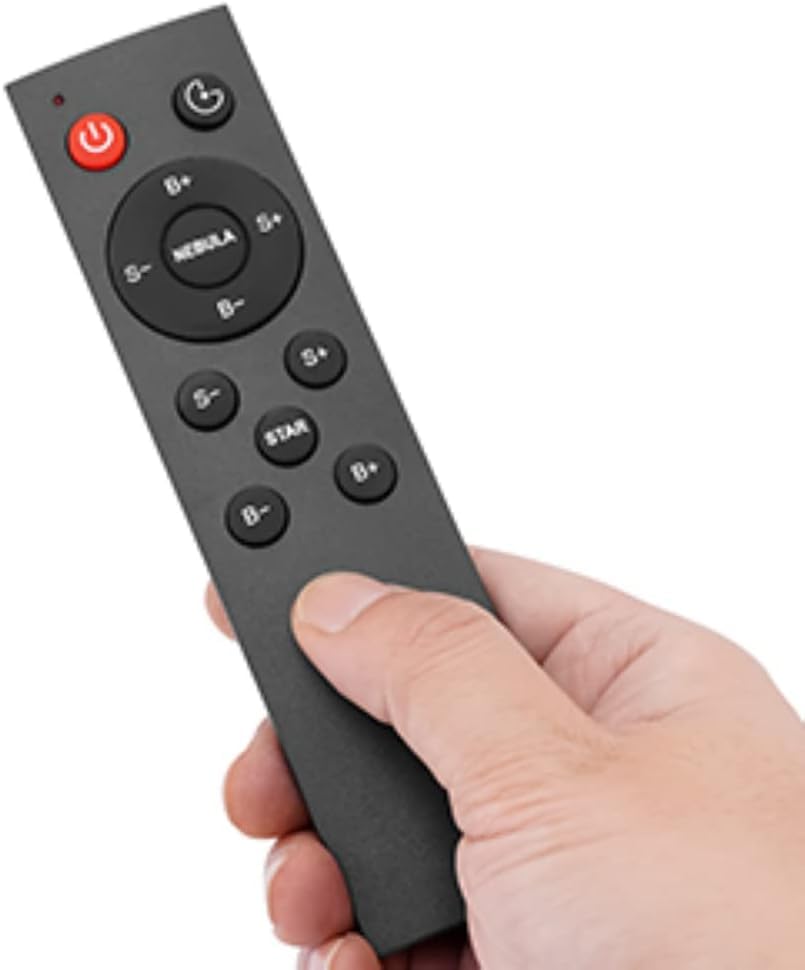
Image: The Mooyran SP01 Remote Control, showing its various buttons for controlling a Galaxy Projector. This image illustrates the layout and design of the remote.
Pemeliharaan
Proper care ensures the longevity and optimal performance of your remote control:
- Tetap Kering: Protect the remote control from water, moisture, and extreme humidity.
- Hindari Dampak: Do not drop the remote or subject it to strong physical shocks.
- Pembersihan: Clean the surface of the remote with a soft, dry, lint-free cloth. Avoid using abrasive cleaners, solvents, or chemical sprays.
- Perawatan Baterai: If the remote control will not be used for an extended period (e.g., more than a month), remove the batteries to prevent potential leakage and corrosion.
Penyelesaian Masalah
Kendali Jarak Jauh Tidak Merespons
- Periksa Baterai: Ensure batteries are correctly installed and are not depleted. Replace with fresh batteries if necessary.
- Pandangan: Verify that there is a clear, unobstructed line of sight between the remote control and the projector's infrared receiver.
- Jarak: Operate the remote control within the recommended effective range of the projector.
- Memperbaiki: If the remote uses Bluetooth or RF, attempt to re-pair it with the projector following the setup instructions in this manual and your projector's manual.
Fungsionalitas Terbatas
- Kesesuaian: Confirm that the Mooyran SP01 Remote Control is fully compatible with your specific Mooyran Galaxy Projector model.
- Projector Manual: Refer to your projector's user manual for specific remote control functions and any advanced settings that might affect remote operation.
Spesifikasi
| Fitur | Detil |
|---|---|
| Nomor Model | SP01 |
| Merek | Mooyran |
| Perangkat yang Kompatibel | Mooyran Galaxy Projector |
| Perangkat yang Didukung Maksimum | 1 |
| Warna | Hitam |
| Berat Barang | 1.13 ons (sekitar 32 gram) |
| Dimensi Paket | 6.77 x 4.8 x 0.83 inci (sekitar 17.2 x 12.2 x 2.1 cm) |
| Fitur Khusus | Belt Clip (Note: This feature may vary or be specific to certain remote designs and is not universally applicable to all projector remotes.) |
Garansi dan Dukungan
For detailed warranty information, customer service, or technical support regarding your Mooyran SP01 Remote Control or Galaxy Projector, please refer to the documentation included with your main projector unit. You may also visit the official Mooyran website for the most up-to-date support resources and contact information. Specific warranty details for accessories like this remote control are typically covered under the main projector's warranty policy.


