
1. Pendahuluan
This manual provides instructions for the Akozon HBVW202012HD 1MP HD USB Camera Module. This module is designed for various applications requiring high-definition imaging and broad operating system compatibility.
Fitur Utama:
- 1MP High-Definition Imaging: Equipped with a 1-megapixel lens, providing clear images with a 50° field of view.
- OV9726 Chip: Utilizes the OV9726 photosensitive chip for consistent performance.
- Kompatibilitas Universal: Supports Windows XP, Windows 10, OS X, and Linux operating systems.
- OTG & UVC Protocol Support: Features a USB 2.0 interface for plug-and-play functionality without requiring additional drivers.
- Aplikasi serbaguna: Suitable for consumer electronics, security systems, industrial applications, QR scanning, and face recognition.

Gambar 1: Depan view of the Akozon HBVW202012HD 1MP HD USB Camera Module, showing the lens and circuit board.
2. Pengaturan
Follow these steps to set up your camera module:
- Hubungkan Kabel USB: Attach the provided USB cable to the camera module's connector. Ensure a secure connection.
- Hubungkan ke Perangkat Host: Plug the USB connector into an available USB 2.0 port on your computer or compatible host device.
- Instalasi Driver: The module supports the UVC protocol, enabling plug-and-play functionality on most compatible operating systems (Windows XP, Windows 10, OS X, Linux). No manual driver installation is typically required. The system should automatically detect and configure the device.
- Verifikasi Koneksi: After connecting, check your device manager or system settings to confirm that the camera module is recognized as a USB camera device.

Figure 2: The camera module connected to its USB cable, ready for integration.
3. Petunjuk Pengoperasian
Once the camera module is successfully connected and recognized by your system, you can begin using it with compatible software applications.
Operasi Dasar:
- Kompatibilitas Perangkat Lunak: Use any standard webcam or camera application compatible with your operating system to access the video feed from the module.
- Pengenalan Fungsi: The module supports functions such as QR code scanning and face recognition, depending on the capabilities of the software application used.
- Fokus Manual: The lens features manual adjustment for focusing. Rotate the lens barrel to achieve optimal image clarity for your specific application distance.

Gambar 3: Contohamples of diverse applications for the HBVW202012HD camera module.
4. Pemeliharaan
Perawatan yang tepat memastikan umur panjang dan kinerja optimal modul kamera Anda.
- Pembersihan: Use a soft, dry cloth to gently clean the lens and module surface. Avoid abrasive materials or harsh chemicals. For stubborn smudges on the lens, a lens cleaning solution designed for optical surfaces can be applied to a microfiber cloth.
- Penyimpanan: Store the module in a cool, dry place away from direct sunlight and extreme temperatures. Protect it from dust and moisture when not in use.
- Penanganan: Handle the module by its edges to avoid touching the lens or electronic components. Avoid dropping or subjecting the module to strong impacts.
5. Penyelesaian masalah
If you encounter issues with your camera module, refer to the following common problems and solutions:
Masalah Umum dan Solusinya:
- Kamera Tidak Terdeteksi:
- Ensure the USB cable is securely connected to both the module and the host device.
- Cobalah menghubungkan ke port USB lain di perangkat Anda.
- Restart your computer or host device.
- Verify that the operating system recognizes the device in Device Manager (Windows) or System Information (OS X/Linux).
- Kualitas Gambar Buruk:
- Adjust the manual focus of the lens by rotating the lens barrel until the image is clear.
- Pastikan pencahayaan yang memadai di lingkungan tersebut.
- Clean the lens surface if it appears dirty or smudged.
- Check the resolution settings in your camera application; ensure it is set to 1280x720 for optimal quality.
- Tidak Ada Umpan Video:
- Confirm that the camera application you are using is correctly configured to select the Akozon HBVW202012HD module as the video source.
- Close any other applications that might be using the camera.
- Update your operating system and USB drivers if available.
6. Spesifikasi
Detailed technical specifications for the Akozon HBVW202012HD 1MP HD USB Camera Module:
| Fitur | Spesifikasi |
|---|---|
| Model Produk | HBV-W202012HD |
| Resolusi | 1MP (1280x720) |
| Chip fotosensitif | OV9726 (1/6 inch) |
| Bidang View (FOV) | 50° |
| Panjang Fokus | ukuran 3.2mm |
| Format Keluaran | MJPG/YUY2 |
| Mode Fokus | Manual (Adjustable Lens) |
| Antarmuka Keluaran | Kabel USB 2.0 |
| Sistem yang Didukung | Windows XP, Windows 10, OS X, Linux |
| Panjang Kawat | Sekitar 50cm / 19.7in |
| Suhu Kerja | -30℃ hingga 70℃ |
| Dimensi Modul | Kira-kira 30 x 25 x 14 mm / 1.2 x 1 x 0.6 inci |
| Fitur Tambahan | Supports external LED infrared fill light connection |
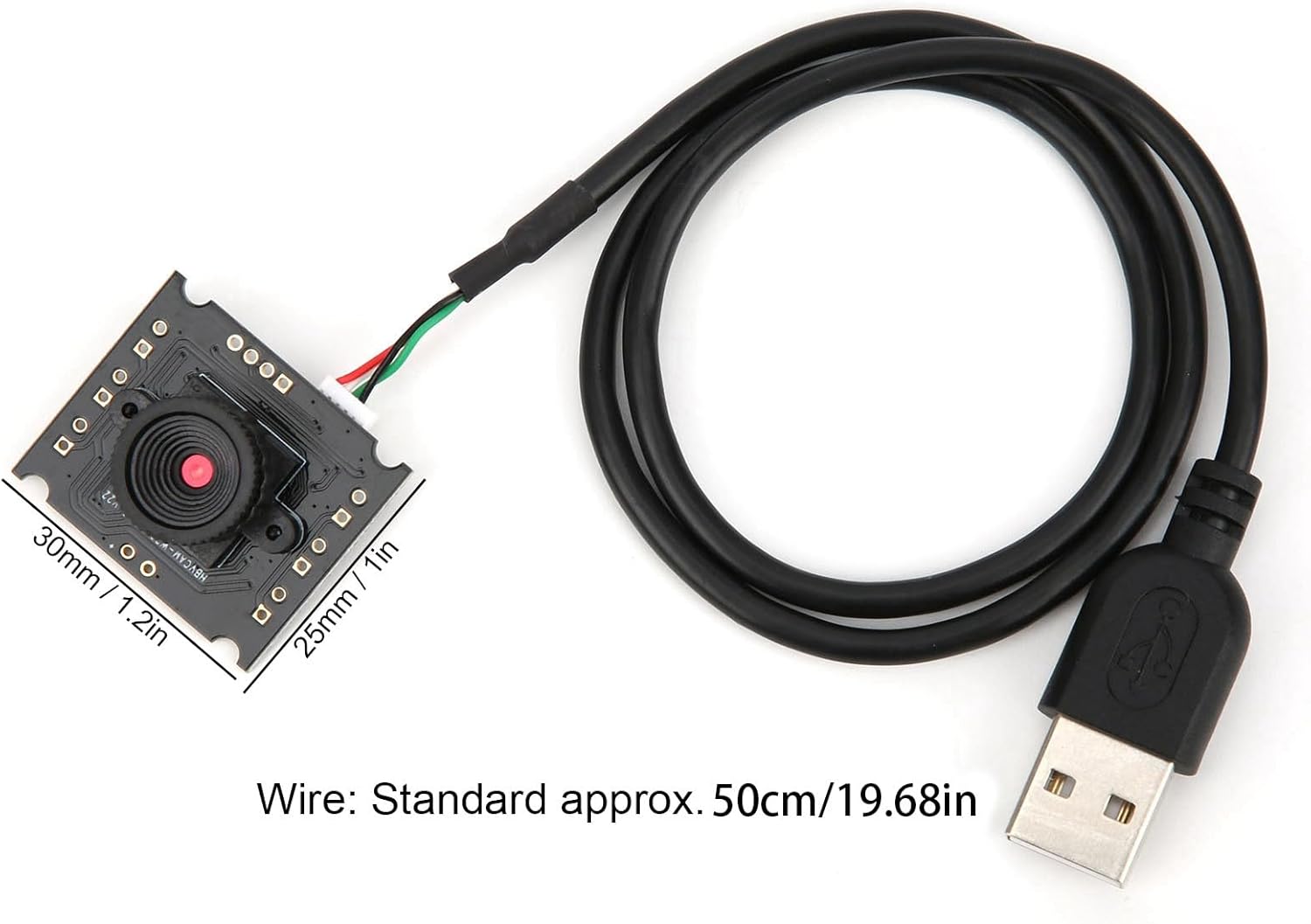
Figure 4: Dimensions of the camera module and standard cable length.

Figure 5: Visual comparison of normal pixel versus 1 megapixel high definition image clarity.
7. Garansi dan Dukungan
For warranty information, technical support, or service inquiries, please refer to the documentation provided with your purchase or contact Akozon customer service through their official channels. Keep your purchase receipt as proof of purchase.