
1. Pendahuluan
This manual provides detailed instructions for the safe and efficient operation of your HANLIM Portable CD Player, Model HL-108. Please read this manual thoroughly before using the product and retain it for future reference.

Gambar 1: Depan view of the HANLIM Portable CD Player HL-108. This image displays the main unit with its control panel, LCD screen, and integrated handle.
2. Petunjuk Keselamatan
- Jangan biarkan unit terkena hujan, kelembapan, atau suhu ekstrem.
- Hindari meletakkan unit di dekat sumber panas atau terkena sinar matahari langsung.
- Jangan membuka casing; serahkan semua servis kepada personel yang berkualifikasi.
- Jauhkan unit dari medan magnet yang kuat.
- Gunakan hanya kabel daya yang disediakan.
- Pastikan ventilasi yang tepat untuk mencegah panas berlebih.
3. Isi Paket
Harap periksa apakah semua item tersedia:
- HANLIM Portable CD Player HL-108
- Kabel daya (1.2m)
- Remote control (baterai tidak termasuk)
- Panduan Pengguna

Gambar 2: The HANLIM Portable CD Player HL-108 shown with its included accessories: the power cable, remote control, and user manual.
4. Produk Lebihview
The HANLIM Portable CD Player HL-108 features a compact design with multiple playback options and connectivity ports.
4.1 Kontrol Panel Depan
- Layar LCD: Menampilkan mode saat ini, informasi trek, dan frekuensi FM.
- Tombol MODE: Beralih antara mode CD, FM, Bluetooth, USB, dan AUX.
- Tombol STANDBY: Menyalakan atau mematikan unit.
- Play/Pause/Scan Button: Memutar/menghentikan sementara media atau memindai stasiun radio FM.
- Previous/CH- Button: Melompat ke trek/stasiun sebelumnya.
- Next/CH+ Button: Melompat ke trek/stasiun berikutnya.
- Tombol Volume: Menyesuaikan volume audio.
- Port USB: Untuk pemutaran melalui USB drive.
- Jack Headphone (3.5mm): Untuk didengarkan secara pribadi.
4.2 Sambungan Panel Belakang
- AUX IN (3.5mm): Hubungkan perangkat audio eksternal.
- Pelabuhan MIC: Connect a microphone for singing.
- Input Daya AC: Connect the power cable for charging or continuous power.
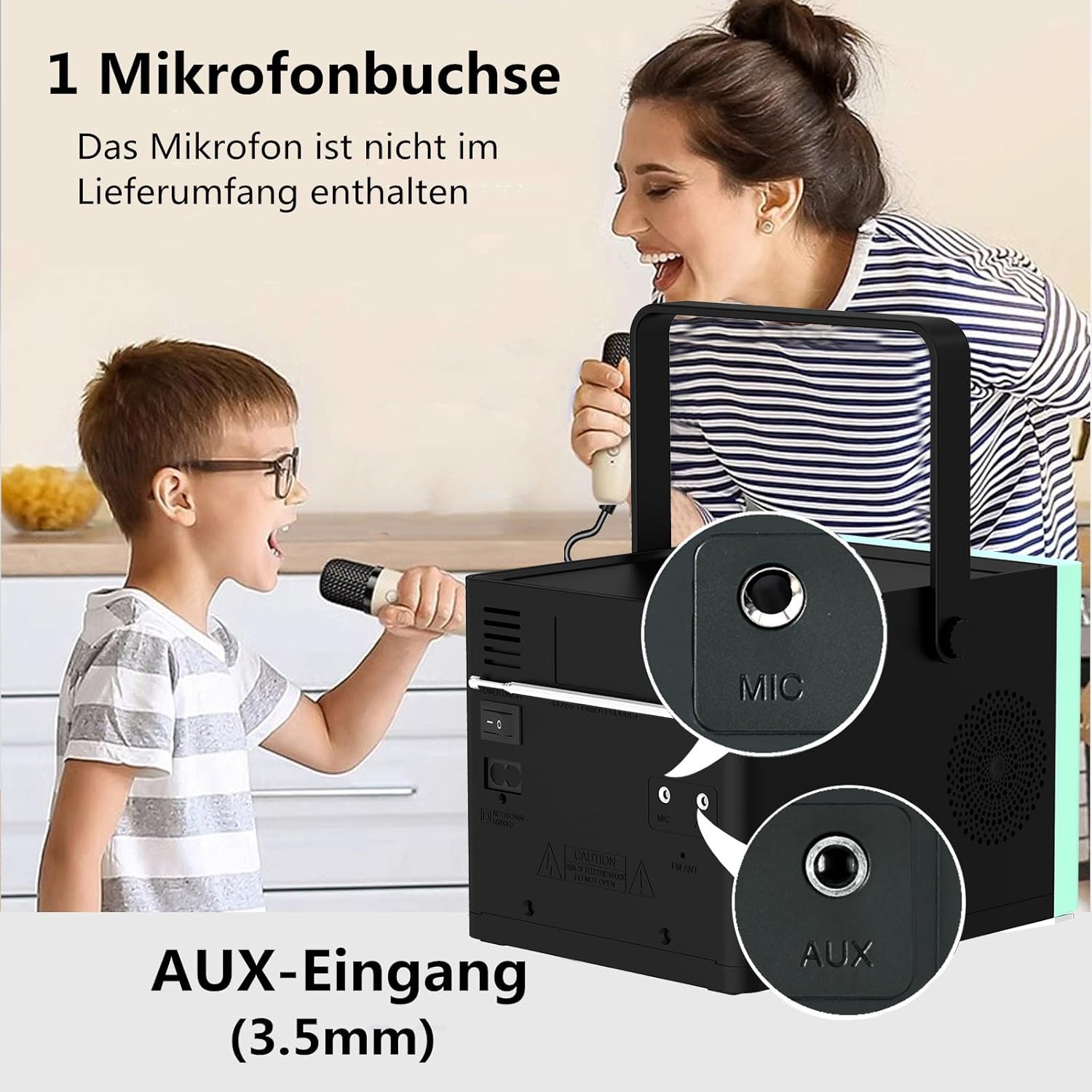
Gambar 3: Belakang view of the HANLIM Portable CD Player HL-108, highlighting the microphone input and AUX input ports.
5. Pengaturan
5.1 Menyalakan dan Mengisi Daya
- Connect the provided power cable to the AC power input on the rear of the unit and plug it into a wall outlet.
- The built-in 2000mAh battery will begin charging automatically. A full charge provides approximately 4.5 to 5 hours of playback at maximum volume.
- Tekan tombol BERSIAP tombol untuk menghidupkan unit.
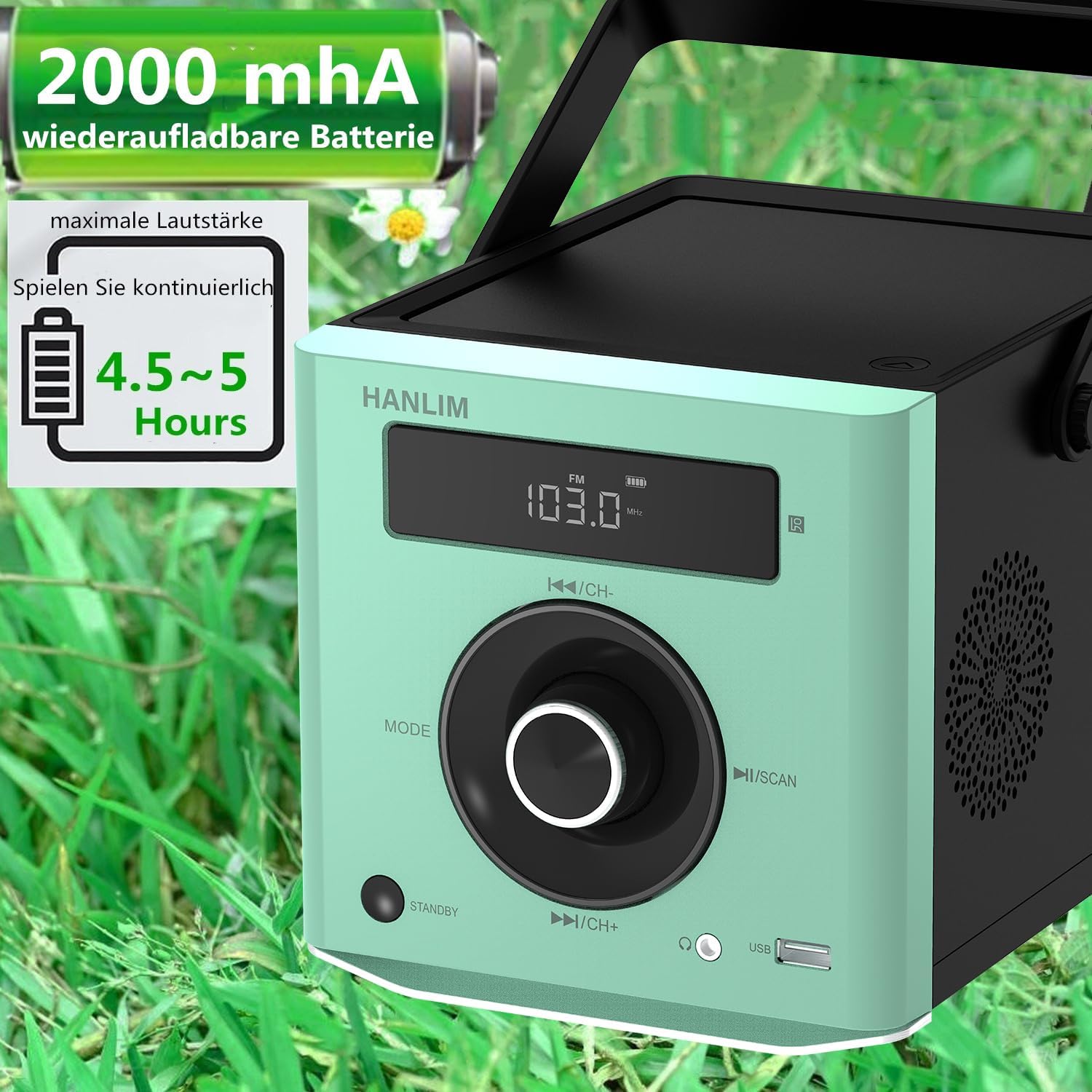
Gambar 4: The HANLIM Portable CD Player HL-108 displaying battery charge status and indicating 4.5-5 hours of continuous playback.
6. Petunjuk Pengoperasian
6.1 Pemutaran CD
- Buka penutup kompartemen CD.
- Place a CD (CD/CD-R/CD-RW/MP3 format) onto the spindle, label side up.
- Tutup penutup kompartemen CD.
- Tekan tombol MODE tekan tombol hingga "CD" ditampilkan.
- Tekan tombol Putar/Jeda tombol untuk memulai pemutaran.
- Gunakan Sebelumnya/Berikutnya tombol untuk melewati trek.
- Fungsi Ulangi: Press the repeat button on the remote control to cycle through repeat one, repeat all, or random play.
- Continue Playback: The unit will resume playback from where it was last stopped, useful for language learning.
6.2 Radio FM
- Tekan tombol MODE tekan tombol hingga "FM" muncul.
- Tekan dan tahan tombol Pindai button to automatically scan and store available FM stations (87.5-108MHz). Up to 20 stations can be stored.
- Gunakan Bahasa Indonesia: CH- Dan Bahasa Indonesia: CH+ tombol untuk menavigasi stasiun yang tersimpan.

Gambar 5: The HANLIM Portable CD Player HL-108 showing the FM radio frequency on its display.
6.3 Koneksi Bluetooth
- Tekan tombol MODE button until "Bluetooth" is displayed. The unit will enter pairing mode.
- On your device (phone, tablet, computer), enable Bluetooth and search for "HANLIM HL-108".
- Select the device to pair. Once connected, you will hear a confirmation sound.
- Note: Bluetooth headphones are not supported for connection to this CD player.

Gambar 6: The HANLIM Portable CD Player HL-108 illustrating its Bluetooth connectivity, USB port, and headphone jack.
6.4 Pemutaran USB
- Insert a USB flash drive (up to 32GB, supporting MP3/WMA formats) into the USB port.
- Tekan tombol MODE tekan tombol hingga "USB" muncul.
- Playback will start automatically. Use the Sebelumnya/Berikutnya tombol untuk menavigasi trek.
6.5 Masukan AUX
- Connect an external audio device (e.g., phone, computer) to the AUX IN port using a 3.5mm audio cable (not included).
- Tekan tombol MODE tekan tombol hingga "AUX" muncul.
- Kendalikan pemutaran dari perangkat Anda yang terhubung.
6.6 Jack Headphone
For private listening, connect 3.5mm headphones to the headphone jack on the front panel.
6.7 Microphone Port
Connect a microphone (not included) to the MIC port on the rear panel for singing along to music.
6.8 Sound Settings (Equalizer)
The unit offers 5 sound qualities: Pop, Jazz, Rock, Classical, and Flat. Use the EQ button on the remote control to cycle through these modes and adjust the audio output to your preference.
7. Pemeliharaan
- Pembersihan: Lap unit dengan kain lembut dan kering. Jangan gunakan pembersih atau pelarut abrasif.
- Perawatan CD: Pegang CD pada bagian tepinya. Bersihkan CD yang kotor dengan kain lembut dan bebas serat, usap dari tengah ke luar.
- Perawatan Baterai: Untuk masa pakai baterai yang optimal, hindari sering-sering mengosongkan daya baterai sepenuhnya. Jika disimpan dalam jangka waktu lama, isi daya baterai hingga sekitar 50% setiap beberapa bulan.
8. Penyelesaian masalah
| Masalah | Kemungkinan Penyebab | Larutan |
|---|---|---|
| Unit tidak menyala. | Baterai habis atau kabel daya tidak terhubung. | Connect the power cable and allow the battery to charge, or operate directly from AC power. |
| Tidak ada suara. | Volume is too low, headphones connected, or incorrect mode selected. | Increase volume, disconnect headphones, or ensure the correct input mode (CD, FM, BT, USB, AUX) is selected. |
| CD tidak bisa diputar atau melompat-lompat. | CD kotor, tergores, atau dimasukkan dengan tidak benar. | Clean the CD, try a different CD, or reinsert the CD correctly. Ensure the CD compartment is fully closed. |
| Pemasangan Bluetooth gagal. | Device is too far, Bluetooth is off on the device, or unit is not in pairing mode. | Ensure the unit is in Bluetooth mode, your device's Bluetooth is on, and they are within range. Try restarting both devices. |
| Penerimaan sinyal radio FM buruk. | Sinyal lemah atau posisi antena kurang baik. | Adjust the unit's position or extend the antenna for better reception. |
9. Spesifikasi
| Fitur | Spesifikasi |
|---|---|
| Merek | HANLIM |
| Model | HL-108 |
| Dimensi Produk | 15.5 x 20.5 x 16 cm (6.1 x 8.1 x 6.3 inci) |
| Berat Barang | 1.7 kg (3.75 pon) |
| Daya Keluaran | 20W |
| Baterai | Built-in 2000mAh rechargeable Lithium Ion |
| Daya Tahan Baterai | Up to 5 hours (at maximum volume) |
| Format CD yang Didukung | CD, CD-R, CD-RW, MP3 |
| Frekuensi Radio FM | Frekuensi 87.5-108MHz |
| Dukungan USB | Up to 32GB, MP3/WMA formats |
| Konektivitas | Bluetooth, USB, AUX (3.5mm), Headphone Jack (3.5mm), Microphone Port |
| Jenis Tampilan | Layar LCD |
| Fitur Khusus | Bluetooth, CD-R/RW Compatible, Equalizer, Portable, Rechargeable |
10. Garansi dan Dukungan
This HANLIM product comes with a garansi satu tahun terhitung sejak tanggal pembelian. Garansi ini mencakup cacat produksi dan pengerjaan dalam penggunaan normal.
For technical support, warranty claims, or service inquiries, please contact your retailer or the HANLIM customer service department through the contact information provided at the point of purchase.