
1. Pendahuluan
This manual provides detailed instructions for the safe and efficient operation of your JORLAI T316 Portable Suitcase Turntable. Please read this manual thoroughly before using the product and retain it for future reference.
2. Informasi Keselamatan
- Jangan biarkan unit terkena hujan atau kelembapan.
- Jangan membongkar unit. Serahkan perbaikan kepada teknisi yang berkualifikasi.
- Jauhkan unit dari sinar matahari langsung, sumber panas, dan medan magnet yang kuat.
- Pastikan ventilasi yang baik; jangan halangi lubang ventilasi.
- Gunakan hanya adaptor daya yang disertakan dengan unit.
- Hindari meletakkan benda berat di atas unit.
3. Produk Lebihview
Familiarize yourself with the components of your JORLAI T316 turntable.

Gambar 3.1: Detail Produk. This image highlights key components including the 45 RPM Adaptor, Tone Arm, Ruby Stylus, Tone Arm Lifter, Auto Stop Switch, Speed Selector, 3.5mm Headphone Jack, Bluetooth Switch, Battery Indicator, Bluetooth Indicator, Power Indicator, and Volume Control.
- Adaptor 45 RPM: Digunakan untuk memutar piringan hitam 7 inci dengan lubang tengah yang besar.
- Lengan Nada: Holds the stylus and tracks the grooves of the record.
- Ruby Stylus: The needle that reads the record's grooves.
- Pengangkat Lengan Nada: Raises and lowers the tone arm gently onto the record.
- Saklar Penghenti Otomatis: Enables or disables automatic stopping of the turntable when a record finishes.
- Pemilih Kecepatan: Allows selection of 33⅓, 45, or 78 RPM playback speeds.
- Jack Headphone 3.5mm: Untuk mendengarkan secara pribadi dengan headphone.
- Saklar Bluetooth: Mengaktifkan mode pemasangan Bluetooth.
- Indikator Baterai: Shows the current battery status.
- Indikator Bluetooth: Lampu akan menyala saat Bluetooth aktif dan terhubung.
- Indikator Daya: Shows if the unit is powered on.
- Kontrol Volume: Menyesuaikan tingkat keluaran audio.

Gambar 3.2: Sambungan Panel Belakang. This image displays the Aux In, Power Interface, and RCA Line Out ports.
- Aux Dalam: Hubungkan perangkat audio eksternal melalui kabel 3.5 mm.
- Antarmuka Daya: Connect the power adapter for charging and operation.
- Jalur Keluar RCA: Connect to external speakers or an amplifier untuk output audio yang ditingkatkan.
4. Pengaturan
- Membongkar: Carefully remove the turntable from its packaging. Retain all packaging materials for future transport or storage.
- Sambungan Daya: Connect the supplied power adapter to the "Power Interface" port on the rear of the turntable and plug it into a wall outlet. The unit has a built-in rechargeable battery, allowing for portable use once charged.
- Penempatan: Place the turntable on a stable, level surface away from direct sunlight, heat, and excessive dust.
- Persiapan Lengan Tone: Gently unlock the tone arm clip. Remove the protective stylus cap from the stylus.
5. Petunjuk Pengoperasian
5.1 Memutar Piringan Hitam
- Nyalakan: Turn the "Volume Control" knob clockwise to power on the unit. The Power Indicator light will illuminate.
- Pilih Kecepatan: Set the "Speed Selector" to the appropriate speed (33⅓, 45, or 78 RPM) for your record. Use the 45 RPM adaptor for 7-inch singles if needed.
- Rekor Tempat: Letakkan piringan hitam Anda dengan hati-hati di atas piringan pemutar piringan hitam.
- Auto Stop (Optional): If you want the turntable to stop automatically at the end of the record, ensure the "Auto Stop Switch" is in the ON position.
- Posisikan Lengan Nada: Gently lift the tone arm using the "Tone Arm Lifter". Move the tone arm over the desired track of the record.
- Lengan Nada Bawah: Slowly lower the tone arm onto the record using the "Tone Arm Lifter". The record will begin to play.
- Sesuaikan Volume: Adjust the volume using the "Volume Control" knob.
- Akhiri Pemutaran: When the record finishes (or manually), lift the tone arm, return it to its rest, and secure it with the tone arm clip. Turn the "Volume Control" knob counter-clockwise to power off the unit.
Video 5.1: JORLAI 3 Speed Vinyl Record Player with BT Built in Battery. This video demonstrates the basic operation of the turntable, including placing a record, adjusting the tone arm, and controlling playback.
Video 5.2: Record Player with Bluetooth Built in Battery. Video ini memberikan gambaran singkat.view of the record player's features, including its Bluetooth connectivity and built-in battery for portability.
5.2 Operasi Bluetooth
- Aktifkan Bluetooth: Turn the "Volume Control" knob clockwise to power on the unit. Slide the "Bluetooth Switch" to the BT position. The Bluetooth Indicator light will flash, indicating pairing mode.
- Pasangkan Perangkat: On your Bluetooth-enabled device (smartphone, tablet, etc.), search for "JORLAI" in the Bluetooth settings and select it to pair. Once connected, the Bluetooth Indicator light will stop flashing and remain solid.
- Putar Audio: You can now play audio from your device through the turntable's built-in speakers. Adjust volume using both your device's volume control and the turntable's "Volume Control" knob.

Figure 5.1: Bluetooth Input. This image illustrates how the turntable can connect wirelessly to a Bluetooth device to play music.
5.3 External Audio Connection (AUX IN / RCA OUT)
- AUX DI: Connect external audio sources (e.g., MP3 player) to the "Aux In" port using a 3.5mm audio cable.
- Jalur Keluar RCA: For enhanced sound, connect the "RCA Line Out" ports to external speakers or an amplifier using RCA cables. Ensure correct left (white) and right (red) channel connections.
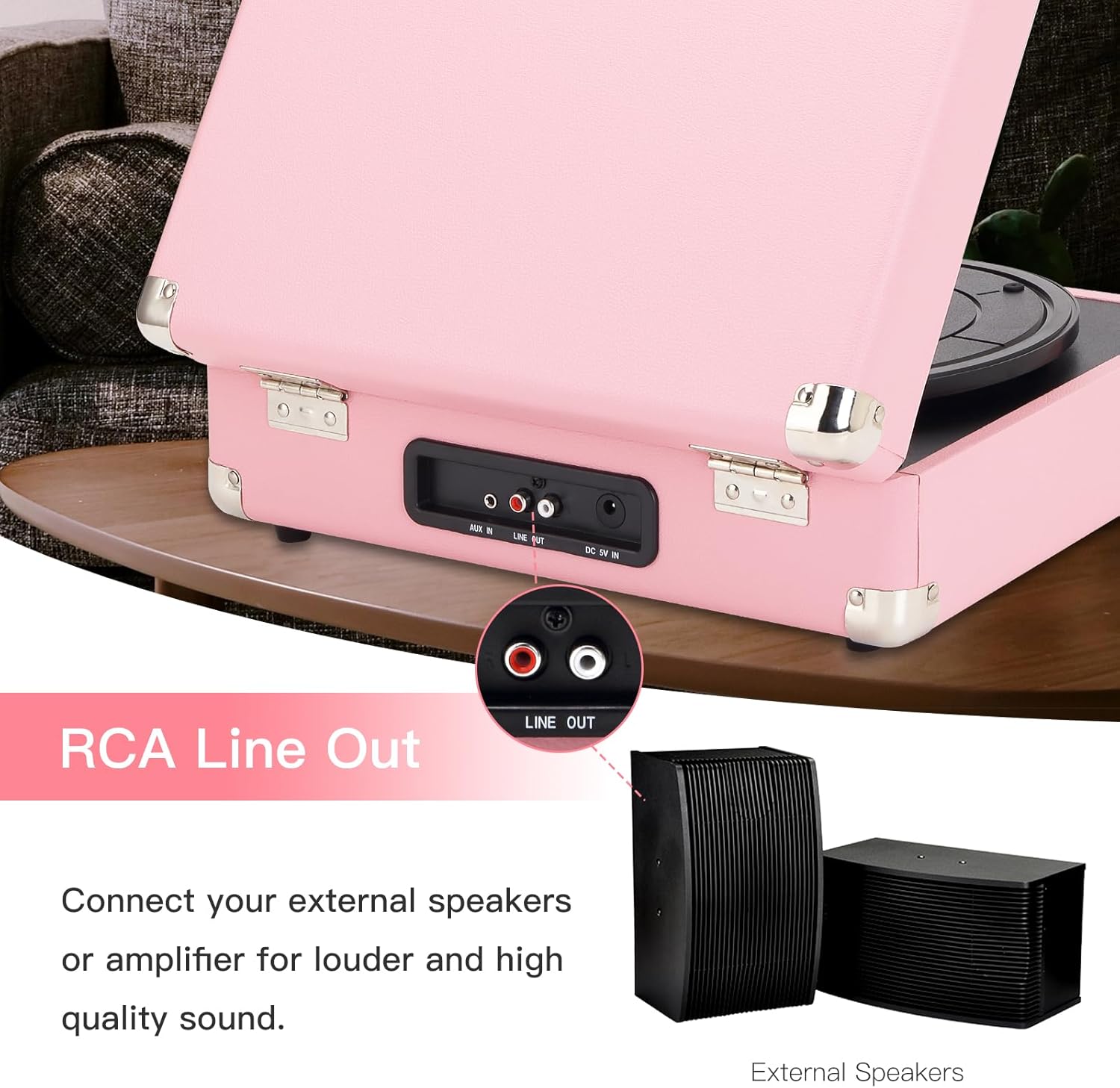
Figure 5.2: RCA Line Out. This image shows the RCA Line Out ports and how to connect external speakers for louder and higher quality sound.
6. Pemeliharaan
- Membersihkan Stylus: Gunakan sikat lembut untuk membersihkan stylus dengan hati-hati, gosok dari belakang ke depan.
- Membersihkan Unit: Wipe the turntable's surface with a soft, dry cloth. Do not use abrasive cleaners or solvents.
- Perawatan Rekam Medis: Jaga agar piringan hitam tetap bersih dan bebas debu. Simpan secara vertikal di dalam sampulnya untuk mencegah kerusakan.
- Penyimpanan: When not in use, close the lid and secure the tone arm clip. Store in a cool, dry place.
7. Penyelesaian masalah
| Masalah | Kemungkinan Penyebab | Larutan |
|---|---|---|
| Tidak ada daya | Power adapter not connected; Battery drained. | Ensure power adapter is securely connected. Charge the battery. |
| Tidak ada suara dari speaker | Volume too low; Incorrect mode selected; External speakers not connected properly. | Increase volume. Ensure correct mode (PH for vinyl, BT for Bluetooth). Check external speaker connections if applicable. |
| Record skips or sounds distorted | Record is dirty or scratched; Stylus is worn or dirty; Turntable not level. | Clean the record. Clean or replace the stylus. Ensure turntable is on a stable, level surface. |
| Bluetooth tidak berpasangan | Bluetooth switch not in BT position; Device too far; Interference. | Ensure Bluetooth switch is in BT position. Move device closer to turntable. Avoid other wireless devices. |
8. Spesifikasi
| Merek | JORLAI |
| Nama Model | T316 |
| Kecepatan Rotasi Maksimum | 78 putaran/menit |
| Bahan | Plastik |
| Berat Barang | 6.55 pon |
| Warna | Pink Silver |
| Perangkat yang Kompatibel | Headphone, Pembicara |
| Tipe Motor | Digerakkan oleh Sabuk |
| Sumber Daya | Bertenaga Baterai |
| Dimensi Barang (P x L x T) | 14"P x 11"L x 5"T |
9. Garansi dan Dukungan
JORLAI is committed to providing excellent quality products. If you have any questions or encounter issues with your T316 turntable, please contact JORLAI customer support for assistance. Refer to the product packaging or the official JORLAI websitus untuk rincian garansi spesifik dan informasi kontak.
Untuk dukungan lebih lanjut, kunjungi JORLAI Store on Amazon.