
Perkenalan
Welcome to the user manual for your new TECNO Spark 20 Pro 5G smartphone. This guide provides essential information to help you set up, operate, maintain, and troubleshoot your device. Please read through this manual carefully to ensure optimal performance and longevity of your smartphone.

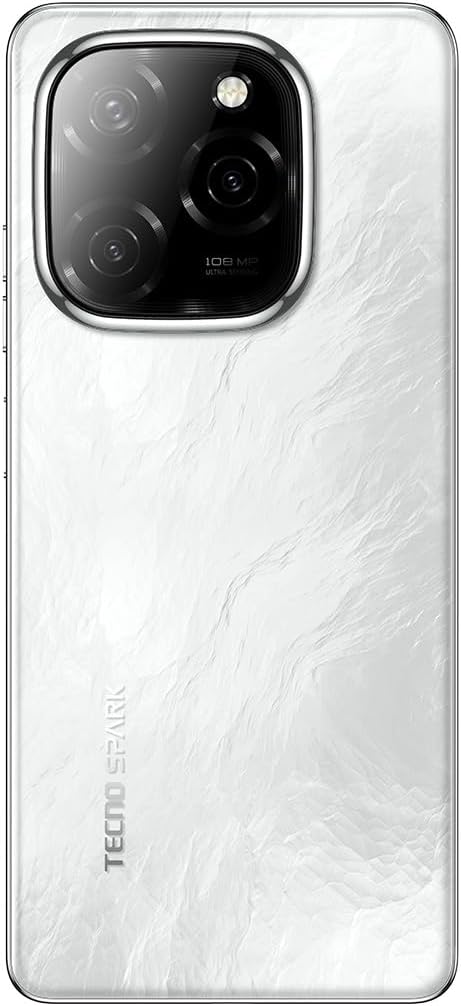
Gambar: Depan dan belakang view of the TECNO Spark 20 Pro 5G smartphone, showcasing desain dan modul kameranya.
1. Pengaturan
1.1 Isi Paket
Sebelum memulai, pastikan semua item ada dalam paket:
- TECNO Spark 20 Pro 5G Smartphone
- Kabel USB Tipe-C
- Adaptor Daya (33W)
- Alat Pengeluar SIM
- Panduan Memulai Cepat (jika ada)
- Kartu Garansi (jika ada)
1.2 Memasukkan Kartu SIM
- Temukan tempat kartu SIM di sisi perangkat Anda.
- Masukkan alat pelepas SIM ke dalam lubang kecil di sebelah baki dan tekan perlahan hingga baki keluar.
- Place your Nano SIM card into the designated slot on the tray. Ensure the gold contacts face downwards.
- Dorong baki dengan hati-hati kembali ke dalam telepon hingga terkunci pada tempatnya.

Gambar: Samping view of the smartphone showing the SIM card tray and power/volume buttons.
1.3 Pengisian Awal dan Penyalaan Daya
Disarankan untuk mengisi penuh daya perangkat Anda sebelum penggunaan pertama.
- Hubungkan kabel USB Type-C ke port pengisian daya ponsel dan adaptor daya.
- Hubungkan adaptor daya ke stopkontak di dinding.
- Once sufficiently charged, press and hold the Power button (located on the side) until the TECNO logo appears.
- Ikuti petunjuk di layar untuk menyelesaikan pengaturan awal, termasuk pemilihan bahasa, koneksi Wi-Fi, dan pengaturan akun Google.
Gambar: Bawah view of the smartphone, highlighting the USB Type-C charging port and speaker grille.
2. Mengoperasikan Perangkat Anda
2.1 Navigasi Dasar
Your TECNO Spark 20 Pro 5G runs on Android 14 with HiOS 14. Navigate using touch gestures:
- Mengetuk: Pilih item atau buka aplikasi.
- Geser: Gulir layar atau daftar.
- Mencubit: Memperbesar atau memperkecil gambar dan web halaman.
- Tekan lama: Akses menu kontekstual atau pindahkan ikon.
2.2 Fungsi Kamera
The device features a 108MP Ultra Clear rear camera and an 8MP front camera with dual LED flash.
- Kamera Belakang: Open the Camera app, select "Photo" for standard shots, "Pro" for advanced settings, or "Macro" for close-up photography.
- Kamera Depan: Switch to the front camera for selfies. The dual LED flash assists in low-light conditions.
- Rekaman Video: Select "Video" mode to record in up to 4K resolution.

Gambar: Belakang view of the smartphone, highlighting the 108MP camera system with its triple lens setup.
2.3 Konektivitas 5G
Experience high-speed internet with 5G connectivity, supported by 10 5G bands, Linkbooming, and Smart 5G 3.0 technology for wider coverage and faster speeds.
- Ensure your SIM card supports 5G and your network provider offers 5G services in your area.
- Access network settings to manage 5G preferences.
2.4 Audio and Display
- Suara: Enjoy immersive sound with Dolby Atmos and dual stereo speakers, featuring Hi-Res Audio certification.
- Menampilkan: The 6.78-inch LTPS display offers a 120Hz adaptive refresh rate for smooth scrolling and gaming. The Dynamic Port 2.0 provides interactive notifications.
2.5 Fitur Keamanan
Unlock your device securely using the side-mounted fingerprint sensor.
- Pergi ke Settings > Security & Privacy > Fingerprint Unlock untuk mengatur sidik jari Anda.
3. Pemeliharaan
3.1 Membersihkan Perangkat Anda
- Gunakan kain lembut dan tidak berbulu untuk membersihkan layar dan badan ponsel.
- Hindari penggunaan bahan kimia keras atau bahan abrasif.
- The device has an IP53 rating, meaning it is resistant to dust and splashing water, but it is not waterproof. Avoid submerging it in water.
3.2 Perawatan Baterai
- Untuk memperpanjang masa pakai baterai, hindari memaparkan ponsel pada suhu ekstrem.
- Use the original 33W fast charger for optimal charging performance.
- Hindari menguras baterai secara menyeluruh secara sering.
3.3 Pembaruan Perangkat Lunak
Periksa dan instal pembaruan perangkat lunak secara berkala untuk memastikan perangkat Anda memiliki fitur dan tambalan keamanan terbaru.
- Pergi ke Pengaturan > Sistem > Pembaruan Perangkat Lunak untuk memeriksa pembaruan yang tersedia.
4. Penyelesaian masalah
| Masalah | Solusi yang mungkin |
|---|---|
| Perangkat tidak menyala. | Ensure the battery is charged. Connect to the charger for at least 10 minutes, then try powering on again. If it still doesn't work, perform a forced restart by holding the Power button for 10-15 seconds. |
| Tidak dapat terhubung ke Wi-Fi. | Check if Wi-Fi is enabled in settings. Restart your router and phone. Forget the network and reconnect. |
| Sinyal 5G buruk. | Ensure you are in a 5G coverage area. Check your SIM card is properly inserted. Contact your network provider for assistance. |
| Kamera tidak berfungsi. | Restart the phone. Clear the cache and data of the Camera app (Settings > Apps > Camera > Storage > Clear Cache/Data). |
| Baterai cepat terkuras. | Close background apps. Reduce screen brightness. Disable unnecessary features like GPS, Bluetooth, or Wi-Fi when not in use. Check battery usage in settings to identify power-hungry apps. |
5. Spesifikasi
| Fitur | Detil |
|---|---|
| Merek | Teknologi |
| Nama Model | percikan 20 profesional |
| Sistem Operasi | Android 14, HiOS 14 |
| Ukuran RAM | 16 GB (8GB physical + 8GB memory fusion) |
| Kapasitas Penyimpanan | 256 GB (UFS 2.2) |
| Model Prosesor | MediaTek Dimensity 6080 5G (6nm) |
| Kecepatan CPU | 2.4 GHz |
| Ukuran Layar | 6.78 inci |
| Resolusi Tampilan | Resolusi 3840x2160 (4K) |
| Tingkat Penyegaran | 120 Hz Adaptive |
| Jenis Tampilan | LCD (LTPS) |
| Resolusi Kamera Belakang | 108 Megapiksel |
| Resolusi Kamera Depan | 8 Megapiksel |
| Fitur Kamera | Macro mode, Integrated Flash (Dual LED for front camera) |
| Resolusi Pengambilan Video | 4K |
| Kapasitas Baterai | 5000 mAh (Litium Polimer) |
| Pengisian daya | Pengisian Cepat 33W, Pengisian Balik 10W |
| Teknologi Seluler | 5G |
| Konektivitas | 5G, Wi-Fi, USB Type-C, 3.5mm Headphone Jack |
| Slot Kartu SIM | Single SIM (Nano) |
| Keamanan Biometrik | Pengenalan Sidik Jari |
| Tingkat Tahan Air | IP53 (Tahan Percikan Air) |
| Komponen yang Termasuk | USB Cable, Power Adapter |
| Dimensi Produk | Ukuran 16.9x7.6x0.9 cm |
| Berat Barang | 199 gram |
| Tahun Manufaktur | 2024 |
6. Informasi Garansi
Your TECNO Spark 20 Pro 5G smartphone comes with a garansi terbatas satu tahun Terhitung sejak tanggal pembelian. Garansi ini mencakup cacat produksi dalam penggunaan normal. Garansi ini tidak mencakup kerusakan yang disebabkan oleh penyalahgunaan, kecelakaan, perbaikan tanpa izin, atau keausan normal.
Please retain your proof of purchase for warranty claims. For detailed terms and conditions, refer to the warranty card included in your product package or visit the official Tecno weblokasi.
7. Dukungan
For further assistance, technical support, or service inquiries, please contact Tecno customer support through one of the following channels:
- Resmi Weblokasi: Kunjungi Tecno official weblokasi untuk FAQ, sumber daya dukungan, dan informasi kontak.
- Dukungan Email: Refer to your warranty card or the official websitus untuk alamat email tertentu.
- Pusat Layanan: Locate authorized service centers in your region via the Tecno weblokasi.
When contacting support, please have your device model (Spark 20 Pro) and serial number ready.