
1. Produk Lebihview
The BYINTEK U4 Mini Projector is a smart wireless projector designed for versatile use, from home theater to business presentations. It features an Android 9.0 TV system, 260 ANSI lumens brightness, and a fully sealed dustproof optical engine for enhanced durability and clear projection. Its compact and portable design allows for easy setup in various environments.

Gambar 1.1: Depan view of the BYINTEK U4 Mini Projector, showcasinkarena desain dan lensa yang ringkas.
Fitur Utama:
- Fully Sealed Optical Engine: Prevents dust from entering, maintaining lens clarity and extending product lifespan.
- Large Projection Screen: Capable of projecting a screen size up to 200 inches (optimal projection distance 0.8~5 meters), suitable for various applications.
- Fokus Elektronik & Koreksi Keystone: Features remote control electronic focus and supports horizontal, vertical, and corner keystone correction for easy image adjustment.
- Konektivitas Nirkabel: Compatible with iOS and Android mobile phones, tablets, and laptops for wireless screen projection.
- Android 9.0 TV System: Equipped with a smart Android 9.0 TV system, pre-installed with various online video programs. Users can install additional applications as needed. Note: Do not upgrade pre-installed software to avoid errors.
- Dukungan Multibahasa: System language can be switched to Arabic and other national languages.
- Audio Terintegrasi: Built-in 3W Hi-Fi stereo speakers with low noise operation.
- Penggunaan serbaguna: Ideal for classroom teaching, home theater, business meetings, gaming, and watching sports.
2. Panduan Pengaturan
2.1 Unboxing dan Pemeriksaan Awal
Keluarkan semua komponen dari kemasan dengan hati-hati. Pastikan barang-barang berikut ada:
- BYINTEK U4 Mini Projector
- Adaptor Daya
- Kontrol Jarak Jauh
- User Manual (dokumen ini)
Inspect the projector and accessories for any signs of damage. If any damage is found, contact customer support immediately.
2.2 Sambungan Daya
- Connect the power adaptor to the DC IN port on the projector.
- Colokkan adaptor daya ke stopkontak yang sesuai.
- Tekan tombol daya pada proyektor atau remote control untuk menghidupkan perangkat.
2.3 Penempatan dan Proyeksi
Letakkan proyektor di permukaan yang stabil dan rata. Pastikan tidak ada penghalang di depan lensa. Untuk hasil optimal viewing, project onto a white wall or a dedicated projector screen.

Figure 2.1: The BYINTEK U4 Mini Projector positioned on a table, demonstrating its portable size.
2.4 Fokus dan Koreksi Keystone
After powering on, the projector may automatically adjust focus. If the image appears blurry or distorted, use the remote control to manually adjust:
- Fokus Elektronik: Use the dedicated focus buttons on the remote to sharpen the image.
- Koreksi Keystone: Adjust horizontal, vertical, or corner keystone settings to correct trapezoidal image distortion, ensuring a rectangular projection.
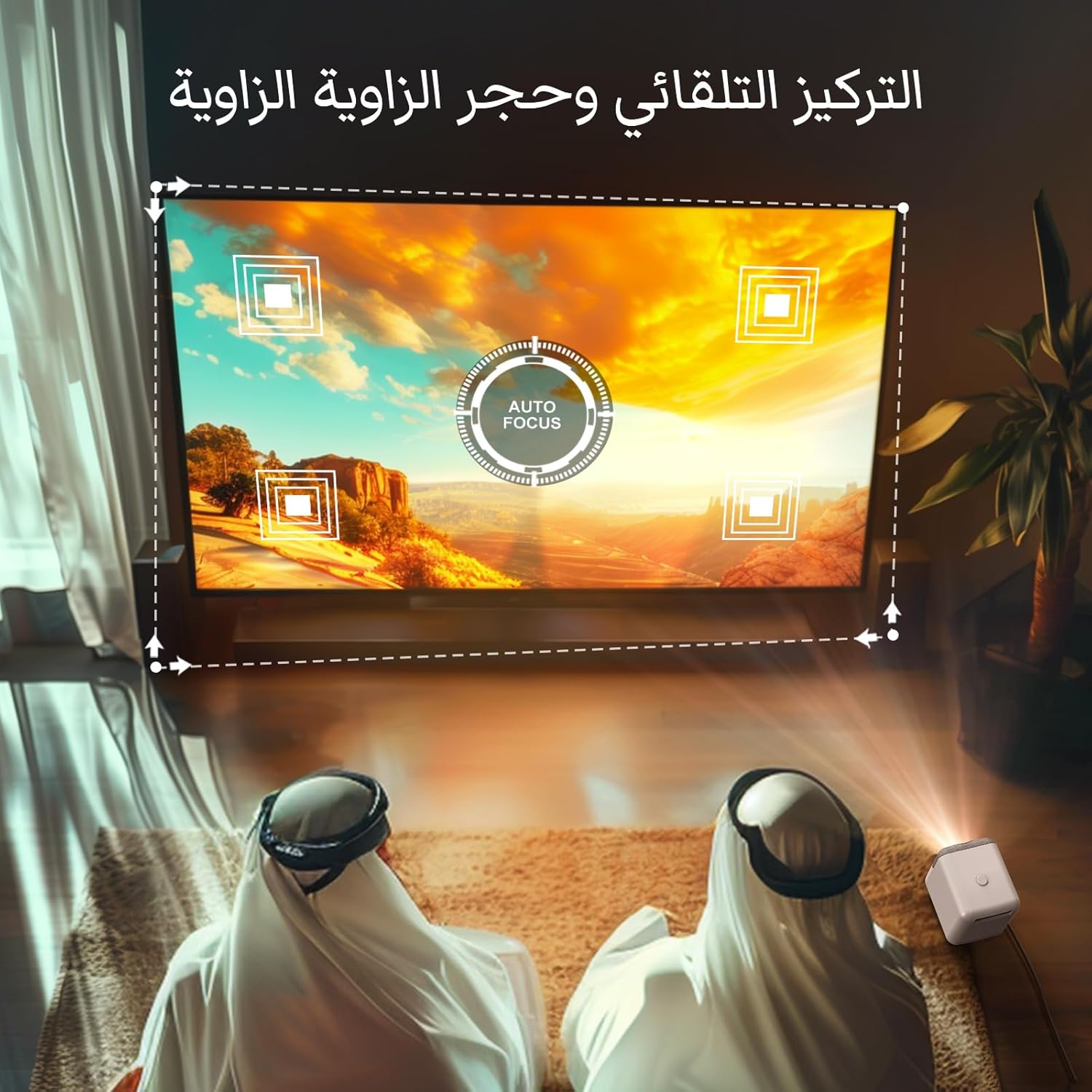
Figure 2.2: Visual representation of the auto-focus and keystone correction capabilities, showing how the projector adjusts the image corners.
3. Petunjuk Pengoperasian
3.1 Navigating the Android 9.0 TV System
The BYINTEK U4 runs on Android 9.0, providing a smart TV experience. Use the remote control to navigate the interface:
- Use the directional pad to move between icons and options.
- Press the 'OK' button to select an item.
- Gunakan tombol 'Kembali' untuk kembali ke layar sebelumnya.
- The 'Home' button will take you to the main Android TV interface.
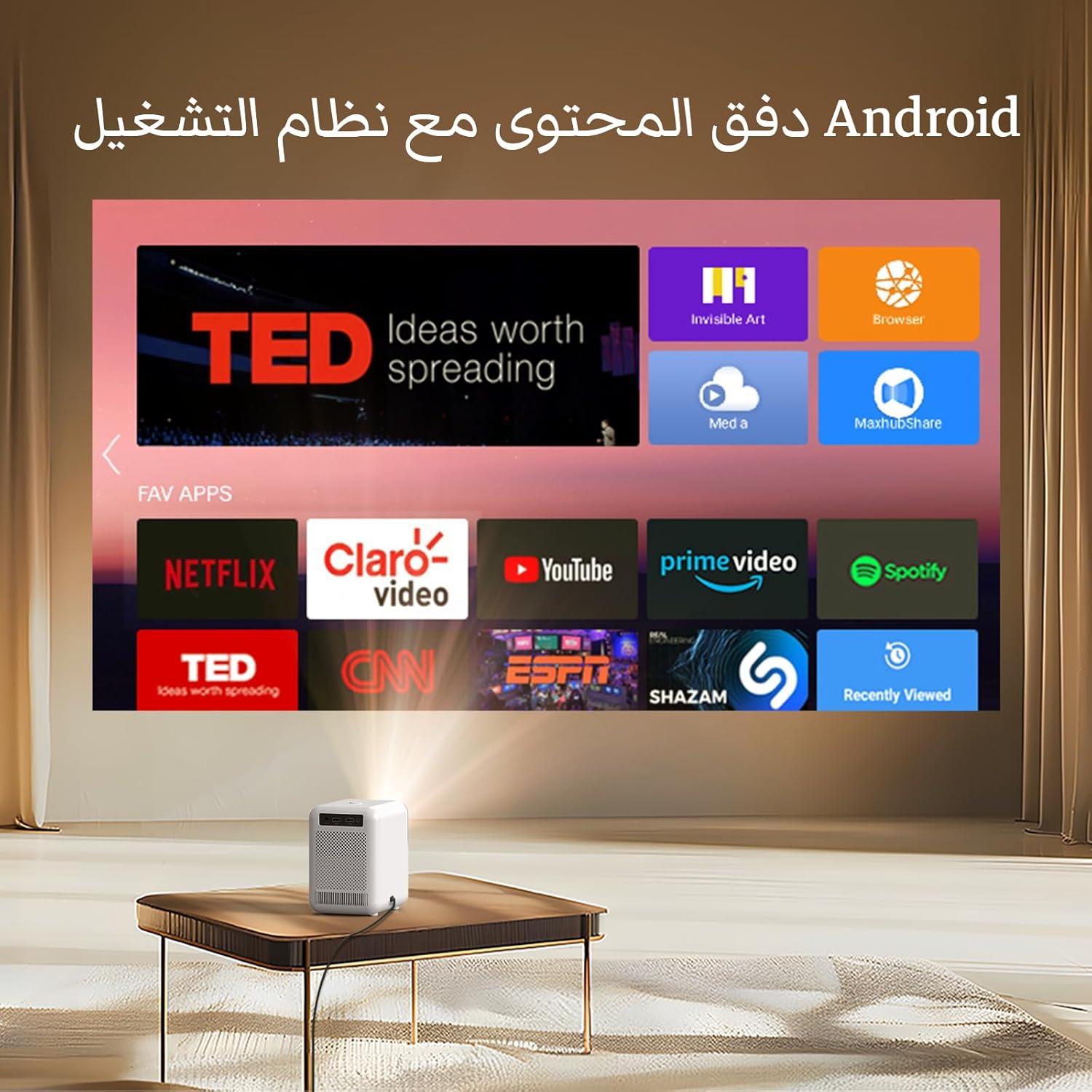
Figure 3.1: The Android TV operating system interface as projected by the U4, showing various pre-installed applications.
3.2 Perangkat Penghubung
The projector supports multiple connectivity options:
- Tampilan Wi-Fi (Pencermian Layar): Connect your iOS or Android mobile phone, tablet, or laptop wirelessly to mirror its screen. Refer to your device's screen mirroring instructions (e.g., AirPlay for iOS, Miracast for Android).
- HDMI: Connect devices like laptops, gaming consoles, or TV sticks using an HDMI cable to the HDMI port.
- Kabel USB: Insert USB drives into the USB port to play media files secara langsung.
- DARI: Use the AV port for older devices requiring analog input.

Figure 3.2: Rear panel of the BYINTEK U4 Mini Projector, highlighting the available connectivity ports including USB, HDMI, and AV.
3.3 Manajemen Aplikasi
The projector comes with pre-installed applications. You can download and install additional apps from the app store within the Android system. Ensure you have a stable internet connection for downloads.
Penting: Do not attempt to upgrade the pre-installed software or firmware outside of official BYINTEK updates, as this may lead to system errors or malfunction.
4. Pemeliharaan
4.1 Pencegahan Debu
The BYINTEK U4 features a fully sealed optical engine designed to prevent dust ingress. This significantly reduces the need for internal cleaning and helps maintain image clarity over time.

Figure 4.1: Illustration demonstrating the effectiveness of the fully sealed dustproof optical engine in preventing dust accumulation compared to a non-sealed system.
4.2 Pembersihan Umum
- Luar: Wipe the exterior of the projector with a soft, dry cloth. For stubborn marks, slightly dampen the cloth with water and mild soap, then wipe dry.
- Lensa: Use a lens cleaning cloth or a soft, lint-free cloth specifically designed for optical surfaces. Gently wipe the lens in a circular motion. Avoid using abrasive materials or harsh chemicals.
- Ventilasi: Ensure the ventilation openings are clear of dust and debris to prevent overheating. Use a soft brush or compressed air to gently clear the vents.
5. Penyelesaian masalah
This section addresses common issues you might encounter with your BYINTEK U4 projector. If the problem persists, please contact customer support.
| Masalah | Kemungkinan Penyebab | Larutan |
|---|---|---|
| Tidak ada gambar atau gambar buram | Power issue, incorrect focus, keystone distortion, input source not selected. | Check power connection. Adjust focus using remote. Correct keystone settings. Ensure correct input source is selected (HDMI, USB, Wi-Fi Display). |
| Tidak ada suara | Volume too low, mute enabled, external audio device not connected properly. | Increase volume. Check if mute is enabled. If using external speakers, ensure they are connected and powered on. |
| Wi-Fi display not connecting | Network issue, device compatibility, incorrect settings. | Ensure both projector and device are on the same Wi-Fi network. Restart both devices. Check device's screen mirroring settings. |
| Kontrol jarak jauh tidak berfungsi | Low batteries, obstruction, incorrect pairing. | Replace batteries. Ensure no obstruction between remote and projector. Re-pair remote if necessary (refer to specific pairing instructions if applicable). |
| Proyektor terlalu panas | Ventilasi tersumbat, penggunaan berkepanjangan di lingkungan yang panas. | Ensure ventilation ports are clear. Operate in a well-ventilated area. Turn off and allow to cool down if excessively hot. |
6. Spesifikasi
Detailed technical specifications for the BYINTEK U4 Mini Projector:
| Fitur | Spesifikasi |
|---|---|
| Merek | OLEHINTEK |
| Nomor Model | U4 |
| Dimensi Paket | Ukuran 29x23.5x22.5 cm |
| Berat Barang | 1.95 Kilogram |
| Warna | Putih |
| Faktor Bentuk | Portabel |
| Resolusi Layar | Ukuran 1280x720 |
| Resolusi Tampilan Maksimum | Ukuran 1280x720 |
| Apatage | 3 watt (speaker) |
| Teknologi Konektivitas | USB, Wi-Fi, HDMI |
| Fitur Khusus | Built-in Wi-Fi, Dustproof Optical Engine |
| Komponen yang Termasuk | Adaptor |
7. Garansi dan Dukungan
BYINTEK projectors come with after-sales protection. If you encounter any problems or require assistance, please do not hesitate to contact BYINTEK customer support. They are committed to providing satisfactory solutions and professional services.
For support inquiries, please refer to the contact information provided with your purchase or visit the official BYINTEK weblokasi.