
1. Pendahuluan
This manual provides detailed instructions for the assembly, operation, and maintenance of your KAI-ROAD White Makeup Vanity Desk with Round Mirror and Lights, Model KLVD120W3D-RML. Please read this manual thoroughly before assembly and use to ensure proper function and longevity of your product. Keep this manual for future reference.
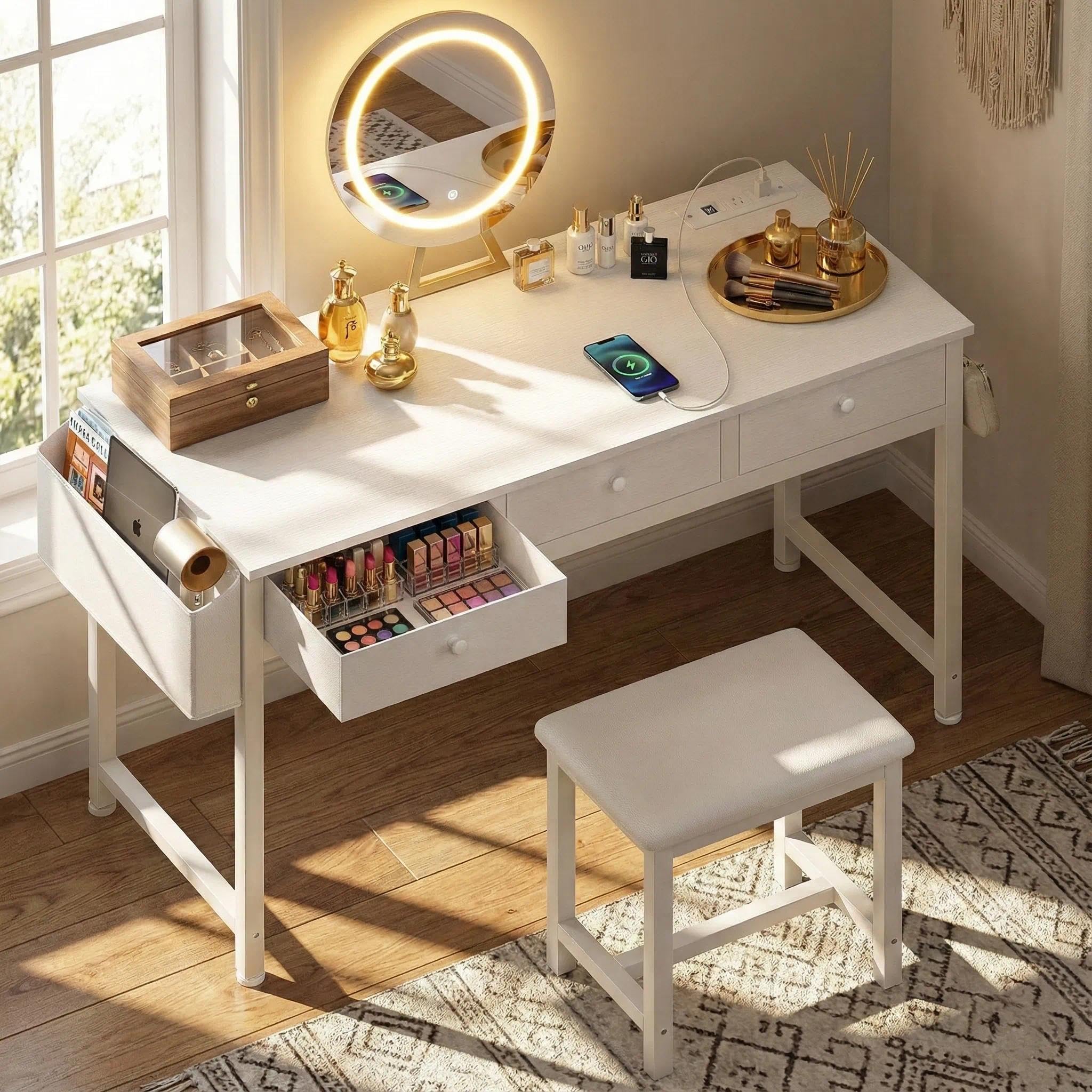
Image 1: KAI-ROAD White Makeup Vanity Desk with Round Mirror and Lights.
2. Fitur Produk
- Cermin LED Terintegrasi: Features a round mirror with built-in LED lights offering three adjustable lighting modes: natural daylight, office lighting, and dining room lighting.
- Ample Penyimpanan: Includes three spacious fabric drawers, a large side pocket, and two integrated hooks for organizing cosmetics, accessories, and electronic devices.
- Tempat duduk yang nyaman: A thick-sponged PU padded stool is provided for comfortable use.
- Stasiun Pengisian Daya Terintegrasi: Equipped with two standard power outlets and two USB ports for convenient charging of multiple devices.
- Desain Serbaguna: Designed to function as a vanity desk, workspace, or compact computer desk, suitable for various room environments.
3. Isi Paket
Please verify that all components listed below are present and undamaged before beginning assembly. If any parts are missing or damaged, please contact customer support.
- Vanity Desk Frame and Tabletop
- Cermin LED Bulat
- Bangku Empuk
- Laci Kain (3 unit)
- Built-in Power Outlet Unit (2 AC outlets, 2 USB ports)
- Removable Hooks (2 units)
- Side Storage Pocket
- Perlengkapan Perakitan (sekrup, alat, dll.)
- Manual Instruksi

Image 2: Product dimensions and included components overview.
4. Pengaturan dan Perakitan
Follow the step-by-step instructions provided in the separate assembly guide included in your package. Ensure all parts are correctly identified and assembled securely. It is recommended to assemble the mirror unit first before attaching it to the main vanity desk to prevent potential damage.
- Buka semua komponen dan verifikasi terhadap daftar isi paket.
- Lay out all hardware and tools.
- Assemble the stool according to the instructions.
- Assemble the main vanity desk frame and tabletop.
- Assemble the LED mirror unit separately, then carefully attach it to the vanity desk.
- Insert the fabric drawers into their designated slots.
- Attach the removable hooks and side storage pocket as desired.
- Connect the power outlet unit and LED mirror power cables.
Ensure all connections are firm and stable before use. Inspect the product for any instability or loose parts after assembly.
5. Petunjuk Pengoperasian
5.1 Operasi Cermin LED
The round LED mirror features touch controls for power, lighting modes, and brightness adjustment.
- Daya Hidup/Mati: Sentuh ikon daya pada permukaan cermin dengan lembut untuk menghidupkan atau mematikan lampu.
- Ubah Mode Pencahayaan: With the lights on, short press the mode icon to cycle through the three lighting modes: cool light (office), natural light (sunlight), and warm light (dining room).
- Sesuaikan Kecerahan: With the lights on, long press the brightness icon to adjust the light intensity from 10% to 100%.

Image 3: Three adjustable lighting modes for the LED mirror.

Image 4: Brightness adjustment for the LED mirror.
5.2 Built-in Power Outlet Usage
The vanity desk includes a built-in charging station for your convenience.
- Stopkontak AC: Plug in standard electrical devices (e.g., hair dryer, curling iron) into the two 125V/12A AC sockets.
- Port USB: Connect USB-powered devices (e.g., smartphone, tablet) to the two 5V/2A USB ports for charging.
Ensure the vanity desk is properly connected to a power source for the outlets and USB ports to function.

Image 5: Built-in power strip with 2 AC outlets and 2 USB ports.
6. Pemeliharaan
- Membersihkan Permukaan Meja: Bersihkan permukaan meja dengan kain lembut dan kering.amp kain. Hindari pembersih yang bersifat abrasif atau bahan kimia keras yang dapat merusak lapisan akhir.
- Membersihkan Cermin: Use a glass cleaner and a soft, lint-free cloth to clean the mirror surface. Do not spray cleaner directly onto the mirror to prevent liquid from entering the electrical components.
- Laci Kain: The fabric drawers can be spot cleaned with a mild detergent and damp kain. Biarkan hingga benar-benar kering.
- Perawatan Umum: Regularly check all screws and connections to ensure they remain tight. Avoid placing excessively heavy items on the desk or stool.
7. Penyelesaian masalah
| Masalah | Kemungkinan Penyebab | Larutan |
|---|---|---|
| LED Mirror lights do not turn on. | Power cable not connected or loose. Mirror unit not receiving power. | Ensure the mirror's power cable is securely plugged into the vanity's power unit and the vanity is plugged into a wall outlet. Check the wall outlet for power. |
| Power outlets/USB ports are not working. | Vanity not plugged into a wall outlet. Power unit cable loose. | Verify the main power cord of the vanity is securely plugged into a functional wall outlet. Check the connection of the power unit within the desk. |
| Desk or stool feels unstable. | Sekrup perakitan longgar. Permukaan lantai tidak rata. | Tighten all assembly screws. If the floor is uneven, use furniture pads or shims to stabilize the unit. |
Jika Anda mengalami masalah yang tidak tercantum di sini atau jika solusi yang disarankan tidak menyelesaikan masalah, silakan hubungi dukungan pelanggan.
8. Spesifikasi
| Fitur | Detil |
|---|---|
| Nomor Model | KLVD120W3D-RML |
| Warna | Putih |
| Bahan | Metal Frame, Wood Tabletop |
| Dimensi Produk (P x L x T) | 17.7" x 47.2" x 30.7" |
| Berat Barang | 36.4 pon |
| Jenis Cermin | Round LED Mirror with 3 Color Lights |
| Stopkontak | 2 stopkontak AC (125V/12A), 2 port USB (5V/2A) |
| Stool Capacity | Up to 200 lbs (approximate, based on review) |
9. Garansi dan Dukungan Pelanggan
Your KAI-ROAD product is covered by a standard manufacturer's warranty. For specific warranty details, please refer to the documentation included with your purchase or contact KAI-ROAD customer service.
For any questions, missing parts, or support needs, please contact KAI-ROAD directly through your purchase platform. You can typically find a "Contact Seller" or "Ask a question" option on the product page or within your order history.
.jpg)
Image 6: Guide to contacting customer support after an order.