
Perkenalan
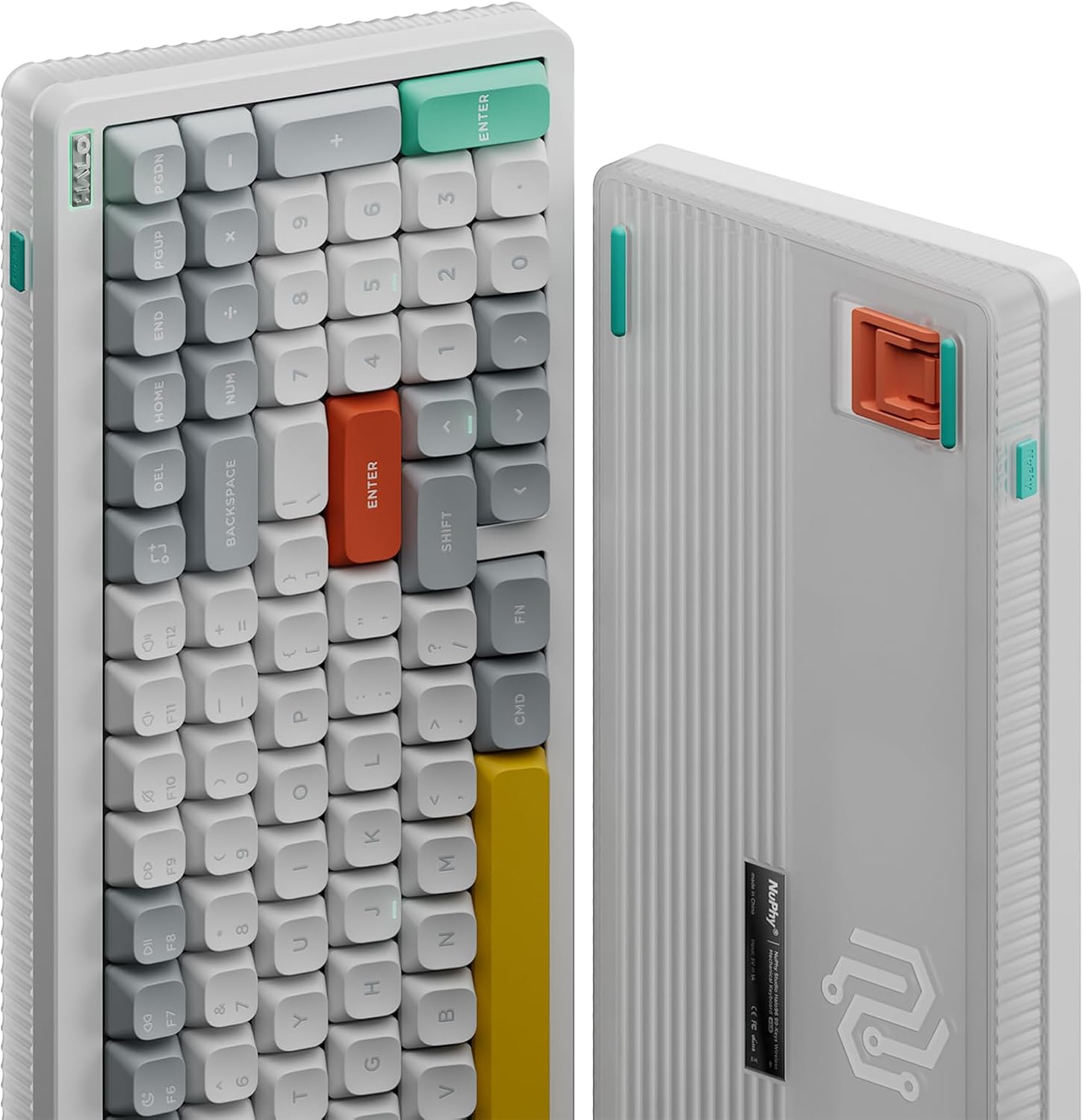
The NuPhy Halo96 V2 is a high-performance 96% layout wireless mechanical keyboard designed for versatility and customization. Featuring a gasket structure, hot-swappable switches, and vibrant RGB backlighting, it offers a premium typing and gaming experience. This keyboard supports QMK/VIA for advanced customization and provides multiple connectivity options including Bluetooth 5.0, 2.4GHz wireless, and USB-C wired modes, ensuring compatibility across various operating systems and devices.
This manual provides essential information for setting up, operating, maintaining, and troubleshooting your NuPhy Halo96 V2 keyboard.
Apa yang ada di dalam kotak
- Keyboard Mekanik Nirkabel NuPhy Halo96 V2
- Kabel USB-C ke USB-A
- 2.4GHz Wireless Receiver (Dongle)
- Penarik Tutup Kunci/Sakelar
- Extra Keycaps (for Mac/Windows layouts)
- Extra Switches (sample switches for different types)
- Panduan Pengguna / Panduan Singkat
- Stiker
Pengaturan
1. Pengaturan Fisik
- Letakkan keyboard di atas permukaan yang stabil dan rata.
- Adjust the keyboard's feet to your preferred typing angle. The Halo96 V2 features two-level adjustable feet for ergonomic comfort.
2. Opsi Konektivitas
The Halo96 V2 offers three modes of connection:
- Mode Kabel USB-C: Connect the provided USB-C cable from the keyboard to your computer. The keyboard will automatically switch to wired mode and begin charging.
- Mode Nirkabel 2.4GHz: Insert the 2.4GHz wireless receiver into an available USB port on your computer. Toggle the switch on the keyboard to 'Wireless' mode. The keyboard should connect automatically.
- Mode Bluetooth 5.0:
- Toggle the switch on the keyboard to 'Wireless' mode.
- Press and hold the 'Fn' key + one of the Bluetooth keys (e.g., 'Fn' + '1', '2', '3', or '4') to enter pairing mode. The indicator light will flash.
- On your device (computer, tablet, smartphone), search for Bluetooth devices and select 'NuPhy Halo96 V2' to pair.
- The keyboard supports connecting up to 4 Bluetooth devices simultaneously. Switch between paired devices using 'Fn' + '1'/'2'/'3'/'4'.

3. Kompatibilitas Sistem
The Halo96 V2 is compatible with macOS, Windows, Linux, Android, and iOS systems. Use the dedicated switch on the keyboard to select between Windows and Mac layouts for optimal functionality.
4. QMK/VIA Configuration
The keyboard supports open-source QMK/VIA firmware, allowing for extensive customization of key mappings, macros, and lighting effects. Download the VIA software and the appropriate JSON file for your Halo96 V2 model from the official NuPhy website to begin customizing.

Petunjuk Pengoperasian
1. Penggunaan Dasar
- Simply connect the keyboard using your preferred method (wired, 2.4GHz, or Bluetooth) and begin typing.
- The 96% layout retains essential arrow keys and a number pad for both work and gaming.
2. RGB Backlighting (Halolight 2.0)
The Halo96 V2 features advanced RGB backlighting with a semi-transparent bottom case for enhanced light transmission. You can customize various lighting effects, colors, and brightness levels:
- Use 'Fn' + specific keys (refer to the quick guide) to cycle through different lighting modes and colors.
- Adjust brightness levels using 'Fn' + arrow keys (up/down).
- Further customization is available via the QMK/VIA software.
3. Mac Shortcuts
When in Mac mode, the keyboard provides access to Mac-specific function keys, including Do Not Disturb and Spotlight, for seamless integration with your Apple ecosystem.
4. Latensi Rendah
Experience a 1000Hz polling rate in both wired and 2.4GHz modes, ensuring minimal input lag for responsive gaming and typing.

Pemeliharaan
1. Pembersihan
- Regularly clean your keyboard with a soft, dry cloth.
- For deeper cleaning, use the provided keycap puller to remove keycaps and clean dust or debris with compressed air.
2. Sakelar yang Dapat Diganti Saat Beroperasi (Hot-Swappable Switches)
The Halo96 V2 features hot-swappable switches, allowing you to change them without soldering:
- Use the provided switch puller to carefully remove a switch.
- Align the pins of the new switch with the sockets on the PCB and gently press down until it clicks into place.
3. Manajemen Baterai
The keyboard is equipped with a 4000mAh battery. To maximize battery life:
- Isi daya keyboard hingga penuh sebelum digunakan pertama kali.
- Connect via USB-C cable to charge.
- Reduce RGB brightness or turn off backlighting when not needed to conserve power.
- The keyboard has a go-to-sleep mode to save power after a period of inactivity.

Penyelesaian Masalah
1. Masalah Konektivitas
- Kegagalan Pemasangan Bluetooth: Ensure the keyboard is in pairing mode (indicator flashing). Remove previous pairings from your device and try again.
- 2.4GHz Disconnection: Ensure the dongle is securely inserted and the keyboard is in 2.4GHz mode. Try a different USB port.
- Wireless Lag: Ensure the keyboard is fully charged. If issues persist, try updating the keyboard firmware.
2. Key Input Errors (Chattering)
If you experience unintended repeated key presses (chattering), it may be due to switch sensitivity or a faulty switch. Try the following:
- Identify the problematic key.
- Carefully remove the switch using the switch puller.
- Replace the switch with a new one or swap it with a less frequently used key to test if the issue is resolved.
- Adjust typing habits to avoid accidental actuation if switches are highly sensitive.
3. Pembaruan Firmware
Regularly check the official NuPhy website for firmware updates. Updates can improve performance, fix bugs, and enhance compatibility. Follow the instructions provided on the website for a successful update.
Spesifikasi
| Fitur | Detil |
|---|---|
| Dimensi Produk | 14.84"P x 5.31"L x 1.3"T |
| Berat Barang | 1.74 pon |
| Pabrikan | nuphy |
| Nomor Model Barang | Halo96 v2 |
| Baterai | Diperlukan 1 baterai P76 (termasuk) |
| Perangkat yang Kompatibel | Laptop, PC, Tablet |
| Teknologi Konektivitas | Bluetooth, USB-C, 2.4GHz |
| Deskripsi Papan Ketik | Support macOS/Windows/Linux/Android/iOS |
| Penggunaan yang Direkomendasikan | Permainan |
| Fitur Khusus | Dapat Ditukar Panas |
| Bahan | Aluminum, ABS, POM |
Garansi dan Dukungan
For warranty information and technical support, please refer to the documentation included with your product or visit the official NuPhy website. The manufacturer provides support for product-related inquiries and issues.
Extended protection plans may be available for purchase separately. Please check with your retailer for details on available plans.